
neoGrid Modern Plugin

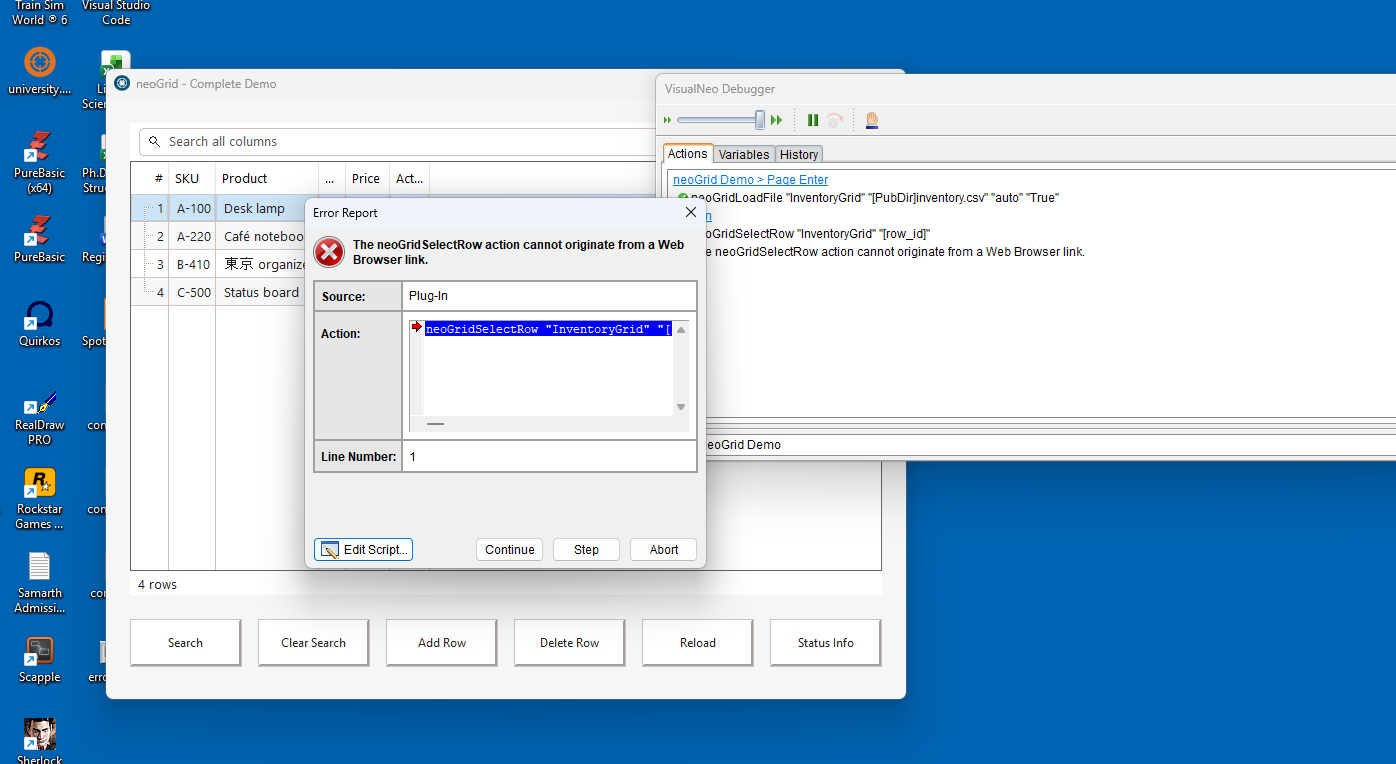
Quote from sghoshnbu on August 23, 2026, 5:18 pmWhile trying to set the 'Selection Changed' event, the plugin is throwing "! The neoGridSelectRow action cannot originate from a Web Browser link". How is the grid plugin related to a web browser link? How can I select a cell value and retain it as a VisualNeoWin variable like [ResultCellSelected] using grid-related commands?
While trying to set the 'Selection Changed' event, the plugin is throwing "! The neoGridSelectRow action cannot originate from a Web Browser link". How is the grid plugin related to a web browser link? How can I select a cell value and retain it as a VisualNeoWin variable like [ResultCellSelected] using grid-related commands?
Uploaded files: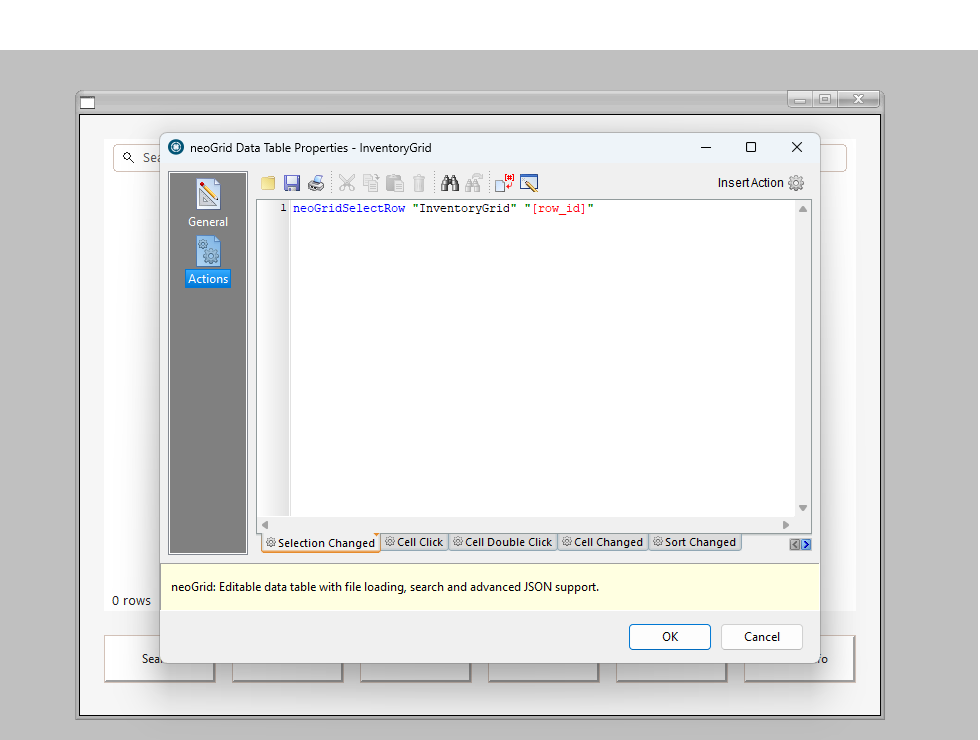

Quote from luishp on August 25, 2026, 6:28 pm@sghoshnbu Thanks for reporting this.
The message about the action originating from a Web Browser link does not make sense in this context.
neoGridSelectRowis being called from the grid's Selection Changed event, so we need to investigate what is actually happening.It is also possible that the error message itself is misleading. In some cases VisualNEO Win may fall back to a more generic error message that does not accurately describe the real cause, so the reference to a Web Browser link may not be directly related to the underlying problem.
Could you please attach a small
.pubexample that reproduces the issue? Ideally, just the grid and the minimum code necessary to trigger the error. That will allow us to reproduce exactly the same execution path and determine whether the problem is in neoGrid, in the modern plugin event handling, or elsewhere in VisualNEO Win.Regarding storing the selected cell/row value in a VisualNEO Win variable, we will also check the intended workflow while investigating the example, as this should be possible without requiring any Web Browser-related mechanism.
Thanks for the screenshots and the report.
@sghoshnbu Thanks for reporting this.
The message about the action originating from a Web Browser link does not make sense in this context. neoGridSelectRow is being called from the grid's Selection Changed event, so we need to investigate what is actually happening.
It is also possible that the error message itself is misleading. In some cases VisualNEO Win may fall back to a more generic error message that does not accurately describe the real cause, so the reference to a Web Browser link may not be directly related to the underlying problem.
Could you please attach a small .pub example that reproduces the issue? Ideally, just the grid and the minimum code necessary to trigger the error. That will allow us to reproduce exactly the same execution path and determine whether the problem is in neoGrid, in the modern plugin event handling, or elsewhere in VisualNEO Win.
Regarding storing the selected cell/row value in a VisualNEO Win variable, we will also check the intended workflow while investigating the example, as this should be possible without requiring any Web Browser-related mechanism.
Thanks for the screenshots and the report.
Quote from sghoshnbu on August 30, 2026, 8:58 am@luishp
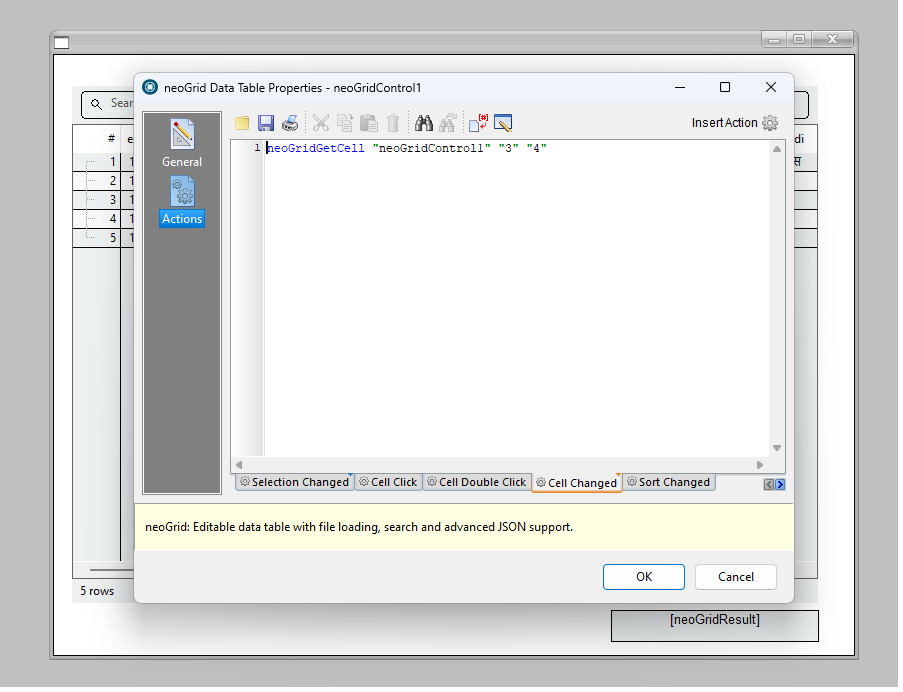
Uploaded a demo pub for your kind perusal. Still showing " ... neoGridGetCell action can not originate from a Web Browser link" is still available". All modern plugins have been updated to version 1.0.2. Use any CSV file as mine one is blocked by the site.
Regards
sghoshnbu
Uploaded a demo pub for your kind perusal. Still showing " ... neoGridGetCell action can not originate from a Web Browser link" is still available". All modern plugins have been updated to version 1.0.2. Use any CSV file as mine one is blocked by the site.
Regards
sghoshnbu
Uploaded files:
Quote from luishp on August 30, 2026, 9:11 am@sghoshnbu I can't test your .pub file without the needed employee.csv file.
Please share also a sample .csv file.
Thank you!
@sghoshnbu I can't test your .pub file without the needed employee.csv file.
Please share also a sample .csv file.
Thank you!
Quote from sghoshnbu on August 30, 2026, 4:14 pm@luishp
The forum software is not allowing to upload the CSV. Here are the contents of the CSV, pasted.
employee_id,title,first_name,middle_name,last_name,name_in_hindi,employee_type,nature_of_employment,organization_unit,designation,sanctioned_ou,sanctioned_designation,guardian_name,mother_name,gender,appointed_category,social_category,is_pwd,blood_group,date_of_birth,date_of_joining,date_of_superannuation,mobile_number,office_phone_number,alternate_mobile_no,official_email,personal_email,residential_address,residential_state,residential_city,residential_pincode,residential_phone_number,permanent_address,permanent_state,permanent_city,permanent_pincode,hometown,hometown_state,hometown_city,hometown_pincode,status
1101,Mr.,Anirban,,Biswas,अनिर्बाण विश्वास,Non-Teaching,Permanent,Centre for Information and Resource Management,System Manager,Centre for Information and Resource Management,System Manager,Ajoy Kumar Biswas,Aruna Biswas,Male,Unreserved,Unreserved,No,B+,08-09-1978,,30-09-2038,9748314666,,,systemmanager@nbu.ac.in,,,,,,,,,,,,,,,Active
1088,Mr.,AMITAVA,,DEB BARMAN,,Non-Teaching,Permanent,Centre for Information and Resource Management,Programmer,Centre for Information and Resource Management,Programmer,,,Male,Unreserved,,No,,,,,9804612717,,,programmer1@nbu.ac.in,,,,,,,,,,,,,,,Active
1129,Dr.,Palash,,Paul,NA,Non-Teaching,Permanent,Office of the Development Officer,Development Officer,Office of the Development Officer,Development Officer,NA,NA,Male,Unreserved,Unreserved,No,NA,,,,7685890704,,,palash@nbu.ac.in,,,,,,,,,,,,,,,Active
1091,Mr.,Utpal,,Mandi,NA,Non-Teaching,Permanent,Centre for Information and Resource Management,Programmer,Centre for Information and Resource Management,Programmer,NA,NA,Male,ST,ST,No,NA,,,,9434418686,,,programmer2@nbu.ac.in,,,,,,,,,,,,,,,Active
1085,Mr.,Sudeep,,Basu,NA,Non-Teaching,Permanent,Centre for Information and Resource Management,System Engineer,Centre for Information and Resource Management,System Engineer,NA,NA,Male,Unreserved,Unreserved,No,NA,,,,9474027800,,,se@nbu.ac.in,,,,,,,,,,,,,,,Active
The forum software is not allowing to upload the CSV. Here are the contents of the CSV, pasted.
employee_id,title,first_name,middle_name,last_name,name_in_hindi,employee_type,nature_of_employment,organization_unit,designation,sanctioned_ou,sanctioned_designation,guardian_name,mother_name,gender,appointed_category,social_category,is_pwd,blood_group,date_of_birth,date_of_joining,date_of_superannuation,mobile_number,office_phone_number,alternate_mobile_no,official_email,personal_email,residential_address,residential_state,residential_city,residential_pincode,residential_phone_number,permanent_address,permanent_state,permanent_city,permanent_pincode,hometown,hometown_state,hometown_city,hometown_pincode,status
1101,Mr.,Anirban,,Biswas,अनिर्बाण विश्वास,Non-Teaching,Permanent,Centre for Information and Resource Management,System Manager,Centre for Information and Resource Management,System Manager,Ajoy Kumar Biswas,Aruna Biswas,Male,Unreserved,Unreserved,No,B+,08-09-1978,,30-09-2038,9748314666,,,systemmanager@nbu.ac.in,,,,,,,,,,,,,,,Active
1088,Mr.,AMITAVA,,DEB BARMAN,,Non-Teaching,Permanent,Centre for Information and Resource Management,Programmer,Centre for Information and Resource Management,Programmer,,,Male,Unreserved,,No,,,,,9804612717,,,programmer1@nbu.ac.in,,,,,,,,,,,,,,,Active
1129,Dr.,Palash,,Paul,NA,Non-Teaching,Permanent,Office of the Development Officer,Development Officer,Office of the Development Officer,Development Officer,NA,NA,Male,Unreserved,Unreserved,No,NA,,,,7685890704,,,palash@nbu.ac.in,,,,,,,,,,,,,,,Active
1091,Mr.,Utpal,,Mandi,NA,Non-Teaching,Permanent,Centre for Information and Resource Management,Programmer,Centre for Information and Resource Management,Programmer,NA,NA,Male,ST,ST,No,NA,,,,9434418686,,,programmer2@nbu.ac.in,,,,,,,,,,,,,,,Active
1085,Mr.,Sudeep,,Basu,NA,Non-Teaching,Permanent,Centre for Information and Resource Management,System Engineer,Centre for Information and Resource Management,System Engineer,NA,NA,Male,Unreserved,Unreserved,No,NA,,,,9474027800,,,se@nbu.ac.in,,,,,,,,,,,,,,,Active
Uploaded files:
Quote from luishp on August 30, 2026, 4:22 pm@sghoshnbu You can always compress your files into a ZIP archive before uploading them to the forum. ZIP files are allowed.
I have tested your sample here and it works correctly.
Please make sure you download and reinstall both the latest version of VisualNEO Win and the latest Modern Plugins collections, so we can be certain you are testing with the most recent releases.
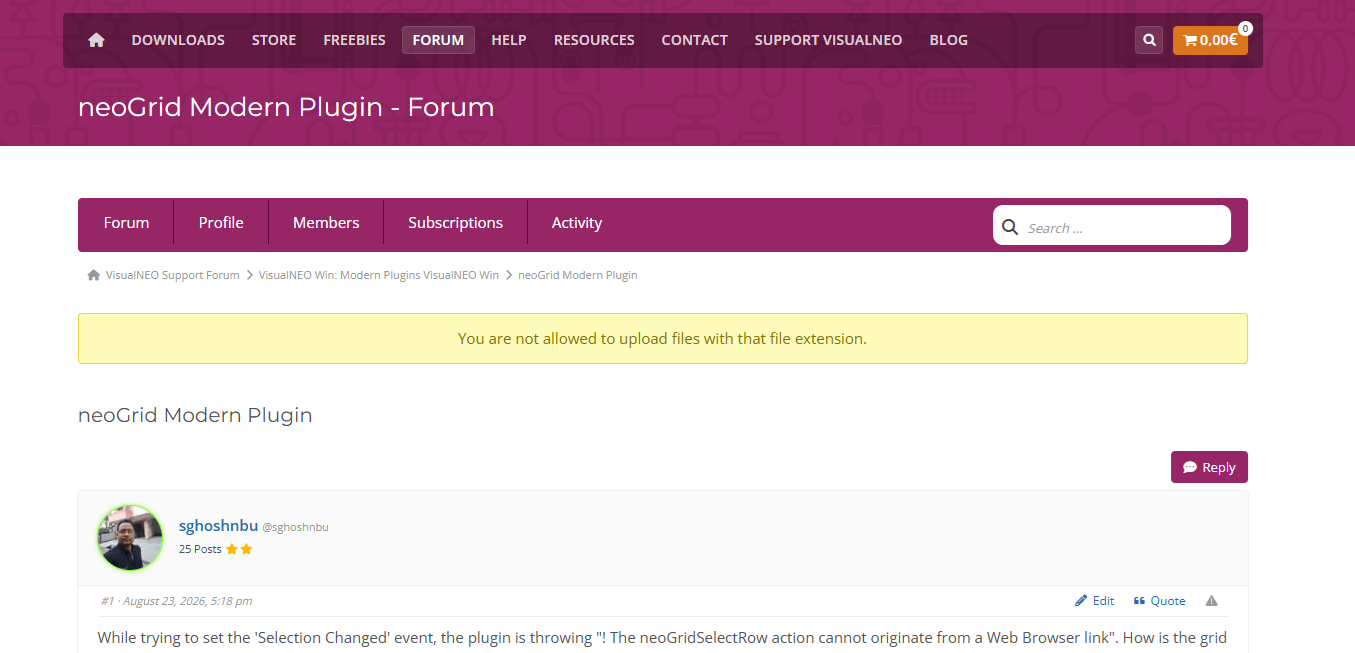
Please also check the attached image for reference.
Thank you!
@sghoshnbu You can always compress your files into a ZIP archive before uploading them to the forum. ZIP files are allowed.
I have tested your sample here and it works correctly.
Please make sure you download and reinstall both the latest version of VisualNEO Win and the latest Modern Plugins collections, so we can be certain you are testing with the most recent releases.
Please also check the attached image for reference.
Thank you!
Quote from luishp on August 30, 2026, 4:23 pmSorry, you are right, I have reproduced the problem here.
Let me some time to study and fix it please.
Sorry, you are right, I have reproduced the problem here.
Let me some time to study and fix it please.
Quote from sghoshnbu on August 30, 2026, 4:32 pm@luishp
Thanks a lot for doing such a big work fork VisualNeo Win. Take your time to fix it. No hurry on my end. It appears that the Grid events are not being fired and are being executed.
Thanks a lot for doing such a big work fork VisualNeo Win. Take your time to fix it. No hurry on my end. It appears that the Grid events are not being fired and are being executed.
Uploaded files: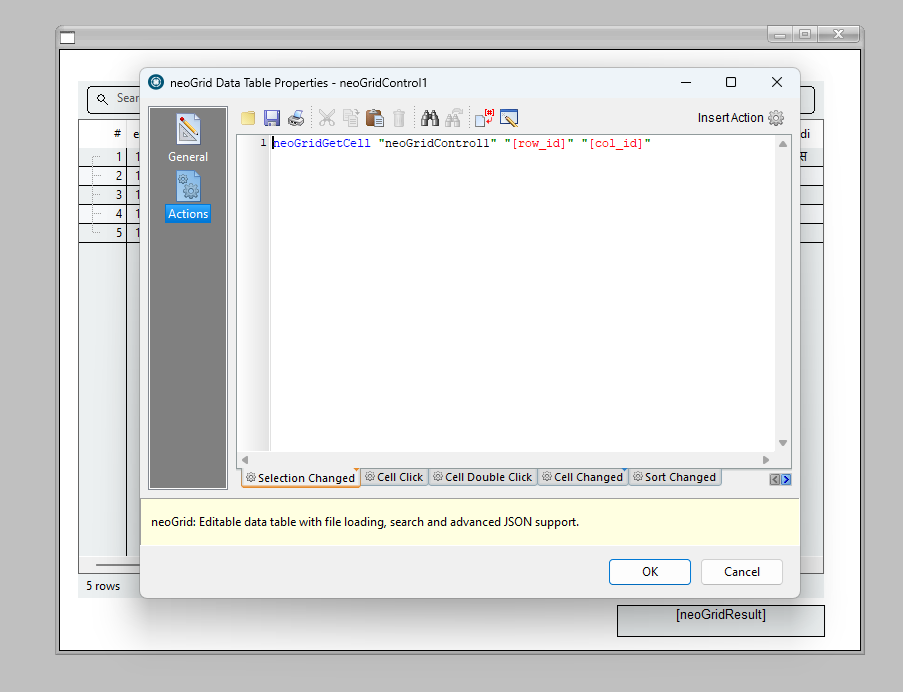
Quote from luishp on August 30, 2026, 11:40 pm@sghoshnbu
Thank you for sending the publication and CSV file. The message shown by
VisualNEO Win was misleading: the action did not originate from a Web Browser
link.First the explanation:
The publication's `selection-change` event called `neoGridGetCell` with
`[row_id]` and `[col_id]`, but those variables had not been assigned. The row
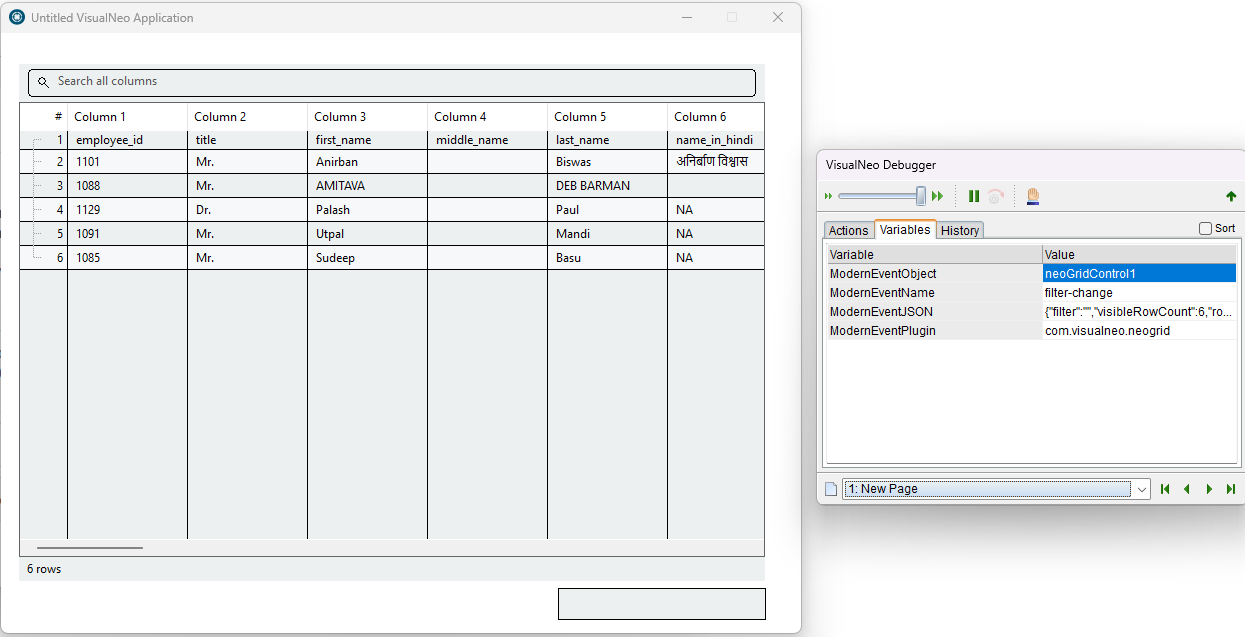
and column identifiers are included in `[ModernEventJSON]`; they do not become
separate VisualNEO variables automatically. neoGrid therefore returned a
`not found` result, and VisualNEO Win incorrectly displayed an unrelated legacy
Web Browser error for every modern plug-in failure.Both parts have now been corrected:
- VisualNEO Win reports modern plug-in failures with their real, localized
reason and result code.
- neoGrid 1.1.3 adds `neoGridGetSelectedCell`, which returns the current cell
value directly in `[neoGridResult]`.The corrected publication is `grid1-fixed.pub`. Its `cell-click` event now
contains only:neoGridGetSelectedCell "neoGridControl1"
It also treats the first CSV row as the column header. Keep `employees.csv`
beside the corrected publication. If a script needs the selected row or column
identifier instead of only the cell value, it can still extract `/rowId` and
`/columnId` from `[ModernEventJSON]` with `JSONGet`.I have updated both VisualNEO Win and UI and Data Suite Plugin Collection.
Please download and reinstall. You may need to remove the affected plugin first.
Attached the fixed project.Please test them anmd let me know how everything works now.
Thank you for sending the publication and CSV file. The message shown by
VisualNEO Win was misleading: the action did not originate from a Web Browser
link.
First the explanation:
The publication's `selection-change` event called `neoGridGetCell` with
`[row_id]` and `[col_id]`, but those variables had not been assigned. The row
and column identifiers are included in `[ModernEventJSON]`; they do not become
separate VisualNEO variables automatically. neoGrid therefore returned a
`not found` result, and VisualNEO Win incorrectly displayed an unrelated legacy
Web Browser error for every modern plug-in failure.
Both parts have now been corrected:
- VisualNEO Win reports modern plug-in failures with their real, localized
reason and result code.
- neoGrid 1.1.3 adds `neoGridGetSelectedCell`, which returns the current cell
value directly in `[neoGridResult]`.
The corrected publication is `grid1-fixed.pub`. Its `cell-click` event now
contains only:
neoGridGetSelectedCell "neoGridControl1"
It also treats the first CSV row as the column header. Keep `employees.csv`
beside the corrected publication. If a script needs the selected row or column
identifier instead of only the cell value, it can still extract `/rowId` and
`/columnId` from `[ModernEventJSON]` with `JSONGet`.
I have updated both VisualNEO Win and UI and Data Suite Plugin Collection.
Please download and reinstall. You may need to remove the affected plugin first.
Attached the fixed project.
Please test them anmd let me know how everything works now.
Uploaded files:Quote from sghoshnbu on August 31, 2026, 4:45 amThank you very much for your prompt fixes and explanations. Now it works flawlessly and resembles to generic VisualNeo Win's
'Action -> Execute-> Explicit Output/[variableoutput]' - structure.
Thank you again for your untiring effort.
sghoshnbu
Thank you very much for your prompt fixes and explanations. Now it works flawlessly and resembles to generic VisualNeo Win's
'Action -> Execute-> Explicit Output/[variableoutput]' - structure.
Thank you again for your untiring effort.
sghoshnbu