
neotablefilter

Quote from juancarlos on July 2, 2020, 11:32 pmhola a todos , tengo una tabla tipo bit 0 y 1
quiero en una table que aparezca 0 como 'NO' y el 1 como 'SI' en la tabla como puedo hacerlo
gracias
hola a todos , tengo una tabla tipo bit 0 y 1
quiero en una table que aparezca 0 como 'NO' y el 1 como 'SI' en la tabla como puedo hacerlo
gracias

Quote from luishp on July 3, 2020, 7:35 amHola @juancarlos, creo que si asumes que el valor 0 es false y el valor 1 es true, puedes filtrarlo sin problemas (no utilices comillas, ya que no son cadenas de texto).
Saludos!
Hola @juancarlos, creo que si asumes que el valor 0 es false y el valor 1 es true, puedes filtrarlo sin problemas (no utilices comillas, ya que no son cadenas de texto).
Saludos!
Quote from juancarlos on July 3, 2020, 11:14 ammuchas gracias , me podrias poner un ejemplo de como utilizar el filtro , es que no se como construirlo ?
muchas gracias , me podrias poner un ejemplo de como utilizar el filtro , es que no se como construirlo ?
Quote from luishp on July 3, 2020, 4:15 pm@juancarlos Fíjate en la carpeta de ejemplos, dentro hay otra que se llama "Tutorials" donde podrás encontrar un tutorial de neoTable. Allí se explica como realizar los filtros. Esta es la pantalla de la versión online donde se describe:
https://visualneo.com/tutorials/neotable/#!/Subroutines
Saludos
@juancarlos Fíjate en la carpeta de ejemplos, dentro hay otra que se llama "Tutorials" donde podrás encontrar un tutorial de neoTable. Allí se explica como realizar los filtros. Esta es la pantalla de la versión online donde se describe:
https://visualneo.com/tutorials/neotable/#!/Subroutines
Saludos
Quote from juancarlos on July 8, 2020, 9:53 pmhola , si ya he conseguido que cambie , pero si edito el campo me sale en blanco y le he puesto un checklist y si marco si o marque no me graba siempre en la base de datos 1 o true
hola , si ya he conseguido que cambie , pero si edito el campo me sale en blanco y le he puesto un checklist y si marco si o marque no me graba siempre en la base de datos 1 o true
Quote from Gaev on July 9, 2020, 2:32 am@Juan Carlos
I don't know how the data is loaded in the [celldata] variable in the example
As co-author of the Tutorial Sample App, allow me to walk you through the relevant pieces of code ...
1) The click event code for the button labelled Load Data contains these commands ...
neoTableSetColumn "SubroutinesContainer" 3 "surname" "Last Name" "" true false true "fmtSurname"
neoTableSetColumn "SubroutinesContainer" 4 "age" "Age" "" true false false "fmtAge"
The last parameter defines the subroutine that will be passed the contents of the cell destined for the named column (for each row)
2) the subroutine named fmtSurname ...
a) has this parameter defined ...
Alias: [cellData]
Type: STRING
... so, each time this subroutine is invoked (i.e. once for each row of data), the variable [cellData] will contain the data for the cell at the intersection of the column named Surname and the current row
b) this command (within the subroutine) ...
Return "<span style='text-transform: uppercase;'>[cellData]</span>"... tells the plugin how the content is to be displayed (i.e. everything is converted to uppercase)
3) the subroutine named fmtAge ...
a) has this parameter defined ...
Alias: [cellData]
Type: STRING
... so, each time this subroutine is invoked (i.e. once for each row of data), the variable [cellData] will contain the data for the cell at the intersection of the column named Surname and the current row
b) these commands (within the subroutine) ...
If [cellData] == 9999
Return "IS DEAD"
EndIf
If [cellData] > 60
Return "<span style='color:red;'>[cellData]</span>"
Else
Return "<span style='color:blue'>[cellData]</span>"
EndIf
... tells the plugin what to display under various conditions.
So, in your case, you need to ...
1) specify a subroutine for the field that contains 0 or 1
2) define the parameter ...
- Alias: [cellData]
- Type: STRING or INTEGER or BOOLEAN (depending on how the source data is stored)3) code something like ...
If [cellData] == 0
 Return "NO"
Else
 Return "YES"
EndIf
... if the source data is a STRING ("0" or "1"), then the If command would look like ... If [cellData] == "0" ... i.e. wrapped in double quotes).
@Juan Carlos
I don't know how the data is loaded in the [celldata] variable in the example
As co-author of the Tutorial Sample App, allow me to walk you through the relevant pieces of code ...
1) The click event code for the button labelled Load Data contains these commands ...
neoTableSetColumn "SubroutinesContainer" 3 "surname" "Last Name" "" true false true "fmtSurname"
neoTableSetColumn "SubroutinesContainer" 4 "age" "Age" "" true false false "fmtAge"
The last parameter defines the subroutine that will be passed the contents of the cell destined for the named column (for each row)
2) the subroutine named fmtSurname ...
a) has this parameter defined ...
Alias: [cellData]
Type: STRING
... so, each time this subroutine is invoked (i.e. once for each row of data), the variable [cellData] will contain the data for the cell at the intersection of the column named Surname and the current row
b) this command (within the subroutine) ...
Return "<span style='text-transform: uppercase;'>[cellData]</span>"
... tells the plugin how the content is to be displayed (i.e. everything is converted to uppercase)
3) the subroutine named fmtAge ...
a) has this parameter defined ...
Alias: [cellData]
Type: STRING
... so, each time this subroutine is invoked (i.e. once for each row of data), the variable [cellData] will contain the data for the cell at the intersection of the column named Surname and the current row
b) these commands (within the subroutine) ...
If [cellData] == 9999
Return "IS DEAD"
EndIf
If [cellData] > 60
Return "<span style='color:red;'>[cellData]</span>"
Else
Return "<span style='color:blue'>[cellData]</span>"
EndIf
... tells the plugin what to display under various conditions.
So, in your case, you need to ...
1) specify a subroutine for the field that contains 0 or 1
2) define the parameter ...
- Alias: [cellData]
- Type: STRING or INTEGER or BOOLEAN (depending on how the source data is stored)
3) code something like ...
If [cellData] == 0
 Return "NO"
Else
 Return "YES"
EndIf
... if the source data is a STRING ("0" or "1"), then the If command would look like ... If [cellData] == "0" ... i.e. wrapped in double quotes).
Quote from juancarlos on July 23, 2020, 6:36 pmhola , os queria dar las gracias por vuestra ayuda
el problema es que el campo esta configurado en mysql como bit , 0,1
cuando le doy a guardar si no he cambiado nada automaticamente manda el 1
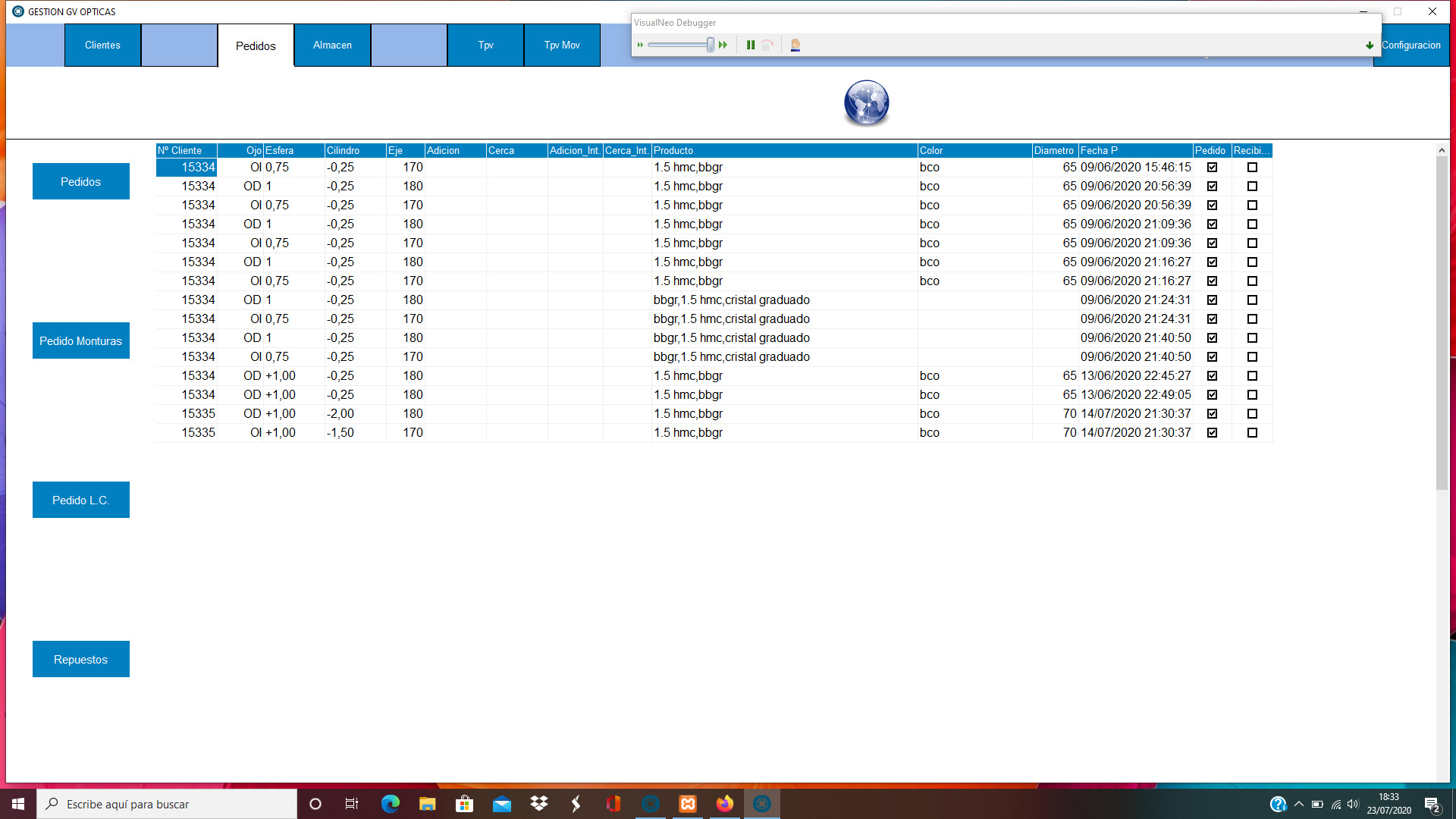
utilizo el bit porque el mismo programa lo tengo hecho con visualneo win , y en la tabla para que me saliera un cuadrado al estilo de radio buttom , si ponia el bit aparecia el cuadrado para marcar os mando foto del programa de visualneowin.
hola , os queria dar las gracias por vuestra ayuda
el problema es que el campo esta configurado en mysql como bit , 0,1
cuando le doy a guardar si no he cambiado nada automaticamente manda el 1
utilizo el bit porque el mismo programa lo tengo hecho con visualneo win , y en la tabla para que me saliera un cuadrado al estilo de radio buttom , si ponia el bit aparecia el cuadrado para marcar os mando foto del programa de visualneowin.
Uploaded files:
Quote from Gaev on July 23, 2020, 10:42 pm@Juan Carlos
I need some clarification ...
the problem is that the field is set in mysql as bit, 0.1
Which field (column) are you referring to ? ... Pedido or Recibi...
when I click save if I have not changed anything it automatically sends 1
a) for the subroutine for the field/column in question, what did you specify for the Type for [cellData] ? .. STRING or INTEGER or BOOLEAN ?
b) were you successful in having it displayed as "YES" or "No" ?
c) please elaborate on "when I click save" ... is this a PushButton of yours ? ... if so, what is the click event code that you have scripted ?
@Juan Carlos
I need some clarification ...
the problem is that the field is set in mysql as bit, 0.1
Which field (column) are you referring to ? ... Pedido or Recibi...
when I click save if I have not changed anything it automatically sends 1
a) for the subroutine for the field/column in question, what did you specify for the Type for [cellData] ? .. STRING or INTEGER or BOOLEAN ?
b) were you successful in having it displayed as "YES" or "No" ?
c) please elaborate on "when I click save" ... is this a PushButton of yours ? ... if so, what is the click event code that you have scripted ?