
NeoWin Interface Designer — A Sneak Peek... 4/7/26

Quote from Anthony LaTorre on April 7, 2026, 3:31 amWhat if you could build modern, professional HTML interfaces for VisualNEO Win — without writing a single line of HTML?
The NeoWin Interface Designer (NWID) is an upcoming drag-and-drop layout tool that runs right inside VisualNEO Win. It gives you a visual canvas where you design your interface, wire up events, and export a fully working HTML runtime — all powered by VNW's scripting engine behind the scenes.
What You Get
25+ controls — buttons, text inputs, sliders, combo boxes, tables, tab controls, media players, tree views, progress steps, accordions, countdown timers, and more. Each one renders as clean, modern HTML with multiple theme support.
A real designer experience — snap-to-grid, alignment guides, multi-select, undo/redo, layers panel, container nesting, master pages, page transitions, and a full properties panel for every control. If you've used a form builder before, you'll feel right at home.
Variable binding — every control automatically generates VNW variables. Click a button?
[btn_save.name]and[btn_save.event]are set before your subroutine fires. Change a slider?[sld_volume.value]has the number. No manual wiring needed. You can assign a VNW subroutine to any control and page enter and exit events...JS Snippets Library — 130+ ready-to-use snippets across categories like Visual Effects, Hover Effects, Toggles, Timers, and Interactive widgets. Select a snippet, configure its parameters, click Insert. Done.
One-click export — hit Export and NWID generates
runtime.htmlandruntime_subs.txt. Drop them into your VNW publication, add a rectangle with ezEdge, and your HTML interface is live. VNW handles the logic. HTML handles the looks.The Big Idea
NWID doesn't replace VisualNEO Win — it extends it. VNW remains the brain: file I/O, databases, system calls, business logic. NWID gives it a modern face. Your users see a polished HTML interface. Your code stays in familiar VNW script.
Coming soon. Stay tuned.
Hello everyone, I took a break from creating plugins for VNW to try a little experiment creating VNW interfaces with HTML-JavaScript-CSS... built with vanilla ES6 JavaScript. This is my first compiled app with the Designer... A simple calculator app... I'm really excited about the possibilities this Designer has to offer. It should be completed before May 1st... Still have some testing & refinements to make...
So try the compiled Calculator App and let me know how it runs...
Below is a screen shot I took of the Designer and it's Media Player Control...***Note to use the Designer you will need the ezEdge Browser Plugin: https://ezwarelab.com/product/ezedge-plugin/14
I purchased a few of Brad's plugin and they are all top-quality well designed plugins... Every serious VNW Developer should have the ezEdge Browser in their toolkit... (And the plugin has been discounted too...)I was debating about announcing this Designer this soon... but I know it will work, and I also could use some feedback... This is a very complicated application with over 30,000 lines of code... I spent many hours, dozens of revisions... and squashed hundreds of bugs... I like where it's at now but there's still much to do... Hope you enjoy this and I hope you can see the potential...
Cheers
What if you could build modern, professional HTML interfaces for VisualNEO Win — without writing a single line of HTML?
The NeoWin Interface Designer (NWID) is an upcoming drag-and-drop layout tool that runs right inside VisualNEO Win. It gives you a visual canvas where you design your interface, wire up events, and export a fully working HTML runtime — all powered by VNW's scripting engine behind the scenes.
What You Get
25+ controls — buttons, text inputs, sliders, combo boxes, tables, tab controls, media players, tree views, progress steps, accordions, countdown timers, and more. Each one renders as clean, modern HTML with multiple theme support.
A real designer experience — snap-to-grid, alignment guides, multi-select, undo/redo, layers panel, container nesting, master pages, page transitions, and a full properties panel for every control. If you've used a form builder before, you'll feel right at home.
Variable binding — every control automatically generates VNW variables. Click a button? [btn_save.name] and [btn_save.event] are set before your subroutine fires. Change a slider? [sld_volume.value] has the number. No manual wiring needed. You can assign a VNW subroutine to any control and page enter and exit events...
JS Snippets Library — 130+ ready-to-use snippets across categories like Visual Effects, Hover Effects, Toggles, Timers, and Interactive widgets. Select a snippet, configure its parameters, click Insert. Done.
One-click export — hit Export and NWID generates runtime.html and runtime_subs.txt. Drop them into your VNW publication, add a rectangle with ezEdge, and your HTML interface is live. VNW handles the logic. HTML handles the looks.
The Big Idea
NWID doesn't replace VisualNEO Win — it extends it. VNW remains the brain: file I/O, databases, system calls, business logic. NWID gives it a modern face. Your users see a polished HTML interface. Your code stays in familiar VNW script.
Coming soon. Stay tuned.
Hello everyone, I took a break from creating plugins for VNW to try a little experiment creating VNW interfaces with HTML-JavaScript-CSS... built with vanilla ES6 JavaScript. This is my first compiled app with the Designer... A simple calculator app... I'm really excited about the possibilities this Designer has to offer. It should be completed before May 1st... Still have some testing & refinements to make...
So try the compiled Calculator App and let me know how it runs...
Below is a screen shot I took of the Designer and it's Media Player Control...
***Note to use the Designer you will need the ezEdge Browser Plugin: https://ezwarelab.com/product/ezedge-plugin/14
I purchased a few of Brad's plugin and they are all top-quality well designed plugins... Every serious VNW Developer should have the ezEdge Browser in their toolkit... (And the plugin has been discounted too...)
I was debating about announcing this Designer this soon... but I know it will work, and I also could use some feedback... This is a very complicated application with over 30,000 lines of code... I spent many hours, dozens of revisions... and squashed hundreds of bugs... I like where it's at now but there's still much to do... Hope you enjoy this and I hope you can see the potential...
Cheers
Uploaded files: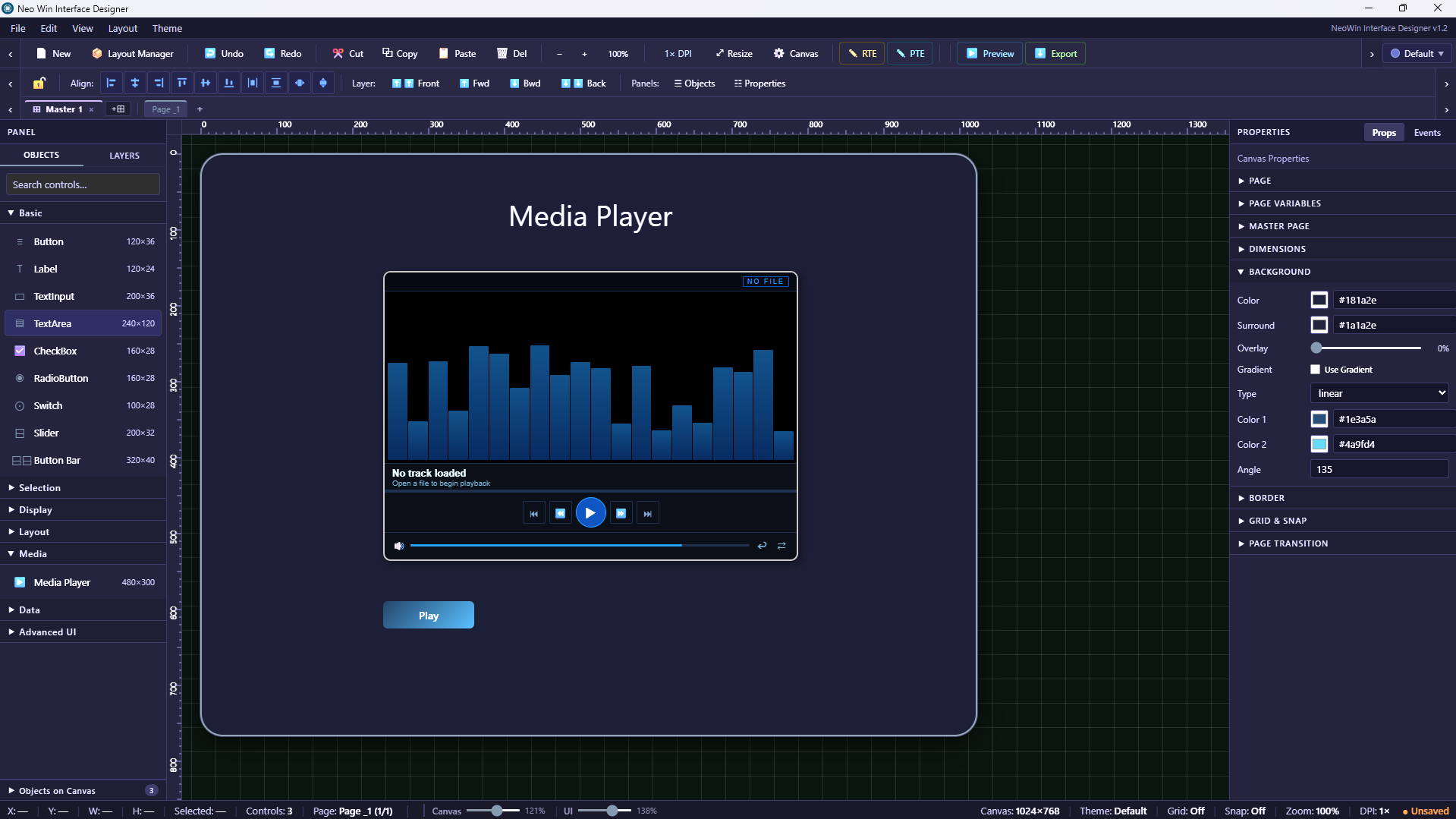

Quote from luishp on April 7, 2026, 1:59 pm@anthony-latorre looks impresive!
@anthony-latorre looks impresive!
Quote from Anthony LaTorre on April 7, 2026, 2:05 pmThank you Luis, I put a lot of work into. it... Not quite finished yet but I'm getting there...
Thank you Luis, I put a lot of work into. it... Not quite finished yet but I'm getting there...

Quote from luiz on April 7, 2026, 7:30 pmSeems great. Waiting...
The Calculator works well here, using Windows 11.
Thanks.
Seems great. Waiting...
The Calculator works well here, using Windows 11.
Thanks.

Quote from Darbdenral on April 7, 2026, 9:45 pm@anthony-latorre I agree with @luishp this looks impressive!
I can see from your picture you have put in quite a bit of work, very nice ;)
If you need help with anything let me know..
thanks!
Brad
@anthony-latorre I agree with @luishp this looks impressive!
I can see from your picture you have put in quite a bit of work, very nice ;)
If you need help with anything let me know..
thanks!
Brad
Quote from Anthony LaTorre on April 7, 2026, 9:58 pmThanks Brad, appreciate that...
Thanks Brad, appreciate that...