
New ezNeoEdge utility that loads content from external site (Avoiding CORS) - Forum
New ezNeoEdge utility that loads content from external site (Avoiding CORS)

Quote from Darbdenral on June 10, 2023, 8:40 amHello,
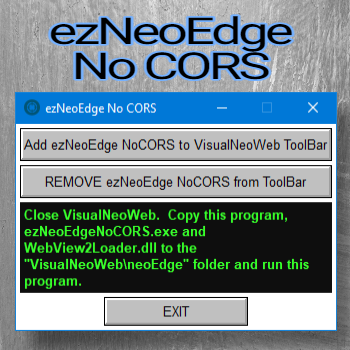
I have developed a new tool called "ezNeoEdge No CORS" for VisualNeoWeb. This tool helps you bypass CORS restrictions when developing local apps. It is essentially a clone of NeoEdge.exe, but it utilizes the ezEdge web browser, which is specifically configured to avoid CORS restrictions.
With this tool, you no longer need to modify your code or use a proxy, nor do you have to upload your files to run your local web apps because of CORS restrictions. To make things even more convenient, I have included a register utility that adds the "ezNeoEdge No CORS" option to the VisualNeoWeb toolbar. Once registered, you can simply click the new icon in the toolbar to run your web apps locally and bypass CORS restrictions.
It's important to note that this tool is designed for local development and testing of VisualNeoWeb apps. It won't be useful if you upload your web app to a server and rely on external site content. However, if you're working on VisualNeoWeb or ezNeoEdge apps that can benefit from avoiding CORS, you can use this tool just like NeoEdge with the ezEdge Plugin and the ezNeoEdge VNW plugin. It also supports the package.json setting for added flexibility.
Overall, this tool is a quick and handy solution that can save you development time, making local app development smoother and more efficient.
Hit F12 for Edge developer console
Ctrl-Shift-F1 (debug screen for NeoEdge apps)
A readme file is included in the zip fileMore information
https://links.tropicdesigns.net/EKpM
Hello,
I have developed a new tool called "ezNeoEdge No CORS" for VisualNeoWeb. This tool helps you bypass CORS restrictions when developing local apps. It is essentially a clone of NeoEdge.exe, but it utilizes the ezEdge web browser, which is specifically configured to avoid CORS restrictions.
With this tool, you no longer need to modify your code or use a proxy, nor do you have to upload your files to run your local web apps because of CORS restrictions. To make things even more convenient, I have included a register utility that adds the "ezNeoEdge No CORS" option to the VisualNeoWeb toolbar. Once registered, you can simply click the new icon in the toolbar to run your web apps locally and bypass CORS restrictions.
It's important to note that this tool is designed for local development and testing of VisualNeoWeb apps. It won't be useful if you upload your web app to a server and rely on external site content. However, if you're working on VisualNeoWeb or ezNeoEdge apps that can benefit from avoiding CORS, you can use this tool just like NeoEdge with the ezEdge Plugin and the ezNeoEdge VNW plugin. It also supports the package.json setting for added flexibility.
Overall, this tool is a quick and handy solution that can save you development time, making local app development smoother and more efficient.
Hit F12 for Edge developer console
Ctrl-Shift-F1 (debug screen for NeoEdge apps)
A readme file is included in the zip file
More information
https://links.tropicdesigns.net/EKpM


Quote from fkapnist on November 16, 2023, 5:38 pmI understand this module is used in the VisualNEO Web editor when testing localhost. But if I copy it into the build folder of my compiled app (along with neoEdge.exe) and run it on a local Windows C: drive, will it also prevent CORS on localhost? Would it need special commands for that?
Thanks.
.
I understand this module is used in the VisualNEO Web editor when testing localhost. But if I copy it into the build folder of my compiled app (along with neoEdge.exe) and run it on a local Windows C: drive, will it also prevent CORS on localhost? Would it need special commands for that?
Thanks.
.
Quote from Darbdenral on November 17, 2023, 12:42 am@fkapnist
You bet.. If you copy (ezNeoEdgeNoCORS.exe,WebView2Loader.dll & package.json) to your folder it will work just like neoEdge, no special commands are needed and you can bypass CORS for your Web desktop app. If your using neoEdge commands to call VisualNEO Win commands during development, follow the installation instructions in the Readme.txt for installing the VisualNeo Web plugin.
Note: If you didn't get the ezNeoEdge web plugin, I updated the download archive above today, so if you download again, there should be a plugin folder with the file.
You bet.. If you copy (ezNeoEdgeNoCORS.exe,WebView2Loader.dll & package.json) to your folder it will work just like neoEdge, no special commands are needed and you can bypass CORS for your Web desktop app. If your using neoEdge commands to call VisualNEO Win commands during development, follow the installation instructions in the Readme.txt for installing the VisualNeo Web plugin.
Note: If you didn't get the ezNeoEdge web plugin, I updated the download archive above today, so if you download again, there should be a plugin folder with the file.
Quote from fkapnist on November 18, 2023, 4:06 pmQuote from Darbdenral on November 17, 2023, 12:42 am@fkapnist
You bet.. If you copy (ezNeoEdgeNoCORS.exe,WebView2Loader.dll & package.json) to your folder it will work just like neoEdge, no special commands are needed and you can bypass CORS for your Web desktop app. If your using neoEdge commands to call VisualNEO Win commands during development, follow the installation instructions in the Readme.txt for installing the VisualNeo Web plugin.
Note: If you didn't get the ezNeoEdge web plugin, I updated the download archive above today, so if you download again, there should be a plugin folder with the file.
Can ezNeoEdgeNoCORS.exe and neoEdge.exe both be located in the same build folder, or does one have to be deleted for the other to work?
.
Quote from Darbdenral on November 17, 2023, 12:42 amYou bet.. If you copy (ezNeoEdgeNoCORS.exe,WebView2Loader.dll & package.json) to your folder it will work just like neoEdge, no special commands are needed and you can bypass CORS for your Web desktop app. If your using neoEdge commands to call VisualNEO Win commands during development, follow the installation instructions in the Readme.txt for installing the VisualNeo Web plugin.
Note: If you didn't get the ezNeoEdge web plugin, I updated the download archive above today, so if you download again, there should be a plugin folder with the file.
Can ezNeoEdgeNoCORS.exe and neoEdge.exe both be located in the same build folder, or does one have to be deleted for the other to work?
.
Quote from Darbdenral on November 18, 2023, 11:15 pm@fkapnist
Can ezNeoEdgeNoCORS.exe and neoEdge.exe both be located in the same build folder, or does one have to be deleted for the other to work?
ezNeoEdge & NeoEdge & ezNeoEdgeNoCORS should all work fine running from the same build folder.
Copy them to your build folder and try it.. they read the same package.json settings.
Can ezNeoEdgeNoCORS.exe and neoEdge.exe both be located in the same build folder, or does one have to be deleted for the other to work?
ezNeoEdge & NeoEdge & ezNeoEdgeNoCORS should all work fine running from the same build folder.
Copy them to your build folder and try it.. they read the same package.json settings.
Quote from fkapnist on November 19, 2023, 12:26 amQuote from Darbdenral on November 18, 2023, 11:15 pm@fkapnist
Can ezNeoEdgeNoCORS.exe and neoEdge.exe both be located in the same build folder, or does one have to be deleted for the other to work?
ezNeoEdge & NeoEdge & ezNeoEdgeNoCORS should all work fine running from the same build folder.
Copy them to your build folder and try it.. they read the same package.json settings.
The package.json allows me to change the title and icon of my app...
except in the Task Bar where the title is always neoEdge.
How can the task bar icon title be corrected?
.
Quote from Darbdenral on November 18, 2023, 11:15 pmCan ezNeoEdgeNoCORS.exe and neoEdge.exe both be located in the same build folder, or does one have to be deleted for the other to work?
ezNeoEdge & NeoEdge & ezNeoEdgeNoCORS should all work fine running from the same build folder.
Copy them to your build folder and try it.. they read the same package.json settings.
The package.json allows me to change the title and icon of my app...
except in the Task Bar where the title is always neoEdge.
How can the task bar icon title be corrected?
.
Quote from Darbdenral on November 19, 2023, 1:10 am@fkapnist
I was thinking about your previous question, I believe I answered that incorrectly.
Can ezNeoEdgeNoCORS.exe and neoEdge.exe both be located in the same build folder, or does one have to be deleted for the other to work?
The answer should have been NO
ezNeoEdge.exe & ezNeoEdgeNoCORS .exe work fine running from the same build folder. But not NeoEdge.exe because it uses a different browser plugin, it's not made for the ezEdge browser plugin and would not communicate correctly. But If your not using VisualNeoWin desktop commands, they all work fine together.How can the task bar icon title be corrected?
Yes, I see what you mean, I updated the ezNeoEdge file(s) to help with this.
I will send a newsletter with the latest updates and source code:
Download latest ezNeoEdge: This is ezNeoEdge, so it only works with ezEdge browser plugin, not NeoEdge browser.
https://links.tropicdesigns.net/JgCb
Download ezNeoEdgeNoCORS
https://links.tropicdesigns.net/EKpM
I was thinking about your previous question, I believe I answered that incorrectly.
Can ezNeoEdgeNoCORS.exe and neoEdge.exe both be located in the same build folder, or does one have to be deleted for the other to work?
The answer should have been NO
ezNeoEdge.exe & ezNeoEdgeNoCORS .exe work fine running from the same build folder. But not NeoEdge.exe because it uses a different browser plugin, it's not made for the ezEdge browser plugin and would not communicate correctly. But If your not using VisualNeoWin desktop commands, they all work fine together.
How can the task bar icon title be corrected?
Yes, I see what you mean, I updated the ezNeoEdge file(s) to help with this.
I will send a newsletter with the latest updates and source code:
Download latest ezNeoEdge: This is ezNeoEdge, so it only works with ezEdge browser plugin, not NeoEdge browser.
https://links.tropicdesigns.net/JgCb
Download ezNeoEdgeNoCORS
https://links.tropicdesigns.net/EKpM
Quote from fkapnist on November 19, 2023, 8:09 pmQuote from Darbdenral on November 19, 2023, 1:10 am@fkapnist
I was thinking about your previous question, I believe I answered that incorrectly.
Can ezNeoEdgeNoCORS.exe and neoEdge.exe both be located in the same build folder, or does one have to be deleted for the other to work?
The answer should have been NO
ezNeoEdge.exe & ezNeoEdgeNoCORS .exe work fine running from the same build folder. But not NeoEdge.exe because it uses a different browser plugin, it's not made for the ezEdge browser plugin and would not communicate correctly. But If your not using VisualNeoWin desktop commands, they all work fine together.How can the task bar icon title be corrected?
Yes, I see what you mean, I updated the ezNeoEdge file(s) to help with this.
I will send a newsletter with the latest updates and source code:
Download latest ezNeoEdge: This is ezNeoEdge, so it only works with ezEdge browser plugin, not NeoEdge browser.
https://links.tropicdesigns.net/JgCb
Download ezNeoEdgeNoCORS
https://links.tropicdesigns.net/EKpMHow come the ezNeoEdge.exe browser isn't bundled with your ezEdge browser plugin installer? I only found it from this link...
https://links.tropicdesigns.net/JgCb
.
Quote from Darbdenral on November 19, 2023, 1:10 amI was thinking about your previous question, I believe I answered that incorrectly.
Can ezNeoEdgeNoCORS.exe and neoEdge.exe both be located in the same build folder, or does one have to be deleted for the other to work?
The answer should have been NO
ezNeoEdge.exe & ezNeoEdgeNoCORS .exe work fine running from the same build folder. But not NeoEdge.exe because it uses a different browser plugin, it's not made for the ezEdge browser plugin and would not communicate correctly. But If your not using VisualNeoWin desktop commands, they all work fine together.How can the task bar icon title be corrected?
Yes, I see what you mean, I updated the ezNeoEdge file(s) to help with this.
I will send a newsletter with the latest updates and source code:
Download latest ezNeoEdge: This is ezNeoEdge, so it only works with ezEdge browser plugin, not NeoEdge browser.
https://links.tropicdesigns.net/JgCb
Download ezNeoEdgeNoCORS
https://links.tropicdesigns.net/EKpM
How come the ezNeoEdge.exe browser isn't bundled with your ezEdge browser plugin installer? I only found it from this link...
https://links.tropicdesigns.net/JgCb
.
Quote from Darbdenral on November 19, 2023, 10:01 pm@fkapnist
How come the ezNeoEdge.exe browser isn't bundled with your ezEdge browser plugin installer? I only found it from this link...
Yes, it was only recently packaged up for public distribution, I still need to put it up on the web too. But registered users can request it, along with source code, there is a statement and link in your purchase email if you check.
Update:
The ezNeoEdge web page is now up ;)
https://tropicdesigns.net/ezneoedge.html
How come the ezNeoEdge.exe browser isn't bundled with your ezEdge browser plugin installer? I only found it from this link...
Yes, it was only recently packaged up for public distribution, I still need to put it up on the web too. But registered users can request it, along with source code, there is a statement and link in your purchase email if you check.
Update:
The ezNeoEdge web page is now up ;)
https://tropicdesigns.net/ezneoedge.html