
New Icon Generator using the power of Google Nano Banana

Quote from Darbdenral on March 23, 2026, 11:48 am
What does ezIcon Generator do?
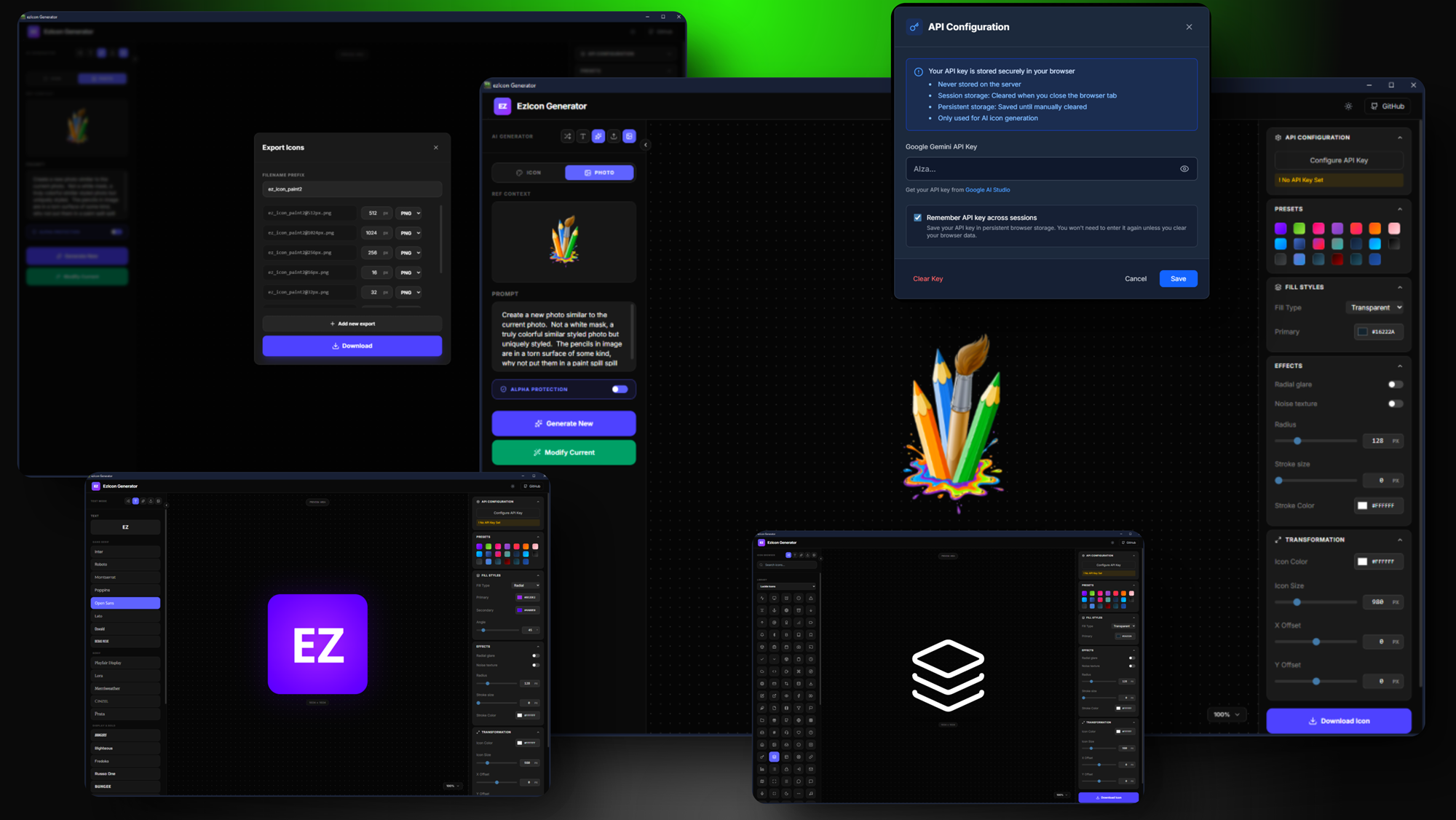
EZIcon Generator is a high-performance icon generator with customization, live preview, and bulk export capabilities. You can generate text and image based icons from Google image fonts, Material Symbols, Font Awesome or Lucide icons. You can use your own text , images from your computer and even generate icons with AI using your Google Gemini API Key and Nano Banana. Enjoy the power of AI to create custom image icons with your custom prompts. Project import and export with last project memory. Batch export multi-size images in a single ZIP containing project settings.
This is a new project that was fun to create! It all started with the need to have some custom icons for a new project WebExeBuilder. I started a new Google AI project using Nano Banana and the ezIcon generator project was born. The ezIcon Generator project turned out so well I decided to use this as a proof of concept app, going from Google AI studio to a WebExeBuilder project. So this project was mostly created in Google AI studio. I then edited the code to incorporate some WebExeBuilder functions and local API functions.
Why did I want to do this, why not just use it as an online app? Actually many reasons, I like using Windows apps, no server fees, protection of app code, local only. This also allows users can use their own API keys not mine, keys are locally stored and never shared and I don't need to charge monthly fees to to you to use the AI features. You are only charged by how much you use the Google API feature by Google, not me.
Q. Do I need a API key to use this software?
A. Yes and No - You only need a Google Gemini API code if you want to use the AI prompt feature, everything else does not require an API key. I use the other features much more often than the AI. It's not needed to use the program. A Google API key is only needed to create icons with AI, you can still use your own icons, images and the built-in icon generation functions.Is there a FREEWARE version?
Yes!Intro video here.
Intro VideoDownload Free here:
ezIcon v1.13Microsoft App Store Listing
ezIcon GeneratorBUT! maybe later, if you really like it and want to show your support please purchase the Professional edition. Only the professional edition allows loading and saving projects including automatic project backups when downloading image archives. Otherwise, there is no difference between the two editions.
Projects can be shared with others using the Professional version too!
ezIcon home page: (Faq, etc.)
https://link.ezwarelab.com/eziconQ. Where do I get an API key and is it FREE?
A. To use the AI features, you'll need a 'key' from Google. Think of it like a digital pass that lets our app talk to Google's smart servers. It's free to start! Just go to AI Studio https://aistudio.google.com and click 'Get API Key,' and paste the code inside the Configure API Key area. Google restricts the Free tier in the EEA and the UK to comply with those local privacy regulations. So many of you need to use a paid key. I use a paid key, it costs very little for me and I have used my key in ezIcon much more than most people would because of testing, developing etc. I have never been charged more than $2o in an entire month. You can set limits now in their online settings at any amount you like. But remember, you don't need a key to use the ezIcon app, just to use the AI feature.
What does ezIcon Generator do?
EZIcon Generator is a high-performance icon generator with customization, live preview, and bulk export capabilities. You can generate text and image based icons from Google image fonts, Material Symbols, Font Awesome or Lucide icons. You can use your own text , images from your computer and even generate icons with AI using your Google Gemini API Key and Nano Banana. Enjoy the power of AI to create custom image icons with your custom prompts. Project import and export with last project memory. Batch export multi-size images in a single ZIP containing project settings.
This is a new project that was fun to create! It all started with the need to have some custom icons for a new project WebExeBuilder. I started a new Google AI project using Nano Banana and the ezIcon generator project was born. The ezIcon Generator project turned out so well I decided to use this as a proof of concept app, going from Google AI studio to a WebExeBuilder project. So this project was mostly created in Google AI studio. I then edited the code to incorporate some WebExeBuilder functions and local API functions.
Why did I want to do this, why not just use it as an online app? Actually many reasons, I like using Windows apps, no server fees, protection of app code, local only. This also allows users can use their own API keys not mine, keys are locally stored and never shared and I don't need to charge monthly fees to to you to use the AI features. You are only charged by how much you use the Google API feature by Google, not me.
Q. Do I need a API key to use this software?
A. Yes and No - You only need a Google Gemini API code if you want to use the AI prompt feature, everything else does not require an API key. I use the other features much more often than the AI. It's not needed to use the program. A Google API key is only needed to create icons with AI, you can still use your own icons, images and the built-in icon generation functions.
Is there a FREEWARE version?
Yes!
Intro video here.
Intro Video
Download Free here:
ezIcon v1.13
Microsoft App Store Listing
ezIcon Generator
BUT! maybe later, if you really like it and want to show your support please purchase the Professional edition. Only the professional edition allows loading and saving projects including automatic project backups when downloading image archives. Otherwise, there is no difference between the two editions.
Projects can be shared with others using the Professional version too!
ezIcon home page: (Faq, etc.)
https://link.ezwarelab.com/ezicon
Q. Where do I get an API key and is it FREE?
A. To use the AI features, you'll need a 'key' from Google. Think of it like a digital pass that lets our app talk to Google's smart servers. It's free to start! Just go to AI Studio https://aistudio.google.com and click 'Get API Key,' and paste the code inside the Configure API Key area. Google restricts the Free tier in the EEA and the UK to comply with those local privacy regulations. So many of you need to use a paid key. I use a paid key, it costs very little for me and I have used my key in ezIcon much more than most people would because of testing, developing etc. I have never been charged more than $2o in an entire month. You can set limits now in their online settings at any amount you like. But remember, you don't need a key to use the ezIcon app, just to use the AI feature.
Quote from Darbdenral on March 25, 2026, 2:05 amUpdated download for ezIcon Generator Free
There seemed to be a caching issue or something that might have prevented many of you from receiving the newest .zip file when you downloaded. The new zip file contains the digitally signed installation, if your archive does not contain a setup and is not digitally signed you have the old version that was not yet digitally signed. You should really download again because the file could give warnings in Windows when trying to run and it's without some additional AI refinements.
Removed previous image as not applicable anymore.
Thanks!
Brad
Updated download for ezIcon Generator Free
There seemed to be a caching issue or something that might have prevented many of you from receiving the newest .zip file when you downloaded. The new zip file contains the digitally signed installation, if your archive does not contain a setup and is not digitally signed you have the old version that was not yet digitally signed. You should really download again because the file could give warnings in Windows when trying to run and it's without some additional AI refinements.
Removed previous image as not applicable anymore.
Thanks!
Brad
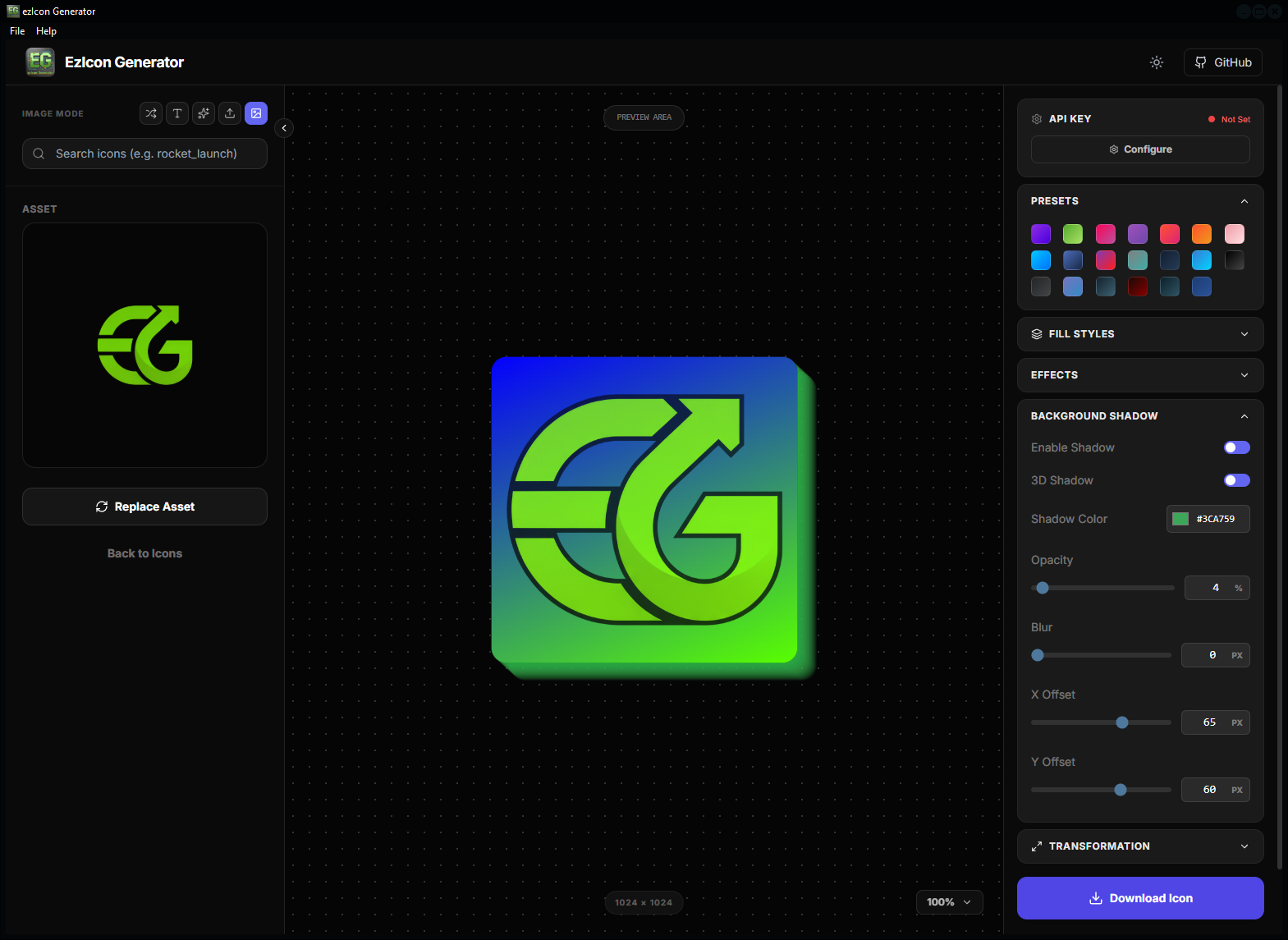
Quote from Darbdenral on March 26, 2026, 1:45 amUpdated today with a nice feature that creates shadows and/or 3D shadow. See right sidebar with the new background shadow properties. This was actually a pretty large change for the exports, so if you have any issues that popup let me know.
Version was changed to 1.10
This new feature does NOT require an API key to use ;)
Some other small fixes were made too.Any feedback, suggestions or issues, please let me know.
I prefer you to contact me on my forums (coming soon) or from my web site, this post is here as a resource for developers not support.. ;)
Thanks!
Brad
Updated today with a nice feature that creates shadows and/or 3D shadow. See right sidebar with the new background shadow properties. This was actually a pretty large change for the exports, so if you have any issues that popup let me know.
Version was changed to 1.10
This new feature does NOT require an API key to use ;)
Some other small fixes were made too.
Any feedback, suggestions or issues, please let me know.
I prefer you to contact me on my forums (coming soon) or from my web site, this post is here as a resource for developers not support.. ;)
Thanks!
Brad

Quote from smartmedia on March 26, 2026, 2:24 pmHi..
Excellent work Brad. You can expand it by adding all ready made icons,. Also you can add movement to icon, not the frame, and export it to gif or svg.
Also you can add save to your own preset style. Overall is great..
Hi..
Excellent work Brad. You can expand it by adding all ready made icons,. Also you can add movement to icon, not the frame, and export it to gif or svg.
Also you can add save to your own preset style. Overall is great..
Quote from Darbdenral on March 27, 2026, 1:30 amQuote from smartmedia on March 26, 2026, 2:24 pmHi..
Excellent work Brad. You can expand it by adding all ready made icons,. Also you can add movement to icon, not the frame, and export it to gif or svg.
Also you can add save to your own preset style. Overall is great..
@smartmedia
You provided some excellent ideas! I really appreciate the feedback, thank you!
The app is now published in the Microsoft Store!
If you enjoy the app, please leave a review.. Microsoft Store Listingthanks!
Quote from smartmedia on March 26, 2026, 2:24 pmHi..
Excellent work Brad. You can expand it by adding all ready made icons,. Also you can add movement to icon, not the frame, and export it to gif or svg.
Also you can add save to your own preset style. Overall is great..
You provided some excellent ideas! I really appreciate the feedback, thank you!
The app is now published in the Microsoft Store!
If you enjoy the app, please leave a review.. Microsoft Store Listing
thanks!

Quote from Phil78 on March 27, 2026, 5:35 pmHi @darbdenral
first of all Congratulations for your great job and to share it with us.
I have a problem with version 1.10, it doesn't start, but there is a process running in the background. If I click again, I get an access violation.
Hi @darbdenral
first of all Congratulations for your great job and to share it with us.
I have a problem with version 1.10, it doesn't start, but there is a process running in the background. If I click again, I get an access violation.
Quote from Darbdenral on March 27, 2026, 9:04 pm@phil78
Hmm, maybe installer failed to close the previous version if it was running when installing? I'm not sure with limited information.
Try downloading again with this link and make sure current version is closed and uninstalled before installing.
Edit:
Download the latest version from the original post above, v1.11 is available today. If you still have issues or anyone else needs help, please contact me from my website.thanks!
Brad
Hmm, maybe installer failed to close the previous version if it was running when installing? I'm not sure with limited information.
Try downloading again with this link and make sure current version is closed and uninstalled before installing.
Edit:
Download the latest version from the original post above, v1.11 is available today. If you still have issues or anyone else needs help, please contact me from my website.
thanks!
Brad

Quote from Alf.bogner on March 29, 2026, 1:19 pmOn my Huawei Mate15 it doesn`t start completely when installed. There is only a black window showed with "File" and "Help" in the menu, nothing else wors. Have already tried to deinstall and re-download and re-install. No change. Whereas on my desktop PC all works like a charm.
On my Huawei Mate15 it doesn`t start completely when installed. There is only a black window showed with "File" and "Help" in the menu, nothing else wors. Have already tried to deinstall and re-download and re-install. No change. Whereas on my desktop PC all works like a charm.
Uploaded files: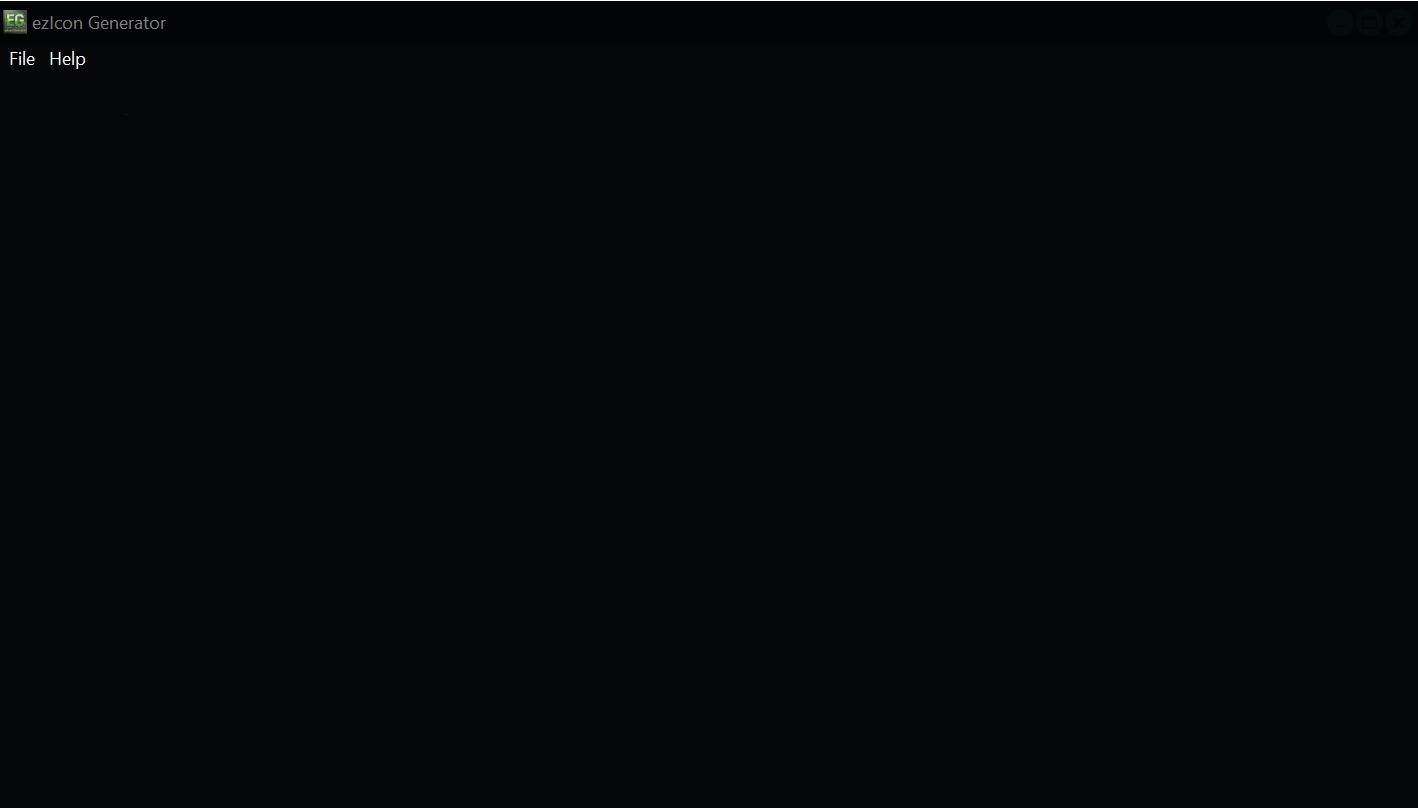
Quote from Darbdenral on March 29, 2026, 2:14 pm@alf-bogner
Yes, we had the same issue with Microsoft store submission with the first version, I made some changes and it passed with no issues. Make sure that your using the v1.11 Setup (ezIcon_Generator_v1.11_Win64_Setup). If you are running the v1.11, that means the bug's still there and I'd like to work with you and try and nail it down.
let me know ..
thanks!
Brad
Yes, we had the same issue with Microsoft store submission with the first version, I made some changes and it passed with no issues. Make sure that your using the v1.11 Setup (ezIcon_Generator_v1.11_Win64_Setup). If you are running the v1.11, that means the bug's still there and I'd like to work with you and try and nail it down.
let me know ..
thanks!
Brad
Quote from Alf.bogner on March 29, 2026, 4:44 pmhi @brad,
unfortunately with v.1.11 still the same problem.
hi @brad,
unfortunately with v.1.11 still the same problem.
Quote from Darbdenral on March 29, 2026, 10:04 pm@alf-bogner
Hi,
If you’d like to collaborate on this, I'd really appreciate it. Please reach out via the contact form on my website. This allows us to move the conversation to email, where I can better assist you.
thanks!
Brad
Hi,
If you’d like to collaborate on this, I'd really appreciate it. Please reach out via the contact form on my website. This allows us to move the conversation to email, where I can better assist you.
thanks!
Brad
Quote from Darbdenral on April 7, 2026, 8:59 pmQuote from Darbdenral on March 29, 2026, 10:04 pm@alf-bogner
Hi,
If you’d like to collaborate on this, I'd really appreciate it. Please reach out via the contact form on my website. This allows us to move the conversation to email, where I can better assist you.
thanks!
Brad
@alf-bogner
Just wanted to drop in and say thanks to Alf for working with me to squash the bug, we got it!
thanks!
Brad
Quote from Darbdenral on March 29, 2026, 10:04 pmHi,
If you’d like to collaborate on this, I'd really appreciate it. Please reach out via the contact form on my website. This allows us to move the conversation to email, where I can better assist you.
thanks!
Brad
Just wanted to drop in and say thanks to Alf for working with me to squash the bug, we got it!
thanks!
Brad