
New major version progress

Quote from luishp on June 25, 2019, 7:30 pmWe are working in a new major version update.
In this thread I will share some progress information.
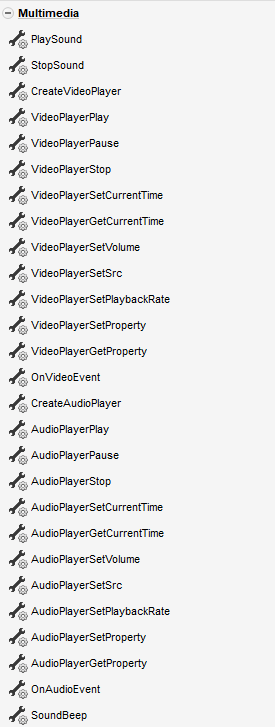
These are the new multimedia actions you will find in the new version:
We are working in a new major version update.
In this thread I will share some progress information.
These are the new multimedia actions you will find in the new version:

Quote from Gustavo1973 on June 26, 2019, 5:15 amYa que veo que estas haciendo mejoras en la parte de multimedia, estaria bueno poder reproducir videos alojados de manera local en aplicaciones que corren en navegadores de PC
Ya que veo que estas haciendo mejoras en la parte de multimedia, estaria bueno poder reproducir videos alojados de manera local en aplicaciones que corren en navegadores de PC
Quote from luishp on June 26, 2019, 7:13 amEstaria bueno poder reproducir videos alojados de manera local
Justo para eso son las nuevas acciones: reproducción de vídeos .mp4 locales o remotos :)
Pronto publicaré una demo.
Estaria bueno poder reproducir videos alojados de manera local
Justo para eso son las nuevas acciones: reproducción de vídeos .mp4 locales o remotos :)
Pronto publicaré una demo.
Quote from luishp on June 26, 2019, 11:25 amI have just uploaded a sample app to show basic Video Player functionality:
https://visualneo.com/tutorials/videoplayer
The video and audio player aspect may vary from one browser to another and some functionality may not be present in Internet Explorer. It's is possible to overimpose transparent images or any other object over the video and get and set information about a lot of aspects: current time, muted, loop, speed...
You can also hide the default controls and code your own.
I have just uploaded a sample app to show basic Video Player functionality:
https://visualneo.com/tutorials/videoplayer
The video and audio player aspect may vary from one browser to another and some functionality may not be present in Internet Explorer. It's is possible to overimpose transparent images or any other object over the video and get and set information about a lot of aspects: current time, muted, loop, speed...
You can also hide the default controls and code your own.
Quote from Gustavo1973 on June 26, 2019, 4:04 pmEstuve mirando tu demo, muy bueno todo se ve , en ese caso particular es un video de la web?
Ya que dices que soportara reproduccion de videos locales, en este punto en VisualNeoWin existe "ListFiles" de una carpeta determinada, se puede en NeoWeb algo similar ?
Podria ser muy util si se quiere armar un tipo de playlist para reproducir uno tras otro en el reproductor
Estuve mirando tu demo, muy bueno todo se ve , en ese caso particular es un video de la web?
Ya que dices que soportara reproduccion de videos locales, en este punto en VisualNeoWin existe "ListFiles" de una carpeta determinada, se puede en NeoWeb algo similar ?
Podria ser muy util si se quiere armar un tipo de playlist para reproducir uno tras otro en el reproductor
Quote from luishp on June 26, 2019, 8:57 pmEl video que utilizo es un .mp4 que se incluye con la app igual que si fuera un archivo de imagen.
No es posible hacer un "ListFiles" en VisualNEO Web por motivos de seguridad aunque si el usuario elije un archivo con un File Input si debería poder reproducirse.
Un playlist si puede hacerse con videos almacenados en un servidor web.
En un futuro queremos integrar mejor VisualNEO Web con VisualNEO Win, de modo que sea sencillo utilizar cualquier comando del segundo desde el primero en aplicaciones EXE. Paciencia...
El video que utilizo es un .mp4 que se incluye con la app igual que si fuera un archivo de imagen.
No es posible hacer un "ListFiles" en VisualNEO Web por motivos de seguridad aunque si el usuario elije un archivo con un File Input si debería poder reproducirse.
Un playlist si puede hacerse con videos almacenados en un servidor web.
En un futuro queremos integrar mejor VisualNEO Web con VisualNEO Win, de modo que sea sencillo utilizar cualquier comando del segundo desde el primero en aplicaciones EXE. Paciencia...
Quote from Ronnie on June 28, 2019, 3:57 pm@luishp
The sample video looks great. A few suggestions to make it even better
- GetVolume level
- Get/Set Peak Level. This is handy to create 'audio peak level' unless you can incorporate a default spectrum analyser level meter...
Rgds
Ronnie
The sample video looks great. A few suggestions to make it even better
- GetVolume level
- Get/Set Peak Level. This is handy to create 'audio peak level' unless you can incorporate a default spectrum analyser level meter...
Rgds
Ronnie

Quote from luishp on July 2, 2019, 7:02 pmI have uploaded a new sample to demostrate Object Duplication at RunTime in next major version.
Note that it will possible to generate new objects from a prexisting one, change their properties and even assign subroutines to execute on different events. In the example a single subroutine is used to control the behaviour of all the generated objects.https://visualneo.com/tutorials/duplicateobject/
This is the button source code:
Loop 1 5 [n]
   DuplicateObject "Ellipse1" "circle[n]" "Container1"
   SetVar [posx] 80*[n]
   SetVar [posy] 170
   MoveObject "circle[n]" [posx] [posy]
   Random 255 [redvalue]
   Random 255 [greenvalue]
   Random 255 [bluevalue]
   SetObjectStyle "circle[n]" "fill" "rgb([redvalue],[greenvalue],[bluevalue])"
   OnMouseEvent "circle[n]" "click" "animateCircle"
EndLoop
And this the source code on the subroutine "animateCircle":
GetThisObjectName [myobject]
GetObjectInfo [myobject] "left" [thisposx]
GetObjectInfo [myobject] "top" [thisposy]
ToNumber "[thisposy]" [thisposy]
If [thisposy] > 80
  AnimateObject [myobject] "[thisposx]" "-=80" 1000 "easeOutElastic" ""
Else
  RemoveObject "[myobject]"
Endif
Refresh
I have uploaded a new sample to demostrate Object Duplication at RunTime in next major version.
Note that it will possible to generate new objects from a prexisting one, change their properties and even assign subroutines to execute on different events. In the example a single subroutine is used to control the behaviour of all the generated objects.
https://visualneo.com/tutorials/duplicateobject/
This is the button source code:
Loop 1 5 [n]
   DuplicateObject "Ellipse1" "circle[n]" "Container1"
   SetVar [posx] 80*[n]
   SetVar [posy] 170
   MoveObject "circle[n]" [posx] [posy]
   Random 255 [redvalue]
   Random 255 [greenvalue]
   Random 255 [bluevalue]
   SetObjectStyle "circle[n]" "fill" "rgb([redvalue],[greenvalue],[bluevalue])"
   OnMouseEvent "circle[n]" "click" "animateCircle"
EndLoop
And this the source code on the subroutine "animateCircle":
GetThisObjectName [myobject]
GetObjectInfo [myobject] "left" [thisposx]
GetObjectInfo [myobject] "top" [thisposy]
ToNumber "[thisposy]" [thisposy]
If [thisposy] > 80
  AnimateObject [myobject] "[thisposx]" "-=80" 1000 "easeOutElastic" ""
Else
  RemoveObject "[myobject]"
Endif
Refresh


Quote from luishp on July 3, 2019, 6:30 pmAfter talking with @gaev I have modified the sample app and the code in order to simplify the way duplicated objects are used.
I have updated the code in the previous post.
Additionaly, now if you try to create an object with a name that is used by another object, the existing one will be removed first, so there is not possiblity to have two different objects with the same name.
Also, if you remove a design time object all of its duplicates will be deleted too.Please let me know if this have sense for all of you.
Your thoughts are very much appreciated.Thank you!
After talking with @gaev I have modified the sample app and the code in order to simplify the way duplicated objects are used.
I have updated the code in the previous post.
Additionaly, now if you try to create an object with a name that is used by another object, the existing one will be removed first, so there is not possiblity to have two different objects with the same name.
Also, if you remove a design time object all of its duplicates will be deleted too.
Please let me know if this have sense for all of you.
Your thoughts are very much appreciated.
Thank you!
Quote from Ronnie on July 4, 2019, 1:29 am@luishp
The Duplicate Object (or CloneObject) reminds me of the days when I used Multimedia Builder to create games, where multiple clone objects are created easily, with each object inheriting its “parent” attributes, unless there are customised changes for each object, like Color...
Good feature that opens new possibilities
The Duplicate Object (or CloneObject) reminds me of the days when I used Multimedia Builder to create games, where multiple clone objects are created easily, with each object inheriting its “parent” attributes, unless there are customised changes for each object, like Color...
Good feature that opens new possibilities

Quote from noyzen on July 5, 2019, 8:31 pmi started to build my first program with MMB or i better say first media player!
then i found NeoBook... and lot more advanced. i made a player called HyperPlayer i remember...
But having ability to make custom media players on VisualNeo Web is a dream really
Good Job as always!
i started to build my first program with MMB or i better say first media player!
then i found NeoBook... and lot more advanced. i made a player called HyperPlayer i remember...
But having ability to make custom media players on VisualNeo Web is a dream really
Good Job as always!
Quote from luishp on July 6, 2019, 6:51 pmWe have just added some drawing commands:
Please take a look at this sample app for plotting a mathematical function:
https://visualneo.com/tutorials/drawplot
Button source code:
DrawClear "Rectangle1"
DrawGrid
Loop 0 500 [x]
  StrReplace "[formula]" "x" "[x]" [formula2] ""
  Math "[formula2]" 1 [y]
  SetVar [y] 250-[y]
  DrawCircle "Rectangle1" "" [x] [y] 2 "" 0 "red"
EndLoop
DrawGrid subroutine source code:
Loop 0 50 [n]
  SetVar [x] [n]*10
  DrawLine "Rectangle1" "" [x] 0 [x] 250 "#aaaaaa" 1
EndLoop
Loop 0 25 [n]
  SetVar [y] [n]*10
  DrawLine "Rectangle1" "" 0 [y] 500 [y] "#aaaaaa" 1
EndLoop
Let me know what you think.
Regards.
We have just added some drawing commands:
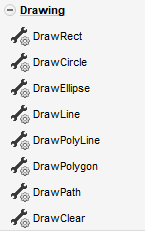
Please take a look at this sample app for plotting a mathematical function:
https://visualneo.com/tutorials/drawplot
Button source code:
DrawClear "Rectangle1"
DrawGrid
Loop 0 500 [x]
  StrReplace "[formula]" "x" "[x]" [formula2] ""
  Math "[formula2]" 1 [y]
  SetVar [y] 250-[y]
  DrawCircle "Rectangle1" "" [x] [y] 2 "" 0 "red"
EndLoop
DrawGrid subroutine source code:
Loop 0 50 [n]
  SetVar [x] [n]*10
  DrawLine "Rectangle1" "" [x] 0 [x] 250 "#aaaaaa" 1
EndLoop
Loop 0 25 [n]
  SetVar [y] [n]*10
  DrawLine "Rectangle1" "" 0 [y] 500 [y] "#aaaaaa" 1
EndLoop
Let me know what you think.
Regards.
Quote from Ronnie on July 8, 2019, 4:58 pm@luishp
i cannot get the Plot button to work even after entering “sin(x)*100+120” .
Anyway, this is a good feature, like a charting function. I can imagine myself doing a sine wave chart like biorhythm etc. Furthermore, with drawing tools, the lines are sharper when resized or page dynamically readjust due to responsive screen layouts. Great to know more features are coming...
i cannot get the Plot button to work even after entering “sin(x)*100+120” .
Anyway, this is a good feature, like a charting function. I can imagine myself doing a sine wave chart like biorhythm etc. Furthermore, with drawing tools, the lines are sharper when resized or page dynamically readjust due to responsive screen layouts. Great to know more features are coming...
Quote from luishp on July 8, 2019, 9:30 pm@ronnie that's quite strange, for me it works on any browser and with any function.
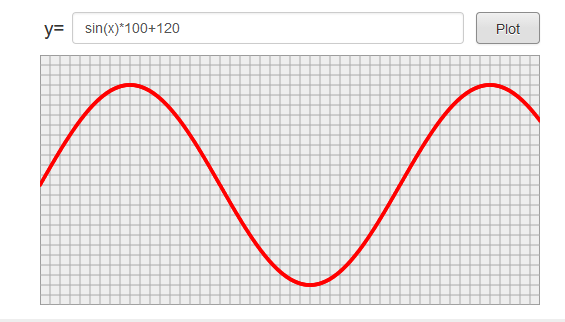
Attached is a screenshot.
I have added more drawing commands to add external files (jpg, png, svg) and text.
As all the commands are SVG based, the resulting drawing is a vector and can be easily resized without losing quality.
I'm right now working on making them interactive, so they can respond to events and change its properties on run time.
Regards.
@ronnie that's quite strange, for me it works on any browser and with any function.
Attached is a screenshot.
I have added more drawing commands to add external files (jpg, png, svg) and text.
As all the commands are SVG based, the resulting drawing is a vector and can be easily resized without losing quality.
I'm right now working on making them interactive, so they can respond to events and change its properties on run time.
Regards.
Quote from Ronnie on July 9, 2019, 6:21 amHi @luishp
Not sure why, but it works now. I could see the sine wave drawn from Mac's Safari and Windows (through VM).
Hmm... would be great to have "DrawText [Text] [angle] [Color]" function, so that we can put the text in any degree on the 'chart', like a biorhythm chart where the date text are displayed in counter-clockwise vertical position
Hi @luishp
Not sure why, but it works now. I could see the sine wave drawn from Mac's Safari and Windows (through VM).
Hmm... would be great to have "DrawText [Text] [angle] [Color]" function, so that we can put the text in any degree on the 'chart', like a biorhythm chart where the date text are displayed in counter-clockwise vertical position