
New major version progress

Quote from luishp on July 9, 2019, 7:15 amHi @ronnie, the DrawText command has been added already :)
More samples to come.
Best regards.
Hi @ronnie, the DrawText command has been added already :)
More samples to come.
Best regards.

Quote from Ronnie on July 10, 2019, 5:36 pm@luishp
Great. Now my Creative juice is flowing... imagine functions like
ColorFill [color/rgb]
imageFill
cloneImage
rotateImage . Better still, rotateContainer.. spin a wheel
ok... perhaps have better looking listbox to support alternate colours in rows, image, multiple text etc... or using containers in dynamic listbox... where each container can hv diff text, images, etc...
Great. Now my Creative juice is flowing... imagine functions like
ColorFill [color/rgb]
imageFill
cloneImage
rotateImage . Better still, rotateContainer.. spin a wheel
ok... perhaps have better looking listbox to support alternate colours in rows, image, multiple text etc... or using containers in dynamic listbox... where each container can hv diff text, images, etc...
Quote from luishp on July 10, 2019, 6:40 pm@ronnie, keep in mind this is a basic system to generate SVG graphics on the fly (vector graphics).
You would probably want to take a look at the included and much more advanced FabricJS plugin (Canvas based).
Regards.
@ronnie, keep in mind this is a basic system to generate SVG graphics on the fly (vector graphics).
You would probably want to take a look at the included and much more advanced FabricJS plugin (Canvas based).
Regards.
Quote from Ronnie on July 11, 2019, 1:31 am@luishp
Yes, you are right. Core functions of the development system would be key focus. Other features could be best supplemented by plugins for specific purpose. Else, the development tool could be over bloated with functions only few people use. That is why it is important to put self-bias and perspectives aside, and all of us to work as a global team to submit feedback to solidify the existing development tool and make it even better.
Yes, you are right. Core functions of the development system would be key focus. Other features could be best supplemented by plugins for specific purpose. Else, the development tool could be over bloated with functions only few people use. That is why it is important to put self-bias and perspectives aside, and all of us to work as a global team to submit feedback to solidify the existing development tool and make it even better.
Quote from luishp on July 18, 2019, 12:16 pmWe are progressing very quickly adding new functionalities.
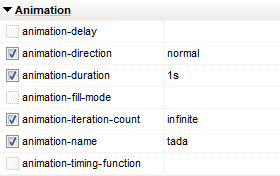
From now on there will be possible to add really complex animations without a single line of code.
In the following sample only the new Animation properties have been used:https://visualneo.com/tutorials/cssanimation
Note the text shadow under the DANGER!, it's a new property too :)
We are progressing very quickly adding new functionalities.
From now on there will be possible to add really complex animations without a single line of code.
In the following sample only the new Animation properties have been used:
https://visualneo.com/tutorials/cssanimation
Note the text shadow under the DANGER!, it's a new property too :)
Quote from luishp on July 18, 2019, 12:28 pmThis one is an experiment to test mouse tracking as [NAB.MouseY] and [NAB.MouseY] are two new predefined variables.
Just move the mouse over the page:
This one is an experiment to test mouse tracking as [NAB.MouseY] and [NAB.MouseY] are two new predefined variables.
Just move the mouse over the page:

Quote from rocote on July 20, 2019, 2:20 amHello, I'm new into the forum and impress by VisualNEO Web app and mobile. Thanks to the developper!
Maybe the question has been answered in the pass, but I will ask it even.
In VisualNEO Web there is an option to publish an app in .exe format for PC or windows users, but will there be an option to publish an app in .dmg (Mac) format later on in the future?
That would be awesome!
My second question is about the new video player that is coming in the next major update.
I saw there is an option to play the video twice the speed (faster), will you add the possibility or the option to play the video
slower or (twice slower). The reason I'm asking is that option would be nice because I need to build an app that teach musical instrument and speed is a nice option in the learning process.
Thanks!
Hello, I'm new into the forum and impress by VisualNEO Web app and mobile. Thanks to the developper!
Maybe the question has been answered in the pass, but I will ask it even.
In VisualNEO Web there is an option to publish an app in .exe format for PC or windows users, but will there be an option to publish an app in .dmg (Mac) format later on in the future?
That would be awesome!
My second question is about the new video player that is coming in the next major update.
I saw there is an option to play the video twice the speed (faster), will you add the possibility or the option to play the video
slower or (twice slower). The reason I'm asking is that option would be nice because I need to build an app that teach musical instrument and speed is a nice option in the learning process.
Thanks!
Quote from luishp on July 20, 2019, 6:30 amHi @rocote and welcome to the forum!
Unfortunately we don't see how to embed an HTML5 App into a .dmg executable but will do some research on it.
Next version VideoPlayer will be able to play the videos at any speed (slower or faster) if the Web Browser supports it (As far as I know only Internet Explorer fails)
Best regards.
Hi @rocote and welcome to the forum!
Unfortunately we don't see how to embed an HTML5 App into a .dmg executable but will do some research on it.
Next version VideoPlayer will be able to play the videos at any speed (slower or faster) if the Web Browser supports it (As far as I know only Internet Explorer fails)
Best regards.
Quote from Ronnie on July 20, 2019, 2:48 pm@luishp & All
I tried fluidapp - it's just like a 'browser wrapper' and it works just like any MacOS app. The menu options etc., are all pointing to fluidapp info etc. Not sure if registered users can change or configure the menu options. It's OK for personal use - not recommended for customer use. I've emailed to developer with few questions and waiting for reply.
@luishp & All
I tried fluidapp - it's just like a 'browser wrapper' and it works just like any MacOS app. The menu options etc., are all pointing to fluidapp info etc. Not sure if registered users can change or configure the menu options. It's OK for personal use - not recommended for customer use. I've emailed to developer with few questions and waiting for reply.
Quote from luishp on July 20, 2019, 4:30 pm@ronnie, @rocote, I have found this one too. It seems to me quite good as it works for Mac, Windows and Linux:
https://getwebcatalog.com/Let us know if you try it.
@ronnie, @rocote, I have found this one too. It seems to me quite good as it works for Mac, Windows and Linux:
https://getwebcatalog.com/
Let us know if you try it.
Quote from rocote on July 20, 2019, 6:53 pmThank you for your help!
My goal was to be able to make a MAC application with VisualNeo Web and a few people has suggest two applications to turn a web page to a MAC (.app) application.
Yes it is working. You can convert to a MAC application from a local web site or an internet web site.
Here is two examples from a MAC computer using Coherence or FLUID (suggested by luishp);
1 - if your web site is LOCAL, the URL will have this syntax; (These files has to be move to a MAC computer).
file:///Users/rocote/Desktop/Condition/index.html
Users/rocote/Desktop: is where is your files for your local web site. (You can publish it where ever you want)
Condition: is the folder where i publish my VisualNeo Web files.
2 - if your web site is publish on INTERNET, the URL will have this syntax;
https://www.google.com
Hope this will be usefull for anyone looking for this solution.
Take care everyone!
Thank you for your help!
My goal was to be able to make a MAC application with VisualNeo Web and a few people has suggest two applications to turn a web page to a MAC (.app) application.
Yes it is working. You can convert to a MAC application from a local web site or an internet web site.
Here is two examples from a MAC computer using Coherence or FLUID (suggested by luishp);
1 - if your web site is LOCAL, the URL will have this syntax; (These files has to be move to a MAC computer).
file:///Users/rocote/Desktop/Condition/index.html
Users/rocote/Desktop: is where is your files for your local web site. (You can publish it where ever you want)
Condition: is the folder where i publish my VisualNeo Web files.
2 - if your web site is publish on INTERNET, the URL will have this syntax;
Hope this will be usefull for anyone looking for this solution.
Take care everyone!
Quote from Ronnie on July 21, 2019, 2:46 amHi @luishp @rocote, and all
These are what they'd called as "site-specific browser" app - check this out - https://en.wikipedia.org/wiki/Site-specific_browser
There are some for MacOs, and some are for Android APK as well...
WebCatalog - it's just like a 'product catalog' screen allowing you to click on each button to access pre-defined accessible URL. You can ADD your HTML5-generated page as an 'installed app.' There are menu options showing their info.. not us, similar to the fluid. I believe they're using similar backend component tools as there is one option - SERVICES - that shows activity tracking etc. I'm suspicious of that... or not comfortable..
Nothing is compiled or embedded.. it still link/access to your web page.. so if you update your web page, a refresh will show the updated pages. that, in theory, is good. But.. if you ask me to suggest Fluidapp or Webcatalog... just forget about it...
These are what they'd called as "site-specific browser" app - check this out - https://en.wikipedia.org/wiki/Site-specific_browser
There are some for MacOs, and some are for Android APK as well...
WebCatalog - it's just like a 'product catalog' screen allowing you to click on each button to access pre-defined accessible URL. You can ADD your HTML5-generated page as an 'installed app.' There are menu options showing their info.. not us, similar to the fluid. I believe they're using similar backend component tools as there is one option - SERVICES - that shows activity tracking etc. I'm suspicious of that... or not comfortable..
Nothing is compiled or embedded.. it still link/access to your web page.. so if you update your web page, a refresh will show the updated pages. that, in theory, is good. But.. if you ask me to suggest Fluidapp or Webcatalog... just forget about it...
Quote from Ronnie on July 21, 2019, 3:25 amOne more thing...
If you are a teacher/educator and wanting to use your WebApp to teach others, and do not want them to see the URL link, then both Fluidapp and WebCatalog would be a good one to 'hide' the browser stuff. After all, while there might be other permanent menu options that you 'DON'T NEED', you're still in control of your lessons... so it's still has a purpose...
Considering both Fluidapp (FA) and WebCatalog (WC) , I'd go for the latter because:
- While FA is cleaner and cheaper, i noticed if you use Date entry... there is no popup calendar widget, like running your app from VisualNeo Web... this means you have to manually edit/enter the day, month, year to make changes. WC uses Safari's calendar widget... so you have the pop-up...
- Who you install your Webapp with WC, a separate external app is created too. This means you can launch the app individually without going through WebCatalog main catalog screen.
- If you have to choose between Fluidapp and WebCatalog, go for WebCatalog because:
- it has fewer 'unnecessary' menu options
- it has themes (dark mode, etc) that can enhance your app. It's just like a 'compiled' app.
- the sidebar option is interesting. If you've develop a series of Webapps and need to use them in your trainings, the sidebar options allow you to click to launch your app within the 'application window'.
- while its double the price ($5 for FA and abt $10 for WC), the price difference is negligible, due to better satisfaction level. I might consider WC due to the extra features and comfort level as there are still some potentials in using them for simple usage.
- If you have a tight budget, then the FREE version will do as there is no popup 'unregistered' nagging message, etc.
Give it a try... as we all have our own preferences and needs, who knows these tools might suit your needs. Make sure you test your web app properly and ensure all features and functions are working. I tested WC and noticed some text info was not displayed, although FA displayed them correctly... so just use the FREE versions for now...
One more thing...
If you are a teacher/educator and wanting to use your WebApp to teach others, and do not want them to see the URL link, then both Fluidapp and WebCatalog would be a good one to 'hide' the browser stuff. After all, while there might be other permanent menu options that you 'DON'T NEED', you're still in control of your lessons... so it's still has a purpose...
Considering both Fluidapp (FA) and WebCatalog (WC) , I'd go for the latter because:
- While FA is cleaner and cheaper, i noticed if you use Date entry... there is no popup calendar widget, like running your app from VisualNeo Web... this means you have to manually edit/enter the day, month, year to make changes. WC uses Safari's calendar widget... so you have the pop-up...
- Who you install your Webapp with WC, a separate external app is created too. This means you can launch the app individually without going through WebCatalog main catalog screen.
- If you have to choose between Fluidapp and WebCatalog, go for WebCatalog because:
- it has fewer 'unnecessary' menu options
- it has themes (dark mode, etc) that can enhance your app. It's just like a 'compiled' app.
- the sidebar option is interesting. If you've develop a series of Webapps and need to use them in your trainings, the sidebar options allow you to click to launch your app within the 'application window'.
- while its double the price ($5 for FA and abt $10 for WC), the price difference is negligible, due to better satisfaction level. I might consider WC due to the extra features and comfort level as there are still some potentials in using them for simple usage.
- If you have a tight budget, then the FREE version will do as there is no popup 'unregistered' nagging message, etc.
Give it a try... as we all have our own preferences and needs, who knows these tools might suit your needs. Make sure you test your web app properly and ensure all features and functions are working. I tested WC and noticed some text info was not displayed, although FA displayed them correctly... so just use the FREE versions for now...
Quote from luishp on July 21, 2019, 6:47 am@rocote, @ronnie, after doing some research, I think the best soution is using Electron (Not sure but I thing Web Catalog is internally using it). It produces Windows, Mac and Linux executables by using Chromium Embedded CEF. It also includes NodeJS. Although the executables will be quite big, it is possible to access Desktop specific functionalities like file management through the also included Electron API.
It seems to me quite more complex than Fluid or Catalog but it's probably the solution for creating and distributing real Desktop applications from VisualNEO Web.
In fact it's probably possible to create a plugin to access Electron API from VisualNEO Web so we can add similar commands to those found in VisualNEO Win. Anyway I need to do more research as I don't understand yet the process to create the final executable.
If anyone have the time to test it, please add a new thread in the forum so we can talk about it, as it seems to me quite interesting regarding future VisualNEO Web development.
Thank you!
@rocote, @ronnie, after doing some research, I think the best soution is using Electron (Not sure but I thing Web Catalog is internally using it). It produces Windows, Mac and Linux executables by using Chromium Embedded CEF. It also includes NodeJS. Although the executables will be quite big, it is possible to access Desktop specific functionalities like file management through the also included Electron API.
It seems to me quite more complex than Fluid or Catalog but it's probably the solution for creating and distributing real Desktop applications from VisualNEO Web.
In fact it's probably possible to create a plugin to access Electron API from VisualNEO Web so we can add similar commands to those found in VisualNEO Win. Anyway I need to do more research as I don't understand yet the process to create the final executable.
If anyone have the time to test it, please add a new thread in the forum so we can talk about it, as it seems to me quite interesting regarding future VisualNEO Web development.
Thank you!
Quote from luishp on July 22, 2019, 12:23 pmI have just updated the online help to reflect the new functionalities that will be found in next version:
There are many changes, but most of them are in these command sections:
Drawing
Multimedia
Objects
Events
Files
I have just updated the online help to reflect the new functionalities that will be found in next version:
There are many changes, but most of them are in these command sections:
Drawing
Multimedia
Objects
Events
Files
Quote from rocote on July 22, 2019, 8:04 pmI don't know if you are alone to do all this, but this is very well done. You should be proud of this software creation.
All I can say is thank you and keep on going!
I don't know if you are alone to do all this, but this is very well done. You should be proud of this software creation.
All I can say is thank you and keep on going!
Quote from luishp on July 22, 2019, 8:12 pmThanks @rocote!
I'm on the shoulders of giants.This is a new animation sample made with the new version:
http://visualneo.com/tutorials/starwarsDone with only six lines of code :)
Thanks @rocote!
I'm on the shoulders of giants.
This is a new animation sample made with the new version:
http://visualneo.com/tutorials/starwars
Done with only six lines of code :)
Quote from rocote on July 22, 2019, 8:25 pmSuper nice animation! You are the giant, I know.
It is good to have people like you on earth to share their knowledge.
By the way, it has been about 20 years I didn't program something. I was using Turbo Basic from Borland.
I think now it is called Power Basic.
Anyway, since I'm also a music composer (I know it is not the place to share it) and if you feel to listen different kind of music to inspired you, here is some link on my facebook page. My first language is French. Sorry for the French listing, but google is a good translator.
I enjoy doing music in my retired time.
Here is a composition called "C'est la vie" on classical guitar. The last one I've done.
Note: If you don't here any sound, the speaker on the video must be closed. Click on it to activate the sound.
https://www.facebook.com/roger.cote.9279/videos/113113933294945/
Here is an arrangement I've done:
https://www.facebook.com/roger.cote.9279/videos/112629933343345/
Thanks again!
Super nice animation! You are the giant, I know.
It is good to have people like you on earth to share their knowledge.
By the way, it has been about 20 years I didn't program something. I was using Turbo Basic from Borland.
I think now it is called Power Basic.
Anyway, since I'm also a music composer (I know it is not the place to share it) and if you feel to listen different kind of music to inspired you, here is some link on my facebook page. My first language is French. Sorry for the French listing, but google is a good translator.
I enjoy doing music in my retired time.
Here is a composition called "C'est la vie" on classical guitar. The last one I've done.
Note: If you don't here any sound, the speaker on the video must be closed. Click on it to activate the sound.
https://www.facebook.com/roger.cote.9279/videos/113113933294945/
Here is an arrangement I've done:
https://www.facebook.com/roger.cote.9279/videos/112629933343345/
Thanks again!