
NEW! NeoVideoEditor V1.3 plugin - MONSTER PLUGIN!! +148 Actions - 🚀 - for VisualNeoWin - Forum
NEW! NeoVideoEditor V1.3 plugin - MONSTER PLUGIN!! +148 Actions - 🚀 - for VisualNeoWin

Quote from Kriscall on February 22, 2026, 9:40 am🎬 NeoVideoEditor V1.3 — A MONSTER Video Editing Plugin for VisualNeo Win
Hey! guys it's me again with a MONSTER of a plugin if you want to take full control of video inside VisualNeo Win, this is absolutely the plugin for you! I originally built this because I wanted to scrub through video quickly and get AI to analyse sections of footage straight from my robot's eye camera but it turned into a full-blown professional video editor along the way, so enjoy that too!
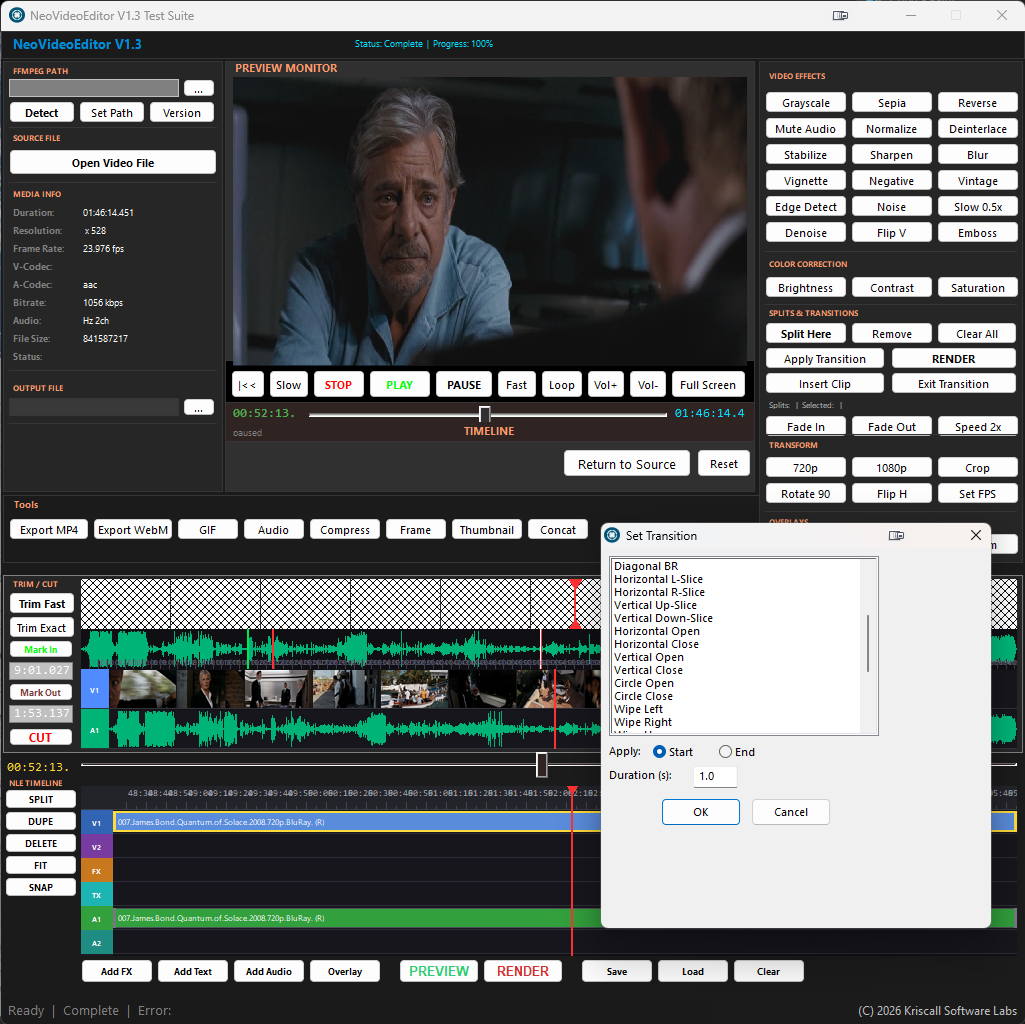
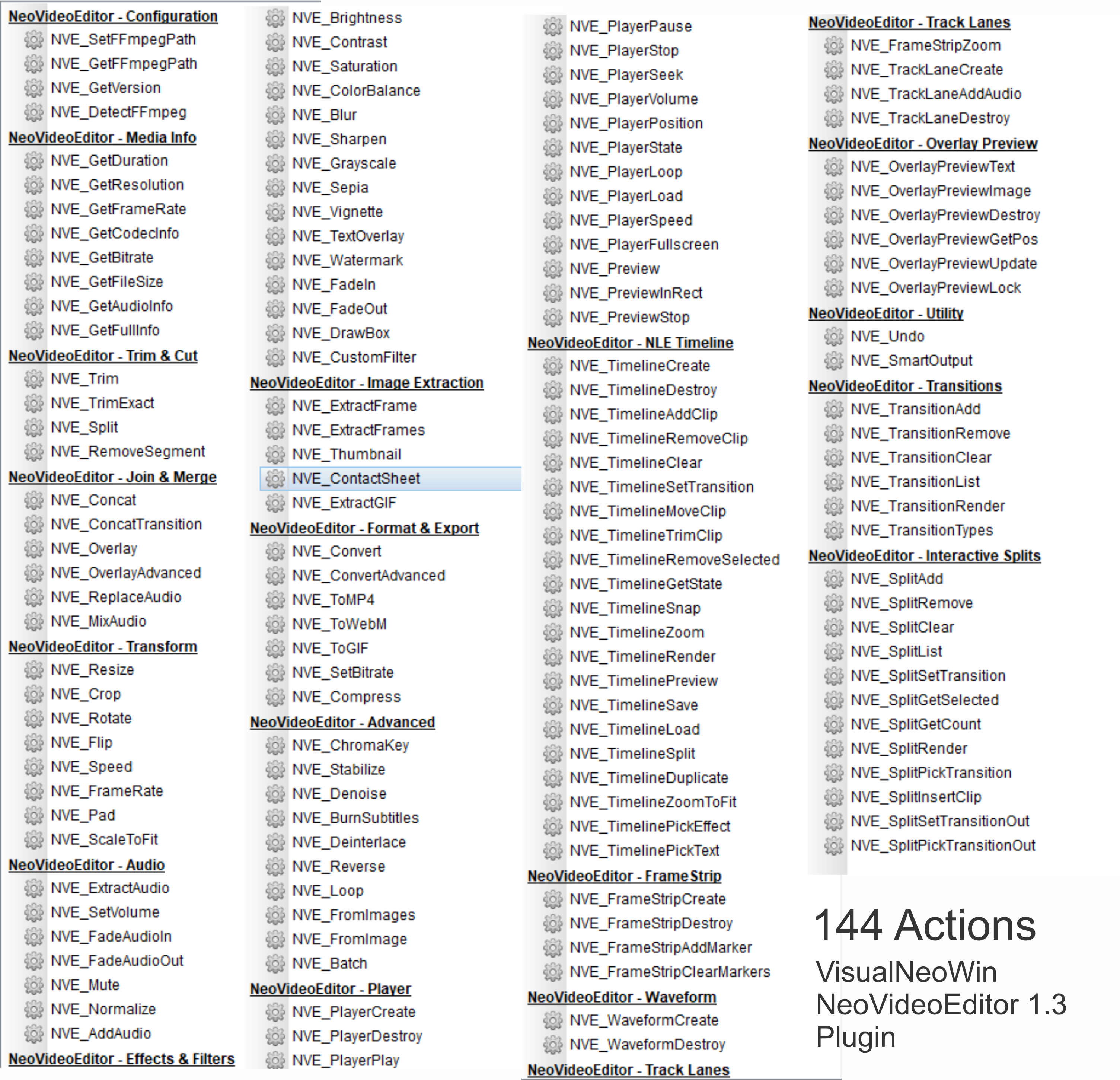
So what can it actually do? Where do I start, 148 actions across 19 categories. On the editing side you get fast stream-copy trimming for when speed matters, or frame-accurate re-encoding when precision matters. You can split, cut out middle segments, concatenate multiple clips, and even reverse video playback. Need to join two clips with a cinematic transition? There are 35 transition types including fades, dissolves, wipes, slides, zooms, radial sweeps, diagonal wipes and more. On the transform side you can resize, crop, rotate, flip, change speed from slow-motion right up to 4x fast forward, adjust frame rates, pad to letterbox, and scale to fit all non-destructively with smart auto-named output files so you never overwrite your originals.
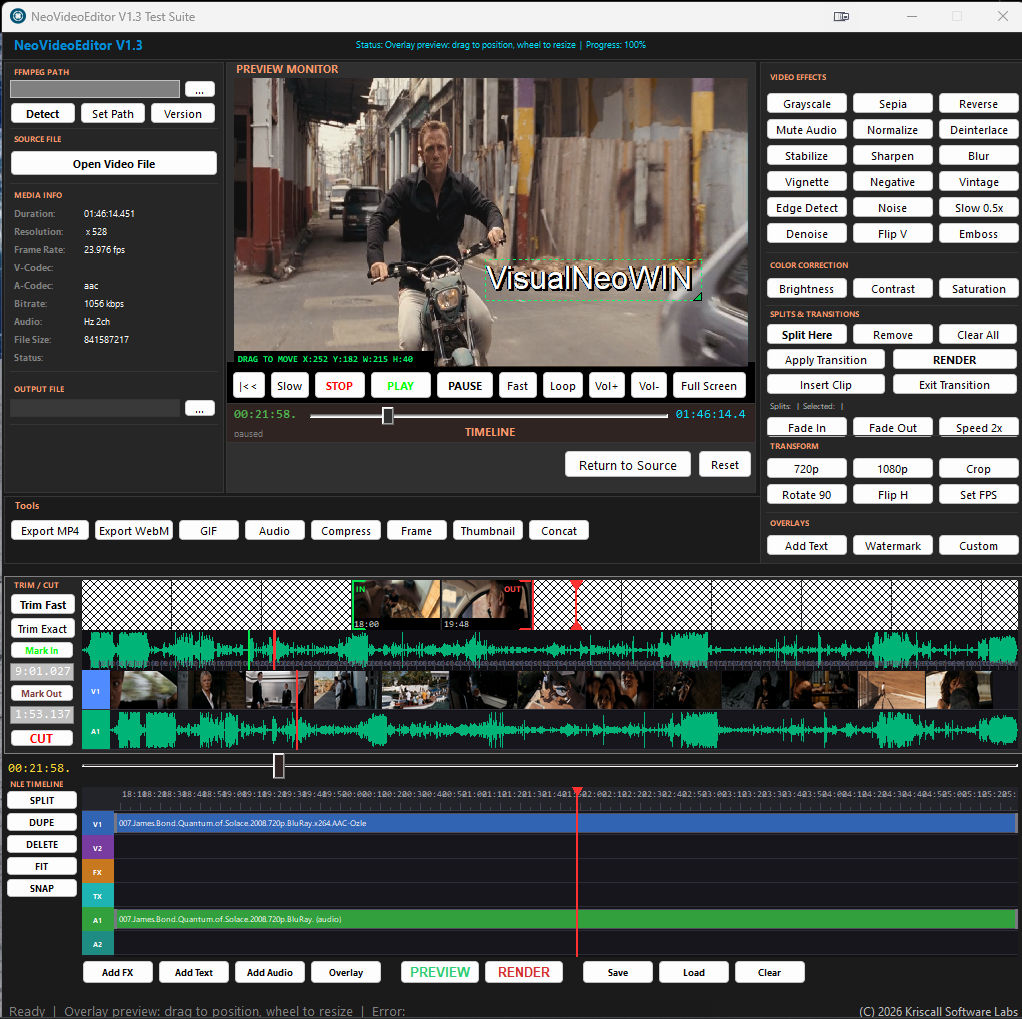
The effects and filters are where it gets really fun, 15 real-time effects including grayscale, sepia, blur, sharpen, vignette, vintage, edge detect, denoise, brightness, contrast and saturation controls, plus the ability to fire any raw FFmpeg filter string directly if you know what you're doing. You can burn text overlays, add watermarks with drag-and-drop positioning, draw boxes, fade in and out, and even do chroma key green/blue screen removal with a background replacement. Need professional audio work? Extract audio tracks, normalise levels, mix background music at custom volumes, fade audio in and out, replace entire soundtracks, or mute completely. Export to 13 formats including MP4, WebM, AVI, MKV, MOV, FLV, WMV, GIF, MP3, WAV, FLAC, OGG and more with full codec and quality control.
The crown jewel though is the full NLE Non-Linear Editor Timeline, a proper 6-track timeline (V1, V2, FX, TX, A1, A2) right inside your VisualNeo publication with drag-and-drop clip arrangement, an interactive filmstrip with real frame thumbnails you can click to seek, a synced audio waveform display, split points, clip duplication, snap-to-grid, zoom controls, project save and load, and a full live preview. There's also a batch processing system so you can apply any filter or effect to an entire folder of videos in one shot, incredibly useful if you're processing camera footage from a robot or any automated capture pipeline.
Yes, it's FREE I believe in building a community, not a paywall. I run on a Value-for-Value (V4V) model: I put in the work, you receive the value, and in return I just ask that you pass it forward, say thanks, help others who ask questions, and keep this community strong. It's built on trust, reciprocal support, and the idea that we're all better when we lift each other up. To get started you'll need the FFmpeg full build, make sure you grab the full build not the essentials as it contains all three required files (ffmpeg.exe, ffprobe.exe and ffplay.exe). Grab it from one of these official sources:
🔗 https://www.gyan.dev/ffmpeg/builds/ download ffmpeg-release-full.7z 🔗 https://github.com/BtbN/FFmpeg-Builds/releases download ffmpeg-master-latest-win64-gpl.zip
Just drop those three .exe files in the same folder as your .pub file and you're good to go. Full instructions are in the manual. Now go build something great! 🚀
Few bugs will iron out in next build but for the most of it 90% working.. A quick Sample included I put together.
🎬 NeoVideoEditor V1.3 — A MONSTER Video Editing Plugin for VisualNeo Win
Hey! guys it's me again with a MONSTER of a plugin if you want to take full control of video inside VisualNeo Win, this is absolutely the plugin for you! I originally built this because I wanted to scrub through video quickly and get AI to analyse sections of footage straight from my robot's eye camera but it turned into a full-blown professional video editor along the way, so enjoy that too!
So what can it actually do? Where do I start, 148 actions across 19 categories. On the editing side you get fast stream-copy trimming for when speed matters, or frame-accurate re-encoding when precision matters. You can split, cut out middle segments, concatenate multiple clips, and even reverse video playback. Need to join two clips with a cinematic transition? There are 35 transition types including fades, dissolves, wipes, slides, zooms, radial sweeps, diagonal wipes and more. On the transform side you can resize, crop, rotate, flip, change speed from slow-motion right up to 4x fast forward, adjust frame rates, pad to letterbox, and scale to fit all non-destructively with smart auto-named output files so you never overwrite your originals.
The effects and filters are where it gets really fun, 15 real-time effects including grayscale, sepia, blur, sharpen, vignette, vintage, edge detect, denoise, brightness, contrast and saturation controls, plus the ability to fire any raw FFmpeg filter string directly if you know what you're doing. You can burn text overlays, add watermarks with drag-and-drop positioning, draw boxes, fade in and out, and even do chroma key green/blue screen removal with a background replacement. Need professional audio work? Extract audio tracks, normalise levels, mix background music at custom volumes, fade audio in and out, replace entire soundtracks, or mute completely. Export to 13 formats including MP4, WebM, AVI, MKV, MOV, FLV, WMV, GIF, MP3, WAV, FLAC, OGG and more with full codec and quality control.
The crown jewel though is the full NLE Non-Linear Editor Timeline, a proper 6-track timeline (V1, V2, FX, TX, A1, A2) right inside your VisualNeo publication with drag-and-drop clip arrangement, an interactive filmstrip with real frame thumbnails you can click to seek, a synced audio waveform display, split points, clip duplication, snap-to-grid, zoom controls, project save and load, and a full live preview. There's also a batch processing system so you can apply any filter or effect to an entire folder of videos in one shot, incredibly useful if you're processing camera footage from a robot or any automated capture pipeline.
Yes, it's FREE I believe in building a community, not a paywall. I run on a Value-for-Value (V4V) model: I put in the work, you receive the value, and in return I just ask that you pass it forward, say thanks, help others who ask questions, and keep this community strong. It's built on trust, reciprocal support, and the idea that we're all better when we lift each other up. To get started you'll need the FFmpeg full build, make sure you grab the full build not the essentials as it contains all three required files (ffmpeg.exe, ffprobe.exe and ffplay.exe). Grab it from one of these official sources:
🔗 https://www.gyan.dev/ffmpeg/builds/ download ffmpeg-release-full.7z 🔗 https://github.com/BtbN/FFmpeg-Builds/releases download ffmpeg-master-latest-win64-gpl.zip
Just drop those three .exe files in the same folder as your .pub file and you're good to go. Full instructions are in the manual. Now go build something great! 🚀
Few bugs will iron out in next build but for the most of it 90% working.. A quick Sample included I put together.
Uploaded files: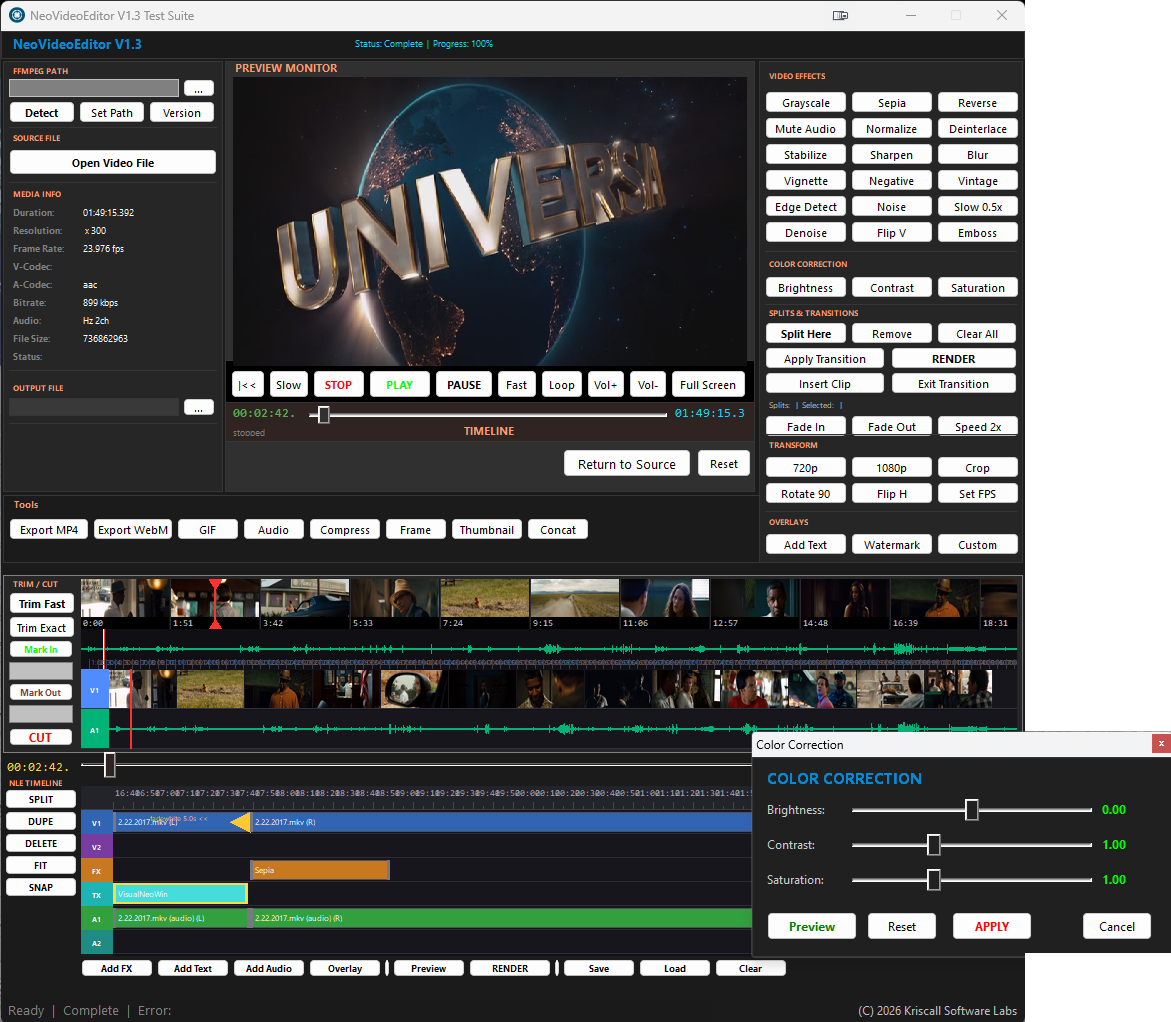

Quote from Kriscall on February 22, 2026, 1:08 pmThank you, @luishp! It’s a huge plugin with a few minor bugs (will update in time), but nothing too noticeable it's ready for release those will be ironed out in the next version. For the most part, everything is working really well, and the demo covers a lot of actions.
The rest is up to everyone who uses it. I don’t personally use it for that specific purpose; the demo was mainly created to show how some of the actions can work together. From here, it’s all about your imagination build whatever you like or just use the parts you need.
It’s definitely a powerful video plugin, built with the latest technologies and codecs. Any codecs already installed on your system can be used as well.
Enjoy! Upload your creations
Thank you, @luishp! It’s a huge plugin with a few minor bugs (will update in time), but nothing too noticeable it's ready for release those will be ironed out in the next version. For the most part, everything is working really well, and the demo covers a lot of actions.
The rest is up to everyone who uses it. I don’t personally use it for that specific purpose; the demo was mainly created to show how some of the actions can work together. From here, it’s all about your imagination build whatever you like or just use the parts you need.
It’s definitely a powerful video plugin, built with the latest technologies and codecs. Any codecs already installed on your system can be used as well.
Enjoy! Upload your creations

Quote from Sinesi Giuseppe on February 22, 2026, 5:49 pmI must say that with the latest plugins from everyone, our visualneo has become the best software of its kind again. Thanks
I must say that with the latest plugins from everyone, our visualneo has become the best software of its kind again. Thanks


Quote from Anthony LaTorre on February 24, 2026, 1:52 amThanks so much Christopher, this plug looks awesome.
Thanks so much Christopher, this plug looks awesome.

Quote from naglieri on February 24, 2026, 9:01 amI still need to recover, VisualNeoWin is more alive than ever.
Oh well, I'm canceling my Premiere subscription :-)
It's something incredible.
I still need to recover, VisualNeoWin is more alive than ever.
Oh well, I'm canceling my Premiere subscription :-)
It's something incredible.

Quote from dglojnar on February 24, 2026, 3:19 pmWonderful,wonderful job :-)
Just one thing - sorry...
I often recieve error message "Error starting MCI" , computer is good - i7,12th GEN, 32MB RAM, integrated graphic card (INTEL), full HD resolution
Am I doing something wrong ?
Sorry once again...
Wonderful,wonderful job :-)
Just one thing - sorry...
I often recieve error message "Error starting MCI" , computer is good - i7,12th GEN, 32MB RAM, integrated graphic card (INTEL), full HD resolution
Am I doing something wrong ?
Sorry once again...

Quote from Matilde on February 24, 2026, 3:59 pmI'm still in awe.
You're truly making history, my friend. If there were an Oscar for film development, you'd undoubtedly win it unanimously.
It's incredible how you're slowly reviving and updating NeoVisualWin, marking a turning point for this excellent program. I understand it's no longer profitable because there's no longer the motivation to maintain or update it... However, people like you ensure that those of us who use this fantastic tool have more and more possibilities every day. The most remarkable thing about your work is the passion you put into it, and your plugins far surpass those of many—and I call them amateurs—who aren't even the ones who actually program them. They have a third party who takes credit for them, sell them in a store, and charge exorbitant prices for plugins that have mostly been surpassed by developers like you, and for free!You don't announce anything you're going to develop, or you showcase something you're developing and announce it with great fanfare, and then... the storm passes, the sun comes out, and months and months of waiting follow, only for it to be, more than anything, an unfinished project...
For all of this, you have my utmost admiration, and I am infinitely grateful for each of the wonderful things you contribute, which I can use so easily.
Best regards from Argentina
I'm still in awe.
You're truly making history, my friend. If there were an Oscar for film development, you'd undoubtedly win it unanimously.
It's incredible how you're slowly reviving and updating NeoVisualWin, marking a turning point for this excellent program. I understand it's no longer profitable because there's no longer the motivation to maintain or update it... However, people like you ensure that those of us who use this fantastic tool have more and more possibilities every day. The most remarkable thing about your work is the passion you put into it, and your plugins far surpass those of many—and I call them amateurs—who aren't even the ones who actually program them. They have a third party who takes credit for them, sell them in a store, and charge exorbitant prices for plugins that have mostly been surpassed by developers like you, and for free!
You don't announce anything you're going to develop, or you showcase something you're developing and announce it with great fanfare, and then... the storm passes, the sun comes out, and months and months of waiting follow, only for it to be, more than anything, an unfinished project...
For all of this, you have my utmost admiration, and I am infinitely grateful for each of the wonderful things you contribute, which I can use so easily.
Best regards from Argentina
Quote from luiz on February 24, 2026, 4:06 pmQuote from dglojnar on February 24, 2026, 3:19 pmWonderful,wonderful job :-)
Just one thing - sorry...
I often recieve error message "Error starting MCI" , computer is good - i7,12th GEN, 32MB RAM, integrated graphic card (INTEL), full HD resolution
Am I doing something wrong ?
Sorry once again...Same with me here: "Error starting MCI".
And on Load button (nleLoad > Left Click):
This action requires 5 parameter(s).
Action:
FileOpenBox "Open Project" "NVE Project|*.nvep|All|*.*" "" "[NLE_ProjectFile]"
If "[NLE_ProjectFile]" "<>" ""
NVE_TimelineLoad "NLERect" "[NLE_ProjectFile]"
EndIf
Quote from dglojnar on February 24, 2026, 3:19 pmWonderful,wonderful job :-)
Just one thing - sorry...
I often recieve error message "Error starting MCI" , computer is good - i7,12th GEN, 32MB RAM, integrated graphic card (INTEL), full HD resolution
Am I doing something wrong ?
Sorry once again...
Same with me here: "Error starting MCI".
And on Load button (nleLoad > Left Click):
This action requires 5 parameter(s).
Action:
FileOpenBox "Open Project" "NVE Project|*.nvep|All|*.*" "" "[NLE_ProjectFile]"
If "[NLE_ProjectFile]" "<>" ""
NVE_TimelineLoad "NLERect" "[NLE_ProjectFile]"
EndIf

Quote from joferar333 on February 24, 2026, 4:08 pm
Super Coll!!!!
Thanks
Best Regards
Super Coll!!!!
Thanks
Best Regards
Quote from Kriscall on February 25, 2026, 3:40 amThanks all will keep pumping out some more plugins for you all! :) I will look into the bug I'm aware of a few will release an update.
Thanks all will keep pumping out some more plugins for you all! :) I will look into the bug I'm aware of a few will release an update.

Quote from fkapnist on March 5, 2026, 11:13 pmI have been tinkering with ffmpeg and VisualNEOWin for some years now and I must say you did a great job! I also discovered some ffmpeg filter combinations (remove fisheye, denoise, optical flow smoothing.. etc.) that you may want to include in your next version. You're giving it to us for free but I think you really deserve some decent donations. Bravo!
.
I have been tinkering with ffmpeg and VisualNEOWin for some years now and I must say you did a great job! I also discovered some ffmpeg filter combinations (remove fisheye, denoise, optical flow smoothing.. etc.) that you may want to include in your next version. You're giving it to us for free but I think you really deserve some decent donations. Bravo!
.
Quote from fkapnist on March 7, 2026, 10:18 pm@kriscall
What is the difference between FrameStrip and Timeline?
Thanks
.
ffplay in rectangle sometimes hangs. I use mpv in the preview rectangle
.
The PREVIEW MONITOR displays video in test m0de - Run (from start). But it is black in the compiled exe.
.
What is the difference between FrameStrip and Timeline?
Thanks
.
ffplay in rectangle sometimes hangs. I use mpv in the preview rectangle
.
The PREVIEW MONITOR displays video in test m0de - Run (from start). But it is black in the compiled exe.
.


Quote from fkapnist on March 12, 2026, 3:08 pmQuote from Kriscall on February 22, 2026, 1:08 pmThank you, @luishp! It’s a huge plugin with a few minor bugs (will update in time), but nothing too noticeable it's ready for release those will be ironed out in the next version. For the most part, everything is working really well, and the demo covers a lot of actions.
The rest is up to everyone who uses it. I don’t personally use it for that specific purpose; the demo was mainly created to show how some of the actions can work together. From here, it’s all about your imagination build whatever you like or just use the parts you need.
It’s definitely a powerful video plugin, built with the latest technologies and codecs. Any codecs already installed on your system can be used as well.
Enjoy! Upload your creations
@kriscall This is such a great plugin. The V1 track lets you keep adding scene clips in blocks that can be re-positioned and rendered as a complete video. Some clips may contain sound, others not, so the rendered output is mute. I can pre-extract the audio of each block and paste it back into the final output. But I'm sure a future plugin update will produce an even better sound mix.
Thanks!
.
Quote from Kriscall on February 22, 2026, 1:08 pmThank you, @luishp! It’s a huge plugin with a few minor bugs (will update in time), but nothing too noticeable it's ready for release those will be ironed out in the next version. For the most part, everything is working really well, and the demo covers a lot of actions.
The rest is up to everyone who uses it. I don’t personally use it for that specific purpose; the demo was mainly created to show how some of the actions can work together. From here, it’s all about your imagination build whatever you like or just use the parts you need.
It’s definitely a powerful video plugin, built with the latest technologies and codecs. Any codecs already installed on your system can be used as well.
Enjoy! Upload your creations
@kriscall This is such a great plugin. The V1 track lets you keep adding scene clips in blocks that can be re-positioned and rendered as a complete video. Some clips may contain sound, others not, so the rendered output is mute. I can pre-extract the audio of each block and paste it back into the final output. But I'm sure a future plugin update will produce an even better sound mix.
Thanks!
.
Quote from fkapnist on March 18, 2026, 9:43 pmQuote from luiz on February 24, 2026, 4:06 pmQuote from dglojnar on February 24, 2026, 3:19 pmWonderful,wonderful job :-)
Just one thing - sorry...
I often recieve error message "Error starting MCI" , computer is good - i7,12th GEN, 32MB RAM, integrated graphic card (INTEL), full HD resolution
Am I doing something wrong ?
Sorry once again...Same with me here: "Error starting MCI".
And on Load button (nleLoad > Left Click):
This action requires 5 parameter(s).
Action:
FileOpenBox "Open Project" "NVE Project|*.nvep|All|*.*" "" "[NLE_ProjectFile]"
If "[NLE_ProjectFile]" "<>" ""
NVE_TimelineLoad "NLERect" "[NLE_ProjectFile]"
EndIf@Kriscall
On my desktop with an old Nvidia graphics card, the Play button shows a blank screen with sound. The Preview button on the timeline shows video without sound.
On my laptop with a new Intel graphics card, the Play button shows video and plays sound. The Preview button on the timeline shows video without sound.
.
Quote from luiz on February 24, 2026, 4:06 pmQuote from dglojnar on February 24, 2026, 3:19 pmWonderful,wonderful job :-)
Just one thing - sorry...
I often recieve error message "Error starting MCI" , computer is good - i7,12th GEN, 32MB RAM, integrated graphic card (INTEL), full HD resolution
Am I doing something wrong ?
Sorry once again...Same with me here: "Error starting MCI".
And on Load button (nleLoad > Left Click):
This action requires 5 parameter(s).
Action:
FileOpenBox "Open Project" "NVE Project|*.nvep|All|*.*" "" "[NLE_ProjectFile]"
If "[NLE_ProjectFile]" "<>" ""
NVE_TimelineLoad "NLERect" "[NLE_ProjectFile]"
EndIf
On my desktop with an old Nvidia graphics card, the Play button shows a blank screen with sound. The Preview button on the timeline shows video without sound.
On my laptop with a new Intel graphics card, the Play button shows video and plays sound. The Preview button on the timeline shows video without sound.
.
Quote from fkapnist on March 22, 2026, 4:27 pmQuote from Kriscall on February 25, 2026, 3:40 amThanks all will keep pumping out some more plugins for you all! :) I will look into the bug I'm aware of a few will release an update.
@Kriscall
I found four bugs that you may want to look into for your next plugin update.
- Main PREVIEW MONITOR does not display video (but plays sound) with some old graphics cards.
- In the Timeline panel the Overlay action does not respond.
- In the Timeline panel the Add Text action does not respond.
- In the Timeline panel the Add Audio action does not respond.
Everything else works great...
.
Quote from Kriscall on February 25, 2026, 3:40 amThanks all will keep pumping out some more plugins for you all! :) I will look into the bug I'm aware of a few will release an update.
I found four bugs that you may want to look into for your next plugin update.
- Main PREVIEW MONITOR does not display video (but plays sound) with some old graphics cards.
- In the Timeline panel the Overlay action does not respond.
- In the Timeline panel the Add Text action does not respond.
- In the Timeline panel the Add Audio action does not respond.
Everything else works great...
.
Quote from fkapnist on March 24, 2026, 2:27 pmQuote from luiz on February 24, 2026, 4:06 pmQuote from dglojnar on February 24, 2026, 3:19 pmWonderful,wonderful job :-)
Just one thing - sorry...
I often recieve error message "Error starting MCI" , computer is good - i7,12th GEN, 32MB RAM, integrated graphic card (INTEL), full HD resolution
Am I doing something wrong ?
Sorry once again...Same with me here: "Error starting MCI".
And on Load button (nleLoad > Left Click):
This action requires 5 parameter(s).
Action:
FileOpenBox "Open Project" "NVE Project|*.nvep|All|*.*" "" "[NLE_ProjectFile]"
If "[NLE_ProjectFile]" "<>" ""
NVE_TimelineLoad "NLERect" "[NLE_ProjectFile]"
EndIf
I also had a MCI issue with an old graphics card. Blank screen with audio. I installed the NeoDX plugin and it solved the error. Apparently the NeoVideoEditor uses MCI for the main preview monitor and ffplay for the filter effects. The NeoDX plugin sorts things out and allows users to select external monitors, etc.
I can't wait for the next update!
.
Quote from luiz on February 24, 2026, 4:06 pmQuote from dglojnar on February 24, 2026, 3:19 pmWonderful,wonderful job :-)
Just one thing - sorry...
I often recieve error message "Error starting MCI" , computer is good - i7,12th GEN, 32MB RAM, integrated graphic card (INTEL), full HD resolution
Am I doing something wrong ?
Sorry once again...Same with me here: "Error starting MCI".
And on Load button (nleLoad > Left Click):
This action requires 5 parameter(s).
Action:
FileOpenBox "Open Project" "NVE Project|*.nvep|All|*.*" "" "[NLE_ProjectFile]"
If "[NLE_ProjectFile]" "<>" ""
NVE_TimelineLoad "NLERect" "[NLE_ProjectFile]"
EndIf
I also had a MCI issue with an old graphics card. Blank screen with audio. I installed the NeoDX plugin and it solved the error. Apparently the NeoVideoEditor uses MCI for the main preview monitor and ffplay for the filter effects. The NeoDX plugin sorts things out and allows users to select external monitors, etc.
I can't wait for the next update!
.