
NEW! PiperTTS V2.1 plugin - Neural Voice Engine +150 real natural voices +30 Languages - 🚀 - for VisualNeoWin! - Forum
NEW! PiperTTS V2.1 plugin - Neural Voice Engine +150 real natural voices +30 Languages - 🚀 - for VisualNeoWin!

Quote from Kriscall on February 9, 2026, 6:57 amPiperTTS V2.0 / 2.1 — Now Available! Offline Neural Text-to-Speech Plugin for VisualNEO Win
Hey! All me again you guys sick of me yet LOL!! anyway I'm proud to present PiperTTS V2.0 for VisualNEO Win. Forget the robotic, monotone voices you're used to from Windows SAPI PiperTTS uses neural AI-trained voice models that sound genuinely natural, with proper intonation, rhythm, and flow. Everything runs locally powered by the open-source Piper TTS engine no internet (just once to download the voice to your PC), no subscriptions, no API fees. Just install, pick a voice, and your app starts talking like a real human.
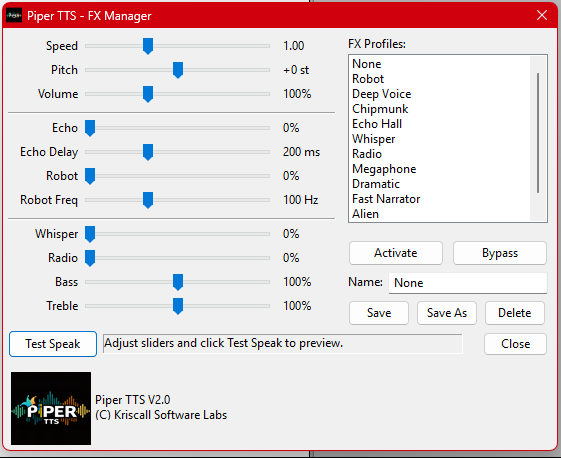
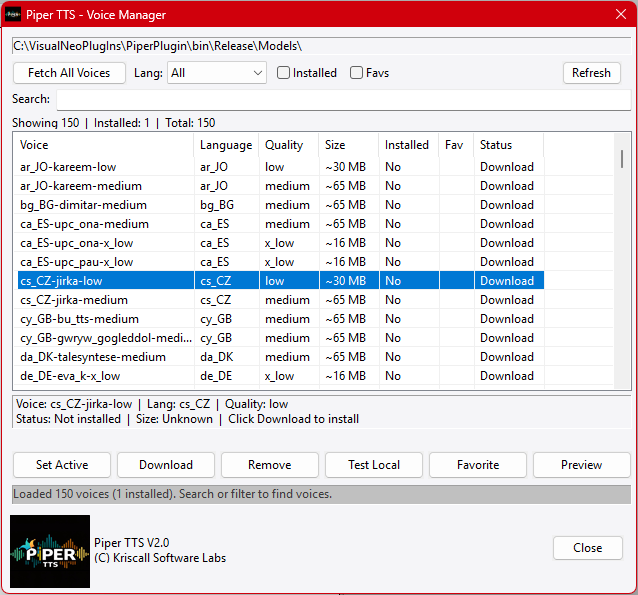
You get 150+ neural voices across 30+ languages through the built-in Voice Manager browse, search, download, and preview voices without writing a single line of code. Speech runs asynchronously so your app stays responsive, and the 64-item queue lets you line up multiple utterances that play back-to-back seamlessly. V2.0 also ships with a full FX Engine 12 built-in presets including Robot, Whisper, Echo Hall, Radio, Chipmunk, and more, plus a visual FX Manager with sliders for pitch, echo, bass, treble, and volume. Save custom profiles and recall them anytime.
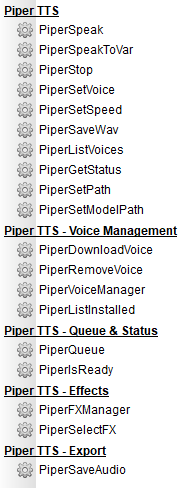
PiperTTS supports multi-format audio export (WAV, AIFF, AU, MP3, OGG, FLAC) for generating voiceovers and accessibility content. Pair it with the LLMPlugin and things get really interesting feed your AI's responses into PiperTTS and your chatbot or assistant starts speaking naturally in real time. With 19 actions, a single-file .nbp distribution, and zero external dependencies, PiperTTS V2.0 is everything you need for professional text-to-speech in your VisualNEO applications no cloud, no cost, no worries.
Report any issues or bugs this I my first time releasing it to public, I will do my best to fix or assit.. I have included a manual that AI and I wiped up for you guys to make life easy, I just don't have the time to code and write documents, but AI did a good job.
YOU HAVE TO GO TO THE STORE TO DOWNLOAD it's in the Freebie section under kriscall above menu on this site. As the plugin as a 20meg piper library embed inside it and it's too large for me to upload here in the forum.
Enjoy!
PiperTTS V2.0 / 2.1 — Now Available! Offline Neural Text-to-Speech Plugin for VisualNEO Win
Hey! All me again you guys sick of me yet LOL!! anyway I'm proud to present PiperTTS V2.0 for VisualNEO Win. Forget the robotic, monotone voices you're used to from Windows SAPI PiperTTS uses neural AI-trained voice models that sound genuinely natural, with proper intonation, rhythm, and flow. Everything runs locally powered by the open-source Piper TTS engine no internet (just once to download the voice to your PC), no subscriptions, no API fees. Just install, pick a voice, and your app starts talking like a real human.
You get 150+ neural voices across 30+ languages through the built-in Voice Manager browse, search, download, and preview voices without writing a single line of code. Speech runs asynchronously so your app stays responsive, and the 64-item queue lets you line up multiple utterances that play back-to-back seamlessly. V2.0 also ships with a full FX Engine 12 built-in presets including Robot, Whisper, Echo Hall, Radio, Chipmunk, and more, plus a visual FX Manager with sliders for pitch, echo, bass, treble, and volume. Save custom profiles and recall them anytime.
PiperTTS supports multi-format audio export (WAV, AIFF, AU, MP3, OGG, FLAC) for generating voiceovers and accessibility content. Pair it with the LLMPlugin and things get really interesting feed your AI's responses into PiperTTS and your chatbot or assistant starts speaking naturally in real time. With 19 actions, a single-file .nbp distribution, and zero external dependencies, PiperTTS V2.0 is everything you need for professional text-to-speech in your VisualNEO applications no cloud, no cost, no worries.
Report any issues or bugs this I my first time releasing it to public, I will do my best to fix or assit.. I have included a manual that AI and I wiped up for you guys to make life easy, I just don't have the time to code and write documents, but AI did a good job.
YOU HAVE TO GO TO THE STORE TO DOWNLOAD it's in the Freebie section under kriscall above menu on this site. As the plugin as a 20meg piper library embed inside it and it's too large for me to upload here in the forum.
Enjoy!
Uploaded files:

Quote from Kriscall on February 10, 2026, 9:53 amYou are all welcome, @vadim @luishp. I’m just trying to help the community see that there is still a lot of untapped potential in VisualNeowin you just have to think outside the box. Sometimes you have to show a new merging market\technologies that the old tools are still here adapting right Infront of them and still can be used. Like a classic hot rod car with heart and soul and a boring TESLA! LOL
All of this work is driven by my robotics hobby. I’ve been using these tools for the past 12–24 months all came from need, and now I’m polishing them up so they’re more distribution-friendly and easier for others to use. My bipedal robot runs on a Windows system, and part of its controller stack is built using VisualNeowin.
The plugins I’m porting are an essential part of the modern world we live in today. If VisualNeowin has access to these capabilities, people will discover entirely new and creative use cases. Yes, we have AI but there’s something deeply satisfying about designing and building your own applications your way, just like building a robot from the ground up.
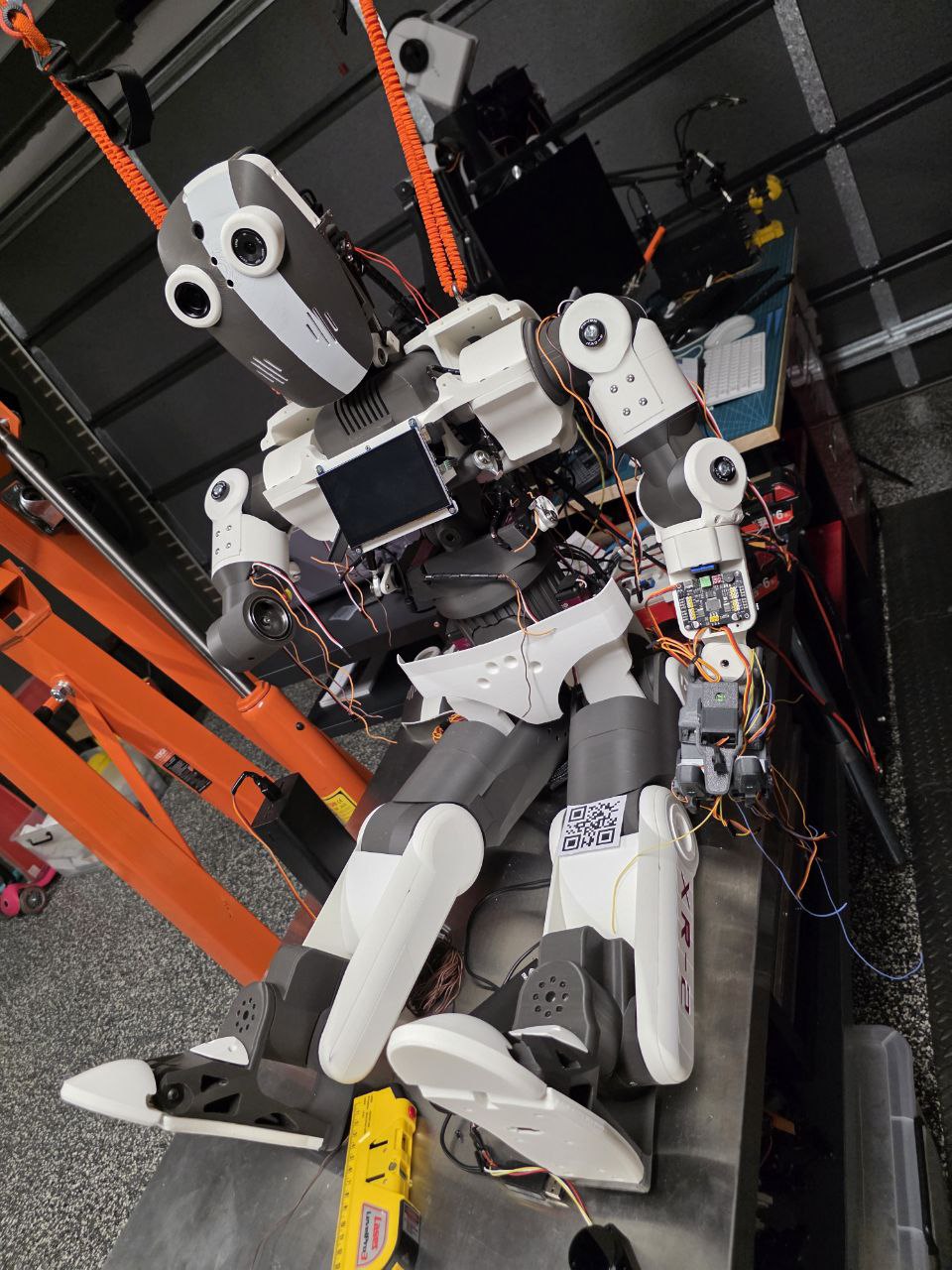
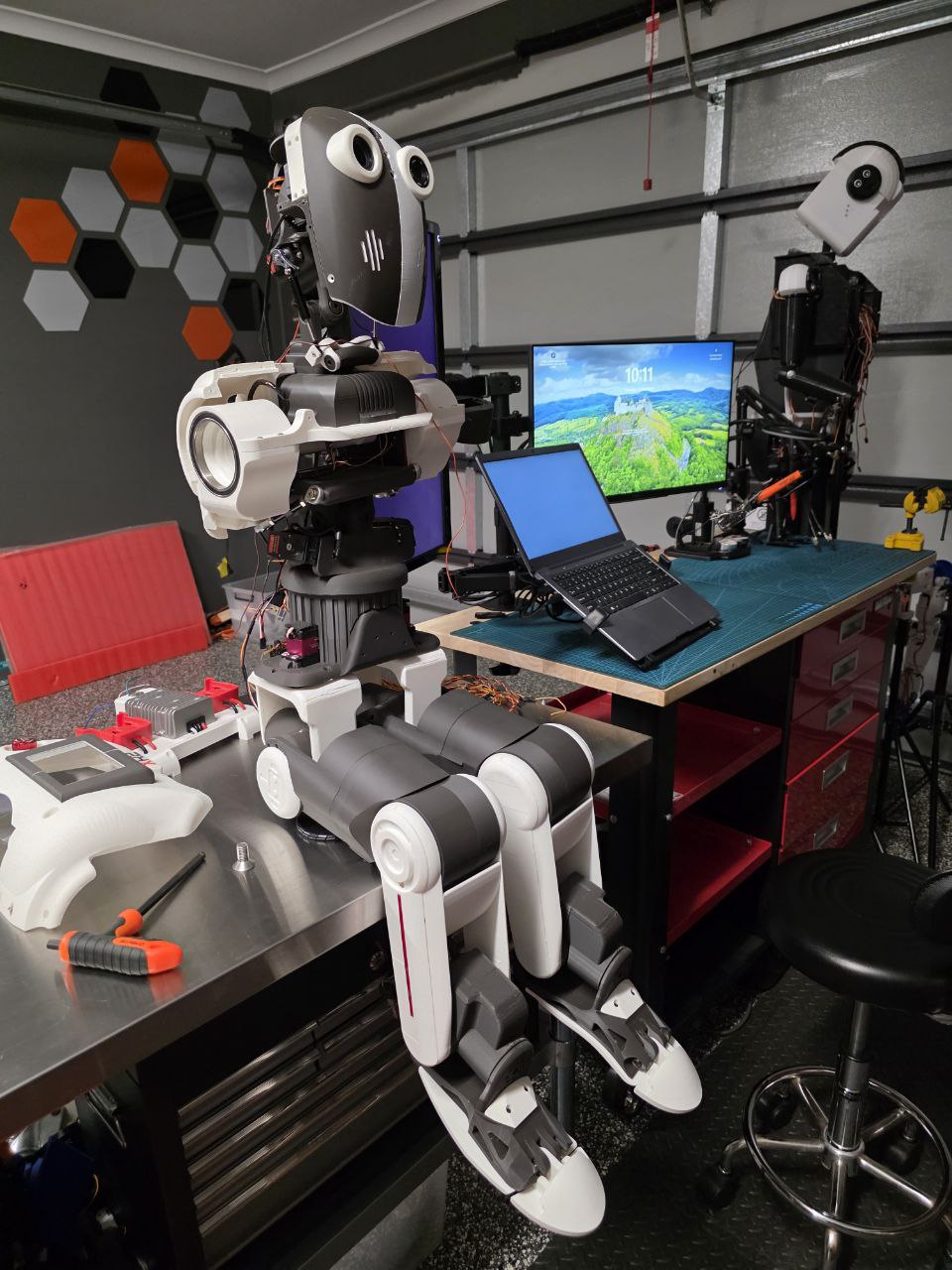
I’ll be porting more tools and plugins as time goes on, and hopefully we can give VisualNeowin a real boost heading into 2026 I also plan to look at VisualNeoWeB as that has uses for my API for the robot communications via web/wifi. There’s no reason why electronics based hobby projects can’t use Visualneo Products to create powerful automation, especially when combined with open-source libraries and plugins like the ones being ported over. I have shared some photo of my current project I hope you don't mind this is where all the work stems from.
You are all welcome, @vadim @luishp. I’m just trying to help the community see that there is still a lot of untapped potential in VisualNeowin you just have to think outside the box. Sometimes you have to show a new merging market\technologies that the old tools are still here adapting right Infront of them and still can be used. Like a classic hot rod car with heart and soul and a boring TESLA! LOL
All of this work is driven by my robotics hobby. I’ve been using these tools for the past 12–24 months all came from need, and now I’m polishing them up so they’re more distribution-friendly and easier for others to use. My bipedal robot runs on a Windows system, and part of its controller stack is built using VisualNeowin.
The plugins I’m porting are an essential part of the modern world we live in today. If VisualNeowin has access to these capabilities, people will discover entirely new and creative use cases. Yes, we have AI but there’s something deeply satisfying about designing and building your own applications your way, just like building a robot from the ground up.
I’ll be porting more tools and plugins as time goes on, and hopefully we can give VisualNeowin a real boost heading into 2026 I also plan to look at VisualNeoWeB as that has uses for my API for the robot communications via web/wifi. There’s no reason why electronics based hobby projects can’t use Visualneo Products to create powerful automation, especially when combined with open-source libraries and plugins like the ones being ported over. I have shared some photo of my current project I hope you don't mind this is where all the work stems from.
Uploaded files: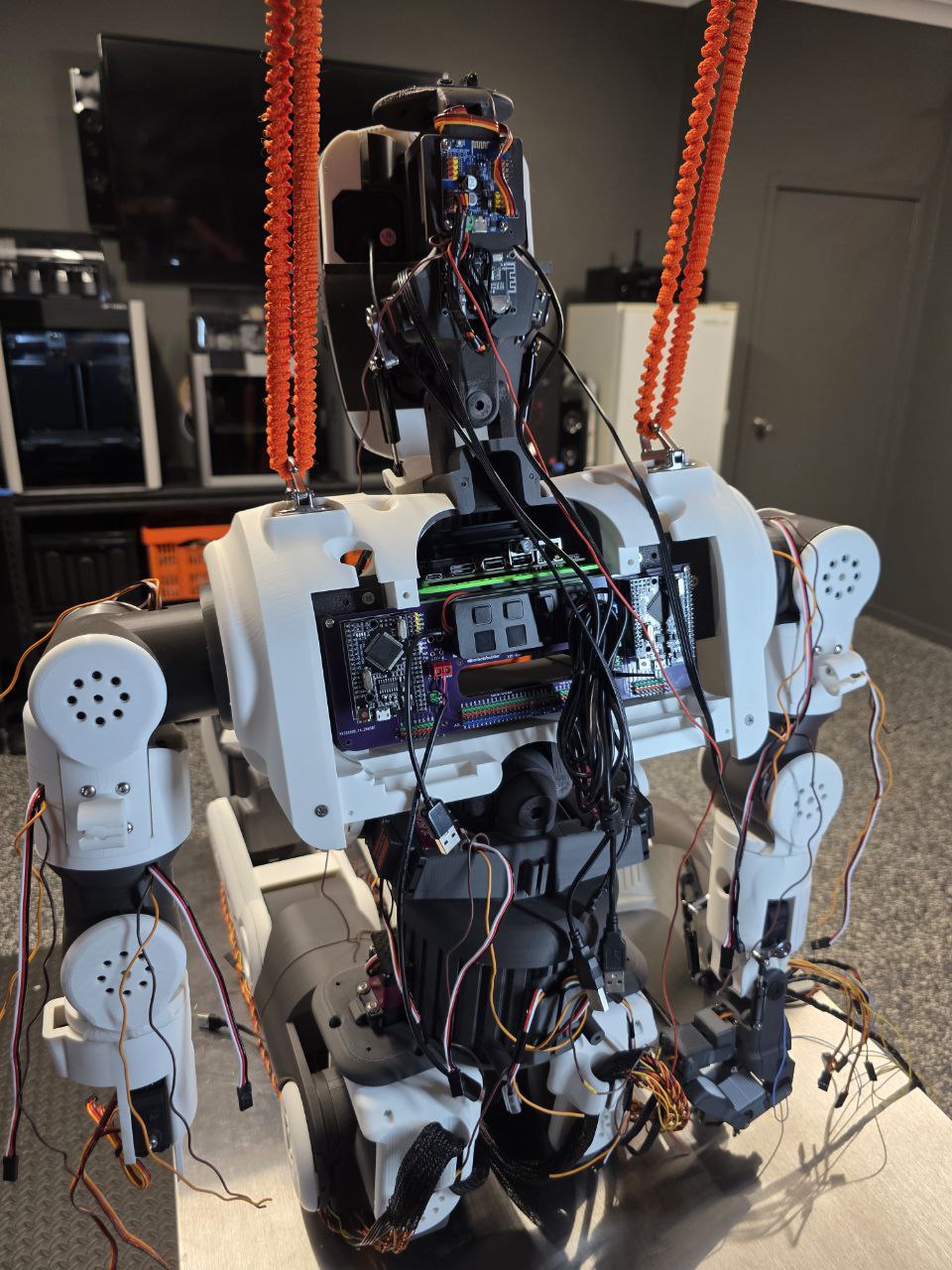

Quote from Kriscall on February 12, 2026, 1:03 amHappy to announce - New Plugin Coming Soon WhisperSTT - Let's go VisualNEO!
WhisperSTT expands your existing setup by adding powerful speech-to-text capabilities, transforming natural voice input into accurate, real-time text (Based on model selected and good mic input). Designed for users already running Piper TTS, this new plugin completes the communication loop allowing you to both speak to your AI and hear it respond naturally.
When combined with the LLM plugin, PiperTTS, and WhisperSTT, the system becomes a fully bidirectional conversational AI pipeline:
🔹 WhisperSTT converts your spoken voice into text input.
🔹 LLM Plugin processes the conversation, generates intelligent responses, and maintains context.
🔹 PiperTTS turns the AI’s replies back into natural-sounding speech.This integration enables seamless, hands-free interaction perfect for robotics, assistants, automation systems, and immersive AI experiences. Instead of typing commands, you can hold continuous spoken conversations with your AI, making interactions faster, more intuitive, and closer to human-like communication.
Stay tuned for release details and setup guides!
Happy to announce - New Plugin Coming Soon WhisperSTT - Let's go VisualNEO!
WhisperSTT expands your existing setup by adding powerful speech-to-text capabilities, transforming natural voice input into accurate, real-time text (Based on model selected and good mic input). Designed for users already running Piper TTS, this new plugin completes the communication loop allowing you to both speak to your AI and hear it respond naturally.
When combined with the LLM plugin, PiperTTS, and WhisperSTT, the system becomes a fully bidirectional conversational AI pipeline:
🔹 WhisperSTT converts your spoken voice into text input.
🔹 LLM Plugin processes the conversation, generates intelligent responses, and maintains context.
🔹 PiperTTS turns the AI’s replies back into natural-sounding speech.
This integration enables seamless, hands-free interaction perfect for robotics, assistants, automation systems, and immersive AI experiences. Instead of typing commands, you can hold continuous spoken conversations with your AI, making interactions faster, more intuitive, and closer to human-like communication.
Stay tuned for release details and setup guides!

Quote from naglieri on February 12, 2026, 9:13 amImpressive.
With all these new plugins from the last 6 months, it's a real renaissance for VisualNeoWin.
Impressive.
With all these new plugins from the last 6 months, it's a real renaissance for VisualNeoWin.
Quote from Kriscall on February 12, 2026, 2:39 pmVisualNeoWin is getting a Mega Updates! It will compete with the best of them but in true VisualNeo style of low code and a few clicks! giving low code users access to high code stuff. No one puts Visualneo in the corner!! 😂 I always tell everyone if you want to learn to code start here, you may never leave now with all the plugins.
VisualNeoWin is getting a Mega Updates! It will compete with the best of them but in true VisualNeo style of low code and a few clicks! giving low code users access to high code stuff. No one puts Visualneo in the corner!! 😂 I always tell everyone if you want to learn to code start here, you may never leave now with all the plugins.

Quote from joferar333 on February 12, 2026, 3:23 pm@kriscall
Hi, I'm truly amazed; the evolution of Visual Neo Win is impressive, thanks to people like you who dedicate themselves with such commitment and care to producing new resources.
I downloaded Piper with great enthusiasm, but when I created the folder within my plugins and installed it, it doesn't show the structure you mention in the manual. I followed the steps, but it's impossible to understand how to download the voices, etc. After installing it, I only have an empty "model" folder, the plugin, and the PDF.
Can you help me?
Best Regards
Hi, I'm truly amazed; the evolution of Visual Neo Win is impressive, thanks to people like you who dedicate themselves with such commitment and care to producing new resources.
I downloaded Piper with great enthusiasm, but when I created the folder within my plugins and installed it, it doesn't show the structure you mention in the manual. I followed the steps, but it's impossible to understand how to download the voices, etc. After installing it, I only have an empty "model" folder, the plugin, and the PDF.
Can you help me?
Best Regards
Quote from joferar333 on February 12, 2026, 3:43 pmI managed to download the Spanish voices; they're now in the model folder, but the rest of the files that should be there still aren't showing up in the displayed structure.
On the other hand, I tried running a local test and a preview, but nothing happens...
Could you post an example so we can follow along? It's not as easy as I thought... I can't get it to work.
I managed to download the Spanish voices; they're now in the model folder, but the rest of the files that should be there still aren't showing up in the displayed structure.
On the other hand, I tried running a local test and a preview, but nothing happens...
Could you post an example so we can follow along? It's not as easy as I thought... I can't get it to work.
Quote from Kriscall on February 13, 2026, 12:20 amI tried putting a sample together, however the main reason I didn’t include one initially is because the size of these models combined with PiperTTS plugin would make the distributable package extremely large for a sample. I still need to think through the best way to handle this, as it also needs to create and configure the environment on your system.
I’m not sure what the upload limits are here, and there’s also a chance the sample may not work completely out-of-the-box due to the way the setup needs to adapt to the target system. I’ll revisit this and get back to you when I can. In the meantime, feel free to experiment with what’s available.
Apologies if my plugins seem a little advanced the complexity comes from what we’re trying to achieve. I know you’ll appreciate that. I do try to keep things as simple as possible since that’s what VisualNEOWin users are familiar with, even though the technology behind them is definitely at the high-end! from where they are ported from.
Process is first got to
PiperVoiceManager "" <-- START HERE!!! This is the download and voice manager add this temperley , click on it to open to pull (Download the models from hugginface.co) Select a model you like and test it. Once you have done that you can remove this from you code this is just a trigger to load the manager. If you leave this in your code it will show the manager to the user and we don't want to do that.
Then simply select your voice you downloaded followed by Piperspeak:
PiperSetVoice "en_US-amy-low"
PiperSpeak "Hello testing 1 2 3"The directory Structure it creates for you looks like this image below.
You should have a piper folder this is the engine that is extracted out of the exe it's basically piper as it was created by the developers that can play the voices. I made a portable version of it. It should be there it makes two copies one in you plugin folder and one in your working [pubdir]
I tried putting a sample together, however the main reason I didn’t include one initially is because the size of these models combined with PiperTTS plugin would make the distributable package extremely large for a sample. I still need to think through the best way to handle this, as it also needs to create and configure the environment on your system.
I’m not sure what the upload limits are here, and there’s also a chance the sample may not work completely out-of-the-box due to the way the setup needs to adapt to the target system. I’ll revisit this and get back to you when I can. In the meantime, feel free to experiment with what’s available.
Apologies if my plugins seem a little advanced the complexity comes from what we’re trying to achieve. I know you’ll appreciate that. I do try to keep things as simple as possible since that’s what VisualNEOWin users are familiar with, even though the technology behind them is definitely at the high-end! from where they are ported from.
Process is first got to
PiperVoiceManager "" <-- START HERE!!! This is the download and voice manager add this temperley , click on it to open to pull (Download the models from hugginface.co) Select a model you like and test it. Once you have done that you can remove this from you code this is just a trigger to load the manager. If you leave this in your code it will show the manager to the user and we don't want to do that.
Then simply select your voice you downloaded followed by Piperspeak:
PiperSetVoice "en_US-amy-low"
PiperSpeak "Hello testing 1 2 3"
The directory Structure it creates for you looks like this image below.
You should have a piper folder this is the engine that is extracted out of the exe it's basically piper as it was created by the developers that can play the voices. I made a portable version of it. It should be there it makes two copies one in you plugin folder and one in your working [pubdir]
Uploaded files: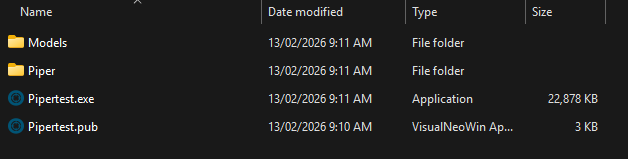
Quote from joferar333 on February 13, 2026, 12:52 am@kriscall
The structure you're showing me isn't created.
Please watch this video...
https://globaldima.com/piper.mp4
wait for you
The structure you're showing me isn't created.
Please watch this video...
https://globaldima.com/piper.mp4
wait for you
Quote from Kriscall on February 13, 2026, 1:41 am@joferar333 Can you try something create a EXE with piper compiled in it then run the EXE. This should create the structure with a folder in your [PUBDIR] called piper, copy a copy of this folder to your plugin directory. Then restart visualneoWIN let me know if that fixes it. I tried to do a quick update, but it looks like the store has upload limits @luishp file was over 40meg to include this externally. I will try and see if there is an issue with extraction in the plugin folder. But try this and let me know good luck.
@joferar333 Can you try something create a EXE with piper compiled in it then run the EXE. This should create the structure with a folder in your [PUBDIR] called piper, copy a copy of this folder to your plugin directory. Then restart visualneoWIN let me know if that fixes it. I tried to do a quick update, but it looks like the store has upload limits @luishp file was over 40meg to include this externally. I will try and see if there is an issue with extraction in the plugin folder. But try this and let me know good luck.
Quote from joferar333 on February 13, 2026, 3:51 am@kriscall
I found the problem. I uninstalled it, went into NeoVisual Win, and in properties, I set it to create an empty application.
Then, in the plugins directory, I created a folder called "piper."
Inside this folder, I put the manual and the plugin.
I installed it. I exited VisualNeo Win. I opened it, created a button, and added the command that should launch it. I ran it. I downloaded only the Spanish voices. I saved and exited. The entire structure is now in the directory. I opened it, replaced the button handle I had created with the command that executes a voice, and I set it to "HELLO WELCOME" (in spanish) so that it would process it and I could hear the audio... To my surprise, when I run it, it says anything but what I specified. I tried several voices, and the resulting audio is completely unintelligible.PiperSetVoice "es_ES-carlfm-x_low"
PiperSetSpeed "1.0"
PiperSpeak "Hola! Bienvenido"
I found the problem. I uninstalled it, went into NeoVisual Win, and in properties, I set it to create an empty application.
Then, in the plugins directory, I created a folder called "piper."
Inside this folder, I put the manual and the plugin.
I installed it. I exited VisualNeo Win. I opened it, created a button, and added the command that should launch it. I ran it. I downloaded only the Spanish voices. I saved and exited. The entire structure is now in the directory. I opened it, replaced the button handle I had created with the command that executes a voice, and I set it to "HELLO WELCOME" (in spanish) so that it would process it and I could hear the audio... To my surprise, when I run it, it says anything but what I specified. I tried several voices, and the resulting audio is completely unintelligible.
PiperSetVoice "es_ES-carlfm-x_low"
PiperSetSpeed "1.0"
PiperSpeak "Hola! Bienvenido"
Quote from Kriscall on February 13, 2026, 4:26 amHmm Try a different model - This is a known quality issue with Piper's x_low models. The
x_lowquality tier is 16kHz with only 2-3M parameters — they sound garbled and unintelligible on many languages, especially Spanish.Try medium quality voice:
PiperSetVoice "es_ES-davefx-medium"
PiperSetSpeed "1.0"
PiperSpeak "Hola! Bienvenido a mi aplicación."
The rule of thumb for Piper voices:
- x_low / low — tiny and fast but often unintelligible, especially for non-English languages
- medium — the sweet spot, good quality, reasonable size (~65MB)
- high — best quality, larger files (~100MB+), slower on older hardware
I will do an Audit and if I find any bugs I will post and update over the weekend. Thank your feedback. If you share your pub demo I can use that as a test sample.
Hmm Try a different model - This is a known quality issue with Piper's x_low models. The x_low quality tier is 16kHz with only 2-3M parameters — they sound garbled and unintelligible on many languages, especially Spanish.
Try medium quality voice:
PiperSetVoice "es_ES-davefx-medium"
PiperSetSpeed "1.0"
PiperSpeak "Hola! Bienvenido a mi aplicación."
The rule of thumb for Piper voices:
- x_low / low — tiny and fast but often unintelligible, especially for non-English languages
- medium — the sweet spot, good quality, reasonable size (~65MB)
- high — best quality, larger files (~100MB+), slower on older hardware
I will do an Audit and if I find any bugs I will post and update over the weekend. Thank your feedback. If you share your pub demo I can use that as a test sample.
Quote from joferar333 on February 13, 2026, 10:05 am@kriscall
Thank you for your time, now it makes sense, but I must tell you that the first part of the text is not processed... it only says "welcome to my application". I have tried with different voices and speeds in all cases the first sentence is omitted.
Thank you for your time, now it makes sense, but I must tell you that the first part of the text is not processed... it only says "welcome to my application". I have tried with different voices and speeds in all cases the first sentence is omitted.
Uploaded files:Quote from joferar333 on February 13, 2026, 10:23 amI finally figured out how to get it to read the entire sentence perfectly... by playing with the speed, you can fine-tune this small detail.
In my case, I adjusted it to "> 1.5" and it reads it perfectly in any voice.Thanks, my friend, for your dedication and your spectacular contribution.
Best of luck!
Regards
I finally figured out how to get it to read the entire sentence perfectly... by playing with the speed, you can fine-tune this small detail.
In my case, I adjusted it to "> 1.5" and it reads it perfectly in any voice.
Thanks, my friend, for your dedication and your spectacular contribution.
Best of luck!
Regards

Quote from Phil78 on February 13, 2026, 7:19 pmHello @kriscall
First of all thanks for your good contribution !
I have tested Piper, all seems good, but I have always an error with PiperSaveWav ?
Hello @kriscall
First of all thanks for your good contribution !
I have tested Piper, all seems good, but I have always an error with PiperSaveWav ?
Quote from Kriscall on February 14, 2026, 2:54 amI'm still working on this as you can apricate it's a very complex plugin. I have just updated Version 2.2 It saves the file only issue is the code is fighting me to add the extensions. .WAV etcc. if you rename it but it works fine. Please try the latest build. Also tidied up a few minor things.
I'm still working on this as you can apricate it's a very complex plugin. I have just updated Version 2.2 It saves the file only issue is the code is fighting me to add the extensions. .WAV etcc. if you rename it but it works fine. Please try the latest build. Also tidied up a few minor things.
Quote from Vadim on February 15, 2026, 3:25 pm@kriscall
Your work is very interesting! Thank you so much for sharing this with the community!!!
It is thanks to VisualNEO plugins that Win continues to actively live and develop!
Your work is very interesting! Thank you so much for sharing this with the community!!!
It is thanks to VisualNEO plugins that Win continues to actively live and develop!