
NEW PLUGIN - ezJSON

Quote from Darbdenral on December 8, 2022, 3:27 amHere's my powerful little plugin ezJSON. I hope you find it useful!
- Plugin Name: ezJSON
- Purpose: To make it easy for VisualNEO Win projects to display, parse, use and generate JSON data.
- Uses: Lightweight database, CSV and XML replacement, display JSON data, share data between one program and another, advanced logging, using modern web service API's, publishing JSON data for use on your web server, migrating from one database to another, anytime your presented with JSON data and need to use it.
- Platform: VisualNeo Win
- Payments: PayPal
- Code Signed: Yes
- Web: https://tropicdesigns.net
The ezJSON plugin has 17 different commands including some utility functions to help you parse, stringify/build and debug your JSON data.
Here's my powerful little plugin ezJSON. I hope you find it useful!
- Plugin Name: ezJSON
- Purpose: To make it easy for VisualNEO Win projects to display, parse, use and generate JSON data.
- Uses: Lightweight database, CSV and XML replacement, display JSON data, share data between one program and another, advanced logging, using modern web service API's, publishing JSON data for use on your web server, migrating from one database to another, anytime your presented with JSON data and need to use it.
- Platform: VisualNeo Win
- Payments: PayPal
- Code Signed: Yes
- Web: https://tropicdesigns.net
The ezJSON plugin has 17 different commands including some utility functions to help you parse, stringify/build and debug your JSON data.
Uploaded files: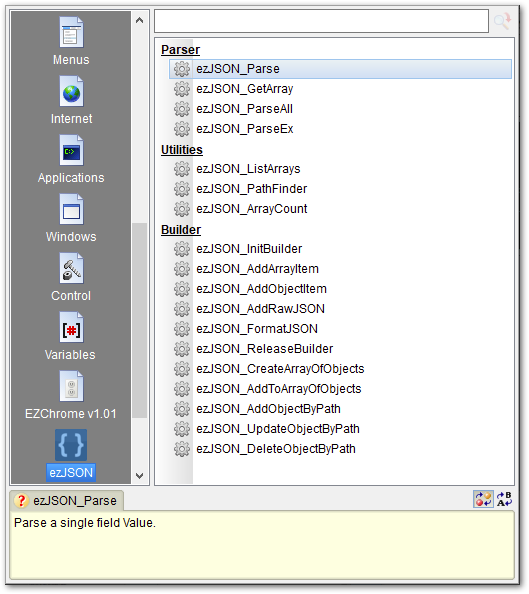

Quote from luishp on December 8, 2022, 11:48 amAwesome! Thanks so much @darbdenral!!!
Awesome! Thanks so much @darbdenral!!!

Quote from Vadim on December 8, 2022, 12:40 pm@darbdenral
I always enjoy new plugins! I haven't worked with JSON yet, and it would be interesting to see a little expansion in the description - what purpose the plugin may be needed for, what problems or tasks can be solved with it.
Thank you very much for your helpful input!
I always enjoy new plugins! I haven't worked with JSON yet, and it would be interesting to see a little expansion in the description - what purpose the plugin may be needed for, what problems or tasks can be solved with it.
Thank you very much for your helpful input!

Quote from Gaev on December 8, 2022, 9:55 pm@vadim
what purpose the plugin may be needed for, what problems or tasks can be solved with it.
Lately, it has become the (unofficial) standard for the responses to Internet (get) requests to be returned in JSON (JavaScript Object Notation) format.
I like to think of JSON as the successor to CSV (Comma Separated Values) ... only, the variable nested key/value structure makes it a kind of 'CSV on steroids' :-)
While JSON is easily handled in Apps created using the VisualNEOWeb platform, VisualNEOWin only has the InternetGet command ... which makes it very difficult to extract the desired values from server responses (limiting Applications to interacting with server side applications that respond with data in a simple string format) ... I believe that this plugin from @darbdenral will enable Applications created with VisualNEOWin to handle (extract) received data with similar ease.
The growing use of JSON has even resulted in NoSQL (often called document) databases, where (unlike SQL), each record does not need to have every field (column) present, nor be limited to a fixed size for any field.
Also, advanced VisualNEOWin programmers can manage related data items within a single (JSON) object rather than using multiple simple variables (or pseudo array variables).
Hope that answers your question.
@darbdenral - I have not tested your plugin, but it looks comprehensive ... thanks for this valuable contribution to the platform.
what purpose the plugin may be needed for, what problems or tasks can be solved with it.
Lately, it has become the (unofficial) standard for the responses to Internet (get) requests to be returned in JSON (JavaScript Object Notation) format.
I like to think of JSON as the successor to CSV (Comma Separated Values) ... only, the variable nested key/value structure makes it a kind of 'CSV on steroids' :-)
While JSON is easily handled in Apps created using the VisualNEOWeb platform, VisualNEOWin only has the InternetGet command ... which makes it very difficult to extract the desired values from server responses (limiting Applications to interacting with server side applications that respond with data in a simple string format) ... I believe that this plugin from @darbdenral will enable Applications created with VisualNEOWin to handle (extract) received data with similar ease.
The growing use of JSON has even resulted in NoSQL (often called document) databases, where (unlike SQL), each record does not need to have every field (column) present, nor be limited to a fixed size for any field.
Also, advanced VisualNEOWin programmers can manage related data items within a single (JSON) object rather than using multiple simple variables (or pseudo array variables).
Hope that answers your question.
@darbdenral - I have not tested your plugin, but it looks comprehensive ... thanks for this valuable contribution to the platform.
Quote from Darbdenral on December 9, 2022, 12:56 amHi @vadim! Yes I'd love to expand upon this, thanks for your response!
But first, thank you @gaev for doing a great job filling in the blanks. I like to think of JSON as CSV on steroids too ;) It goes even further adding a real standard and unlike CSV, JSON allows you to create a hierarchical structure of your data. It's great for transmitting, receiving and storing data in any project and is pretty much the standard now if you want to integrate with any web APIs. For those that have never used JSON, It might seem intimidating at first. But it's quite simple to use and easy for us to read and write, since JSON exists as a string.
Included with the ezJSON plugin are plenty of examples that solve various problems.
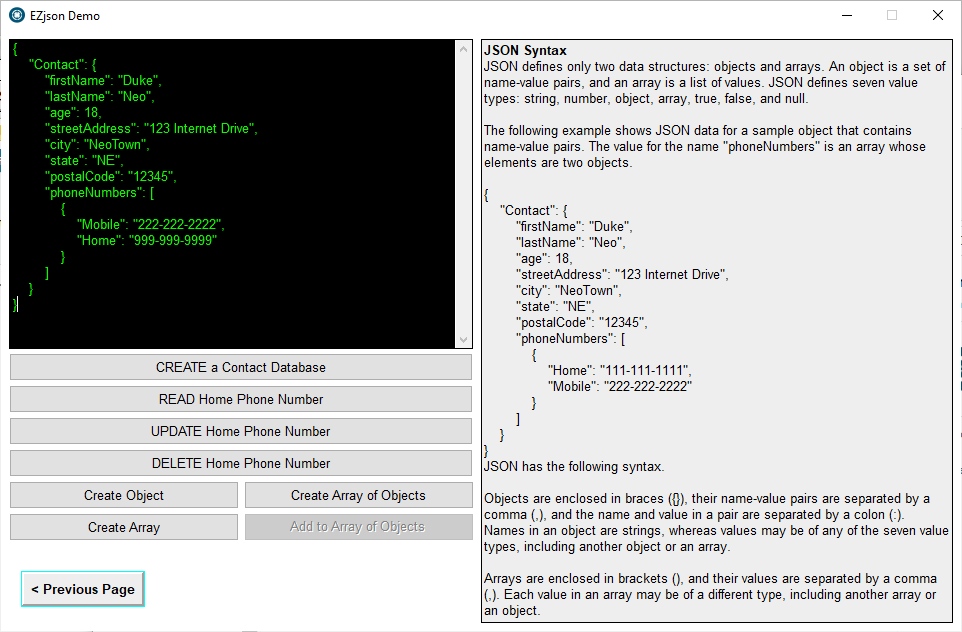
I've found one of the best ways to learn is to dive right in with the examples included. One good example is on the third page of the main demo, where I have demonstrated a simple database storage system. JSON is the perfect data format for solving the problem of storing and manipulating data. With its lightweight structure and ease of use, JSON makes it a breeze to work with data. Every database system should have the fundamental elements CRUD (Create, Read, Update, Delete) for a usable storage model to work. Click on the third image in my previous post above to see the image of that example and/or download the plugin and try the included demo.
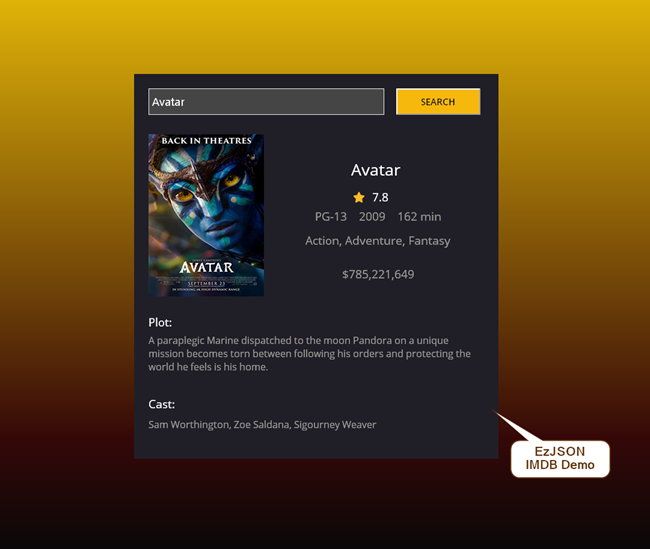
But my favorite problem to solve is gathering and using data from a web API that uses JSON. Pretty much every web API on the Internet uses JSON now. So, having the ability to use JSON in your Windows applications opens up a universe of ideas! Now you can create many different Windows applications using the thousands of API's available on the Internet like text to speech, translation, weather, NASA, etc. There are many free and paid API's now on the Internet, do a search on Google for free API feeds and you can find many good examples. I'll admit many free services cannot survive, they come and go but many paid services offer generous free plans to get your projects started.
Gaev also mentioned the use of a single JSON object as a replacement for multiple variables or pseudo array variables, what a great idea!
I hope this helps.
thanks! :)
Hi @vadim! Yes I'd love to expand upon this, thanks for your response!
But first, thank you @gaev for doing a great job filling in the blanks. I like to think of JSON as CSV on steroids too ;) It goes even further adding a real standard and unlike CSV, JSON allows you to create a hierarchical structure of your data. It's great for transmitting, receiving and storing data in any project and is pretty much the standard now if you want to integrate with any web APIs. For those that have never used JSON, It might seem intimidating at first. But it's quite simple to use and easy for us to read and write, since JSON exists as a string.
Included with the ezJSON plugin are plenty of examples that solve various problems.
I've found one of the best ways to learn is to dive right in with the examples included. One good example is on the third page of the main demo, where I have demonstrated a simple database storage system. JSON is the perfect data format for solving the problem of storing and manipulating data. With its lightweight structure and ease of use, JSON makes it a breeze to work with data. Every database system should have the fundamental elements CRUD (Create, Read, Update, Delete) for a usable storage model to work. Click on the third image in my previous post above to see the image of that example and/or download the plugin and try the included demo.
But my favorite problem to solve is gathering and using data from a web API that uses JSON. Pretty much every web API on the Internet uses JSON now. So, having the ability to use JSON in your Windows applications opens up a universe of ideas! Now you can create many different Windows applications using the thousands of API's available on the Internet like text to speech, translation, weather, NASA, etc. There are many free and paid API's now on the Internet, do a search on Google for free API feeds and you can find many good examples. I'll admit many free services cannot survive, they come and go but many paid services offer generous free plans to get your projects started.
Gaev also mentioned the use of a single JSON object as a replacement for multiple variables or pseudo array variables, what a great idea!
I hope this helps.
thanks! :)

Quote from Krakerman on December 9, 2022, 4:31 amJust FYI let you know when downloading the ezJSON Setup MS Defender flags it as a virus. I'm sure it's a false positive.
Just FYI let you know when downloading the ezJSON Setup MS Defender flags it as a virus. I'm sure it's a false positive.
Quote from Darbdenral on December 9, 2022, 4:52 amQuote from Krakerman on December 9, 2022, 4:31 amJust FYI let you know when downloading the ezJSON Setup MS Defender flags it as a virus. I'm sure it's a false positive.
@krakerman
Yes, false positives can be quite common but I'm not seeing that behavior here at all with MS Defender.
And VirusTotal results are clean too.
Setup results
Plugin results
Quote from Krakerman on December 9, 2022, 4:31 amJust FYI let you know when downloading the ezJSON Setup MS Defender flags it as a virus. I'm sure it's a false positive.
Yes, false positives can be quite common but I'm not seeing that behavior here at all with MS Defender.
And VirusTotal results are clean too.
Setup results
Plugin results
Quote from Krakerman on December 9, 2022, 5:22 amYeah ... I am on Win 11 if that matters but noticed it flagged it when I d/l it. Curious thou the differences between your plugin and zmwJSON as far as features. I am very much interested in your plugin thou and looking forward to possibly more plugins in the future.
Very nice welcome addition to VNW !
Yeah ... I am on Win 11 if that matters but noticed it flagged it when I d/l it. Curious thou the differences between your plugin and zmwJSON as far as features. I am very much interested in your plugin thou and looking forward to possibly more plugins in the future.
Very nice welcome addition to VNW !
Quote from Darbdenral on December 9, 2022, 6:24 amQuote from Krakerman on December 9, 2022, 5:22 amYeah ... I am on Win 11 if that matters but noticed it flagged it when I d/l it. Curious thou the differences between your plugin and zmwJSON as far as features.
@krakerman Thanks! I wanted to create a JSON plugin that would be as user friendly as possible for beginners and powerful enough for advanced use at an affordable price. The demos included are part of that process too. I try and design things that have a natural flow and make our development job as painless as possible. I also like to use my plugin's before release in actual projects for myself and clients. There's nothing better and rewarding then seeing your creation work as designed. This particular plugin I've been using for over a year, adding as I go features I wish I had. If I made it easier, faster and powerful to use, then I guess I did well. That's why you can see many more commands and utility functions included that are powerful features that can really accelerate your design process. They aren't needed to get the same results but sure make my job easier.
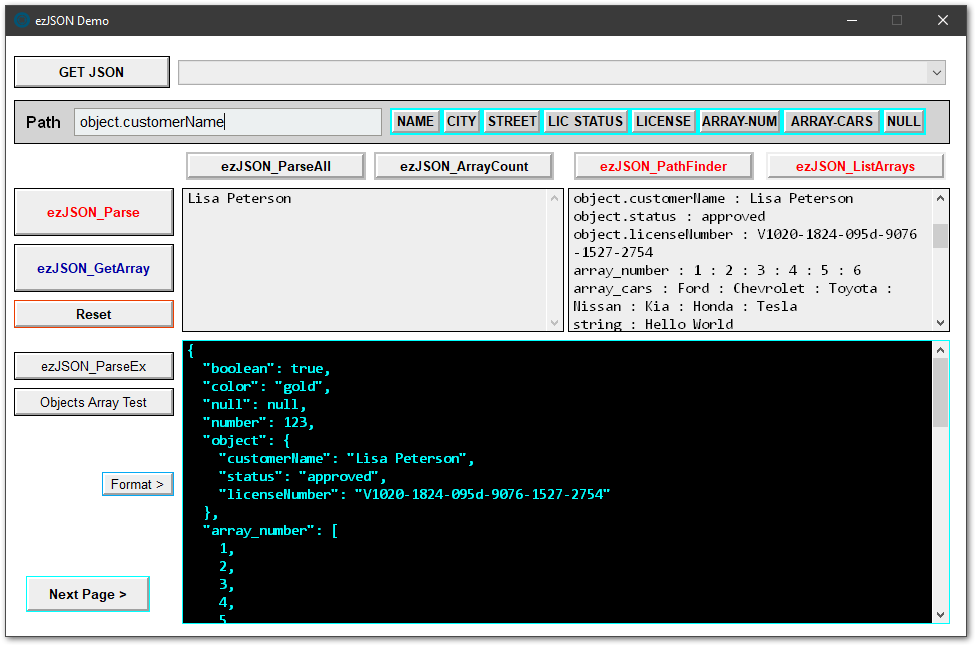
I like to start my new JSON projects with the included Main demo, it's a powerful project designed to use many of the functions. Open the main demo, now click the EZJSON_PathFinder button in the upper right toolbar. Now you see every element, including the path(left):value(right) in the upper right window. This one feature saves time when your trying to find and evaluate a specific object or array. If you see an item you would like to parse results for, highlight the object path and when you move your mouse to the ezJSON_Parse button on the left, the highlighted object is prefilled into the Path text entry box without you having to do it. Now click the ezJSON_Parse button and the element value should be displayed in the upper-left box. If you highlighted an array, then use the ezJSON_GetArray command to display your result. This is a natural flow, fast and great for analyzing JSON for any project. You can also paste any valid JSON inside the black JSON code window or download data from any valid JSON URL. I still need to make a quick video for this project and it's use.. but learning by doing is sometimes best..
Anyways, thanks for your time and post!
Demo video completed in 8 languages : Video walk through
Quote from Krakerman on December 9, 2022, 5:22 amYeah ... I am on Win 11 if that matters but noticed it flagged it when I d/l it. Curious thou the differences between your plugin and zmwJSON as far as features.
@krakerman Thanks! I wanted to create a JSON plugin that would be as user friendly as possible for beginners and powerful enough for advanced use at an affordable price. The demos included are part of that process too. I try and design things that have a natural flow and make our development job as painless as possible. I also like to use my plugin's before release in actual projects for myself and clients. There's nothing better and rewarding then seeing your creation work as designed. This particular plugin I've been using for over a year, adding as I go features I wish I had. If I made it easier, faster and powerful to use, then I guess I did well. That's why you can see many more commands and utility functions included that are powerful features that can really accelerate your design process. They aren't needed to get the same results but sure make my job easier.
I like to start my new JSON projects with the included Main demo, it's a powerful project designed to use many of the functions. Open the main demo, now click the EZJSON_PathFinder button in the upper right toolbar. Now you see every element, including the path(left):value(right) in the upper right window. This one feature saves time when your trying to find and evaluate a specific object or array. If you see an item you would like to parse results for, highlight the object path and when you move your mouse to the ezJSON_Parse button on the left, the highlighted object is prefilled into the Path text entry box without you having to do it. Now click the ezJSON_Parse button and the element value should be displayed in the upper-left box. If you highlighted an array, then use the ezJSON_GetArray command to display your result. This is a natural flow, fast and great for analyzing JSON for any project. You can also paste any valid JSON inside the black JSON code window or download data from any valid JSON URL. I still need to make a quick video for this project and it's use.. but learning by doing is sometimes best..
Anyways, thanks for your time and post!
Demo video completed in 8 languages : Video walk through
Quote from Vadim on December 9, 2022, 7:03 am@gaev @darbdenral
Thank you very much for the detailed answers! It really helps to understand the purpose and capabilities of the plugin!
I'm happy to see the expanding possibilities for VisualNEO Win!!!
Thank you very much for the detailed answers! It really helps to understand the purpose and capabilities of the plugin!
I'm happy to see the expanding possibilities for VisualNEO Win!!!
Quote from Krakerman on December 22, 2022, 3:28 am@darbdenral I finally no longer get that virus false positive but after installing I get an error when running the ezJSON Demo.
I get a window with this message:
Page: Parse Users Details
D:\Documents\VisualNeoWin\MyApps\EZjsonDemo\Resources\cartoon-pic_small.jpgThis file doesn't exist
@darbdenral I finally no longer get that virus false positive but after installing I get an error when running the ezJSON Demo.
I get a window with this message:
Page: Parse Users Details
D:\Documents\VisualNeoWin\MyApps\EZjsonDemo\Resources\cartoon-pic_small.jpg
This file doesn't exist
Quote from Darbdenral on December 22, 2022, 5:19 am@krakerman Yes, it looks like a sample image was not included for the demo. It's the image on the "Parse User Details" page (2nd page) of the project. I'll attach the image here and I updated the project source and installation with the missing image too.
thanks!
@krakerman Yes, it looks like a sample image was not included for the demo. It's the image on the "Parse User Details" page (2nd page) of the project. I'll attach the image here and I updated the project source and installation with the missing image too.
thanks!
Uploaded files:
Quote from Darbdenral on December 22, 2022, 6:28 amQuote from Krakerman on December 22, 2022, 5:31 amThanks!
Purchased :)
Thanks for your support!
Quote from Krakerman on December 22, 2022, 5:31 amThanks!
Purchased :)
Thanks for your support!