
NEW PLUGIN! NeoFit 6/7/26

Quote from Anthony LaTorre on June 8, 2026, 2:14 amNeoFit — your VisualNEO layouts, on every screen
Ever built a beautiful publication only to watch it fall apart on a customer's widescreen laptop or 4K monitor? NeoFit fixes that. Design your page once, register your objects, and call NeoFit_Apply — the plugin proportionally rescales and repositions everything to fit the live window, automatically, at any resolution. Backdrops and panels stretch to fill (SCALE mode), while buttons and logos keep their size and stay pinned exactly where you want them — snug in a corner or dead-center — with simple L/R/C and T/B/C edge references (MOVE mode). Add an optional FIT mode that preserves aspect ratio with clean letterboxing, per-pixel nudge controls for fine-tuning, and a point-and-click object picker, and you've got resolution independence in four short actions. No math, no headaches — just publications that look right everywhere.This is a rewrite of an AutoResize plugin I posted here a few months ago... This one works much better, but I haven't tested on complex layouts. The plugin comes with 2 test pubs... Click on the title bar and drag the corners of the test pub. a user manual is also included.
This plugin should greatly simplify the creation of scalable apps at any screen resolution...
If you encounter any problems or need help with something let me know...Hope you find the plugin useful,
Cheers
UPDATED VERSION 3
NeoFit — your VisualNEO layouts, on every screen
Ever built a beautiful publication only to watch it fall apart on a customer's widescreen laptop or 4K monitor? NeoFit fixes that. Design your page once, register your objects, and call NeoFit_Apply — the plugin proportionally rescales and repositions everything to fit the live window, automatically, at any resolution. Backdrops and panels stretch to fill (SCALE mode), while buttons and logos keep their size and stay pinned exactly where you want them — snug in a corner or dead-center — with simple L/R/C and T/B/C edge references (MOVE mode). Add an optional FIT mode that preserves aspect ratio with clean letterboxing, per-pixel nudge controls for fine-tuning, and a point-and-click object picker, and you've got resolution independence in four short actions. No math, no headaches — just publications that look right everywhere.
This is a rewrite of an AutoResize plugin I posted here a few months ago... This one works much better, but I haven't tested on complex layouts. The plugin comes with 2 test pubs... Click on the title bar and drag the corners of the test pub. a user manual is also included.
This plugin should greatly simplify the creation of scalable apps at any screen resolution...
If you encounter any problems or need help with something let me know...
Hope you find the plugin useful,
Cheers
UPDATED VERSION 3
Uploaded files:
Quote from Anthony LaTorre on June 8, 2026, 5:51 pmThank you luiz, let me know if you have any issues with the plugin...
Thank you luiz, let me know if you have any issues with the plugin...
Quote from Anthony LaTorre on June 9, 2026, 1:08 amI have updated the plugin... to: NeoFit-V2. The plugin now displays screen resolutions: 1920 x 1080, 1680 x 1050, 1600 x 900, 1440 x 900, 1356 x 768, 1280 x 1024, 1280 x, 1280 x 720 and 1128 x 634 correctly. These are the one's I tested... I don't have a high-res monitor... So if anyone can test it on a high - res display I would appreciate it... Also DPI scaling up to 150% seams to be working well. Of course a lot depends on how you structure your layout to get your Pub to display correctly at any resolution... This plugin will get you most of the way there...
So, download V-2 from the first post and give it a go...
Cheers
I have updated the plugin... to: NeoFit-V2. The plugin now displays screen resolutions: 1920 x 1080, 1680 x 1050, 1600 x 900, 1440 x 900, 1356 x 768, 1280 x 1024, 1280 x, 1280 x 720 and 1128 x 634 correctly. These are the one's I tested... I don't have a high-res monitor... So if anyone can test it on a high - res display I would appreciate it... Also DPI scaling up to 150% seams to be working well. Of course a lot depends on how you structure your layout to get your Pub to display correctly at any resolution... This plugin will get you most of the way there...
So, download V-2 from the first post and give it a go...
Cheers

Quote from alangonzalez91 on June 11, 2026, 11:40 pmExcelent!!
Excelent!!
Quote from Anthony LaTorre on June 12, 2026, 1:40 pmUpdated plugin to Version 3.
Killed a bug that prevented the plugin from completely shutting down on app exit... Seams to be working fine now.Download Version 3 from the first post above...
Updated plugin to Version 3.
Killed a bug that prevented the plugin from completely shutting down on app exit... Seams to be working fine now.
Download Version 3 from the first post above...

Quote from joferar333 on August 15, 2026, 1:21 am@anthony-latorre
Without a doubt, this is one of the most interesting plugins I've seen. I downloaded and installed it, but since my English isn't great, I uploaded the plugin, the example, and the source code that comes with it so that artificial intelligence could interpret it and teach me how to use it in Spanish.
The result is a complete user manual in Spanish that will allow anyone like me, who doesn't speak English fluently, to hit the track using this amazing tool.
I'm sending it to you to share with anyone who might need it; it helped me a ton.
Thank you so much for your continued contributions. Excellent work as always. Best regards.
Without a doubt, this is one of the most interesting plugins I've seen. I downloaded and installed it, but since my English isn't great, I uploaded the plugin, the example, and the source code that comes with it so that artificial intelligence could interpret it and teach me how to use it in Spanish.
The result is a complete user manual in Spanish that will allow anyone like me, who doesn't speak English fluently, to hit the track using this amazing tool.
I'm sending it to you to share with anyone who might need it; it helped me a ton.
Thank you so much for your continued contributions. Excellent work as always. Best regards.
Uploaded files:
Quote from Anthony LaTorre on August 15, 2026, 1:29 pmNeoFit User Guides.
I have uploaded user guides in Spanish and English to the original topic post...
I would like to thank ALEJANDRO (joferar333) for creating the user guide...
If you encounter any issues... please reply to this topic.Cheers
NeoFit User Guides.
I have uploaded user guides in Spanish and English to the original topic post...
I would like to thank ALEJANDRO (joferar333) for creating the user guide...
If you encounter any issues... please reply to this topic.
Cheers
Quote from Anthony LaTorre on August 18, 2026, 4:03 pmYes, all the commands are the same... But on version 3, I implemented a more robust plugin cleanup routine when the pub shuts down... This is to prevent the plugin from running in memory when the pub or app is closed.
Yes, all the commands are the same... But on version 3, I implemented a more robust plugin cleanup routine when the pub shuts down... This is to prevent the plugin from running in memory when the pub or app is closed.
Quote from joferar333 on August 22, 2026, 1:46 am@anthony-latorre
Hi master, I'm working on a Neofit project, but I don't know where this error is coming from, what it means, or how to fix it (see attached screenshot).
Can you help me?
Hi master, I'm working on a Neofit project, but I don't know where this error is coming from, what it means, or how to fix it (see attached screenshot).
Can you help me?
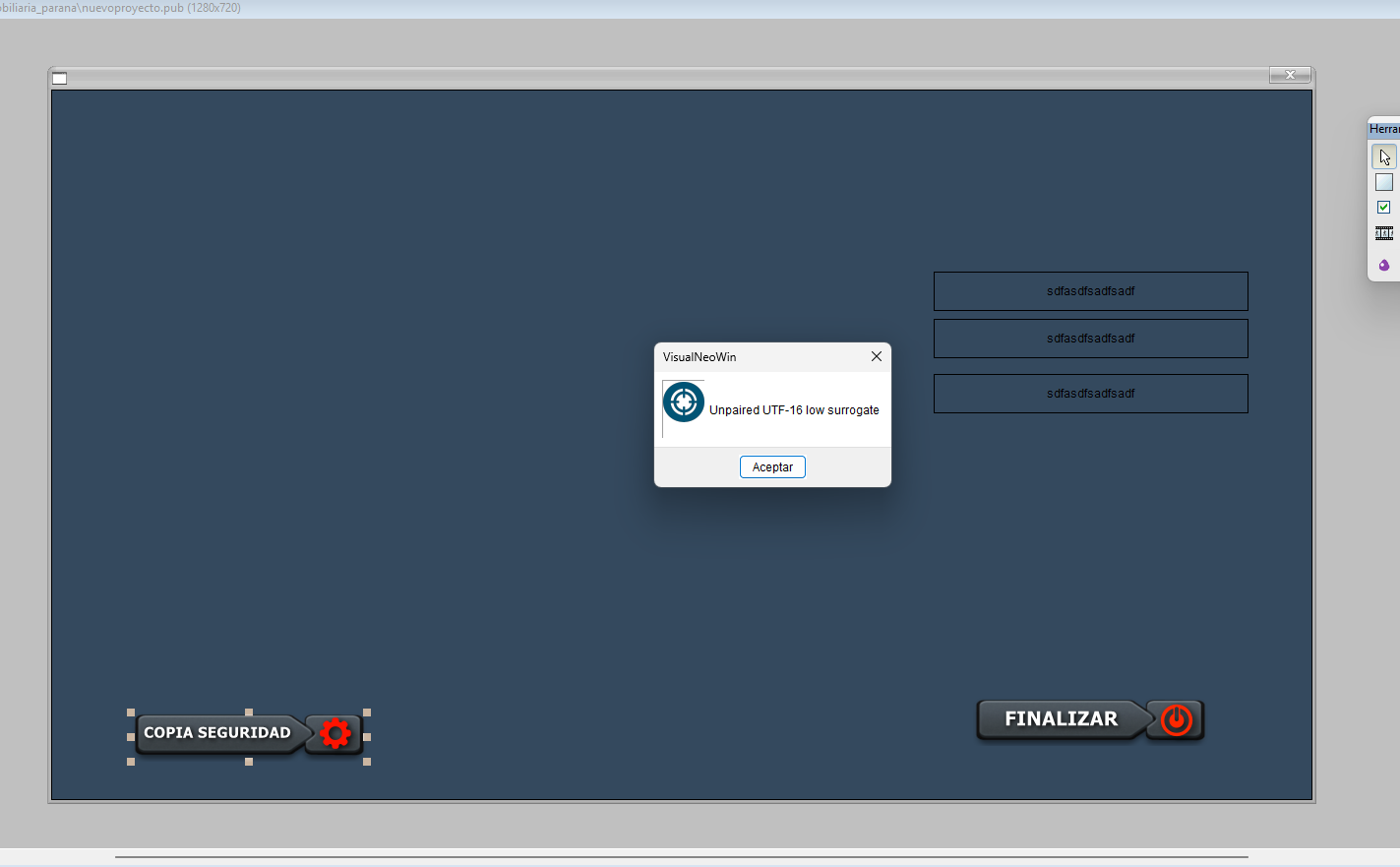
Quote from Anthony LaTorre on August 22, 2026, 2:24 amALEJANDRO, I am away from my computer until tomorrow... If you can upload the pub you are getting the error in, I can take a look at it tomorrow...
ALEJANDRO, I am away from my computer until tomorrow... If you can upload the pub you are getting the error in, I can take a look at it tomorrow...
Quote from Anthony LaTorre on August 22, 2026, 6:31 pmALEJANDRO, this does not seem to be a NeoFit error... Until you upload your pub file I won't know for sure...
ALEJANDRO, this does not seem to be a NeoFit error... Until you upload your pub file I won't know for sure...

Quote from Matilde on August 23, 2026, 6:12 pm@anthony-latorre helo i Alejandro Valenti frond the account the Matilde my friend....
Hello,
I am currently testing NeoFit with VisualNEO Win and I ran into a limitation when trying to make a complete group of objects responsive.
NeoFit v2 works very well when objects are registered individually using NeoFit_RegisterObject. However, I have pages containing many controls grouped together in VisualNEO, and I would like to scale the entire group as a single responsive unit while preserving the relative positions and proportions of all the objects inside it.
For example, I originally tried:
NeoFit_Clear
NeoFit_RegisterObject "contenedor1" "STRETCH" "STRETCH" "L" "T" "0" "0"
NeoFit_RegisterObject "Grupo74" "STRETCH" "STRETCH" "L" "T" "0" "0"
NeoFit_PinObject "Grupo74" "contenedor1" "CC" "CC" "0" "0"NeoFit_Apply
This does not produce the desired result.
NeoFit_PinObject is useful for positioning one object relative to another, but it does not make the child objects inside a VisualNEO Group inherit the size or transformation of that group.
What I would like is something closer to the original global scaling concept, but applied to a specific group/container instead of the whole page.
I have therefore prepared an experimental modification of the NeoFit source code that introduces a new command:
NeoFit_RegisterGroup "Grupo74" "contenedor1" "FIT"
The intended behavior is:
Grupo74 represents the original group/area containing the controls.
contenedor1 represents the destination responsive area.
FIT scales the complete contents proportionally while preserving their relative positions and aspect ratio.
The complete group should remain centered inside the destination container.I also added:
NeoFit_RegisterGroup "Grupo74" "contenedor1" "FILL"
FILL is intended to use the complete available width and height of the destination container, even if the horizontal and vertical scaling factors are different.
The proposed usage is:
NeoFit_Clear
NeoFit_SetDesignSize "1280" "720"
NeoFit_RegisterObject "contenedor1" "STRETCH" "STRETCH" "L" "T" "0" "0"
NeoFit_RegisterGroup "Grupo74" "contenedor1" "FIT"
NeoFit_Apply
The main objective is to make it possible to design a complete section/page in VisualNEO, group its controls, and then have NeoFit scale all the controls belonging to that group together, instead of having to manually register dozens or hundreds of individual objects.
I am attaching the modified NeoFit .pb source code.
This version is experimental and has not been compiled or fully validated yet. I would really appreciate it if you could review the implementation, correct anything necessary regarding VisualNEO's internal handling of Groups/objects, and compile it using the same environment and architecture as the original NeoFit plugin.
In particular, it would be useful to confirm whether the VisualNEO plugin API provides a reliable way to enumerate the actual members of a Group. If it does not, the implementation may need an alternative mechanism for explicitly registering the objects that belong to a responsive group.
The goal is essentially:
Original Group → Responsive Container → proportional transformation of every member's position, width and height.
Thank you very much for taking a look at it.
@anthony-latorre helo i Alejandro Valenti frond the account the Matilde my friend....
Hello,
I am currently testing NeoFit with VisualNEO Win and I ran into a limitation when trying to make a complete group of objects responsive.
NeoFit v2 works very well when objects are registered individually using NeoFit_RegisterObject. However, I have pages containing many controls grouped together in VisualNEO, and I would like to scale the entire group as a single responsive unit while preserving the relative positions and proportions of all the objects inside it.
For example, I originally tried:
NeoFit_Clear
NeoFit_RegisterObject "contenedor1" "STRETCH" "STRETCH" "L" "T" "0" "0"
NeoFit_RegisterObject "Grupo74" "STRETCH" "STRETCH" "L" "T" "0" "0"
NeoFit_PinObject "Grupo74" "contenedor1" "CC" "CC" "0" "0"
NeoFit_Apply
This does not produce the desired result.
NeoFit_PinObject is useful for positioning one object relative to another, but it does not make the child objects inside a VisualNEO Group inherit the size or transformation of that group.
What I would like is something closer to the original global scaling concept, but applied to a specific group/container instead of the whole page.
I have therefore prepared an experimental modification of the NeoFit source code that introduces a new command:
NeoFit_RegisterGroup "Grupo74" "contenedor1" "FIT"
The intended behavior is:
Grupo74 represents the original group/area containing the controls.
contenedor1 represents the destination responsive area.
FIT scales the complete contents proportionally while preserving their relative positions and aspect ratio.
The complete group should remain centered inside the destination container.
I also added:
NeoFit_RegisterGroup "Grupo74" "contenedor1" "FILL"
FILL is intended to use the complete available width and height of the destination container, even if the horizontal and vertical scaling factors are different.
The proposed usage is:
NeoFit_Clear
NeoFit_SetDesignSize "1280" "720"
NeoFit_RegisterObject "contenedor1" "STRETCH" "STRETCH" "L" "T" "0" "0"
NeoFit_RegisterGroup "Grupo74" "contenedor1" "FIT"
NeoFit_Apply
The main objective is to make it possible to design a complete section/page in VisualNEO, group its controls, and then have NeoFit scale all the controls belonging to that group together, instead of having to manually register dozens or hundreds of individual objects.
I am attaching the modified NeoFit .pb source code.
This version is experimental and has not been compiled or fully validated yet. I would really appreciate it if you could review the implementation, correct anything necessary regarding VisualNEO's internal handling of Groups/objects, and compile it using the same environment and architecture as the original NeoFit plugin.
In particular, it would be useful to confirm whether the VisualNEO plugin API provides a reliable way to enumerate the actual members of a Group. If it does not, the implementation may need an alternative mechanism for explicitly registering the objects that belong to a responsive group.
The goal is essentially:
Original Group → Responsive Container → proportional transformation of every member's position, width and height.
Thank you very much for taking a look at it.
Uploaded files:Quote from Anthony LaTorre on August 23, 2026, 7:02 pmHello Matilde, and thank you for making me aware of this limitation...
I have created a version that hopefully handles resize and positioning of groups... I haven't had time to test this... so please let me know if it is working.
Thanks again.
Hello Matilde, and thank you for making me aware of this limitation...
I have created a version that hopefully handles resize and positioning of groups... I haven't had time to test this... so please let me know if it is working.
Thanks again.
Uploaded files:Quote from joferar333 on August 23, 2026, 7:44 pm@anthony-latorre
Dear Genius, I sent you the build file with the suggestion from Matilde's account (a friend) because I had been blocked when I tried to send it to you. I received your new build and tested it—it's truly excellent! It saves a lot of time and also allows you to quickly make an entire complex screen responsive through this new grouping feature.
Congratulations on your work! I'm sure you'll appreciate this tool, which will now allow for the creation of truly responsive applications. I also appreciate your openness to suggestions, which definitely add value to your excellent work.
I think you should release it as an upgrade now because it's really worth it.
Best regards from Argentina, Alejandro
Dear Genius, I sent you the build file with the suggestion from Matilde's account (a friend) because I had been blocked when I tried to send it to you. I received your new build and tested it—it's truly excellent! It saves a lot of time and also allows you to quickly make an entire complex screen responsive through this new grouping feature.
Congratulations on your work! I'm sure you'll appreciate this tool, which will now allow for the creation of truly responsive applications. I also appreciate your openness to suggestions, which definitely add value to your excellent work.
I think you should release it as an upgrade now because it's really worth it.
Best regards from Argentina, Alejandro
Quote from Anthony LaTorre on August 23, 2026, 7:58 pmThank you Alejandro for testing this... If you encounter no problems, I will announce the update shortly to the forum... Please let me know if you encounter any issues...
Thanks again
Thank you Alejandro for testing this... If you encounter no problems, I will announce the update shortly to the forum... Please let me know if you encounter any issues...
Thanks again
Quote from joferar333 on August 24, 2026, 1:55 am@anthony-latorre
Hello,
Thank you for the NeoFit v2.2 build and especially for adding
NeoFit_RegisterGroup. The new group functionality is working very well
and solves the original problem.However, while testing it in a real VisualNEO Win application, we found
another issue related to window maximization/resizing and NeoFit_Apply.CURRENT VISUALNEO SETUP
The application was originally designed at 1280 x 720.
NeoFit uses:
NeoFit_SetDesignSize “1280” “720”
At VisualNEO Startup the application is maximized with:
SetVar “[WindowState]” “Maximized”
The complete Startup code currently is:
SetVar “[WindowState]” “Maximized” setvar “[fecha]” “[DateLong]” Call
“FUNCIONES_PERSONALES_capitalizar” “[fecha]” “[fecha]” dbpOpenDatabase
“parana1” “[pubdir]parana1.mdb” dbpTranslateHints
“First=Primero;Previous=Anterior;Next=Siguiente;Last=Ultimo;Add=Agregar;Delete=Eliminar;Edit=editar;Save=grabar
edicion;Cancel=Cancelar edicion;Refresh=Actualizar;DeletePrompt=Eliminar
Registro?;DeleteTitle=Confirmar” dbpShowErrors “Yes”The NeoFit configuration itself is now working correctly at the original
1280x720 design size.A real frame object and a real target object are being used, and
NeoFit_RegisterGroup is correctly handling the member objects.Conceptually, the configuration is:
NeoFit_Clear
NeoFit_SetDesignSize “1280” “720”
NeoFit_RegisterObject “contenedor1” “STRETCH” “STRETCH” “L” “T” “0” “0”
NeoFit_RegisterGroup “marco_principal” “contenedor1” “FIT”
“p001;p002;p003;p004;p005;p006;p007;p008;p009;p010;p011;p012;p013;p014;p015;p016;ModernImage7;p017”NeoFit_Apply
marco_principal represents the original 1280x720 frame.
contenedor1 is the responsive destination area.
With the geometry corrected, the entire group now displays correctly at
1280x720.THE REMAINING PROBLEM
When VisualNEO maximizes the publication window, the NeoFit layout
remains at approximately the original 1280x720 size instead of being
recalculated for the new maximized client area.We initially suspected: - an incorrect group frame; - incorrect
Members; - the target being accidentally included in Members; -
duplicate Members; - a timing issue; - NeoFit_Apply running too early.Those possibilities were tested.
We also tried delaying the NeoFit execution after:
SetVar “[WindowState]” “Maximized”
but even with a delay the problem remained.
The important observation is:
At the original 1280x720 size, the new RegisterGroup implementation
works correctly. The problem occurs when the VisualNEO publication
window changes to its maximized size.WHAT WE FOUND IN NEOFIT V2.2 SOURCE
Looking at ApplyAll(), NeoFit obtains the current client size using:
GetClientRect_(g_pubHwnd, @rc)
curW = rc- rc curH = rc- rc
sx = curW / g_designW sy = curH / g_designH
Therefore the scaling mathematics itself appears capable of using the
actual current window size.g_pubHwnd is initialized from the VisualNEO publication HWND:
_nbInitPlugIn(hWnd…) g_pubHwnd = hWnd
So it does not appear that NeoFit is permanently caching 1280x720 as the
current window size.The interesting part is the VisualNEO message handling.
NeoFit v2.2 recognizes:
#NBMSG_MOVESIZE = 5
but the current implementation intentionally ignores the MOVESIZE
notification.There is a comment indicating that re-layout should instead be triggered
from the VisualNEO script by calling NeoFit_Apply from a Resized event.This creates a problem in our current VisualNEO Win version/application
because we do not have an accessible Resize/Resized publication event
available where we can reliably call:NeoFit_Apply
VisualNEO itself changes the window state through:
SetVar “[WindowState]” “Maximized”
but NeoFit does not automatically re-apply the registered layout after
this size change.PROPOSED SOLUTION
Would it be possible for NeoFit itself to react to:
#NBMSG_MOVESIZE
and automatically re-run the current layout?
Conceptually something similar to:
ProcedureDLL _nbMessage(MsgCode.i, Reserved.i)
Select MsgCode
Case #NBMSG_ENTER_RUNMODE
ResetGlobalsOnly()Case #NBMSG_EXIT_RUNMODE
PurgePluginResources()Case #NBMSG_MOVESIZE
ApplyAll()EndSelect
EndProcedure
The intended sequence would then be:
VisualNEO publication starts | v SetVar “[WindowState]” “Maximized” | v
VisualNEO window/client area changes | v #NBMSG_MOVESIZE | v NeoFit
receives the notification | v ApplyAll() | v GetClientRect_(g_pubHwnd…)
| v new curW / curH | v new sx / sy | v target + RegisterGroup layout
recalculatedThis would also make NeoFit considerably easier to use because the
VisualNEO publication would not need to manually call NeoFit_Apply every
time the main window changes size.IMPORTANT CONSIDERATION
I realize that #NBMSG_MOVESIZE may be fired repeatedly while a user
manually resizes or moves the publication window.Therefore simply calling:
ApplyAll()
for every MOVESIZE notification may not necessarily be the optimal
implementation.NeoFit already has an internal apply/re-entry guard (g_inApplyGuard),
but it may still be worth considering: - re-entry protection; - whether
MOVESIZE is also sent for movement without resizing; - avoiding
unnecessary recalculation when client width/height did not actually
change; - storing the previous clientW/clientH and only applying when
dimensions change; - possibly debouncing/throttling rapid resize
notifications if VisualNEO generates many of them.For example, conceptually:
Case #NBMSG_MOVESIZE
GetClientRect_(g_pubHwnd, @rc)
newW = rc- rc newH = rc- rc
If newW <> g_lastClientW Or newH <> g_lastClientH
g_lastClientW = newW
g_lastClientH = newHApplyAll()
EndIf
Of course, this is only a proposed approach. You know the VisualNEO
plugin lifecycle and message system much better, so please implement it
in whichever way is safest.DESIRED RESULT
We would like NeoFit to work like this:
Design: 1280 x 720 | v NeoFit registers objects/groups | v VisualNEO
maximizes the publication | v NeoFit detects the new client size
automatically | v NeoFit recalculates the registered layout | v The
interface fills/fits the new available areaThe new NeoFit_RegisterGroup functionality itself appears to be working
correctly now. The remaining issue seems specifically related to
automatically reapplying the layout after the VisualNEO publication
window changes size.If possible, could you please review the handling of #NBMSG_MOVESIZE and
provide a new compiled build (for example v2.3) that automatically
recalculates the NeoFit layout when the publication client size changes?It would also be useful if manual NeoFit_Apply continued to work
normally, so both automatic and explicit application remain available.RegisterGroup itself is already working correctly, so there should be no
need to redesign that functionality. The requested change is
specifically about automatic re-application when the publication
window/client area changes size.Thank you again for the work on NeoFit and for adding RegisterGroup.
Hello,
Thank you for the NeoFit v2.2 build and especially for adding
NeoFit_RegisterGroup. The new group functionality is working very well
and solves the original problem.
However, while testing it in a real VisualNEO Win application, we found
another issue related to window maximization/resizing and NeoFit_Apply.
CURRENT VISUALNEO SETUP
The application was originally designed at 1280 x 720.
NeoFit uses:
NeoFit_SetDesignSize “1280” “720”
At VisualNEO Startup the application is maximized with:
SetVar “[WindowState]” “Maximized”
The complete Startup code currently is:
SetVar “[WindowState]” “Maximized” setvar “[fecha]” “[DateLong]” Call
“FUNCIONES_PERSONALES_capitalizar” “[fecha]” “[fecha]” dbpOpenDatabase
“parana1” “[pubdir]parana1.mdb” dbpTranslateHints
“First=Primero;Previous=Anterior;Next=Siguiente;Last=Ultimo;Add=Agregar;Delete=Eliminar;Edit=editar;Save=grabar
edicion;Cancel=Cancelar edicion;Refresh=Actualizar;DeletePrompt=Eliminar
Registro?;DeleteTitle=Confirmar” dbpShowErrors “Yes”
The NeoFit configuration itself is now working correctly at the original
1280x720 design size.
A real frame object and a real target object are being used, and
NeoFit_RegisterGroup is correctly handling the member objects.
Conceptually, the configuration is:
NeoFit_Clear
NeoFit_SetDesignSize “1280” “720”
NeoFit_RegisterObject “contenedor1” “STRETCH” “STRETCH” “L” “T” “0” “0”
NeoFit_RegisterGroup “marco_principal” “contenedor1” “FIT”
“p001;p002;p003;p004;p005;p006;p007;p008;p009;p010;p011;p012;p013;p014;p015;p016;ModernImage7;p017”
NeoFit_Apply
marco_principal represents the original 1280x720 frame.
contenedor1 is the responsive destination area.
With the geometry corrected, the entire group now displays correctly at
1280x720.
THE REMAINING PROBLEM
When VisualNEO maximizes the publication window, the NeoFit layout
remains at approximately the original 1280x720 size instead of being
recalculated for the new maximized client area.
We initially suspected: - an incorrect group frame; - incorrect
Members; - the target being accidentally included in Members; -
duplicate Members; - a timing issue; - NeoFit_Apply running too early.
Those possibilities were tested.
We also tried delaying the NeoFit execution after:
SetVar “[WindowState]” “Maximized”
but even with a delay the problem remained.
The important observation is:
At the original 1280x720 size, the new RegisterGroup implementation
works correctly. The problem occurs when the VisualNEO publication
window changes to its maximized size.
WHAT WE FOUND IN NEOFIT V2.2 SOURCE
Looking at ApplyAll(), NeoFit obtains the current client size using:
GetClientRect_(g_pubHwnd, @rc)
curW = rc- rc curH = rc- rc
sx = curW / g_designW sy = curH / g_designH
Therefore the scaling mathematics itself appears capable of using the
actual current window size.
g_pubHwnd is initialized from the VisualNEO publication HWND:
_nbInitPlugIn(hWnd…) g_pubHwnd = hWnd
So it does not appear that NeoFit is permanently caching 1280x720 as the
current window size.
The interesting part is the VisualNEO message handling.
NeoFit v2.2 recognizes:
#NBMSG_MOVESIZE = 5
but the current implementation intentionally ignores the MOVESIZE
notification.
There is a comment indicating that re-layout should instead be triggered
from the VisualNEO script by calling NeoFit_Apply from a Resized event.
This creates a problem in our current VisualNEO Win version/application
because we do not have an accessible Resize/Resized publication event
available where we can reliably call:
NeoFit_Apply
VisualNEO itself changes the window state through:
SetVar “[WindowState]” “Maximized”
but NeoFit does not automatically re-apply the registered layout after
this size change.
PROPOSED SOLUTION
Would it be possible for NeoFit itself to react to:
#NBMSG_MOVESIZE
and automatically re-run the current layout?
Conceptually something similar to:
ProcedureDLL _nbMessage(MsgCode.i, Reserved.i)
Select MsgCode
Case #NBMSG_ENTER_RUNMODE
ResetGlobalsOnly()
Case #NBMSG_EXIT_RUNMODE
PurgePluginResources()
Case #NBMSG_MOVESIZE
ApplyAll()
EndSelect
EndProcedure
The intended sequence would then be:
VisualNEO publication starts | v SetVar “[WindowState]” “Maximized” | v
VisualNEO window/client area changes | v #NBMSG_MOVESIZE | v NeoFit
receives the notification | v ApplyAll() | v GetClientRect_(g_pubHwnd…)
| v new curW / curH | v new sx / sy | v target + RegisterGroup layout
recalculated
This would also make NeoFit considerably easier to use because the
VisualNEO publication would not need to manually call NeoFit_Apply every
time the main window changes size.
IMPORTANT CONSIDERATION
I realize that #NBMSG_MOVESIZE may be fired repeatedly while a user
manually resizes or moves the publication window.
Therefore simply calling:
ApplyAll()
for every MOVESIZE notification may not necessarily be the optimal
implementation.
NeoFit already has an internal apply/re-entry guard (g_inApplyGuard),
but it may still be worth considering: - re-entry protection; - whether
MOVESIZE is also sent for movement without resizing; - avoiding
unnecessary recalculation when client width/height did not actually
change; - storing the previous clientW/clientH and only applying when
dimensions change; - possibly debouncing/throttling rapid resize
notifications if VisualNEO generates many of them.
For example, conceptually:
Case #NBMSG_MOVESIZE
GetClientRect_(g_pubHwnd, @rc)
newW = rc- rc newH = rc- rc
If newW <> g_lastClientW Or newH <> g_lastClientH
g_lastClientW = newW
g_lastClientH = newH
ApplyAll()
EndIf
Of course, this is only a proposed approach. You know the VisualNEO
plugin lifecycle and message system much better, so please implement it
in whichever way is safest.
DESIRED RESULT
We would like NeoFit to work like this:
Design: 1280 x 720 | v NeoFit registers objects/groups | v VisualNEO
maximizes the publication | v NeoFit detects the new client size
automatically | v NeoFit recalculates the registered layout | v The
interface fills/fits the new available area
The new NeoFit_RegisterGroup functionality itself appears to be working
correctly now. The remaining issue seems specifically related to
automatically reapplying the layout after the VisualNEO publication
window changes size.
If possible, could you please review the handling of #NBMSG_MOVESIZE and
provide a new compiled build (for example v2.3) that automatically
recalculates the NeoFit layout when the publication client size changes?
It would also be useful if manual NeoFit_Apply continued to work
normally, so both automatic and explicit application remain available.
RegisterGroup itself is already working correctly, so there should be no
need to redesign that functionality. The requested change is
specifically about automatic re-application when the publication
window/client area changes size.
Thank you again for the work on NeoFit and for adding RegisterGroup.
Quote from joferar333 on August 24, 2026, 4:45 pm@anthony-latorre
Hello,
I have very good news regarding NeoFit v2.2 and the issue I reported earlier.
After further testing, I discovered that NeoFit itself was not the problem, and the automatic resizing/maximization logic does not appear to require the modification I previously suggested.
The problem was related to the type of image object I was using in VisualNEO Win.
On my main page, some images had originally been inserted using ModernImage objects instead of standard VisualNEO Image objects.
While those ModernImage objects were included in the responsive layout/group, the result was incorrect. The layout appeared to remain constrained, objects were positioned incorrectly, and this initially made it look as if NeoFit was not correctly recalculating the layout for the maximized publication window.
I continued experimenting and removed the problematic ModernImage objects. I then inserted the images again using the standard Image object in VisualNEO.
After doing this, NeoFit v2.2 works perfectly, including on the maximized window.
The working structure is essentially:
NeoFit_Clear
NeoFit_SetDesignSize "1280" "720"

NeoFit_RegisterObject "marco3_principal" "STRETCH" "STRETCH" "L" "T" "0" "0"

NeoFit_RegisterGroup "contenedor1" "marco3_principal" "FIT" "member1;member2;member3;..."

NeoFit_Apply
marco3_principalis the responsive target/frame and expands correctly to the available publication area.The objects registered through
NeoFit_RegisterGroupare then scaled withFIT, preserving the layout and proportions.With standard VisualNEO Image objects included in the layout, the complete interface now adapts correctly from the original 1280×720 design to the maximized screen.
I have tested it successfully and the result is exactly what I was trying to achieve.
Therefore, regarding my previous message about
#NBMSG_MOVESIZE, please do not make that modification based on my previous report yet. My testing now indicates that the resize problem I was experiencing was caused by the ModernImage objects rather than by NeoFit failing to detect the maximized window.There may still be something worth investigating regarding compatibility between NeoFit and VisualNEO's ModernImage object, because replacing ModernImage with the standard Image object immediately solved the problem.
So the current conclusion is:
NeoFit_RegisterGroup: WORKING
FIT group scaling: WORKING
1280×720 → maximized window: WORKING
Standard VisualNEO Image objects: WORKING
ModernImage objects: appear to cause incorrect behavior when used in this responsive group/layout
Thank you again for NeoFit v2.2 and for implementing
NeoFit_RegisterGroup. After correcting the image object type, the result is excellent and the complete page now scales as intended.If useful, the remaining area to investigate would be why ModernImage behaves differently from a standard Image object when NeoFit attempts to include it in the responsive layout.
Thank you!
Best Regards
Hello,
I have very good news regarding NeoFit v2.2 and the issue I reported earlier.
After further testing, I discovered that NeoFit itself was not the problem, and the automatic resizing/maximization logic does not appear to require the modification I previously suggested.
The problem was related to the type of image object I was using in VisualNEO Win.
On my main page, some images had originally been inserted using ModernImage objects instead of standard VisualNEO Image objects.
While those ModernImage objects were included in the responsive layout/group, the result was incorrect. The layout appeared to remain constrained, objects were positioned incorrectly, and this initially made it look as if NeoFit was not correctly recalculating the layout for the maximized publication window.
I continued experimenting and removed the problematic ModernImage objects. I then inserted the images again using the standard Image object in VisualNEO.
After doing this, NeoFit v2.2 works perfectly, including on the maximized window.
The working structure is essentially:
NeoFit_Clear
NeoFit_SetDesignSize "1280" "720"

NeoFit_RegisterObject "marco3_principal" "STRETCH" "STRETCH" "L" "T" "0" "0"

NeoFit_RegisterGroup "contenedor1" "marco3_principal" "FIT" "member1;member2;member3;..."

NeoFit_Apply
marco3_principal is the responsive target/frame and expands correctly to the available publication area.
The objects registered through NeoFit_RegisterGroup are then scaled with FIT, preserving the layout and proportions.
With standard VisualNEO Image objects included in the layout, the complete interface now adapts correctly from the original 1280×720 design to the maximized screen.
I have tested it successfully and the result is exactly what I was trying to achieve.
Therefore, regarding my previous message about #NBMSG_MOVESIZE, please do not make that modification based on my previous report yet. My testing now indicates that the resize problem I was experiencing was caused by the ModernImage objects rather than by NeoFit failing to detect the maximized window.
There may still be something worth investigating regarding compatibility between NeoFit and VisualNEO's ModernImage object, because replacing ModernImage with the standard Image object immediately solved the problem.
So the current conclusion is:
NeoFit_RegisterGroup: WORKING
FIT group scaling: WORKING
1280×720 → maximized window: WORKING
Standard VisualNEO Image objects: WORKING
ModernImage objects: appear to cause incorrect behavior when used in this responsive group/layout
Thank you again for NeoFit v2.2 and for implementing NeoFit_RegisterGroup. After correcting the image object type, the result is excellent and the complete page now scales as intended.
If useful, the remaining area to investigate would be why ModernImage behaves differently from a standard Image object when NeoFit attempts to include it in the responsive layout.
Thank you!
Best Regards
Quote from joferar333 on August 24, 2026, 11:15 pm@anthony-latorre please i need your help
Hello,

I am sending you the current two-page VisualNEO Win test publication so
you can reproduce a NeoFit v2.2 problem that I have not been able to
solve after extensive testing.

The publication has been intentionally reduced to only two pages:
PRINCIPAL and PROPIETARIOS. The purpose is to isolate the problem and
make it easier to reproduce.

CURRENT RESULT

On the PRINCIPAL page, NeoFit works correctly. The page was designed
around 1280 x 720 and, when the publication runs maximized, the
interface adapts correctly. The objects maintain their expected
proportions and relative positions.

However, when I navigate from PRINCIPAL to PROPIETARIOS, the
PROPIETARIOS page becomes badly distorted/disorganized. The page
expands, but the internal layout is not preserved. Controls change
position and/or scale incorrectly, producing a completely different
result from the PRINCIPAL page.

This is now reproducible in the attached two-page PUB.

IMPORTANT DISCOVERY ABOUT IMAGES

During earlier testing I discovered that VisualNEO ModernImage objects
caused problems with NeoFit. After removing the ModernImage objects and
replacing them with standard VisualNEO Image objects, the PRINCIPAL page
began working perfectly.

Therefore the current PRINCIPAL page demonstrates that
NeoFit_RegisterGroup, FIT scaling, standard Image objects, and
maximized-window scaling can work correctly.

The remaining problem is specifically the second page, PROPIETARIOS.

BASIC WORKING STRUCTURE ON PRINCIPAL

NeoFit_Clear NeoFit_SetDesignSize “1280” “720” NeoFit_RegisterObject
“marco3_principal” “STRETCH” “STRETCH” “L” “T” “0” “0”
NeoFit_RegisterGroup “contenedor1” “marco3_principal” “FIT” “members…”
NeoFit_Apply

This works correctly on PRINCIPAL.

PROBLEM ON PROPIETARIOS

We attempted to reproduce the same concept on PROPIETARIOS:

NeoFit_Clear NeoFit_SetDesignSize “1280” “720” NeoFit_RegisterObject
“marco_propietarios” “STRETCH” “STRETCH” “L” “T” “0” “0”
NeoFit_RegisterGroup “contenedor2” “marco_propietarios” “FIT” “members…”
NeoFit_Apply

The target/frame expands, but the objects on the page do not retain the
correct layout.

TESTS ALREADY PERFORMED

1.  NeoFit_Clear: We verified that NeoFit_Clear is active before
    registering the PROPIETARIOS layout, so registrations from PRINCIPAL
    should not remain active.

2.  Design size: We consistently tested with NeoFit_SetDesignSize “1280”
    “720”.

3.  Container height: We tested both 1280 x 690 and 1280 x 720. Neither
    solved the distortion.

4.  Container Y position: We tested the original vertical position and
    also X=0, Y=0, W=1280, H=720. The problem remained.

5.  Duplicate Members: We found and removed duplicated member names from
    NeoFit_RegisterGroup. This did not solve the problem.

6.  Target included as a Member: We verified that the target/container
    itself was not incorrectly included in its own Members list.

7.  Reduced test with only four controls: We reduced
    NeoFit_RegisterGroup to only four simple buttons. Even with only
    four buttons, PROPIETARIOS still did not lay out correctly.

8.  Group/frame experiments: We tested a logical group name and a real
    VisualNEO group/frame, and attempted to reproduce the same physical
    grouping structure used by PRINCIPAL. The problem remained.

9.  Rebuilding the PROPIETARIOS container: We rebuilt it to follow a
    structure similar to PRINCIPAL. NeoFit expanded the area, but the
    internal object layout was still incorrect.

10. Anchor experiments: We inspected and tested differences in VisualNEO
    anchor properties. This did not resolve the issue.

11. ModernImage: ModernImage was previously identified as a real source
    of problems on PRINCIPAL. Those objects were removed/replaced with
    standard Image objects. PRINCIPAL then worked correctly, but the
    current PROPIETARIOS problem persisted.

12. Startup/maximized window: The publication is maximized at Startup
    using SetVar “[WindowState]” “Maximized”. We tested delaying NeoFit
    execution. That did not solve PROPIETARIOS. PRINCIPAL now works
    correctly maximized, so maximization itself does not appear to be
    the fundamental issue.

WHY THE TWO-PAGE PUB IS IMPORTANT

The attached publication has been reduced specifically to PRINCIPAL and
PROPIETARIOS.

Inside the same publication:

PRINCIPAL = NeoFit works correctly. PRINCIPAL -> PROPIETARIOS = NeoFit
expands/recalculates, but the layout becomes distorted.

Both pages run under the same window, monitor, VisualNEO Win version,
NeoFit build, and 1280 x 720 design concept.

WHAT I WOULD LIKE YOU TO CHECK

Could you please run the attached two-page PUB and inspect what happens
internally when changing from PRINCIPAL to PROPIETARIOS?

In particular, please check: - what geometry NeoFit captures for the
PROPIETARIOS group/frame; - what original coordinates are captured for
its Members; - whether those coordinates are page-relative,
group-relative, or publication/client-relative; - whether
NeoFit_RegisterGroup correctly rebuilds its baseline after NeoFit_Clear
when entering another page; - whether object handles from the previous
page can remain cached; - whether the group/member baseline is captured
before or after VisualNEO has fully activated the new page; - whether
VisualNEO group objects on secondary pages expose coordinates
differently; - whether the first NeoFit_Apply modifies values that are
later reused as a new design baseline; - whether a page transition
requires a specific reset/re-registration step; - whether NeoFit
resolves object handles differently on the first page and subsequent
pages.

POSSIBLE DEBUGGING INFORMATION

If useful, a diagnostic/debug version of NeoFit could log for each
RegisterGroup call:

Current page Group/frame name Target name Target HWND Group/frame
rectangle Target rectangle Member name Member HWND Original member
X/Y/W/H Calculated X/Y/W/H Current client width/height Design
width/height FIT scale factor FIT offset X/Y

This would make it much easier to compare PRINCIPAL with PROPIETARIOS.

CURRENT CONCLUSION

At this point I do not want to continue changing the publication blindly
because we have already tested the most obvious configuration
possibilities.

The important facts are:

NeoFit v2.2 + NeoFit_RegisterGroup works on PRINCIPAL. Standard
VisualNEO Image objects work correctly. The publication can scale
correctly to the maximized window. PROPIETARIOS fails even after testing
different container sizes, positions, Members lists, grouping
structures, anchors, and a minimal four-button group. The attached
two-page PUB reproduces the difference in a much simpler environment.

I would greatly appreciate it if you could inspect the attached PUB
directly and determine whether there is a NeoFit issue related to
RegisterGroup when changing VisualNEO pages, or whether there is a
specific requirement for secondary pages that we are missing.

Please do not focus on the earlier MOVESIZE theory unless your debugging
indicates it is relevant. After correcting the ModernImage issue,
PRINCIPAL scales correctly in the maximized window, so our earlier
suspicion about MOVESIZE does not appear to explain this current
problem.

If you can identify the cause, please let me know the correct NeoFit
configuration for PROPIETARIOS. If the problem is inside the plugin, a
corrected or diagnostic build would be extremely useful.

Thank you very much for your help and for your patience with all these
tests.
@anthony-latorre please i need your help
Hello,

I am sending you the current two-page VisualNEO Win test publication so
you can reproduce a NeoFit v2.2 problem that I have not been able to
solve after extensive testing.

The publication has been intentionally reduced to only two pages:
PRINCIPAL and PROPIETARIOS. The purpose is to isolate the problem and
make it easier to reproduce.

CURRENT RESULT

On the PRINCIPAL page, NeoFit works correctly. The page was designed
around 1280 x 720 and, when the publication runs maximized, the
interface adapts correctly. The objects maintain their expected
proportions and relative positions.

However, when I navigate from PRINCIPAL to PROPIETARIOS, the
PROPIETARIOS page becomes badly distorted/disorganized. The page
expands, but the internal layout is not preserved. Controls change
position and/or scale incorrectly, producing a completely different
result from the PRINCIPAL page.

This is now reproducible in the attached two-page PUB.

IMPORTANT DISCOVERY ABOUT IMAGES

During earlier testing I discovered that VisualNEO ModernImage objects
caused problems with NeoFit. After removing the ModernImage objects and
replacing them with standard VisualNEO Image objects, the PRINCIPAL page
began working perfectly.

Therefore the current PRINCIPAL page demonstrates that
NeoFit_RegisterGroup, FIT scaling, standard Image objects, and
maximized-window scaling can work correctly.

The remaining problem is specifically the second page, PROPIETARIOS.

BASIC WORKING STRUCTURE ON PRINCIPAL

NeoFit_Clear NeoFit_SetDesignSize “1280” “720” NeoFit_RegisterObject
“marco3_principal” “STRETCH” “STRETCH” “L” “T” “0” “0”
NeoFit_RegisterGroup “contenedor1” “marco3_principal” “FIT” “members…”
NeoFit_Apply

This works correctly on PRINCIPAL.

PROBLEM ON PROPIETARIOS

We attempted to reproduce the same concept on PROPIETARIOS:

NeoFit_Clear NeoFit_SetDesignSize “1280” “720” NeoFit_RegisterObject
“marco_propietarios” “STRETCH” “STRETCH” “L” “T” “0” “0”
NeoFit_RegisterGroup “contenedor2” “marco_propietarios” “FIT” “members…”
NeoFit_Apply

The target/frame expands, but the objects on the page do not retain the
correct layout.

TESTS ALREADY PERFORMED

1.  NeoFit_Clear: We verified that NeoFit_Clear is active before
    registering the PROPIETARIOS layout, so registrations from PRINCIPAL
    should not remain active.

2.  Design size: We consistently tested with NeoFit_SetDesignSize “1280”
    “720”.

3.  Container height: We tested both 1280 x 690 and 1280 x 720. Neither
    solved the distortion.

4.  Container Y position: We tested the original vertical position and
    also X=0, Y=0, W=1280, H=720. The problem remained.

5.  Duplicate Members: We found and removed duplicated member names from
    NeoFit_RegisterGroup. This did not solve the problem.

6.  Target included as a Member: We verified that the target/container
    itself was not incorrectly included in its own Members list.

7.  Reduced test with only four controls: We reduced
    NeoFit_RegisterGroup to only four simple buttons. Even with only
    four buttons, PROPIETARIOS still did not lay out correctly.

8.  Group/frame experiments: We tested a logical group name and a real
    VisualNEO group/frame, and attempted to reproduce the same physical
    grouping structure used by PRINCIPAL. The problem remained.

9.  Rebuilding the PROPIETARIOS container: We rebuilt it to follow a
    structure similar to PRINCIPAL. NeoFit expanded the area, but the
    internal object layout was still incorrect.

10. Anchor experiments: We inspected and tested differences in VisualNEO
    anchor properties. This did not resolve the issue.

11. ModernImage: ModernImage was previously identified as a real source
    of problems on PRINCIPAL. Those objects were removed/replaced with
    standard Image objects. PRINCIPAL then worked correctly, but the
    current PROPIETARIOS problem persisted.

12. Startup/maximized window: The publication is maximized at Startup
    using SetVar “[WindowState]” “Maximized”. We tested delaying NeoFit
    execution. That did not solve PROPIETARIOS. PRINCIPAL now works
    correctly maximized, so maximization itself does not appear to be
    the fundamental issue.

WHY THE TWO-PAGE PUB IS IMPORTANT

The attached publication has been reduced specifically to PRINCIPAL and
PROPIETARIOS.

Inside the same publication:

PRINCIPAL = NeoFit works correctly. PRINCIPAL -> PROPIETARIOS = NeoFit
expands/recalculates, but the layout becomes distorted.

Both pages run under the same window, monitor, VisualNEO Win version,
NeoFit build, and 1280 x 720 design concept.

WHAT I WOULD LIKE YOU TO CHECK

Could you please run the attached two-page PUB and inspect what happens
internally when changing from PRINCIPAL to PROPIETARIOS?

In particular, please check: - what geometry NeoFit captures for the
PROPIETARIOS group/frame; - what original coordinates are captured for
its Members; - whether those coordinates are page-relative,
group-relative, or publication/client-relative; - whether
NeoFit_RegisterGroup correctly rebuilds its baseline after NeoFit_Clear
when entering another page; - whether object handles from the previous
page can remain cached; - whether the group/member baseline is captured
before or after VisualNEO has fully activated the new page; - whether
VisualNEO group objects on secondary pages expose coordinates
differently; - whether the first NeoFit_Apply modifies values that are
later reused as a new design baseline; - whether a page transition
requires a specific reset/re-registration step; - whether NeoFit
resolves object handles differently on the first page and subsequent
pages.

POSSIBLE DEBUGGING INFORMATION

If useful, a diagnostic/debug version of NeoFit could log for each
RegisterGroup call:

Current page Group/frame name Target name Target HWND Group/frame
rectangle Target rectangle Member name Member HWND Original member
X/Y/W/H Calculated X/Y/W/H Current client width/height Design
width/height FIT scale factor FIT offset X/Y

This would make it much easier to compare PRINCIPAL with PROPIETARIOS.

CURRENT CONCLUSION

At this point I do not want to continue changing the publication blindly
because we have already tested the most obvious configuration
possibilities.

The important facts are:

NeoFit v2.2 + NeoFit_RegisterGroup works on PRINCIPAL. Standard
VisualNEO Image objects work correctly. The publication can scale
correctly to the maximized window. PROPIETARIOS fails even after testing
different container sizes, positions, Members lists, grouping
structures, anchors, and a minimal four-button group. The attached
two-page PUB reproduces the difference in a much simpler environment.

I would greatly appreciate it if you could inspect the attached PUB
directly and determine whether there is a NeoFit issue related to
RegisterGroup when changing VisualNEO pages, or whether there is a
specific requirement for secondary pages that we are missing.

Please do not focus on the earlier MOVESIZE theory unless your debugging
indicates it is relevant. After correcting the ModernImage issue,
PRINCIPAL scales correctly in the maximized window, so our earlier
suspicion about MOVESIZE does not appear to explain this current
problem.

If you can identify the cause, please let me know the correct NeoFit
configuration for PROPIETARIOS. If the problem is inside the plugin, a
corrected or diagnostic build would be extremely useful.

Thank you very much for your help and for your patience with all these
tests.