
NEW PLUGIN! NeoOverlay & NeoWin Animator -Animation plugin-2/16/26

Quote from Anthony LaTorre on February 13, 2026, 2:12 pmCreate Stunning User Interfaces!
NeoOverlay brings PNG overlay layers, real-time blend modes, color tints, and screen keying to VisualNEO Win. Build atmospheric scenes with fog, glows, light beams, and tinted effects — all from simple commands.
━━━━━━━━━━━━━━━━━━━━━━━━━━━━━━
✦ FEATURES
🖼️ PNG Overlay Layers
Load any PNG onto a Rectangle with Stretch, Fill, Fit, or Tile layout.
Full alpha transparency with per-pixel precision.🎨 8 Blend Modes
Screen, Multiply, Overlay, Add, Subtract, Darken, Lighten, Normal.
Composite layers together like Photoshop, right inside your app.✨ Screen Key
One command converts black-background PNGs to transparent.
Perfect for moon beams, light rays, particles, and glow effects.🌈 20 Tint Presets
Warm Sunset, Cool Night, Deep Blue Night, Orange Fire, Purple Magic,
Sepia Old Photo, and many more. Plus custom RGB for total control.💧 Dynamic Opacity
Fade layers in and out at any time. Create at zero opacity for
flicker-free setup, then reveal when ready.⚡ Optimized Rendering
Smart dirty-flag system. Lightweight repositioning during window drag.
Only re-renders when something actually changes.Plugin has been totally rebuilt from an earlier version...
Hope you find the plugin useful,
CheersPLUGIN UPDATE 2/15/26 -png images will now render in a transparent Rectangle Object...
This plugin is also the companion plugin to the New NeoWin Animate plugin... Once I upload it and Luis gets around to posting it... lol...*You can download the NeoWin Animator plugin from the 5th post in this topic thread...
Create Stunning User Interfaces!
NeoOverlay brings PNG overlay layers, real-time blend modes, color tints, and screen keying to VisualNEO Win. Build atmospheric scenes with fog, glows, light beams, and tinted effects — all from simple commands.
━━━━━━━━━━━━━━━━━━━━━━━━━━━━━━
✦ FEATURES
🖼️ PNG Overlay Layers
Load any PNG onto a Rectangle with Stretch, Fill, Fit, or Tile layout.
Full alpha transparency with per-pixel precision.
🎨 8 Blend Modes
Screen, Multiply, Overlay, Add, Subtract, Darken, Lighten, Normal.
Composite layers together like Photoshop, right inside your app.
✨ Screen Key
One command converts black-background PNGs to transparent.
Perfect for moon beams, light rays, particles, and glow effects.
🌈 20 Tint Presets
Warm Sunset, Cool Night, Deep Blue Night, Orange Fire, Purple Magic,
Sepia Old Photo, and many more. Plus custom RGB for total control.
💧 Dynamic Opacity
Fade layers in and out at any time. Create at zero opacity for
flicker-free setup, then reveal when ready.
⚡ Optimized Rendering
Smart dirty-flag system. Lightweight repositioning during window drag.
Only re-renders when something actually changes.
Plugin has been totally rebuilt from an earlier version...
Hope you find the plugin useful,
Cheers
PLUGIN UPDATE 2/15/26 -png images will now render in a transparent Rectangle Object...
This plugin is also the companion plugin to the New NeoWin Animate plugin... Once I upload it and Luis gets around to posting it... lol...
*You can download the NeoWin Animator plugin from the 5th post in this topic thread...
Uploaded files: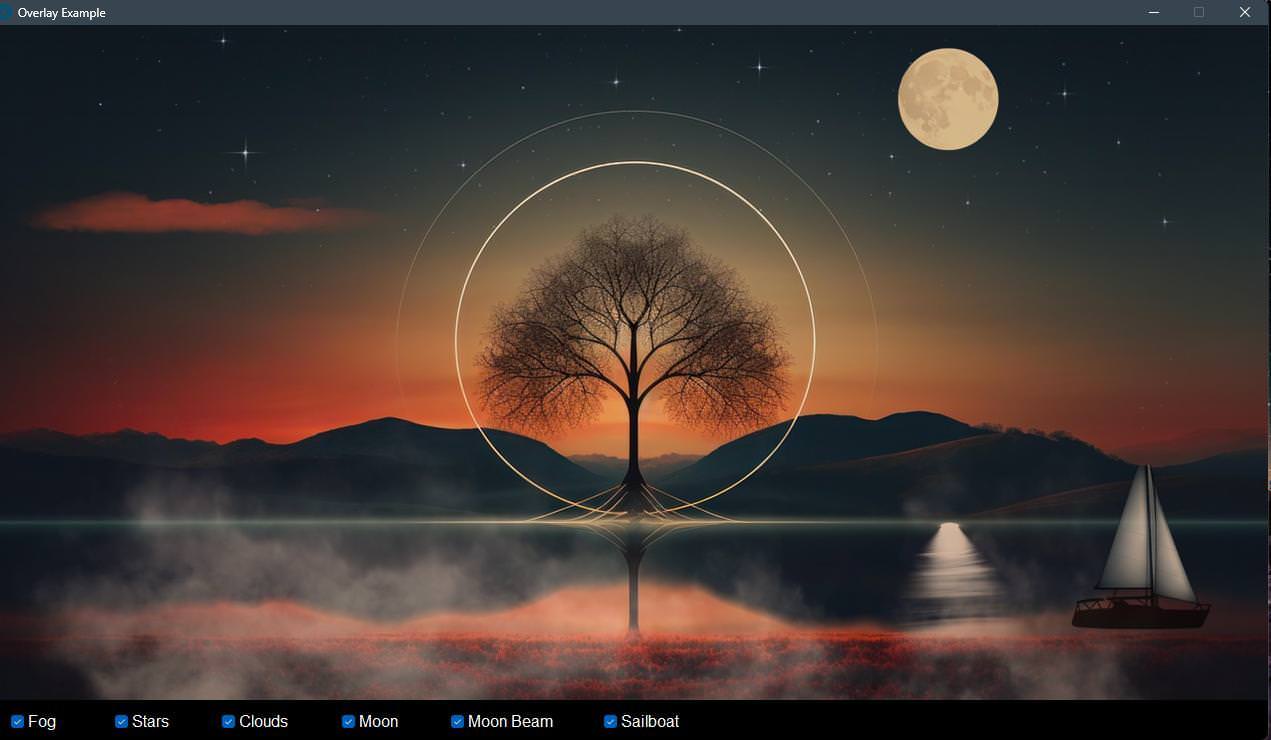
Quote from Anthony LaTorre on February 15, 2026, 11:17 pmAnother upgrade to this plugin will be coming soon... It will be designed to work with a new plugin called NeoWin Animator.
NeoWin Animator. can animate objects and images on Linear as well as Bezier paths... You will be able to animate images as well as controls like buttons. I got it working well but I want to add object scaling and opacity as well as looping animations and a few other things... This will go way beyond what you can do with the "PlayCartoonFile"command.I hope to have this up and running shortly...
Cheers
Another upgrade to this plugin will be coming soon... It will be designed to work with a new plugin called NeoWin Animator.
NeoWin Animator. can animate objects and images on Linear as well as Bezier paths... You will be able to animate images as well as controls like buttons. I got it working well but I want to add object scaling and opacity as well as looping animations and a few other things... This will go way beyond what you can do with the "PlayCartoonFile"command.
I hope to have this up and running shortly...
Cheers

Quote from Kriscall on February 16, 2026, 4:47 am1st of all thank you for great plugin contributions. :)
Just wondering @anthony-latorre, have you considered putting these plugins in one place under Freebie store. very easy to do makes it for others to find them.
But only if you have time! I know as a developer myself this is my main battel.
Again thanks! keep up the good work.
1st of all thank you for great plugin contributions. :)
Just wondering @anthony-latorre, have you considered putting these plugins in one place under Freebie store. very easy to do makes it for others to find them.
But only if you have time! I know as a developer myself this is my main battel.
Again thanks! keep up the good work.
Quote from Anthony LaTorre on February 16, 2026, 5:08 amHello Christopher, and thank you...
I am eventually going to get around to opening a store and organizing my plugins... I should have done this from the get go, now I got probably a dozen plugins all over the place. I am so disorganized... (story of my life)Hopefully, I will soon find the time and motivation to get the store up and running... Right after I release my Animation plugin today.. lol...
And thank you for your contributions, I love what you are doing...
Cheers
Hello Christopher, and thank you...
I am eventually going to get around to opening a store and organizing my plugins... I should have done this from the get go, now I got probably a dozen plugins all over the place. I am so disorganized... (story of my life)
Hopefully, I will soon find the time and motivation to get the store up and running... Right after I release my Animation plugin today.. lol...
And thank you for your contributions, I love what you are doing...
Cheers
Quote from Anthony LaTorre on February 16, 2026, 5:57 amI am trying to upload a new animation plugin, but my new post got banned... Hoping that I can get it through here...
Included in the zip package is the latest version of the NeoOverlay plugin. You must install it to animate png images... You can also download it from the first post in this topic along with the uses guides...Here is a new animation plugin... For some reason I am getting my post blocked on almost every attempt... that I make. Hope to get that sorted out later...
NeoWin Animator:
I am trying to upload a new animation plugin, but my new post got banned... Hoping that I can get it through here...
Included in the zip package is the latest version of the NeoOverlay plugin. You must install it to animate png images... You can also download it from the first post in this topic along with the uses guides...
Here is a new animation plugin... For some reason I am getting my post blocked on almost every attempt... that I make. Hope to get that sorted out later...
NeoWin Animator:
Uploaded files: