
Note Heart, (English) Ultimate note management cross platform app! (and how it works) - Forum
Note Heart, (English) Ultimate note management cross platform app! (and how it works)

Quote from noyzen on August 8, 2023, 6:12 pm[Made with VisualNEO]
This is a cross platform desktop software to manage your notes! (screenshot attached)
- Simple and sharp UI design
- Search inside all notes
- Auto-Save ability, by time or by number of changes.
- Backup revisions, protect notes from unwanted changes by restoring revisions.
- Color, font and direction change for each note! (+more options)
- Trash bin to restore removed notes
- Note encryption and protection by passwords (per note)
- Manage notes in folders
- Global UI Zoom for big screens!
- 100% Portable without any dependencies or installation!
- Windows and Linux version
- 100% Free product, without any ads, or malwares and or premium verions.
I have used VisualNEO Web and Win and Go programming language (for some backend works like easyupdate program) and I used 'phpdesktop' which is a portable chromium and a lite php web server which is free also! here is the link of 'phpdesktop':
https://github.com/cztomczak/phpdesktop
I used my own plugins like 'NoyzenUtility' and some others... (yes you can run exe from JavaScript, using php)
I accept donations, I hope I get some so I can keep my apps free for everyone who can't pay for softwares.
If I got any donations it will be shared with VisualNEO Staff for making this great tools.And finaly this is my website https://noyzen.com where you can download Notebox and read the news about updates!
Windows Download Link:
https://noyzen.com/?sdm_process_download=1&download_id=99Linux Download Link:
https://noyzen.com/?sdm_process_download=1&download_id=100I like to hear your opinions @luishp
[Made with VisualNEO]
This is a cross platform desktop software to manage your notes! (screenshot attached)
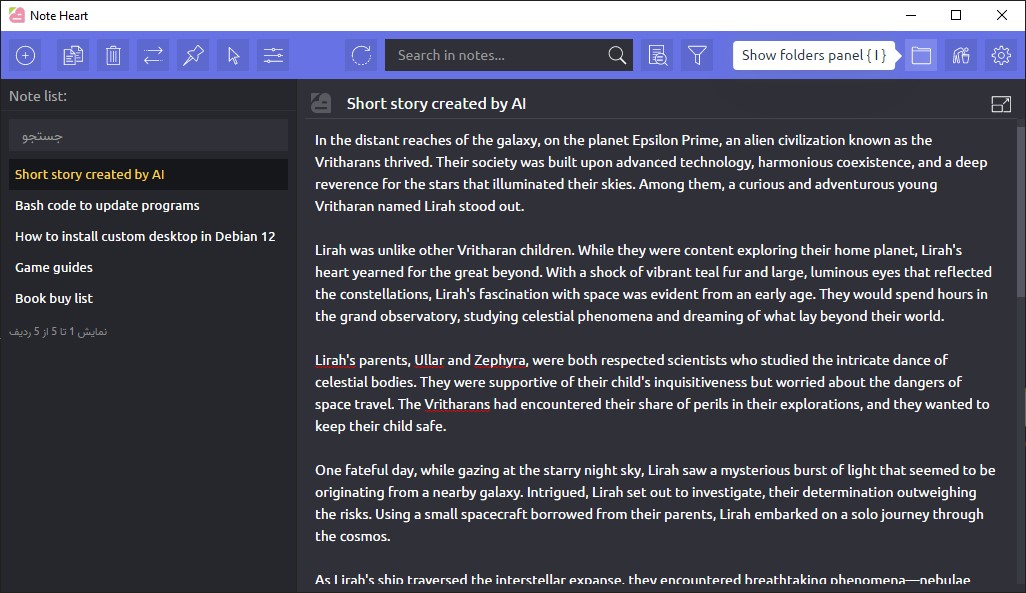
- Simple and sharp UI design
- Search inside all notes
- Auto-Save ability, by time or by number of changes.
- Backup revisions, protect notes from unwanted changes by restoring revisions.
- Color, font and direction change for each note! (+more options)
- Trash bin to restore removed notes
- Note encryption and protection by passwords (per note)
- Manage notes in folders
- Global UI Zoom for big screens!
- 100% Portable without any dependencies or installation!
- Windows and Linux version
- 100% Free product, without any ads, or malwares and or premium verions.
I have used VisualNEO Web and Win and Go programming language (for some backend works like easyupdate program) and I used 'phpdesktop' which is a portable chromium and a lite php web server which is free also! here is the link of 'phpdesktop':
https://github.com/cztomczak/phpdesktop
I used my own plugins like 'NoyzenUtility' and some others... (yes you can run exe from JavaScript, using php)
I accept donations, I hope I get some so I can keep my apps free for everyone who can't pay for softwares.
If I got any donations it will be shared with VisualNEO Staff for making this great tools.
And finaly this is my website https://noyzen.com where you can download Notebox and read the news about updates!
Windows Download Link:
https://noyzen.com/?sdm_process_download=1&download_id=99
Linux Download Link:
https://noyzen.com/?sdm_process_download=1&download_id=100
I like to hear your opinions @luishp
Uploaded files:
Quote from susan on August 9, 2023, 5:53 amThe looks really good! I had not heard of phpdesktop, and even though I not much of a php user, it always good to know about options.
Wishing you much success with this project.
The looks really good! I had not heard of phpdesktop, and even though I not much of a php user, it always good to know about options.
Wishing you much success with this project.
Quote from noyzen on August 9, 2023, 11:08 amThanks! Right now I'm working on English version of this app so my friends here can try it soon. I have to make a new English website for it also...
Thanks! Right now I'm working on English version of this app so my friends here can try it soon. I have to make a new English website for it also...
Quote from susan on August 10, 2023, 5:17 amLooks good, and I love the new name. I will use it some more, but my first impressions are positive, I really like having a portable program that can be unzipped and used immediately (in any folder I want) without a fuss!
Can I give some feedback?
I was in the Note Options, and then applied a Filter that had no notes in the range of dates. The icons in the top left disappeared and it was not obvious to me what was happening. I clicked on Cancel search and reload, and they came back, but this felt buggy. See the image below.
Also, if I can say one more thing, in the Filter dialogue, pressing the tab key moves to the next field in the reverse order to what I would expect.
Looks good, and I love the new name. I will use it some more, but my first impressions are positive, I really like having a portable program that can be unzipped and used immediately (in any folder I want) without a fuss!
Can I give some feedback?
I was in the Note Options, and then applied a Filter that had no notes in the range of dates. The icons in the top left disappeared and it was not obvious to me what was happening. I clicked on Cancel search and reload, and they came back, but this felt buggy. See the image below.
Also, if I can say one more thing, in the Filter dialogue, pressing the tab key moves to the next field in the reverse order to what I would expect.
Uploaded files: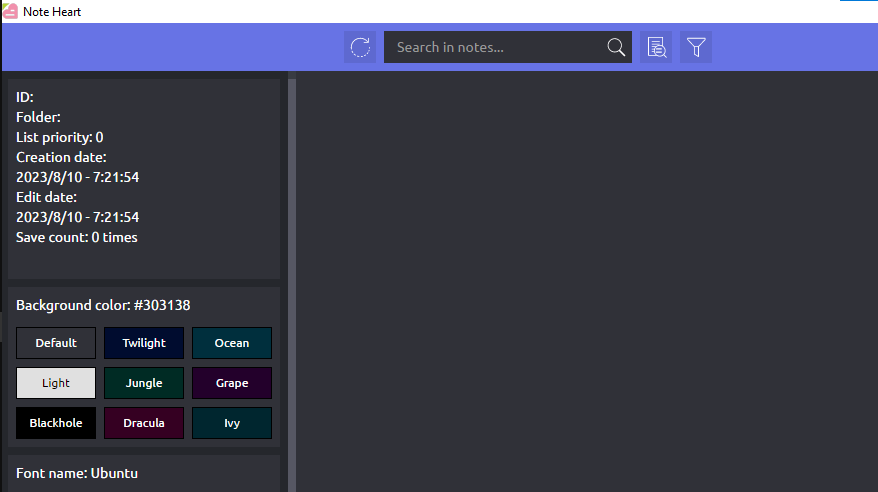
Quote from noyzen on August 10, 2023, 11:34 amThanks @susan for feedback!
I found some other bugs myself, and I will work on them, get ready for patch!
I will update and fix bugs even you and me are the only users :)
Soon you will see a new update avaliable in setting page (500kb usualy) and then check if problems are solved.
Thanks @susan for feedback!
I found some other bugs myself, and I will work on them, get ready for patch!
I will update and fix bugs even you and me are the only users :)
Soon you will see a new update avaliable in setting page (500kb usualy) and then check if problems are solved.
Quote from noyzen on August 10, 2023, 12:22 pmFastest update in the history og software development :D
Now re-open program, and you see update notification at startup (top of setting icon), go to setting page, click on new version button, update it and re-open again.
see if all bugs are fixed.
Fastest update in the history og software development :D
Now re-open program, and you see update notification at startup (top of setting icon), go to setting page, click on new version button, update it and re-open again.
see if all bugs are fixed.

Quote from luishp on August 10, 2023, 12:35 pm@noyzen congratulations!
I have just tested your app and it looks very professional :)
Why not an online version?
@noyzen congratulations!
I have just tested your app and it looks very professional :)
Why not an online version?
Quote from noyzen on August 10, 2023, 12:45 pmHi Luis!
First note apps I have made were online, but online web applications needs a very good security and I don't have enough knowledge.
About mobile and Android apps I don't like to mess with Cordova and JDK and NDK and SDK...
For now I'm very happy by making desktop softwares with a combination of VisualNEO and phpDesktop and go language!
Online stuff need hosting, and Internet itself... I moved my online data to offline storages because every day Internet getting worst here.
I was using Google Keep and Cherry Tree but now I use Notebox/Note Heart (which I can't decide Persian or English I must choose for my softwares)
Hi Luis!
First note apps I have made were online, but online web applications needs a very good security and I don't have enough knowledge.
About mobile and Android apps I don't like to mess with Cordova and JDK and NDK and SDK...
For now I'm very happy by making desktop softwares with a combination of VisualNEO and phpDesktop and go language!
Online stuff need hosting, and Internet itself... I moved my online data to offline storages because every day Internet getting worst here.
I was using Google Keep and Cherry Tree but now I use Notebox/Note Heart (which I can't decide Persian or English I must choose for my softwares)
Quote from noyzen on August 10, 2023, 3:13 pmI'm, sorry guys, there was a bug in update function which used update URL from Persian version in English. thats why you did not see update button or updated to Persian UI again...
You have to reDownload Note Heart for latest version, but after that you will be able to use fast updates!
If you have stored some notes in app and you need help moving data to new downloaded zip, you just need to move 'database.db' in 'www' folder into same place in new program folder.
and expect some more of this little bugs because of duplicated version from Persian. just let me know and I will fix them all quickly!
@susan
I'm, sorry guys, there was a bug in update function which used update URL from Persian version in English. thats why you did not see update button or updated to Persian UI again...
You have to reDownload Note Heart for latest version, but after that you will be able to use fast updates!
If you have stored some notes in app and you need help moving data to new downloaded zip, you just need to move 'database.db' in 'www' folder into same place in new program folder.
and expect some more of this little bugs because of duplicated version from Persian. just let me know and I will fix them all quickly!