
object snapshot / снимок обьекта

Quote from lolo on June 12, 2022, 9:25 pmI can't figure out how can I take a snapshot of an object in my program and save it to a file?
Я не могу понять, как я могу сделать снимок объекта в своей программе и сохранить его в файл?
I can't figure out how can I take a snapshot of an object in my program and save it to a file?
Я не могу понять, как я могу сделать снимок объекта в своей программе и сохранить его в файл?

Quote from Vadim on June 13, 2022, 8:28 am@lolo
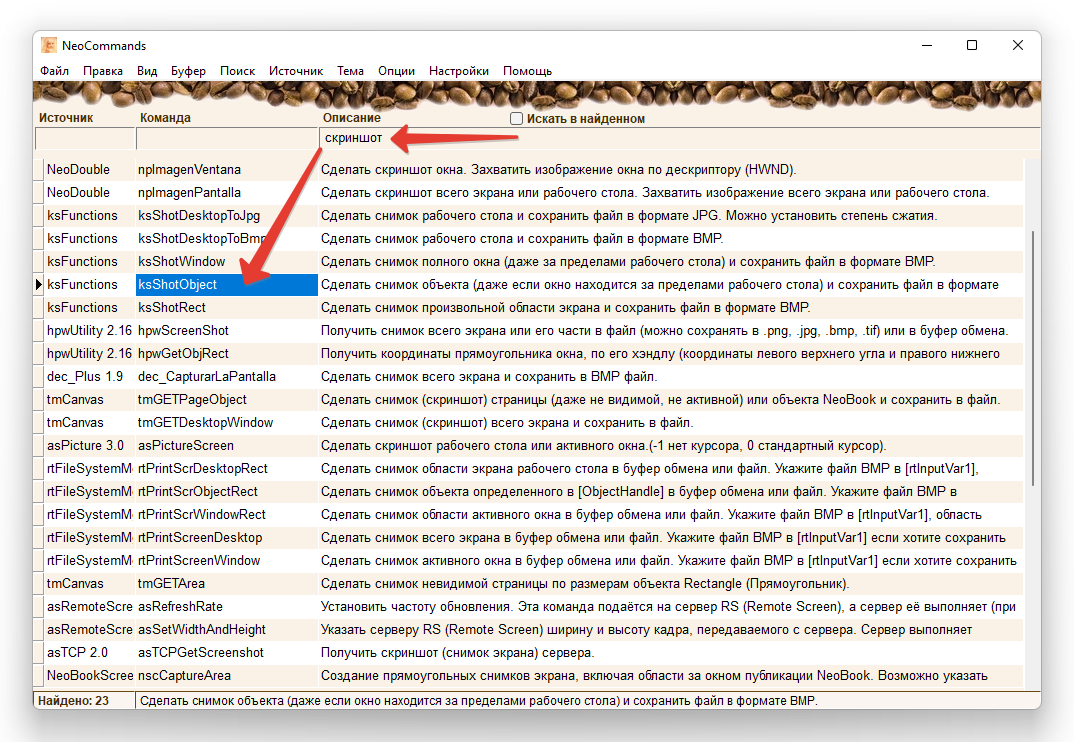
You can use special programs to search for commands, mine is called NeoCommands (https://distant.orgpsiholog.ru/mod/url/view.php?id=362), mishem's is called PluginInfo (https://visualneo.com/forum/topic/plugininfo). Choose the one that is more convenient for you. An example of a search from my program, using the word "screenshot":
You can use special programs to search for commands, mine is called NeoCommands (https://distant.orgpsiholog.ru/mod/url/view.php?id=362), mishem's is called PluginInfo (https://visualneo.com/forum/topic/plugininfo). Choose the one that is more convenient for you. An example of a search from my program, using the word "screenshot":
Uploaded files:
Quote from lolo on June 13, 2022, 11:19 am@vadim
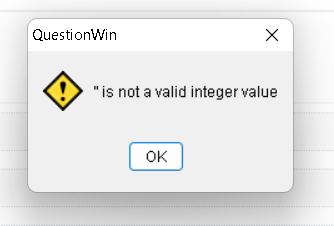
i know about NeoCommands and PluginInfo i already tried to use ksShotObject but i get error
я знаю про NeoCommands и PluginInfo, я уже пытался использовать ksShotObject, но я получаю ошибку
@vadim
i know about NeoCommands and PluginInfo i already tried to use ksShotObject but i get error
я знаю про NeoCommands и PluginInfo, я уже пытался использовать ksShotObject, но я получаю ошибку
Quote from Vadim on June 13, 2022, 12:32 pm@lolo
Attach an isolated demo example of the problem so that we can reproduce it in our own place.
Приложите изолированный демо-пример с проблемой, чтобы мы могли воспроизвести её у себя.
Attach an isolated demo example of the problem so that we can reproduce it in our own place.
Приложите изолированный демо-пример с проблемой, чтобы мы могли воспроизвести её у себя.
Quote from lolo on June 13, 2022, 5:39 pm@vadim
функция ksShotObject работает с переменными (ksShotObject "[WinHandle]" "C:\Users\Vladimir\Desktop\yui.bmp"), но объект (conteiner) не имеет переменной..
@vadim
функция ksShotObject работает с переменными (ksShotObject "[WinHandle]" "C:\Users\Vladimir\Desktop\yui.bmp"), но объект (conteiner) не имеет переменной..
Quote from Vadim on June 13, 2022, 5:59 pm@lolo
Here's an example of how you can take a screenshot of a container with this command.
Here's an example of how you can take a screenshot of a container with this command.
Uploaded files:
Quote from DaviddeArgentina on June 13, 2022, 9:13 pmYou could use PowerShell script using this code:
Remember you need get the coordinates of the object (or the screen), recreate a PS1 file and run this script file for any way like NeoPowerShell plugin
# coordintates based on the VNW / NeoBook action like:

# GetObjectInfo "object" "Left" "[left]"
# GetObjectInfo "object" "Top" "[top]"
# GetObjectInfo "object" "Width" "[width]"
# GetObjectInfo "object" "Height" "[height]"

# Remember you must FileWrite the PS1 file with this values in order to run the script

$top    = [top]
$left   = [left]
$width  = [width]
$height = [height]

$bounds   = [Drawing.Rectangle]::FromLTRB($left, $top, $width, $height)
$bmp      = New-Object System.Drawing.Bitmap ([int]$bounds.width), ([int]$bounds.height)
$graphics = [Drawing.Graphics]::FromImage($bmp)

$graphics.CopyFromScreen($bounds.Location, [Drawing.Point]::Empty, $bounds.size)

$bmp.Save("$env:USERPROFILE\test.png")   # change as you need

$graphics.Dispose()
$bmp.Dispose()
You could use PowerShell script using this code:
Remember you need get the coordinates of the object (or the screen), recreate a PS1 file and run this script file for any way like NeoPowerShell plugin
# coordintates based on the VNW / NeoBook action like:

# GetObjectInfo "object" "Left" "[left]"
# GetObjectInfo "object" "Top" "[top]"
# GetObjectInfo "object" "Width" "[width]"
# GetObjectInfo "object" "Height" "[height]"

# Remember you must FileWrite the PS1 file with this values in order to run the script

$top    = [top]
$left   = [left]
$width  = [width]
$height = [height]

$bounds   = [Drawing.Rectangle]::FromLTRB($left, $top, $width, $height)
$bmp      = New-Object System.Drawing.Bitmap ([int]$bounds.width), ([int]$bounds.height)
$graphics = [Drawing.Graphics]::FromImage($bmp)

$graphics.CopyFromScreen($bounds.Location, [Drawing.Point]::Empty, $bounds.size)

$bmp.Save("$env:USERPROFILE\test.png")   # change as you need

$graphics.Dispose()
$bmp.Dispose()