
ODBC Driver for Excel xlsx file

Quote from donbwalker on January 17, 2020, 10:30 pmI knew this at one time but have lost it. (the info, not my cool)
I believe a Microsoft driver is needed to open an Excel xlsx file in dbpro plugin. I don't need for csv but I do for xlsx or xls.
Anyone having that info, where to get it and where it needs to get installed?
Thanks in advance.
I knew this at one time but have lost it. (the info, not my cool)
I believe a Microsoft driver is needed to open an Excel xlsx file in dbpro plugin. I don't need for csv but I do for xlsx or xls.
Anyone having that info, where to get it and where it needs to get installed?
Thanks in advance.

Quote from HPW on January 17, 2020, 10:51 pmMaybe this may help for xls:
https://archive.visualneo.com/viewtopic.php?f=21&t=17189&p=11221599&hilit=excel#p11221599
Regards
Hans-Peter
Maybe this may help for xls:
https://archive.visualneo.com/viewtopic.php?f=21&t=17189&p=11221599&hilit=excel#p11221599
Regards
Hans-Peter
Quote from donbwalker on January 19, 2020, 9:33 pmThanks Hans-Peter
Gosh, I actually started the post years ago. A walk back in time.
It does work with xls. It is such a useful tool that I wonder if there a way to get the plugin updated for xlsx?
Who owns that plugin now? David, Luis ??
Thanks Hans-Peter
Gosh, I actually started the post years ago. A walk back in time.
It does work with xls. It is such a useful tool that I wonder if there a way to get the plugin updated for xlsx?
Who owns that plugin now? David, Luis ??

Quote from ebear on January 24, 2020, 11:03 pmHello All,
With the correct ODBC driver it is possible without any issues to connect to xlsx Excel documents.
I developed several applications, and Im currently developing an application which imports data from xlsx, xls and xlsm documents.
Below the code to use for opening an Excel file (xlsx, xls and xlsm)
dbpOpenDatabase "excel" "Provider=Microsoft.ACE.OLEDB.12.0;Data Source=[P100_ExcelPathFile];Extended Properties=[#34]Excel 12.0 Xml;HDR=YES[#34];Persist Security Info=False"The ODBC driver I currently use is the "AccessDatabaseEngine_X32" version 14.0.6119.5000 from Microsoft. Don't let the name of the ODBC driver confuse you as this is a driver for MS Office documents including Excel.
An newer version of the ODBC driver is also available, but I didn't had the time to study the differences yet.With the combination of dbpro plugin and the ODBC driver Im able to read the Excel files, and although I don't use this it is also possible to write to the Excel files.
I also attach a image for the ODBC driver settings in Windows.
I hope this helps further.
Best regards,
Eric Beerhorst
Hello All,
With the correct ODBC driver it is possible without any issues to connect to xlsx Excel documents.
I developed several applications, and Im currently developing an application which imports data from xlsx, xls and xlsm documents.
Below the code to use for opening an Excel file (xlsx, xls and xlsm)
dbpOpenDatabase "excel" "Provider=Microsoft.ACE.OLEDB.12.0;Data Source=[P100_ExcelPathFile];Extended Properties=[#34]Excel 12.0 Xml;HDR=YES[#34];Persist Security Info=False"
The ODBC driver I currently use is the "AccessDatabaseEngine_X32" version 14.0.6119.5000 from Microsoft. Don't let the name of the ODBC driver confuse you as this is a driver for MS Office documents including Excel.
An newer version of the ODBC driver is also available, but I didn't had the time to study the differences yet.
With the combination of dbpro plugin and the ODBC driver Im able to read the Excel files, and although I don't use this it is also possible to write to the Excel files.
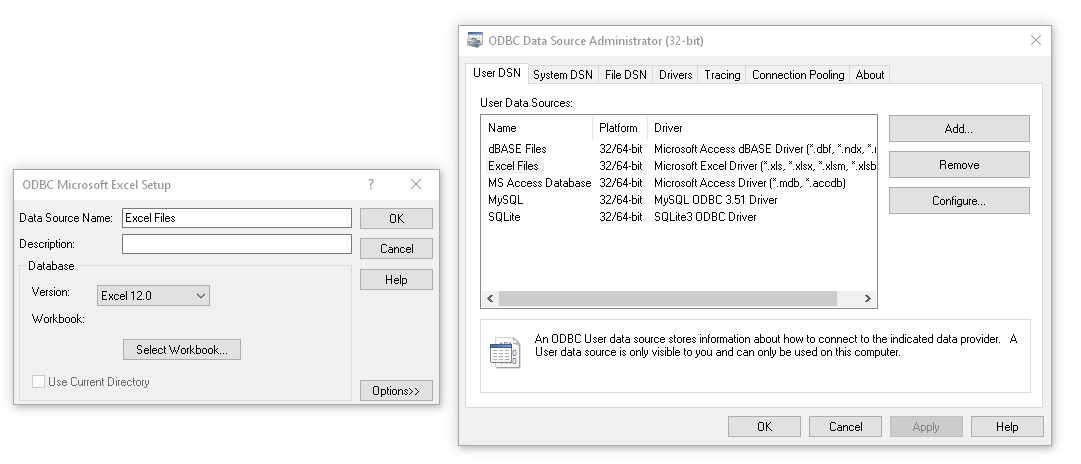
I also attach a image for the ODBC driver settings in Windows.
I hope this helps further.
Best regards,
Eric Beerhorst
Uploaded files:

Quote from Gaev on January 24, 2020, 11:39 pm@ebear
With the correct ODBC driver it is possible without any issues to connect to xlsx Excel documents.
I do all my spreadsheet'ing with Google Sheets, which is capable of downloading them to .xlsx format files.
Do you know if a copy of MS Office needs to be installed on the machine for this driver to work (with neoDBPro) ?
With the correct ODBC driver it is possible without any issues to connect to xlsx Excel documents.
I do all my spreadsheet'ing with Google Sheets, which is capable of downloading them to .xlsx format files.
Do you know if a copy of MS Office needs to be installed on the machine for this driver to work (with neoDBPro) ?
Quote from ebear on January 25, 2020, 12:34 amHello Geav,
No with the ODBC driver MS Office is not needed.
To read the Excel file some coding is needed as well it is needed to know exactly in with cells the data you want to read is located.
The Excel sheets need to have always the same structure, as you are pointing to the data location programmatically.
Instead of standard Cell locations as eg. A1, the open Excel database will have rows 1,2,3,... and Columns called F1, F2, F3,...
This means that the data in Cell A1 will be Record 1, Field F1.In a normal DataBase table you would give your fields a name and each record will have a number, the Excel DataBase will work almost the same Excel Rows: "Record Number" Excel columns: "FieldName"
As you remember you helped me to get the piece of code to find the Sheet Names out of the array of variables. ;-)
Even when I'm not the most advanced programmer and maybe there are better solutions, I hope this helps, but I'm always open for enhancements.
Best regards,
Eric
Below some of the coding I use:
.First open the Excel file as a database
    dbpOpenDatabase "excel" "Provider=Microsoft.ACE.OLEDB.12.0;Data Source=[P100_ExcelPathFile];Extended Properties=[#34]Excel 12.0 Xml;HDR=YES[#34];Persist Security Info=False"

. Next for my project I need to get the TableNames. These are the names of the sheets. This is not needed when the sheet names are alway the same.
    dbpGetTableNames "excel" "#" "[ExcelTables]"
    StrParse "[ExcelTables]" "#" "[ExcelTableItems]" "[ExcelTablesCount]"
    Loop "1" "[ExcelTablesCount]" "[ExcelTableNumber]"
        npEndsStr "[ExcelTableItems[ExcelTableNumber]]" "$" "[EndsWith]"
        If "[EndsWith]" "=" "True"
           SetVar "[ExcelSheets]" "[ExcelTableItems[ExcelTableNumber]];[ExcelSheets]"
        EndIf
    EndLoop
.Next I open the table "Konfigurator$" and select the Top 50 rows, wher the data I need exists dbpExecSQL "excel" "SELECT Top 50 * FROM [#91]Konfigurator$[#93]" "wi".Here I loop through the open table, get data from the Excel file and INSERT this into a SQL server table dbpGotoRecord "excel" "fame_wi" "10" dbpExecSQL "fame" "SELECT * FROM fame_slicetype WHERE deleted = 0" "fame_slicetype" Loop "6" "31" "[P100_LoopNo]" dbpFirst "fame" "fame_slicetype" Loop "1" "[fame.fame_slicetype.$RecCount]" "[P100_SliceLoopNo]" SearchStr "[excel.fame_wi.F[P100_LoopNo]]" "[fame.fame_slicetype.slice_name]" "[P100_SliceType]" "" If "[P100_SliceType]" ">" "0" SetVar "[F[P100_LoopNo]]" "[fame.fame_slicetype.slice_code]" ExitLoop Else dbpNext "fame" "fame_slicetype" EndIf EndLoop EndLoop dbpExecSQL "fame" "INSERT INTO fame_product_rows(author,product_id,row_no,row_name,P01,P02,P03,P04,P05,P06,P07,P08,P09,P10,P11,P12,P13,P14,P15,P16,P17,P18,P19,P20,P21,P22,P23,P24,P25) VALUES('System','[fame.fame_product_id.id]','2','[excel.fame_wi.F3]','[F6]','[F7]','[F8]','[F9]','[F10]','[F11]','[F12]','[F13]','[F14]','[F15]','[F16]','[F17]','[F18]','[F19]','[F20]','[F21]','[F22]','[F23]','[F24]','[F25]','[F26]','[F27]','[F28]','[F29]','[F30]')" ""
Hello Geav,
No with the ODBC driver MS Office is not needed.
To read the Excel file some coding is needed as well it is needed to know exactly in with cells the data you want to read is located.
The Excel sheets need to have always the same structure, as you are pointing to the data location programmatically.
Instead of standard Cell locations as eg. A1, the open Excel database will have rows 1,2,3,... and Columns called F1, F2, F3,...
This means that the data in Cell A1 will be Record 1, Field F1.
In a normal DataBase table you would give your fields a name and each record will have a number, the Excel DataBase will work almost the same Excel Rows: "Record Number" Excel columns: "FieldName"
As you remember you helped me to get the piece of code to find the Sheet Names out of the array of variables. ;-)
Even when I'm not the most advanced programmer and maybe there are better solutions, I hope this helps, but I'm always open for enhancements.
Best regards,
Eric
Below some of the coding I use:
.First open the Excel file as a database
dbpOpenDatabase "excel" "Provider=Microsoft.ACE.OLEDB.12.0;Data Source=[P100_ExcelPathFile];Extended Properties=[#34]Excel 12.0 Xml;HDR=YES[#34];Persist Security Info=False"
. Next for my project I need to get the TableNames. These are the names of the sheets. This is not needed when the sheet names are alway the same.
dbpGetTableNames "excel" "#" "[ExcelTables]"
StrParse "[ExcelTables]" "#" "[ExcelTableItems]" "[ExcelTablesCount]"
Loop "1" "[ExcelTablesCount]" "[ExcelTableNumber]"
npEndsStr "[ExcelTableItems[ExcelTableNumber]]" "$" "[EndsWith]"
If "[EndsWith]" "=" "True"
SetVar "[ExcelSheets]" "[ExcelTableItems[ExcelTableNumber]];[ExcelSheets]"
EndIf
EndLoop
.Next I open the table "Konfigurator$" and select the Top 50 rows, wher the data I need exists
    dbpExecSQL "excel" "SELECT Top 50 * FROM [#91]Konfigurator$[#93]" "wi"
.Here I loop through the open table, get data from the Excel file and INSERT this into a SQL server table
    dbpGotoRecord "excel" "fame_wi" "10"
    dbpExecSQL "fame" "SELECT * FROM fame_slicetype WHERE deleted = 0" "fame_slicetype"
    Loop "6" "31" "[P100_LoopNo]"
        dbpFirst "fame" "fame_slicetype"
        Loop "1" "[fame.fame_slicetype.$RecCount]" "[P100_SliceLoopNo]"
             SearchStr "[excel.fame_wi.F[P100_LoopNo]]" "[fame.fame_slicetype.slice_name]" "[P100_SliceType]" ""
             If "[P100_SliceType]" ">" "0"
                SetVar "[F[P100_LoopNo]]" "[fame.fame_slicetype.slice_code]"
                ExitLoop
             Else
                 dbpNext "fame" "fame_slicetype"
             EndIf
        EndLoop
    EndLoop

    dbpExecSQL "fame" "INSERT INTO fame_product_rows(author,product_id,row_no,row_name,P01,P02,P03,P04,P05,P06,P07,P08,P09,P10,P11,P12,P13,P14,P15,P16,P17,P18,P19,P20,P21,P22,P23,P24,P25) VALUES('System','[fame.fame_product_id.id]','2','[excel.fame_wi.F3]','[F6]','[F7]','[F8]','[F9]','[F10]','[F11]','[F12]','[F13]','[F14]','[F15]','[F16]','[F17]','[F18]','[F19]','[F20]','[F21]','[F22]','[F23]','[F24]','[F25]','[F26]','[F27]','[F28]','[F29]','[F30]')" ""
