
Opción "Retrato Solo" deshabilitada

Quote from Tioemo on November 26, 2024, 8:09 pmBuenas tardes.
Estoy con una aplicación para android.Quiero que la aplicación solo funcione con el móvil en situación vertical.
La opción "Retrato solo" que aparece en la pestaña Tamaño de Propiedades de la aplicación está deshabilitada.
¿Cómo puedo habilitarla?Un saludo
Buenas tardes.
Estoy con una aplicación para android.
Quiero que la aplicación solo funcione con el móvil en situación vertical.
La opción "Retrato solo" que aparece en la pestaña Tamaño de Propiedades de la aplicación está deshabilitada.
¿Cómo puedo habilitarla?
Un saludo

Quote from luishp on November 27, 2024, 10:52 amHola @tioemo,
Asegúrate de haber escogido primero la orientación adecuada justo un poco más arriba.
Saludos.
Hola @tioemo,
Asegúrate de haber escogido primero la orientación adecuada justo un poco más arriba.
Saludos.
Quote from Tioemo on November 27, 2024, 5:45 pmHola
No sé la razón pero si el tamaño de la aplicación está personalizado, la opción de "retrato solo" queda inhabilitada.Saludos
Hola
No sé la razón pero si el tamaño de la aplicación está personalizado, la opción de "retrato solo" queda inhabilitada.
Saludos
Uploaded files: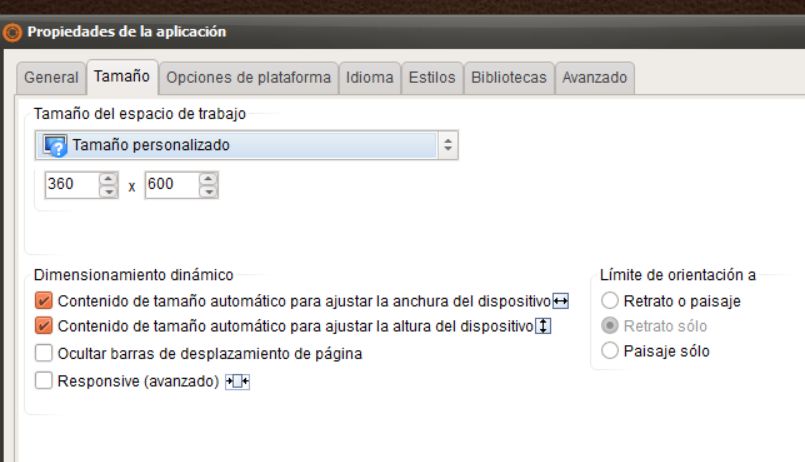
Quote from luishp on November 28, 2024, 1:00 pm@tioemo I think it's a bug. It works fine when you define a new project but not in an existent one.
Anyway locking screen orientation is not always possible,
You can have better control by using neoDeviceOnOrientationChange command.
I usually send the user to a specially designed screen where to ask him to rotate the device to the correct position.
Check this app in your mobile phone:
https://deportes.diputoledo.es/appAn alternative you can try this code to lock the screen position (not guaranteed to work on any situation):
BeginJS
if (screen.orientation && screen.orientation.lock) {
    screen.orientation.lock("portrait");
}
EndJS
I hope it helps.
@tioemo I think it's a bug. It works fine when you define a new project but not in an existent one.
Anyway locking screen orientation is not always possible,
You can have better control by using neoDeviceOnOrientationChange command.
I usually send the user to a specially designed screen where to ask him to rotate the device to the correct position.
Check this app in your mobile phone:
https://deportes.diputoledo.es/app
An alternative you can try this code to lock the screen position (not guaranteed to work on any situation):
BeginJS
if (screen.orientation && screen.orientation.lock) {
    screen.orientation.lock("portrait");
}
EndJS
I hope it helps.