Quote from
luishp on February 1, 2021, 2:22 pm
The Tools menu, within the main menu, is a very useful way to improve our VisualNEO Web user interface.
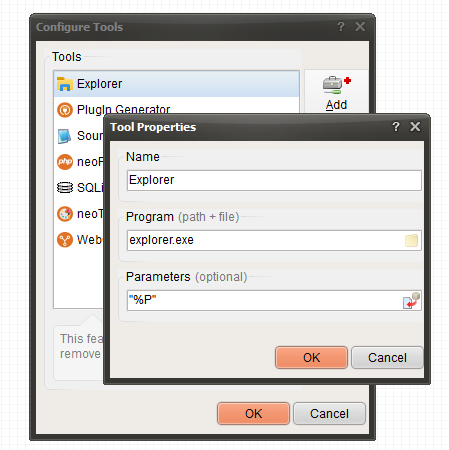
Lets see how to add a new option to open the current project folder in Windows Explorer:
- Go to Tools > Configure Tools
- Press "Add"
- In "Name" write: Explorer (or anything you want)
- In "Program" write: explorer.exe
- In "Parameters" select "Project Folder (%P)"
Done. Now you have a new option to open the current project folder with one click.
The Tools menu, within the main menu, is a very useful way to improve our VisualNEO Web user interface.
Lets see how to add a new option to open the current project folder in Windows Explorer:
- Go to Tools > Configure Tools
- Press "Add"
- In "Name" write: Explorer (or anything you want)
- In "Program" write: explorer.exe
- In "Parameters" select "Project Folder (%P)"
Done. Now you have a new option to open the current project folder with one click.
Uploaded files:Vadim, CDY@44 and 3 other users have reacted to this post.
VadimCDY@44CN_Icemanasmatshahram