
Open Local Text Files

Quote from fkapnist on September 16, 2023, 8:40 pmI am not able to open local text files with NEO Web.
If, for example, I put "test.txt" in the same build folder as my app, I still cannot open or display it. What is the correct action or subroutine?
Thanks.
.
I am not able to open local text files with NEO Web.
If, for example, I put "test.txt" in the same build folder as my app, I still cannot open or display it. What is the correct action or subroutine?
Thanks.
.
Quote from fkapnist on September 16, 2023, 8:43 pmQuote from fkapnist on September 16, 2023, 8:40 pmI am not able to open local text files with NEO Web.
If, for example, I put "test.txt" in the same build folder as my app, I still cannot open or display it. What is the correct action or subroutine?
Thanks.
(I want it to open automatically when the page loads, not with a file selection dialog)
.
Quote from fkapnist on September 16, 2023, 8:40 pmI am not able to open local text files with NEO Web.
If, for example, I put "test.txt" in the same build folder as my app, I still cannot open or display it. What is the correct action or subroutine?
Thanks.
(I want it to open automatically when the page loads, not with a file selection dialog)
.
Quote from fkapnist on September 16, 2023, 9:09 pmnone of these are working for me:
LocalFileToVar "C:\blabla\TEST.TXT" [myvar]
SetVar [TextArea3] [myvar]


LoadHTML "TextArea3" "C:/blabla/TEST.HTM"


LoadHTML "TextArea3" "C:\blabla\TEST.HTM"
none of these are working for me:
LocalFileToVar "C:\blabla\TEST.TXT" [myvar]
SetVar [TextArea3] [myvar]


LoadHTML "TextArea3" "C:/blabla/TEST.HTM"


LoadHTML "TextArea3" "C:\blabla\TEST.HTM"

Quote from Gaev on September 16, 2023, 10:36 pm@fkapnist
(I want it to open automatically when the page loads, not with a file selection dialog)
If this was allowed, it would be a huge security issue ... imagine if the WebApp were to load sensitive information (file) without user permission.
Reproduced from Help file at https://webhelp.visualneo.com/Files.html ... note the text I hilited in red ...
LocalFileToVar
Purpose:
Loads the content of a local file into a variable. You should use this action inside the FileInput Object change event. Note that loading is asynchronous. The content is loaded as text.
Category:
Files
Syntax:
LocalFileToVar "fileinput obj name" [result var]
fileinput obj name
A FileInput Object previously added to the Path to the Work Space. Necessary to allow the user to select the file.
result var
Variable to store the loaded content.
Example:
LocalFileToVar "FileInput1" [myvar]
As for LoadHTML command, the example in the Help file, reproduced below ...
LoadHTML "Container1" "https://mydomain.com/html/mywebpage.html"
.. says it all ... it is for loading HTML content from a domain, not a local drive.
(I want it to open automatically when the page loads, not with a file selection dialog)
If this was allowed, it would be a huge security issue ... imagine if the WebApp were to load sensitive information (file) without user permission.
Reproduced from Help file at https://webhelp.visualneo.com/Files.html ... note the text I hilited in red ...
LocalFileToVar
Purpose:
Loads the content of a local file into a variable. You should use this action inside the FileInput Object change event. Note that loading is asynchronous. The content is loaded as text.
Category:
Files
Syntax:
LocalFileToVar "fileinput obj name" [result var]
fileinput obj name
A FileInput Object previously added to the Path to the Work Space. Necessary to allow the user to select the file.
result var
Variable to store the loaded content.
Example:
LocalFileToVar "FileInput1" [myvar]
As for LoadHTML command, the example in the Help file, reproduced below ...
LoadHTML "Container1" "https://mydomain.com/html/mywebpage.html"
.. says it all ... it is for loading HTML content from a domain, not a local drive.
Quote from fkapnist on September 16, 2023, 11:33 pmwhat about neoFileRead "" ""
how do you determine what a FileHandle is?
My problem is this: I have a text file variable [textvar] in VisualNEO Win
and I want to send it as a variable [textvar2] to VisualNEO Web through the neoEdge plugin
and then have NEO Web display it in a TextArea.
what about neoFileRead "" ""
how do you determine what a FileHandle is?
My problem is this: I have a text file variable [textvar] in VisualNEO Win
and I want to send it as a variable [textvar2] to VisualNEO Web through the neoEdge plugin
and then have NEO Web display it in a TextArea.
Quote from fkapnist on September 16, 2023, 11:47 pmQuote from Gaev on September 16, 2023, 10:36 pm@fkapnist
(I want it to open automatically when the page loads, not with a file selection dialog)
If this was allowed, it would be a huge security issue ... imagine if the WebApp were to load sensitive information (file) without user permission.
Reproduced from Help file at https://webhelp.visualneo.com/Files.html ... note the text I hilited in red ...
LocalFileToVar
Purpose:
Loads the content of a local file into a variable. You should use this action inside the FileInput Object change event. Note that loading is asynchronous. The content is loaded as text.
Category:
Files
Syntax:
LocalFileToVar "fileinput obj name" [result var]
fileinput obj name
A FileInput Object previously added to the Path to the Work Space. Necessary to allow the user to select the file.
result var
Variable to store the loaded content.
Example:
LocalFileToVar "FileInput1" [myvar]
As for LoadHTML command, the example in the Help file, reproduced below ...
LoadHTML "Container1" "https://mydomain.com/html/mywebpage.html"
.. says it all ... it is for loading HTML content from a domain, not a local drive.
As I mentioned above, the text file is in the same build folder as the app, so it was created by the app author, and is not sensitives information. What is the procedure for automatically accessing a text file in the build folder without user input? Thanks.
Quote from Gaev on September 16, 2023, 10:36 pm(I want it to open automatically when the page loads, not with a file selection dialog)
If this was allowed, it would be a huge security issue ... imagine if the WebApp were to load sensitive information (file) without user permission.
Reproduced from Help file at https://webhelp.visualneo.com/Files.html ... note the text I hilited in red ...
LocalFileToVar
Purpose:
Loads the content of a local file into a variable. You should use this action inside the FileInput Object change event. Note that loading is asynchronous. The content is loaded as text.
Category:
Files
Syntax:
LocalFileToVar "fileinput obj name" [result var]
fileinput obj name
A FileInput Object previously added to the Path to the Work Space. Necessary to allow the user to select the file.
result var
Variable to store the loaded content.
Example:
LocalFileToVar "FileInput1" [myvar]
As for LoadHTML command, the example in the Help file, reproduced below ...
LoadHTML "Container1" "https://mydomain.com/html/mywebpage.html"
.. says it all ... it is for loading HTML content from a domain, not a local drive.
As I mentioned above, the text file is in the same build folder as the app, so it was created by the app author, and is not sensitives information. What is the procedure for automatically accessing a text file in the build folder without user input? Thanks.
Quote from Gaev on September 17, 2023, 2:05 am@fkapnist
it was created by the app author, and is not sensitives information
But your browser has no way of knowing that ... so it takes the safe approach and disallows ANY automatic (via script) read/write of local (i.e. c:\blah\blah\blah.blah) file.
what about neoFileRead "" ""
how do you determine what a FileHandle is?I do not have any experience with neoEdge, but according to this page in the Help file ...
https://webhelp.visualneo.com/neoFileSystem.html
... neoFileOpenBox ...
- allows the user to select a file name using a standard Windows File Open dialog box.
- returns a FileHandle to the Callback subroutine.So again, not automatic, but under user's control.
it was created by the app author, and is not sensitives information
But your browser has no way of knowing that ... so it takes the safe approach and disallows ANY automatic (via script) read/write of local (i.e. c:\blah\blah\blah.blah) file.
what about neoFileRead "" ""
how do you determine what a FileHandle is?
I do not have any experience with neoEdge, but according to this page in the Help file ...
... neoFileOpenBox ...
- allows the user to select a file name using a standard Windows File Open dialog box.
- returns a FileHandle to the Callback subroutine.
So again, not automatic, but under user's control.
Quote from fkapnist on September 17, 2023, 5:15 amA compiled VisualNEO Web app creates four folders: css, fonts, img and js. If a picture can load automatically from the "img" folder without any user interaction, why not a text file? What's the logic of blocking stored files that are part of the app? I'm sure it can be done. I remember doing it before but I forgot the commands.
If a "text" folder were added to the compiled app... along with css, fonts, img and js... maybe it would give file and folder permissions for embedded text documents?
It is kind of funny because I have two rectangles side by side in my app. And apparently I can't send text directly from one rectangle to the other. I can however, upload text from the NEO Win rectangle to my cloud server, and then download it again to the NEO Web rectangle right next to it. But I want my app to work offline
.
A compiled VisualNEO Web app creates four folders: css, fonts, img and js. If a picture can load automatically from the "img" folder without any user interaction, why not a text file? What's the logic of blocking stored files that are part of the app? I'm sure it can be done. I remember doing it before but I forgot the commands.
If a "text" folder were added to the compiled app... along with css, fonts, img and js... maybe it would give file and folder permissions for embedded text documents?
It is kind of funny because I have two rectangles side by side in my app. And apparently I can't send text directly from one rectangle to the other. I can however, upload text from the NEO Win rectangle to my cloud server, and then download it again to the NEO Web rectangle right next to it. But I want my app to work offline
.
Quote from fkapnist on September 17, 2023, 9:18 amQuote from fkapnist on September 16, 2023, 11:47 pmQuote from Gaev on September 16, 2023, 10:36 pm@fkapnist
(I want it to open automatically when the page loads, not with a file selection dialog)
If this was allowed, it would be a huge security issue ... imagine if the WebApp were to load sensitive information (file) without user permission.
Reproduced from Help file at https://webhelp.visualneo.com/Files.html ... note the text I hilited in red ...
LocalFileToVar
Purpose:
Loads the content of a local file into a variable. You should use this action inside the FileInput Object change event. Note that loading is asynchronous. The content is loaded as text.
Category:
Files
Syntax:
LocalFileToVar "fileinput obj name" [result var]
fileinput obj name
A FileInput Object previously added to the Path to the Work Space. Necessary to allow the user to select the file.
result var
Variable to store the loaded content.
Example:
LocalFileToVar "FileInput1" [myvar]
As for LoadHTML command, the example in the Help file, reproduced below ...
LoadHTML "Container1" "https://mydomain.com/html/mywebpage.html"
.. says it all ... it is for loading HTML content from a domain, not a local drive.
As I mentioned above, the text file is in the same build folder as the app, so it was created by the app author, and is not sensitives information. What is the procedure for automatically accessing a text file in the build folder without user input? Thanks.
@Gaev
You say local files are blocked from being loaded because they may contain sensitive information? Are not the pictures in the "img" folder local files? They can be loaded without any user permission. So why should there be a bias against text files? I can automatically load the images of text files, but not the text files themselves. That seems strange doesn't it....
.
Quote from fkapnist on September 16, 2023, 11:47 pmQuote from Gaev on September 16, 2023, 10:36 pm(I want it to open automatically when the page loads, not with a file selection dialog)
If this was allowed, it would be a huge security issue ... imagine if the WebApp were to load sensitive information (file) without user permission.
Reproduced from Help file at https://webhelp.visualneo.com/Files.html ... note the text I hilited in red ...
LocalFileToVar
Purpose:
Loads the content of a local file into a variable. You should use this action inside the FileInput Object change event. Note that loading is asynchronous. The content is loaded as text.
Category:
Files
Syntax:
LocalFileToVar "fileinput obj name" [result var]
fileinput obj name
A FileInput Object previously added to the Path to the Work Space. Necessary to allow the user to select the file.
result var
Variable to store the loaded content.
Example:
LocalFileToVar "FileInput1" [myvar]
As for LoadHTML command, the example in the Help file, reproduced below ...
LoadHTML "Container1" "https://mydomain.com/html/mywebpage.html"
.. says it all ... it is for loading HTML content from a domain, not a local drive.
As I mentioned above, the text file is in the same build folder as the app, so it was created by the app author, and is not sensitives information. What is the procedure for automatically accessing a text file in the build folder without user input? Thanks.
You say local files are blocked from being loaded because they may contain sensitive information? Are not the pictures in the "img" folder local files? They can be loaded without any user permission. So why should there be a bias against text files? I can automatically load the images of text files, but not the text files themselves. That seems strange doesn't it....
.
Uploaded files: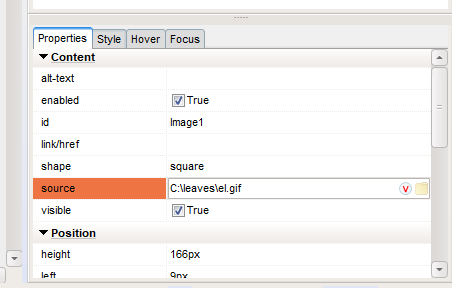
Quote from Gaev on September 17, 2023, 6:01 pm@fkapnist
You say local files are blocked from being loaded because they may contain sensitive information? Are not the pictures in the "img" folder local files? They can be loaded without any user permission.
Isn't the image in your post that of a DESIGN time process within VisualNEOWeb ? ... you do know that ...
- VisualNEOWeb is an exe (not a browser) that runs under Windows; my statement referred to the permissions regarding browsers !
- Files specified at DESIGN time are copied into a folder that is then loaded to your server; when a third party navigates to a page in your WebApp, this file is NO LONGER a local file (just a copy of the specified file)
So why should there be a bias against text files? I can automatically load the images of text files, but not the text files themselves. That seems strange doesn't it....
For reasons explained above, it is not strange at all ... local files specified to VisualNEOWeb become remote files (on your server) ... what you are attempting to do is load the original local file ... do you not see a problem if browsers allowed "automatic" load of files (any files) on any user's computer without first getting some sort of permission from the user ?
If you don't see a problem, I don't have anything to say that will change your outlook; this post is closed to me.
You say local files are blocked from being loaded because they may contain sensitive information? Are not the pictures in the "img" folder local files? They can be loaded without any user permission.
Isn't the image in your post that of a DESIGN time process within VisualNEOWeb ? ... you do know that ...
- VisualNEOWeb is an exe (not a browser) that runs under Windows; my statement referred to the permissions regarding browsers !
- Files specified at DESIGN time are copied into a folder that is then loaded to your server; when a third party navigates to a page in your WebApp, this file is NO LONGER a local file (just a copy of the specified file)
So why should there be a bias against text files? I can automatically load the images of text files, but not the text files themselves. That seems strange doesn't it....
For reasons explained above, it is not strange at all ... local files specified to VisualNEOWeb become remote files (on your server) ... what you are attempting to do is load the original local file ... do you not see a problem if browsers allowed "automatic" load of files (any files) on any user's computer without first getting some sort of permission from the user ?
If you don't see a problem, I don't have anything to say that will change your outlook; this post is closed to me.
Quote from fkapnist on September 17, 2023, 7:01 pm
@gaev
RE : - Files specified at DESIGN time are copied into a folder that is then loaded to your server; when a third party navigates to a page in your WebApp, this file is NO LONGER a local file (just a copy of the specified file)
Yes, but if I make a desktop or native app, the local files will indeed remain.
Anyway I apologize if my questions seem to bother you. Perhaps someone else on the forum might give me advice on building native desktop (Windows) apps using VisualNEO ? I'm into native apps, not web-based. Thanks for your time....
RE : - Files specified at DESIGN time are copied into a folder that is then loaded to your server; when a third party navigates to a page in your WebApp, this file is NO LONGER a local file (just a copy of the specified file)
Yes, but if I make a desktop or native app, the local files will indeed remain.
Anyway I apologize if my questions seem to bother you. Perhaps someone else on the forum might give me advice on building native desktop (Windows) apps using VisualNEO ? I'm into native apps, not web-based. Thanks for your time....

Quote from luishp on September 18, 2023, 12:47 pm@fkapnist desktop apps can be created in many different ways from VisualNEO Web:
If you are using NWjs then you can embed any NodeJS code into you app as you can do with normal JavaScript.
If you are using neoAppDesktop, then you can use PHP to perform any needed file operation.
If you are using neoEdge, then you can use the included neoEdge plugin to call any VisualNEO Win file commands.
neoFileSystem Plugin can also be very useful if you are working with Chrome and/or Microsoft Edge web browsers (check the included sample app).Of course you can use many more alternative solutions to generate and use Desktop apps.
Regards.
@fkapnist desktop apps can be created in many different ways from VisualNEO Web:
If you are using NWjs then you can embed any NodeJS code into you app as you can do with normal JavaScript.
If you are using neoAppDesktop, then you can use PHP to perform any needed file operation.
If you are using neoEdge, then you can use the included neoEdge plugin to call any VisualNEO Win file commands.
neoFileSystem Plugin can also be very useful if you are working with Chrome and/or Microsoft Edge web browsers (check the included sample app).
Of course you can use many more alternative solutions to generate and use Desktop apps.
Regards.
Quote from fkapnist on November 9, 2023, 4:46 pmQuote from fkapnist on September 16, 2023, 11:47 pmQuote from Gaev on September 16, 2023, 10:36 pm@fkapnist
(I want it to open automatically when the page loads, not with a file selection dialog)
If this was allowed, it would be a huge security issue ... imagine if the WebApp were to load sensitive information (file) without user permission.
Reproduced from Help file at https://webhelp.visualneo.com/Files.html ... note the text I hilited in red ...
LocalFileToVar
Purpose:
Loads the content of a local file into a variable. You should use this action inside the FileInput Object change event. Note that loading is asynchronous. The content is loaded as text.
Category:
Files
Syntax:
LocalFileToVar "fileinput obj name" [result var]
fileinput obj name
A FileInput Object previously added to the Path to the Work Space. Necessary to allow the user to select the file.
result var
Variable to store the loaded content.
Example:
LocalFileToVar "FileInput1" [myvar]
As for LoadHTML command, the example in the Help file, reproduced below ...
LoadHTML "Container1" "https://mydomain.com/html/mywebpage.html"
.. says it all ... it is for loading HTML content from a domain, not a local drive.
As I mentioned above, the text file is in the same build folder as the app, so it was created by the app author, and is not sensitives information. What is the procedure for automatically accessing a text file in the build folder without user input? Thanks.
Project > Properites
Libraries / Files
I discovered this is the best way to add a subfolder containing text files that can be manipulated without CORS or file blocking etc...
.
Quote from fkapnist on September 16, 2023, 11:47 pmQuote from Gaev on September 16, 2023, 10:36 pm(I want it to open automatically when the page loads, not with a file selection dialog)
If this was allowed, it would be a huge security issue ... imagine if the WebApp were to load sensitive information (file) without user permission.
Reproduced from Help file at https://webhelp.visualneo.com/Files.html ... note the text I hilited in red ...
LocalFileToVar
Purpose:
Loads the content of a local file into a variable. You should use this action inside the FileInput Object change event. Note that loading is asynchronous. The content is loaded as text.
Category:
Files
Syntax:
LocalFileToVar "fileinput obj name" [result var]
fileinput obj name
A FileInput Object previously added to the Path to the Work Space. Necessary to allow the user to select the file.
result var
Variable to store the loaded content.
Example:
LocalFileToVar "FileInput1" [myvar]
As for LoadHTML command, the example in the Help file, reproduced below ...
LoadHTML "Container1" "https://mydomain.com/html/mywebpage.html"
.. says it all ... it is for loading HTML content from a domain, not a local drive.
As I mentioned above, the text file is in the same build folder as the app, so it was created by the app author, and is not sensitives information. What is the procedure for automatically accessing a text file in the build folder without user input? Thanks.
Project > Properites
Libraries / Files
I discovered this is the best way to add a subfolder containing text files that can be manipulated without CORS or file blocking etc...
.
Quote from xcger on March 9, 2024, 9:10 amIt seems that I have encountered the same problem as you. And what I am reading is a larger capacity mp4 format file, which the web cannot do due to the impact of CORS.
And I really enjoy using VisualNEO WEB to create courseware for local applications and package it as an exe. I sincerely hope to get this solution soon~
P.S. In VisualNEO WIN (neobook),it is often easy to implement using the [PubDir] variable as a relative path~
It seems that I have encountered the same problem as you. And what I am reading is a larger capacity mp4 format file, which the web cannot do due to the impact of CORS.
And I really enjoy using VisualNEO WEB to create courseware for local applications and package it as an exe. I sincerely hope to get this solution soon~
P.S. In VisualNEO WIN (neobook),it is often easy to implement using the [PubDir] variable as a relative path~
Quote from fkapnist on March 9, 2024, 10:26 amQuote from xcger on March 9, 2024, 9:10 amIt seems that I have encountered the same problem as you. And what I am reading is a larger capacity mp4 format file, which the web cannot do due to the impact of CORS.
And I really enjoy using VisualNEO WEB to create courseware for local applications and package it as an exe. I sincerely hope to get this solution soon~
P.S. In VisualNEO WIN (neobook),it is often easy to implement using the [PubDir] variable as a relative path~
Try this ezNeoEdgeNoCORS for VisualNeo for Windows (tropicdesigns.net)
Quote from xcger on March 9, 2024, 9:10 amIt seems that I have encountered the same problem as you. And what I am reading is a larger capacity mp4 format file, which the web cannot do due to the impact of CORS.
And I really enjoy using VisualNEO WEB to create courseware for local applications and package it as an exe. I sincerely hope to get this solution soon~
P.S. In VisualNEO WIN (neobook),it is often easy to implement using the [PubDir] variable as a relative path~
Try this ezNeoEdgeNoCORS for VisualNeo for Windows (tropicdesigns.net)
Quote from xcger on March 12, 2024, 7:21 pm@fkap
I am very happy to receive your reply. The ez plugin, including many plugins on their website, has excited me. It is not only functional but also free.
It's just that the platform I'm facing is still limited to Win7, so I can only regret missing out on Edge based plugins~
But I still have to thank you for telling ez about this website. It's so practical~
@fkap
I am very happy to receive your reply. The ez plugin, including many plugins on their website, has excited me. It is not only functional but also free.
It's just that the platform I'm facing is still limited to Win7, so I can only regret missing out on Edge based plugins~
But I still have to thank you for telling ez about this website. It's so practical~