
Open PDF file

Quote from asmat on February 23, 2021, 8:31 pmI have two pdf links they are from different source:
First: http://www.ssmrmh.ro/wp-content/uploads/2021/02/LIMIT-563.pdf
second:https://firebasestorage.googleapis.com/v0/b/kankor-plus-80e20.appspot.com/o/form%2F%D9%81%D9%88%D8%B1%D9%85%20%D9%88%D9%84%D8%A7%DB%8C%D8%AA%20%D8%AA%D8%AE%D8%A7%D8%B1.pdf?alt=media&token=b48b4405-d255-41e1-be0a-62b7d4d22605
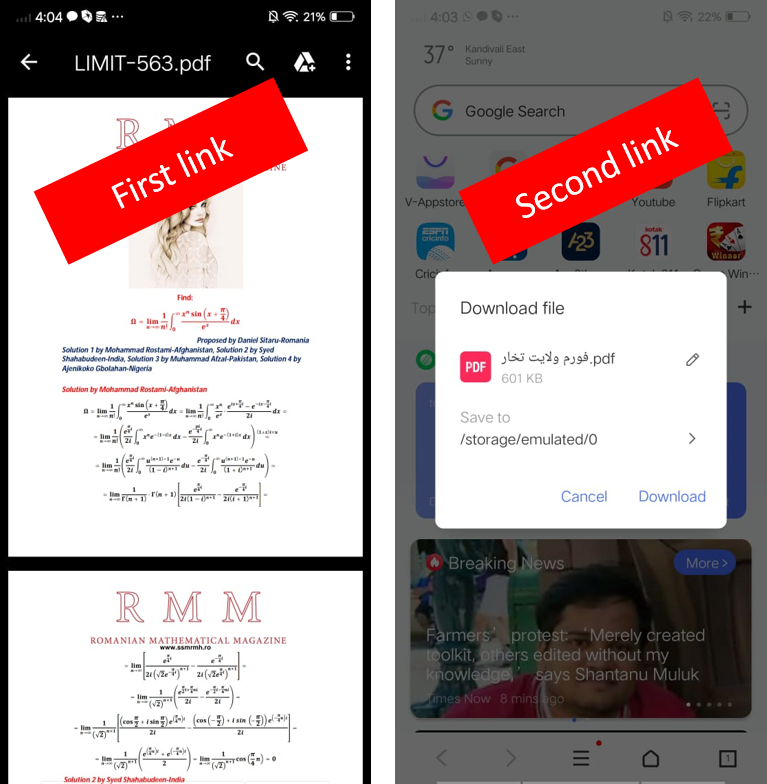
Both of Them open in the browser very well. but in the mobile first link open with google drive that is good!
but second link open in mobile browser with download dialog, that is bad.
Is there any way to fix the second link treatment?
I have two pdf links they are from different source:
First: http://www.ssmrmh.ro/wp-content/uploads/2021/02/LIMIT-563.pdf
Both of Them open in the browser very well. but in the mobile first link open with google drive that is good!
but second link open in mobile browser with download dialog, that is bad.
Is there any way to fix the second link treatment?
Uploaded files:
Quote from asmat on February 24, 2021, 3:16 am@luishp I tried to upload a record screen video but the website did not allow me.
The size of video is just 2MB.
@luishp I tried to upload a record screen video but the website did not allow me.
The size of video is just 2MB.
Quote from luishp on February 24, 2021, 8:00 amI tried to upload a record screen video but the website did not allow me. The size of video is just 2MB.
@asmat the size limit is 5 Mb but the server is not working very well lately, sorry.
Anyway, take a look here:
https://codepen.io/adrianparr/pen/qjmLxxYou can create dinamicaly a link by using this:
BeginJS
var a = document.createElement("a");
a.href = $App.myUrlToThePdf;
a.target = "_blank";
a.click();
EndJS
I tried to upload a record screen video but the website did not allow me. The size of video is just 2MB.
@asmat the size limit is 5 Mb but the server is not working very well lately, sorry.
Anyway, take a look here:
https://codepen.io/adrianparr/pen/qjmLxx
You can create dinamicaly a link by using this:
BeginJS
var a = document.createElement("a");
a.href = $App.myUrlToThePdf;
a.target = "_blank";
a.click();
EndJS
Quote from asmat on February 24, 2021, 1:52 pm@luishp your code is treat like my code, there is no difference .
BEGINJS
$App.url ="https://firebasestorage.googleapis.com/v0/b/kankor-plus-80e20.appspot.com/o/form%2F%D9%81%D9%88%D8%B1%D9%85%20%D9%88%D9%84%D8%A7%DB%8C%D8%AA%20%D8%AA%D8%AE%D8%A7%D8%B1.pdf?alt=media&token=b48b4405-d255-41e1-be0a-62b7d4d22605";
var a = document.createElement("a");
a.href = $App.url;
a.target = "_blank";
a.click();
ENDJS
@luishp your code is treat like my code, there is no difference .
BEGINJS
$App.url ="https://firebasestorage.googleapis.com/v0/b/kankor-plus-80e20.appspot.com/o/form%2F%D9%81%D9%88%D8%B1%D9%85%20%D9%88%D9%84%D8%A7%DB%8C%D8%AA%20%D8%AA%D8%AE%D8%A7%D8%B1.pdf?alt=media&token=b48b4405-d255-41e1-be0a-62b7d4d22605";
var a = document.createElement("a");
a.href = $App.url;
a.target = "_blank";
a.click();
ENDJS
Uploaded files:
Quote from luishp on February 24, 2021, 2:29 pm@asmat the only explanation I can think of is that the second PDF cannot be displayed in the Web Brrowser PDF viewer for some reason.
@asmat the only explanation I can think of is that the second PDF cannot be displayed in the Web Brrowser PDF viewer for some reason.