
Opensource YouTube Video Downloader

Quote from luishp on December 22, 2018, 10:44 pmOur user Reinier Maliepaard made mcYouTube Downloader v1.0 for a colleague who does not like the command line.
The colleague's request was: 'don't make me think, I only want to download a YouTube video or its audio'.
The result is a simple program and his colleague could not do anything wrong.You can download mcYouTube Downloader v1.0 via:mcYoutube-dl.zip (38,3 MB)
Unzip and run mcYoutube-dl.exe.
The downloadable zip contains executables, annotated source code, images, license and GNU texts.Thank you Reinier!!
The colleague's request was: 'don't make me think, I only want to download a YouTube video or its audio'.
The result is a simple program and his colleague could not do anything wrong.You can download mcYouTube Downloader v1.0 via:
mcYoutube-dl.zip (38,3 MB)
Unzip and run mcYoutube-dl.exe.
The downloadable zip contains executables, annotated source code, images, license and GNU texts.

Quote from luishp on April 15, 2020, 11:17 am@feli it's on @reinier website.
He will get an email notification and I hope he can answer you here soon.
Regards.
@feli it's on @reinier website.
He will get an email notification and I hope he can answer you here soon.
Regards.
Quote from Feli on April 16, 2020, 2:29 pmHello Luis.
I found the solution to download a video youtube and play it!
It's not very hard...
If anyone is interested let me know.
Feli
Hello Luis.
I found the solution to download a video youtube and play it!
It's not very hard...
If anyone is interested let me know.
Feli

Quote from PaulJonestindall on April 20, 2020, 11:20 am@loishp & @reinier
I would definately be interested in the YouTube downloader.
Thanks.
@loishp & @reinier
I would definately be interested in the YouTube downloader.
Thanks.
Quote from Reinier Maliepaard on April 20, 2020, 11:59 amHello,
The correct download link is: https://www.mcdigit.nl/
visualneo/mcYoutube-dl.zip Best regards,
Reinier
Hello,
The correct download link is: https://www.mcdigit.nl/
Best regards,
Reinier

Quote from rrey on April 21, 2020, 7:25 amHola Reinier,
El programa no funcionaal mnos en Windoes 10. El mensaje dice que falta una librería dll.
Saludos,
Roger
Hola Reinier,
El programa no funcionaal mnos en Windoes 10. El mensaje dice que falta una librería dll.
Saludos,
Roger
Quote from Feli on April 21, 2020, 10:38 amHello you ! First you need to download the file 'youtube-dl.exe'. (Google) For my pub ... You need to rename this file 'tbe-dl.exe' and place it in a sub-folder of the .pub named 'fichiers'. .
Surely this is not the best way but it works.
Feli
Hello you ! First you need to download the file 'youtube-dl.exe'. (Google) For my pub ... You need to rename this file 'tbe-dl.exe' and place it in a sub-folder of the .pub named 'fichiers'. .
Surely this is not the best way but it works.
Feli
Uploaded files:

Quote from impactband4u on April 21, 2020, 1:44 pmThank You, i'm also interested and will have a look at it.
Greetings
Thank You, i'm also interested and will have a look at it.
Greetings
Quote from Reinier Maliepaard on May 14, 2020, 4:47 pmHello,
Some explanation on my mcYoutube-dl that you can download via
https://www.mcdigit.nl/visualneo/mcYoutube-dl.zip
If my program mcYoutube-dl does not work on your machine, then probably msvcr100.dll is missing. Find it via Google (I cannot recommend a credible, trustworthy website) and place it in the directory of the program.
On some machines with Windows this dll is present. On my Windows 10 machine (64-bit), it is found in the directory Windows/sysWOW64, on my old Windows 7 machine in Windows/System32. However, I bought yesterday a new machine and the dll was missing: mcYoutube-dl did not download a video. So I copied the dll from my older machine to the mcYoutube-dl directory, and the programm worked flawlessly (maybe after clicking the button Update).
I hope this helps.
Best regards,
Reinier
Hello,
Some explanation on my mcYoutube-dl that you can download via
https://www.mcdigit.nl/visualneo/mcYoutube-dl.zip
If my program mcYoutube-dl does not work on your machine, then probably msvcr100.dll is missing. Find it via Google (I cannot recommend a credible, trustworthy website) and place it in the directory of the program.
On some machines with Windows this dll is present. On my Windows 10 machine (64-bit), it is found in the directory Windows/sysWOW64, on my old Windows 7 machine in Windows/System32. However, I bought yesterday a new machine and the dll was missing: mcYoutube-dl did not download a video. So I copied the dll from my older machine to the mcYoutube-dl directory, and the programm worked flawlessly (maybe after clicking the button Update).
I hope this helps.
Best regards,
Reinier
Quote from Reinier Maliepaard on June 1, 2020, 1:51 pmHello,
YouTube offers sometimes high quality HD video's. This can be inconvenient for you if you want to download such a YouTube video. In that case, you like to have a lower video and/or audio quality resulting in a smaller video download. By default, my program mcYouTube-dl downloads YouTube videos with the best video and audio quality. However, in the current release v.1.2 you can manage the quality parameters by yourself.
You can download code, executables and msvcr100.dll via
https://www.mcdigit.nl/visualneo/mcYoutube-dl.zip
Have fun! BTW any comments are welcome!
Best regards,
Reinier
Hello,
YouTube offers sometimes high quality HD video's. This can be inconvenient for you if you want to download such a YouTube video. In that case, you like to have a lower video and/or audio quality resulting in a smaller video download. By default, my program mcYouTube-dl downloads YouTube videos with the best video and audio quality. However, in the current release v.1.2 you can manage the quality parameters by yourself.
You can download code, executables and msvcr100.dll via
https://www.mcdigit.nl/visualneo/mcYoutube-dl.zip
Have fun! BTW any comments are welcome!
Best regards,
Reinier

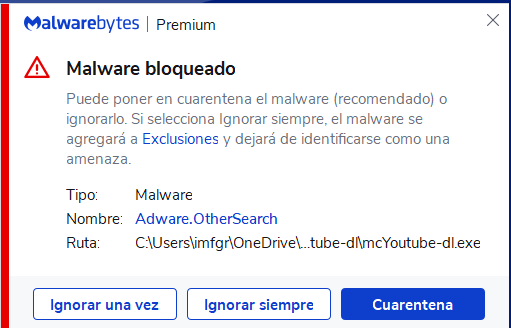
Quote from Ivanes82 on October 11, 2020, 4:23 amThe file contains a virus.
The infected file is mcYoutube-dl.exe.
I don't know if it's going to be a false positive, but just in case, I deleted it and recompiled it with Visualneo and it doesn't show up again.
The file contains a virus.
The infected file is mcYoutube-dl.exe.
I don't know if it's going to be a false positive, but just in case, I deleted it and recompiled it with Visualneo and it doesn't show up again.
Uploaded files:
Quote from mishem on September 27, 2026, 10:55 pmI came across this topic and decided to try writing something myself. I am attaching just the project file. The project itself is in Russian, but upon launch, the language will switch to match your system settings; if a translation for your system isn't available, it will default to English.
Here is what you need to do:
1. Go to Project > Embedded Files. Remove any missing entries and specify the correct paths to the files in the "Lang" folder.
2. The dmCMDLine plugin is required.
http://neobooker.ru/forum/37-2893-1#61254
3. The yt-dlp.exe file is required.
https://github.com/yt-dlp/yt-dlp/releases?ysclid=mujtgahrnd721751032#release-2026.08.19
4. The ffmpeg.exe and ffprobe.exe files are required.
You can download them here:
https://ffmpeg.org/
Or here for Windows:
https://www.gyan.dev/ffmpeg/builds/I couldn't attach these files to the post because of their large size, so you will need to download them yourself.
Feel free to develop the project further. The combination of yt-dlp.exe and ffmpeg.exe offers great capabilities.
I implemented the ability to download videos in popular formats as well as just the audio—useful if, for example, someone only needs the music or specific spoken content...
I came across this topic and decided to try writing something myself. I am attaching just the project file. The project itself is in Russian, but upon launch, the language will switch to match your system settings; if a translation for your system isn't available, it will default to English.
Here is what you need to do:
1. Go to Project > Embedded Files. Remove any missing entries and specify the correct paths to the files in the "Lang" folder.
2. The dmCMDLine plugin is required.
http://neobooker.ru/forum/37-2893-1#61254
3. The yt-dlp.exe file is required.
https://github.com/yt-dlp/yt-dlp/releases?ysclid=mujtgahrnd721751032#release-2026.08.19
4. The ffmpeg.exe and ffprobe.exe files are required.
You can download them here:
https://ffmpeg.org/
Or here for Windows:
https://www.gyan.dev/ffmpeg/builds/
I couldn't attach these files to the post because of their large size, so you will need to download them yourself.
Feel free to develop the project further. The combination of yt-dlp.exe and ffmpeg.exe offers great capabilities.
I implemented the ability to download videos in popular formats as well as just the audio—useful if, for example, someone only needs the music or specific spoken content...
Uploaded files: