
Paste where ever has focus

Quote from rcohen on November 11, 2021, 9:32 amI am in need of a sendkeys for Ctrl+V but the problem is, I won't know what application has focus. This is an auto paste function that is supposed to paste text into whatever application they are in and whatever text entry field has the focus. I would use Sendkeys but I have no idea what application the user may be using this feature in.
Anyone have any ideas?
Thanks
I am in need of a sendkeys for Ctrl+V but the problem is, I won't know what application has focus. This is an auto paste function that is supposed to paste text into whatever application they are in and whatever text entry field has the focus. I would use Sendkeys but I have no idea what application the user may be using this feature in.
Anyone have any ideas?
Thanks

Quote from Vadim on November 11, 2021, 9:45 am@rcohen
You can find out the descriptor and header text of the top window in the system with the zmFunctions plugin (to demonstrate this in the attached example this is done with the global mouse monitor (code on the button and in the subroutine). But it is the global monitor function may not work on Windows above version 7. However, the commands to get the descriptor and header should work. Check.
You can find out the descriptor and header text of the top window in the system with the zmFunctions plugin (to demonstrate this in the attached example this is done with the global mouse monitor (code on the button and in the subroutine). But it is the global monitor function may not work on Windows above version 7. However, the commands to get the descriptor and header should work. Check.
Uploaded files:Quote from rcohen on November 11, 2021, 10:00 amThanks @vadim. I generally am lost with the handles and IDs of windows, but I will try to follow your pub, thank you. The other thing is that I am using the global hotkey plugin and I hope the global functions of zmFunctions. I'll give this a try and see what happens ;-)
Thanks again.
I'm surprised that there isn't a way to do this with core VNW.
Thanks @vadim. I generally am lost with the handles and IDs of windows, but I will try to follow your pub, thank you. The other thing is that I am using the global hotkey plugin and I hope the global functions of zmFunctions. I'll give this a try and see what happens ;-)
Thanks again.
I'm surprised that there isn't a way to do this with core VNW.
Quote from rcohen on November 11, 2021, 10:07 amI installed the plugin and ran the demo pub you made for me and..... nothing happens. I clicked the button and see the command engage in the debugger, but when I click around on other windows (or even it's own window) there are no variables being populated ;-( I guess it's not a thing in Windows 8.1
Thanks anyway @vadim Much appreciated.
I installed the plugin and ran the demo pub you made for me and..... nothing happens. I clicked the button and see the command engage in the debugger, but when I click around on other windows (or even it's own window) there are no variables being populated ;-( I guess it's not a thing in Windows 8.1
Thanks anyway @vadim Much appreciated.
Quote from Vadim on November 11, 2021, 11:20 am@rcohen
No problem. Try the second method (see sample). Press the active button. Now the plugin itself tracks the top window in the system, with a frequency of 100ms (code in the timer).
No problem. Try the second method (see sample). Press the active button. Now the plugin itself tracks the top window in the system, with a frequency of 100ms (code in the timer).
Uploaded files:
Quote from DaviddeArgentina on November 11, 2021, 7:23 pmHi @rcohen,
You could broadcast the data to the target receptors.
Perhaps this link could generate an idea:
https://visualneo.com/forum/topic/quiz-multiuser-over-local-network
Cheers,
David de Argentina
Hi @rcohen,
You could broadcast the data to the target receptors.
Perhaps this link could generate an idea:
https://visualneo.com/forum/topic/quiz-multiuser-over-local-network
Cheers,
David de Argentina
Quote from rcohen on November 11, 2021, 8:39 pmThanks @vadim @daviddeargentina
I will try again Vadim, but that's what I did the first time is click that button. And nothing happened. After clicking I opened various software and even the pub itself. But I'll give it another go just in case I missed something...
David, I clicked the link and got an error message about not having permission to view it. I will guess it's just for plugin devs. But thanks for thinking of me...
Thanks @vadim @daviddeargentina
I will try again Vadim, but that's what I did the first time is click that button. And nothing happened. After clicking I opened various software and even the pub itself. But I'll give it another go just in case I missed something...
David, I clicked the link and got an error message about not having permission to view it. I will guess it's just for plugin devs. But thanks for thinking of me...
Quote from DaviddeArgentina on November 11, 2021, 10:58 pm@rcohen,
I had reposted the topic for all users.
take a look of:
https://visualneo.com/forum/topic/quiz-multiuser-over-local-network-public-topic#postid-13014
Cheers,
David de Argentina
I had reposted the topic for all users.
take a look of:
Cheers,
David de Argentina
Quote from rcohen on November 12, 2021, 1:21 am@daviddeargentina, thank you for the working link.While this looks fascinating, it's WAY overkill for the little ditty I'm trying to code. I'm looking for a simple answer ;-)@vadim, the second attempt didn't yield any difference in results ;-0 Thanks for the effort, that's much appreciated.Thanks again to both of you.
Quote from Vadim on November 12, 2021, 9:34 am@rcohen
I just tested the compiled sample on Windows 10. Both methods (global mouse monitor and timer) work fine, which makes me very happy. I thought the global monitor wouldn't work on 10, but it does too.
Check the attached compiled sample (I'm attaching the pub file too, I've added to turn off the buttons after selecting any of them to simply avoid using the plugin commands twice). To run the second method you will need to restart the program.
After starting the project, you need to click on the different open windows - in the text box should appear the headers of these windows.
The attached archive contains a compiled version and a PUB file.
I just tested the compiled sample on Windows 10. Both methods (global mouse monitor and timer) work fine, which makes me very happy. I thought the global monitor wouldn't work on 10, but it does too.
Check the attached compiled sample (I'm attaching the pub file too, I've added to turn off the buttons after selecting any of them to simply avoid using the plugin commands twice). To run the second method you will need to restart the program.
After starting the project, you need to click on the different open windows - in the text box should appear the headers of these windows.
The attached archive contains a compiled version and a PUB file.
Uploaded files:
Quote from rcohen on November 12, 2021, 8:11 pm@Vadim, thank you. I will test these out and try to understand how to use it. These kinds of things I usually have a hard time following. I appreciate your help.
@Vadim, thank you. I will test these out and try to understand how to use it. These kinds of things I usually have a hard time following. I appreciate your help.
Quote from Vadim on November 12, 2021, 8:19 pm@rcohen
A friend told me that on his computer, the first way of detecting top windows in the operating system does not work (Windows 10), but the second way (through the timer) works fine. Try the second way. To do this, click on the second way and then click on the open program windows on your computer to see the titles of these windows in a text object in the window of the demo file. The principle of work of the second way in the project is very simple - the timer every 100 ms checks which window is on top (on top of others) and reads the title of this window into a variable, which is displayed in the project window in the Inscription object.
A friend told me that on his computer, the first way of detecting top windows in the operating system does not work (Windows 10), but the second way (through the timer) works fine. Try the second way. To do this, click on the second way and then click on the open program windows on your computer to see the titles of these windows in a text object in the window of the demo file. The principle of work of the second way in the project is very simple - the timer every 100 ms checks which window is on top (on top of others) and reads the title of this window into a variable, which is displayed in the project window in the Inscription object.
Quote from rcohen on November 12, 2021, 8:22 pmThat is exactly how my testing went ;-) The second method works great. Win 8.1
Now I have to figure out how to get over the finish line. Thanks again. Gonna go dig into the pub to see how this works.
Thanks again @Vadim
That is exactly how my testing went ;-) The second method works great. Win 8.1
Now I have to figure out how to get over the finish line. Thanks again. Gonna go dig into the pub to see how this works.
Thanks again @Vadim

Quote from Talker on November 14, 2021, 5:56 am@rcohen
The "easy" way to do this would be to let your NEO app send a global {AltDn}{Esc}{AltUp} which should activate the window that was open prior to launching your app.
However, I have not yet seen a "global" way to send (system)keys in NEO. It appears that one of the arguments needs to be a specific window/application. Even in hpwSendKeys.
Can you send global (system) keys with NEO?
@Vadim
Thanks for your sample app to find the currently active window! Very useful. It's amazing how relatively little code it takes to find the active window in NEO compared to, for instance C#.
Is it possible to add detection of the Taskbar and Notification Area as well? Currently I'm getting a "blank" there...
@HPW
Thanks for your plug-ins! I am particularly interested in hpwSetTransparent. Can you give me an example of making Notepad transparent? I've not been able to get it to work yet. Also, is it possible to apply transparency to the currently active window (making it "global")?
The "easy" way to do this would be to let your NEO app send a global {AltDn}{Esc}{AltUp} which should activate the window that was open prior to launching your app.
However, I have not yet seen a "global" way to send (system)keys in NEO. It appears that one of the arguments needs to be a specific window/application. Even in hpwSendKeys.
Can you send global (system) keys with NEO?
Thanks for your sample app to find the currently active window! Very useful. It's amazing how relatively little code it takes to find the active window in NEO compared to, for instance C#.
Is it possible to add detection of the Taskbar and Notification Area as well? Currently I'm getting a "blank" there...
Thanks for your plug-ins! I am particularly interested in hpwSetTransparent. Can you give me an example of making Notepad transparent? I've not been able to get it to work yet. Also, is it possible to apply transparency to the currently active window (making it "global")?
Quote from rcohen on November 14, 2021, 6:05 amHi @talker,
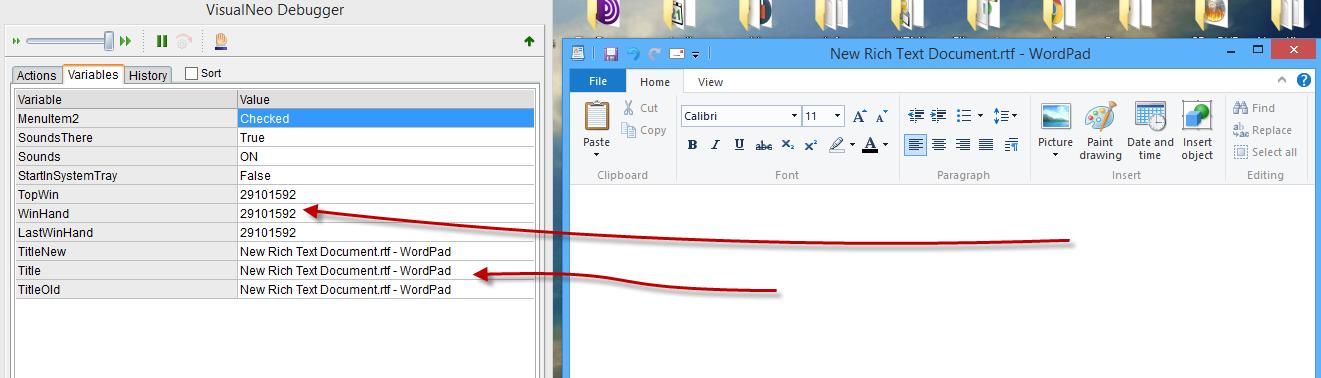
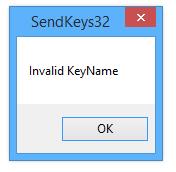
I was thinking the same when I began this project, but when I engage VisualNeo, the Winhandle and title change to my pub. So I built in a "last handle" routine BUT.... regardless if I use the winhandle, or the title, I get the same error message. I have checked and double checked, the win-handle is accurate. But I get the same error either way (title or winhandle).
I'm SOOO close ;-) Any ideas @vadim ?
Thanks again
Hi @talker,
I was thinking the same when I began this project, but when I engage VisualNeo, the Winhandle and title change to my pub. So I built in a "last handle" routine BUT.... regardless if I use the winhandle, or the title, I get the same error message. I have checked and double checked, the win-handle is accurate. But I get the same error either way (title or winhandle).
I'm SOOO close ;-) Any ideas @vadim ?
Thanks again
Uploaded files:
Quote from Talker on November 14, 2021, 6:42 amTry this standalone global Alt+Tab C# executable. Just load it as Application --> Run.
That should switch to the previous application/window (the one that was active before your app was loaded).In order to avoid any false positives, first extract the file to any location (don't run it from within the zip).
The file is safe.
Try this standalone global Alt+Tab C# executable. Just load it as Application --> Run.
That should switch to the previous application/window (the one that was active before your app was loaded).
In order to avoid any false positives, first extract the file to any location (don't run it from within the zip).
The file is safe.
Uploaded files:Quote from rcohen on November 14, 2021, 8:58 amHi @Talker,
I appreciate the effort, but this didn't work either.
GoSub "Sort"
Run "[PubDir]Alt+Tab.exe" "" "RunOnce+Wait" "" ""
hpwSendKeysToTitle "[Title]" "[#252]v[#253]"And I get the same error. Twice.
I think I'll just leave the pasting process as a manual one ;-) This was a fringe function I was trying to add, not a necessary one. And I think I've burned enough of (all of) your time.
Thanks again everyone. Much appreciated.
Hi @Talker,
I appreciate the effort, but this didn't work either.
GoSub "Sort"
Run "[PubDir]Alt+Tab.exe" "" "RunOnce+Wait" "" ""
hpwSendKeysToTitle "[Title]" "[#252]v[#253]"
And I get the same error. Twice.
I think I'll just leave the pasting process as a manual one ;-) This was a fringe function I was trying to add, not a necessary one. And I think I've burned enough of (all of) your time.
Thanks again everyone. Much appreciated.

Quote from HPW on November 14, 2021, 9:11 amHello,
Thanks for your plug-ins! I am particularly interested in hpwSetTransparent. Can you give me an example of making Notepad transparent? I've not been able to get it to work yet. Also, is it possible to apply transparency to the currently active window (making it "global")?
First I need a handle of the notepad window:
hpwFindAWindow "Titlestring" "" "[MyWinHandle]"
hpwSetTransparent "[MyWinHandle]" "50"
Makes it 50% transparent.
To get the curreent active window:
hpwAutoItWinGetActiveTitle "[PubDir]" "[ActiveWinTitle]"
hpwFindAWindow "[ActiveWinTitle]" "" "[MyWinHandle]"
hpwSetTransparent "[MyWinHandle]" "50"
Regards
Hans-Peter
Hello,
Thanks for your plug-ins! I am particularly interested in hpwSetTransparent. Can you give me an example of making Notepad transparent? I've not been able to get it to work yet. Also, is it possible to apply transparency to the currently active window (making it "global")?
First I need a handle of the notepad window:
hpwFindAWindow "Titlestring" "" "[MyWinHandle]"
hpwSetTransparent "[MyWinHandle]" "50"
Makes it 50% transparent.
To get the curreent active window:
hpwAutoItWinGetActiveTitle "[PubDir]" "[ActiveWinTitle]"
hpwFindAWindow "[ActiveWinTitle]" "" "[MyWinHandle]"
hpwSetTransparent "[MyWinHandle]" "50"
Regards
Hans-Peter

Quote from mishem on November 14, 2021, 9:49 amHow is it that this issue is being addressed in two threads? Let's define where it needs to be addressed.
https://visualneo.com/forum/topic/new-plugin-cliptricks?part=2#postid-13081
How is it that this issue is being addressed in two threads? Let's define where it needs to be addressed.
Quote from mishem on November 14, 2021, 10:54 am@rcohen
Attached is another example of changing window layout, inserting text, transparency, closing windows by ID.
Attached is another example of changing window layout, inserting text, transparency, closing windows by ID.
Uploaded files: