
PlayAction

Quote from fkapnist on September 19, 2022, 10:11 pmI noticed that NEO Win has some more features than Neobook5 did, such as PlayAction.
Is there more info on how to use this?
I want to call external files but am not sure how they should be formatted.
I wonder what relation it has to the hpwPlayAction plugin, which actually consists of six different plugins.
Is there any more documentation?
Thanks
I noticed that NEO Win has some more features than Neobook5 did, such as PlayAction.
Is there more info on how to use this?
I want to call external files but am not sure how they should be formatted.
I wonder what relation it has to the hpwPlayAction plugin, which actually consists of six different plugins.
Is there any more documentation?
Thanks
Uploaded files: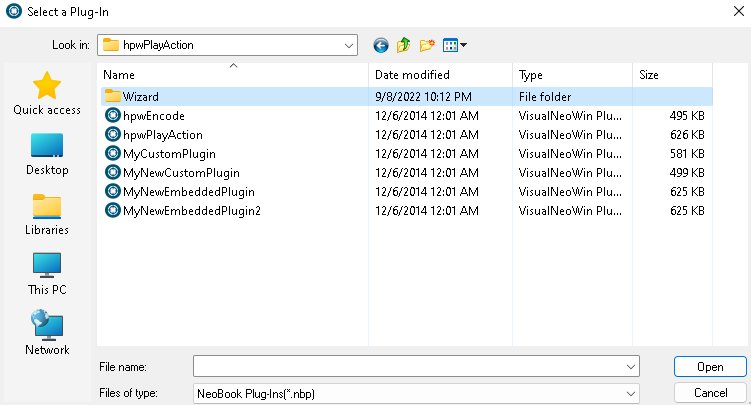

Quote from HPW on September 20, 2022, 5:01 pmHello,
https://winhelp.visualneo.com/Control.html#PLAYACTION
The text file should be plain text and ASCII/ANSI.
I do usally gave such files the *.nbs extension to remind me to "neobook script". Or maybe now *.vns ! ;-)
hpwPlayAction use the same internal function through the SDK of VisualNeo.
PlayAction was added because many user wants that without a plugin use.
Regards
Hello,
https://winhelp.visualneo.com/Control.html#PLAYACTION
The text file should be plain text and ASCII/ANSI.
I do usally gave such files the *.nbs extension to remind me to "neobook script". Or maybe now *.vns ! ;-)
hpwPlayAction use the same internal function through the SDK of VisualNeo.
PlayAction was added because many user wants that without a plugin use.
Regards
Quote from fkapnist on September 21, 2022, 12:15 amQuote from HPW on September 20, 2022, 5:01 pmHello,
https://winhelp.visualneo.com/Control.html#PLAYACTION
The text file should be plain text and ASCII/ANSI.
I do usally gave such files the *.nbs extension to remind me to "neobook script". Or maybe now *.vns ! ;-)
hpwPlayAction use the same internal function through the SDK of VisualNeo.
PlayAction was added because many user wants that without a plugin use.
Regards
Thanks. What does hpwEncode do?
.
Quote from HPW on September 20, 2022, 5:01 pmHello,
https://winhelp.visualneo.com/Control.html#PLAYACTION
The text file should be plain text and ASCII/ANSI.
I do usally gave such files the *.nbs extension to remind me to "neobook script". Or maybe now *.vns ! ;-)
hpwPlayAction use the same internal function through the SDK of VisualNeo.
PlayAction was added because many user wants that without a plugin use.
Regards
Thanks. What does hpwEncode do?
.
Quote from HPW on September 21, 2022, 4:05 pmHello,
hpwEncode was developed to be able to encrypt a nbs script and play it with passwort.
It was meant to get an option for protecting your scriptwork from spying eyes.
It was also later used to build custom plugins with neobook with encypted script code in the resource-string-space of a custom plugin.
Regards
Hans-Peter
Hello,
hpwEncode was developed to be able to encrypt a nbs script and play it with passwort.
It was meant to get an option for protecting your scriptwork from spying eyes.
It was also later used to build custom plugins with neobook with encypted script code in the resource-string-space of a custom plugin.
Regards
Hans-Peter
Quote from fkapnist on September 22, 2022, 12:54 amQuote from HPW on September 21, 2022, 4:05 pmHello,
hpwEncode was developed to be able to encrypt a nbs script and play it with passwort.
It was meant to get an option for protecting your scriptwork from spying eyes.
It was also later used to build custom plugins with neobook with encypted script code in the resource-string-space of a custom plugin.
Regards
Hans-Peter
Thank you.
Quote from HPW on September 21, 2022, 4:05 pmHello,
hpwEncode was developed to be able to encrypt a nbs script and play it with passwort.
It was meant to get an option for protecting your scriptwork from spying eyes.
It was also later used to build custom plugins with neobook with encypted script code in the resource-string-space of a custom plugin.
Regards
Hans-Peter
Thank you.

Quote from ilcaa72 on February 18, 2023, 6:02 pmwhat is proper syntax within VNW to use this PlayAction command?
i have a ANSI encoded textfile saved to Desktop with:
"Alertbox " [#34]Message[#34] [#34]Hello world![#34]"within an Action, Left-Click window i have
PlayAction "C:\Users\ilcaa72\Desktop\playthisaction.txt"no alertbox...what am i doing wrong? thanks
what is proper syntax within VNW to use this PlayAction command?
i have a ANSI encoded textfile saved to Desktop with:
"Alertbox " [#34]Message[#34] [#34]Hello world![#34]"
within an Action, Left-Click window i have
PlayAction "C:\Users\ilcaa72\Desktop\playthisaction.txt"
no alertbox...what am i doing wrong? thanks
Quote from fkapnist on February 18, 2023, 6:40 pmQuote from ilcaa72 on February 18, 2023, 6:02 pmwhat is proper syntax within VNW to use this PlayAction command?
i have a ANSI encoded textfile saved to Desktop with:
"Alertbox " [#34]Message[#34] [#34]Hello world![#34]"within an Action, Left-Click window i have
PlayAction "C:\Users\ilcaa72\Desktop\playthisaction.txt"no alertbox...what am i doing wrong? thanks
.............................
Remove the quotation mark right after Alertbox. But keep the final quotation mark (you mistakenly have three quotation marks)....
"AlertBox [#34]Message[#34] [#34]Hello world![#34]"
.
Quote from ilcaa72 on February 18, 2023, 6:02 pmwhat is proper syntax within VNW to use this PlayAction command?
i have a ANSI encoded textfile saved to Desktop with:
"Alertbox " [#34]Message[#34] [#34]Hello world![#34]"within an Action, Left-Click window i have
PlayAction "C:\Users\ilcaa72\Desktop\playthisaction.txt"no alertbox...what am i doing wrong? thanks
.............................
Remove the quotation mark right after Alertbox. But keep the final quotation mark (you mistakenly have three quotation marks)....
"AlertBox [#34]Message[#34] [#34]Hello world![#34]"
.
Quote from ilcaa72 on February 18, 2023, 6:56 pmthanks for the suggestion... i played with the quotes and this is what worked within text file
AlertBox "Message" "Hello from TextFile"
thanks for the suggestion... i played with the quotes and this is what worked within text file
AlertBox "Message" "Hello from TextFile"
Quote from PaulJonestindall on March 1, 2023, 8:57 pmThe PlayAction action could be used to create a rather simple interpreter program for VisualNeo coding.
I created a multiline TextEntry object and a button to execute the PlayAction action using the TextEntry variable.My only problem, however, is that the ShowErrors "False" seems to only return part of any [LastErrors] variable.
But this could be a handy tool.
The PlayAction action could be used to create a rather simple interpreter program for VisualNeo coding.
I created a multiline TextEntry object and a button to execute the PlayAction action using the TextEntry variable.
My only problem, however, is that the ShowErrors "False" seems to only return part of any [LastErrors] variable.
But this could be a handy tool.
Quote from fkapnist on March 1, 2023, 10:04 pmQuote from PaulJonestindall on March 1, 2023, 8:57 pmThe PlayAction action could be used to create a rather simple interpreter program for VisualNeo coding.
I created a multiline TextEntry object and a button to execute the PlayAction action using the TextEntry variable.My only problem, however, is that the ShowErrors "False" seems to only return part of any [LastErrors] variable.
But this could be a handy tool.@pauljonestindall
The PlayAction of VisualNEO Win was originally from the hpwPlayAction plugin for Neobook.
It also allows you to create custom macros and plugins.
.
Quote from PaulJonestindall on March 1, 2023, 8:57 pmThe PlayAction action could be used to create a rather simple interpreter program for VisualNeo coding.
I created a multiline TextEntry object and a button to execute the PlayAction action using the TextEntry variable.My only problem, however, is that the ShowErrors "False" seems to only return part of any [LastErrors] variable.
But this could be a handy tool.
The PlayAction of VisualNEO Win was originally from the hpwPlayAction plugin for Neobook.
It also allows you to create custom macros and plugins.
.
Quote from ilcaa72 on March 2, 2023, 3:35 pmquestion fkapnist to better understand this function...
the original is obsolete (hpwPlayAction ) or does it provide additional functionality the built-in one cant provide?
to create a macro or plugin using PlayAction you can only use strings of functions currently within your installation of NVWin, (a macro being a list of consecutive commands that allow you to achieve something, basically automate).
But how would Plugin work for this PlayAction command. do you have a simple sample of building a Plugin with PlayAction you can provide so i can reverse engineer to understand better?
question fkapnist to better understand this function...
the original is obsolete (hpwPlayAction ) or does it provide additional functionality the built-in one cant provide?
to create a macro or plugin using PlayAction you can only use strings of functions currently within your installation of NVWin, (a macro being a list of consecutive commands that allow you to achieve something, basically automate).
But how would Plugin work for this PlayAction command. do you have a simple sample of building a Plugin with PlayAction you can provide so i can reverse engineer to understand better?
Quote from fkapnist on March 2, 2023, 4:28 pmQuote from ilcaa72 on March 2, 2023, 3:35 pmquestion fkapnist to better understand this function...
the original is obsolete (hpwPlayAction ) or does it provide additional functionality the built-in one cant provide?
to create a macro or plugin using PlayAction you can only use strings of functions currently within your installation of NVWin, (a macro being a list of consecutive commands that allow you to achieve something, basically automate).
But how would Plugin work for this PlayAction command. do you have a simple sample of building a Plugin with PlayAction you can provide so i can reverse engineer to understand better?
@ilcaa72
In VisualNEO Win, "PlayAction" is found in Control > SubRoutine Access > ... along with "GoSub" and "Return."
The original (hpwPlayAction ) is NOT obsolete. You can download it and install it like any other plugin. It contains more actions for macros and even a "wizard" folder to help create new plugins. I suggest you contact Hans-Peter @hpw who wrote the PlayAction code for more details.But if your problem is that you can't put an entire list of consecutive commands on a single text string, try creating an external Function (i.e. MyFunction) that contains the entire block or list of commands that you want to use. Then create a simple Subroutine (i.e. CallMyFunction) that is a single "Call" string, to run your external function list of actions using PlayAction. I was able to use PlayAction to send information to the Chrome browser from a rectangle within VisualNEO Win (or Neobook5).
Good luck.
.
Quote from ilcaa72 on March 2, 2023, 3:35 pmquestion fkapnist to better understand this function...
the original is obsolete (hpwPlayAction ) or does it provide additional functionality the built-in one cant provide?
to create a macro or plugin using PlayAction you can only use strings of functions currently within your installation of NVWin, (a macro being a list of consecutive commands that allow you to achieve something, basically automate).
But how would Plugin work for this PlayAction command. do you have a simple sample of building a Plugin with PlayAction you can provide so i can reverse engineer to understand better?
In VisualNEO Win, "PlayAction" is found in Control > SubRoutine Access > ... along with "GoSub" and "Return."
The original (hpwPlayAction ) is NOT obsolete. You can download it and install it like any other plugin. It contains more actions for macros and even a "wizard" folder to help create new plugins. I suggest you contact Hans-Peter @hpw who wrote the PlayAction code for more details.
But if your problem is that you can't put an entire list of consecutive commands on a single text string, try creating an external Function (i.e. MyFunction) that contains the entire block or list of commands that you want to use. Then create a simple Subroutine (i.e. CallMyFunction) that is a single "Call" string, to run your external function list of actions using PlayAction. I was able to use PlayAction to send information to the Chrome browser from a rectangle within VisualNEO Win (or Neobook5).
Good luck.
.