
Polygon Background

Quote from Gremlin on November 5, 2022, 1:11 pmHy,
my first steps with NBWeb . I try to fill at Polygon with color, when button klick.
I tried this code (from documentation) but doesn´t work...
neoBackgroundColor [Polygon1] [green]
Can someone give me a hint ?
Hy,
my first steps with NBWeb . I try to fill at Polygon with color, when button klick.
I tried this code (from documentation) but doesn´t work...
neoBackgroundColor [Polygon1] [green]
Can someone give me a hint ?

Quote from Vadim on November 5, 2022, 4:30 pm@gremlin
Good time!
Pay attention to the syntax of the command in the help:
https://webhelp.visualneo.com/neoBackground.html
Good time!
Pay attention to the syntax of the command in the help:
Quote from paultomo on November 5, 2022, 4:30 pm@gremlin
You can also use SetObjectStyle, which allows you to change and set an individual CSS style for an object.
Create the polygon with ID "MyPoly", add Fill "#008B0E" or any colour.
Then add the following on click:
SetObjectStyle "MyPoly" "fill" "#FF8B0E"
The Polygon will change From Green to Orange when clicked on.
You can also use SetObjectStyle, which allows you to change and set an individual CSS style for an object.
Create the polygon with ID "MyPoly", add Fill "#008B0E" or any colour.
Then add the following on click:
SetObjectStyle "MyPoly" "fill" "#FF8B0E"
The Polygon will change From Green to Orange when clicked on.
Quote from Gremlin on November 6, 2022, 1:34 am@paultomo: Thanks, this work but
@Vadmin: I had tried with Picture (neoBackgroundImage) and Color (neoBackgroundColor) but the command still black , not changing to blue and it doesn`t work. Error message. Why this Plugin don´t work ?
@paultomo: Thanks, this work but
@Vadmin: I had tried with Picture (neoBackgroundImage) and Color (neoBackgroundColor) but the command still black , not changing to blue and it doesn`t work. Error message. Why this Plugin don´t work ?
Quote from Vadim on November 6, 2022, 10:28 am@gremlin
Yes, these commands are not recognized in the new version. Judging by the list of plug-ins, neoBackground is not included in the compiled version. Therefore, the commands of this plugin are not recognized by VisualNEO Web.
I will mark the login of Luis (@luishp) so that he will pay attention to this topic.
Yes, these commands are not recognized in the new version. Judging by the list of plug-ins, neoBackground is not included in the compiled version. Therefore, the commands of this plugin are not recognized by VisualNEO Web.
I will mark the login of Luis (@luishp) so that he will pay attention to this topic.

Quote from luishp on November 6, 2022, 3:03 pm@gremlin @vadim please download and install the attached plugin.
It seems I forgot to include it within the installer. I have already fixed it :)
Thank you!
@gremlin @vadim please download and install the attached plugin.
It seems I forgot to include it within the installer. I have already fixed it :)
Thank you!
Quote from Gremlin on November 6, 2022, 3:39 pm@luishp: Thank you, it work a little bit better but now it fill not the Polygon. The Space around the Polygon are filled. My Sample I tried to fill the yellow with orange:
Code: neoBackgroundColor "Polygon1" "#ee7752"
@luishp: Thank you, it work a little bit better but now it fill not the Polygon. The Space around the Polygon are filled. My Sample I tried to fill the yellow with orange:
Code: neoBackgroundColor "Polygon1" "#ee7752"
Uploaded files: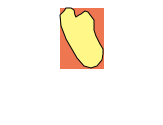
Quote from Vadim on November 6, 2022, 5:21 pm@gremlin
This is how it should be, because the neoBackground plugin works with the background.
To change the Polygon object's fill, insert a variable instead of the color name in the object's properties and apply the SetVar command.
For example:
SetVar [PolygonColor] "#FD5308"
This is how it should be, because the neoBackground plugin works with the background.
To change the Polygon object's fill, insert a variable instead of the color name in the object's properties and apply the SetVar command.
For example:
SetVar [PolygonColor] "#FD5308"
Uploaded files: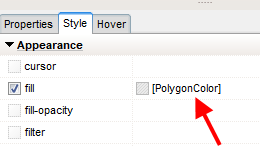
Quote from luishp on November 6, 2022, 6:00 pm@gremlin neoBackground is intended to work (mainly) on Container objects.
Polygons are inline SVG's so you will need an alternative method:SetObjectStyle "MyPoly" "fill" "#FF8B0E"Or using a variable as a property value, as @vadim suggest.
Regards.
@gremlin neoBackground is intended to work (mainly) on Container objects.
Polygons are inline SVG's so you will need an alternative method:
SetObjectStyle "MyPoly" "fill" "#FF8B0E"
Or using a variable as a property value, as @vadim suggest.
Regards.
Quote from Gremlin on November 6, 2022, 7:27 pmHy, thank you very much. Now it work´s
Can I add with this command a picture to this Polygon too ?
I had tried:
SetObjectStyle "MyPoly" "fill" "e:\Download\123.jpg"
or
SetObjectStyle "MyPoly" "fill" "E./Download/123.jpg"
or via Website:
SetObjectStyle "MyPoly" "fill" "http://test.de/123.jpg"
Hy, thank you very much. Now it work´s
Can I add with this command a picture to this Polygon too ?
I had tried:
SetObjectStyle "MyPoly" "fill" "e:\Download\123.jpg"
or
SetObjectStyle "MyPoly" "fill" "E./Download/123.jpg"
or via Website:
SetObjectStyle "MyPoly" "fill" "http://test.de/123.jpg"
Quote from luishp on November 7, 2022, 10:21 am@gremlin, you can do it but you need to define the background as a SVG pattern first (add it as HTML into a Container). Take a look here:
https://stackoverflow.com/questions/3796025/fill-svg-path-element-with-a-background-image
Regards.
@gremlin, you can do it but you need to define the background as a SVG pattern first (add it as HTML into a Container). Take a look here:
https://stackoverflow.com/questions/3796025/fill-svg-path-element-with-a-background-image
Regards.
Quote from Gremlin on November 7, 2022, 12:46 pmSorry , I tried to understand, but I can´t.
I had tried varius , but I don´t know how to define the background as SVG pattern.
Code:
SetObjectStyle "Rueckenteil" "content" "<defs><pattern id='img1' patternUnits='userSpaceOnUse' width='100' height='100'><image href='c:\Users\StrandkorbKing\Downloads\schirmstaender_0106140-000_m.jpg' x='0' y='0' width='100' height='100'/></pattern>"
Rueckenteil are a Polygon
I think my code absolute a fail ... (but I can´t find a sample or I don´t understand how to do that)
Sorry , I tried to understand, but I can´t.
I had tried varius , but I don´t know how to define the background as SVG pattern.
Code:
SetObjectStyle "Rueckenteil" "content" "<defs><pattern id='img1' patternUnits='userSpaceOnUse' width='100' height='100'><image href='c:\Users\StrandkorbKing\Downloads\schirmstaender_0106140-000_m.jpg' x='0' y='0' width='100' height='100'/></pattern>"
Rueckenteil are a Polygon
I think my code absolute a fail ... (but I can´t find a sample or I don´t understand how to do that)
Quote from luishp on November 7, 2022, 3:30 pm@gremlin please check the attached app. Note that I have used a remotely hosted image. Local absolute paths can cause problems once the application is compiled and published somewhere if you don't understand how paths work. Try using relative paths instead.
Regards.
@gremlin please check the attached app. Note that I have used a remotely hosted image. Local absolute paths can cause problems once the application is compiled and published somewhere if you don't understand how paths work. Try using relative paths instead.
Regards.
Uploaded files: