
PONGO LA RUTINA Y LA APP ME DEJA EN BLANCO LA PANTALLA

Quote from joferar333 on July 21, 2023, 1:38 am@Luishp aplique la rutina tal como me lo indicaste pero cuando pondo la rutina automaticamente la app nse muestra queda en blanco, la desactivo y vuelve a aparecer
Fijate en el video que te hice donde te muestro que pasa si activo la rutina que me enviaste
https://alejandrovalenti.com/rutina.mp4
Te amplio porque ahora si que no entiendo mas nada... he desactivado absolutamente todo para encontrar el error, aparentemente cuando desactive las rutinas
la pantalla aparecio tal como te muestro en el video anterior pero hoy me lleve la gran sorpresa
Coloque al inicio de la app un evento que solo lee un archivo y trae el contenido y lo pone en una variable. (lo hice a partir de la galereia de ejemplos) aca
esto lo chisto lo ejecuto en Localhost y funciona perfecto, lee el archivo y me lo pone en la variable ahora cuando lo subo al servidor sone ya la pantalla queda
en blanco y instpeccionando la consola me da un error que la verdad no entiendo
por favor @luishp mira este otro videito realmente me cuenta creer que leer un archivo y poner los valores en variables sea tan complicado con este programa
https://alejandrovalenti.com/luisxx.mp4
Este es el resultado de la consola cuando subo al servidor
main.js:35 Uncaught SyntaxError: Unexpected number
jquery.min.js:2 Uncaught Error: [$injector:modulerr] http://errors.angularjs.org/1.8.2/$injector/modulerr?p0=NeoApp&p1=Error%3A%20%5B%24injector%3Anomod%5D%20http%3A%2F%2Ferrors.angularjs.org%2F1.8.2%2F%24injector%2Fnomod%3Fp0%3DNeoApp%0A%20%20%20%20at%20https%3A%2F%2Fagilprestamosprendarios.com%2Fsimulador%2Fjs%2Fangular.min.js%3A7%3A168%0A%20%20%20%20at%20https%3A%2F%2Fagilprestamosprendarios.com%2Fsimulador%2Fjs%2Fangular.min.js%3A26%3A503%0A%20%20%20%20at%20b%20(https%3A%2F%2Fagilprestamosprendarios.com%2Fsimulador%2Fjs%2Fangular.min.js%3A26%3A25)%0A%20%20%20%20at%20https%3A%2F%2Fagilprestamosprendarios.com%2Fsimulador%2Fjs%2Fangular.min.js%3A26%3A277%0A%20%20%20%20at%20https%3A%2F%2Fagilprestamosprendarios.com%2Fsimulador%2Fjs%2Fangular.min.js%3A43%3A201%0A%20%20%20%20at%20r%20(https%3A%2F%2Fagilprestamosprendarios.com%2Fsimulador%2Fjs%2Fangular.min.js%3A8%3A76)%0A%20%20%20%20at%20g%20(https%3A%2F%2Fagilprestamosprendarios.com%2Fsimulador%2Fjs%2Fangular.min.js%3A43%3A49)%0A%20%20%20%20at%20fb%20(https%3A%2F%2Fagilprestamosprendarios.com%2Fsimulador%2Fjs%2Fangular.min.js%3A47%3A153)%0A%20%20%20%20at%20c%20(https%3A%2F%2Fagilprestamosprendarios.com%2Fsimulador%2Fjs%2Fangular.min.js%3A22%3A57)%0A%20%20%20%20at%20Wc%20(https%3A%2F%2Fagilprestamosprendarios.com%2Fsimulador%2Fjs%2Fangular.min.js%3A22%3A370)
at angular.min.js:7:168
at angular.min.js:43:491
at r (angular.min.js:8:76)
at g (angular.min.js:43:49)
at fb (angular.min.js:47:153)
at c (angular.min.js:22:57)
at Wc (angular.min.js:22:370)
at Ee (angular.min.js:21:45)
at HTMLDocument.<anonymous> (angular.min.js:351:117)
at e (jquery.min.js:2:30038)
Gracias
@Luishp aplique la rutina tal como me lo indicaste pero cuando pondo la rutina automaticamente la app nse muestra queda en blanco, la desactivo y vuelve a aparecer
Fijate en el video que te hice donde te muestro que pasa si activo la rutina que me enviaste
[video src="https://alejandrovalenti.com/rutina.mp4" /]
Te amplio porque ahora si que no entiendo mas nada... he desactivado absolutamente todo para encontrar el error, aparentemente cuando desactive las rutinas
la pantalla aparecio tal como te muestro en el video anterior pero hoy me lleve la gran sorpresa
Coloque al inicio de la app un evento que solo lee un archivo y trae el contenido y lo pone en una variable. (lo hice a partir de la galereia de ejemplos) aca
esto lo chisto lo ejecuto en Localhost y funciona perfecto, lee el archivo y me lo pone en la variable ahora cuando lo subo al servidor sone ya la pantalla queda
en blanco y instpeccionando la consola me da un error que la verdad no entiendo
por favor @luishp mira este otro videito realmente me cuenta creer que leer un archivo y poner los valores en variables sea tan complicado con este programa
[video src="https://alejandrovalenti.com/luisxx.mp4" /]
Este es el resultado de la consola cuando subo al servidor
main.js:35 Uncaught SyntaxError: Unexpected number
jquery.min.js:2 Uncaught Error: [$injector:modulerr] http://errors.angularjs.org/1.8.2/$injector/modulerr?p0=NeoApp&p1=Error%3A%20%5B%24injector%3Anomod%5D%20http%3A%2F%2Ferrors.angularjs.org%2F1.8.2%2F%24injector%2Fnomod%3Fp0%3DNeoApp%20%20%20%20at%20https%3A%2F%2Fagilprestamosprendarios.com%2Fsimulador%2Fjs%2Fangular.min.js%3A7%3A168%20%20%20%20at%20https%3A%2F%2Fagilprestamosprendarios.com%2Fsimulador%2Fjs%2Fangular.min.js%3A26%3A503%20%20%20%20at%20b%20(https%3A%2F%2Fagilprestamosprendarios.com%2Fsimulador%2Fjs%2Fangular.min.js%3A26%3A25)%20%20%20%20at%20https%3A%2F%2Fagilprestamosprendarios.com%2Fsimulador%2Fjs%2Fangular.min.js%3A26%3A277%20%20%20%20at%20https%3A%2F%2Fagilprestamosprendarios.com%2Fsimulador%2Fjs%2Fangular.min.js%3A43%3A201%20%20%20%20at%20r%20(https%3A%2F%2Fagilprestamosprendarios.com%2Fsimulador%2Fjs%2Fangular.min.js%3A8%3A76)%20%20%20%20at%20g%20(https%3A%2F%2Fagilprestamosprendarios.com%2Fsimulador%2Fjs%2Fangular.min.js%3A43%3A49)%20%20%20%20at%20fb%20(https%3A%2F%2Fagilprestamosprendarios.com%2Fsimulador%2Fjs%2Fangular.min.js%3A47%3A153)%20%20%20%20at%20c%20(https%3A%2F%2Fagilprestamosprendarios.com%2Fsimulador%2Fjs%2Fangular.min.js%3A22%3A57)%20%20%20%20at%20Wc%20(https%3A%2F%2Fagilprestamosprendarios.com%2Fsimulador%2Fjs%2Fangular.min.js%3A22%3A370)
at angular.min.js:7:168
at angular.min.js:43:491
at r (angular.min.js:8:76)
at g (angular.min.js:43:49)
at fb (angular.min.js:47:153)
at c (angular.min.js:22:57)
at Wc (angular.min.js:22:370)
at Ee (angular.min.js:21:45)
at HTMLDocument.<anonymous> (angular.min.js:351:117)
at e (jquery.min.js:2:30038)
Gracias

Quote from luishp on July 21, 2023, 10:02 am@joferar333 no puedes dar nombres a variables que consistan en un número (esto es así en todos los lenguajes de programación).
De verdad creo que deberías leer al menos la parte de introducción del manual de usuario de VisualNEO Web:Valid Variable Names (visualneo.com)
Esto es incorrecto:
SetVar [12] [myArray(0)]Yo de verdad que tengo mucha paciencia, pero estoy agotado...
@joferar333 no puedes dar nombres a variables que consistan en un número (esto es así en todos los lenguajes de programación).
De verdad creo que deberías leer al menos la parte de introducción del manual de usuario de VisualNEO Web:
Valid Variable Names (visualneo.com)
Esto es incorrecto:
SetVar [12] [myArray(0)]
Yo de verdad que tengo mucha paciencia, pero estoy agotado...
Quote from joferar333 on July 21, 2023, 10:34 am@luishp realmente te pido mil disculpas por las molestias ocacionadas
Ni me imagine que el tema podria ser por los nombres de las variable pero aun asi no logro que me leea el archivo
neoPhpFileToVar "autonormal_2023-2013.txt" [resultado] "parseData1"
Math "[xxx] * [a]/1000" 1 [fina]
MathCeil [fina] [fina]
BeginJS
var number=parseFloat($App.fina);
$App.final12 = number.toLocaleString('de-DE');
EndJSrutina
parseData1
StrParse "[resultado]" "\n" [miArray]
ArrayLen [miArray] [totalLineas]SetVar [a] [miArray(0)]
SetVar [b] [miArray(1)]
SetVar [c] [miArray(2)]
SetVar [d] [miArray(3)]
SetVar [e] [miArray(4)]
SetVar [f] [miArray(5)]
SetVar [g] [MiArray(6)][resultado] Interger respuesa probe con ambas formas interg y string
@luishp realmente te pido mil disculpas por las molestias ocacionadas
Ni me imagine que el tema podria ser por los nombres de las variable pero aun asi no logro que me leea el archivo
neoPhpFileToVar "autonormal_2023-2013.txt" [resultado] "parseData1"
Math "[xxx] * [a]/1000" 1 [fina]
MathCeil [fina] [fina]
BeginJS
var number=parseFloat($App.fina);
$App.final12 = number.toLocaleString('de-DE');
EndJS
rutina
parseData1
StrParse "[resultado]" "\n" [miArray]
ArrayLen [miArray] [totalLineas]
SetVar [a] [miArray(0)]
SetVar [b] [miArray(1)]
SetVar [c] [miArray(2)]
SetVar [d] [miArray(3)]
SetVar [e] [miArray(4)]
SetVar [f] [miArray(5)]
SetVar [g] [MiArray(6)]
[resultado] Interger respuesa probe con ambas formas interg y string
Quote from luishp on July 21, 2023, 10:57 am@joferar333 Esto debe estar también en la subrutina (al final de ella):
Math "[xxx] * [a]/1000" 1 [fina] MathCeil [fina] [fina] BeginJS var number=parseFloat($App.fina); $App.final12 = number.toLocaleString('de-DE'); EndJSPorque entonces, y solo entonces, [a] tendrá un valor.
De lo contrario, tal y como estás haciendo ahora, cuando ejecutas Math, [a] todavía no tiene un valor.Es decir, la subrutina sirve para estar seguro de que en el momento en que esta se ejecute, el archivo ya ha sido leído.
Si pones acciones detrás de neoPhpFileToVar se ejecutarán inmediatamente, sin esperar a que el archivo haya sido leído.¿Lo entiendes ahora?
@joferar333 Esto debe estar también en la subrutina (al final de ella):
Math "[xxx] * [a]/1000" 1 [fina]
MathCeil [fina] [fina]
BeginJS
var number=parseFloat($App.fina);
$App.final12 = number.toLocaleString('de-DE');
EndJS
Porque entonces, y solo entonces, [a] tendrá un valor.
De lo contrario, tal y como estás haciendo ahora, cuando ejecutas Math, [a] todavía no tiene un valor.
Es decir, la subrutina sirve para estar seguro de que en el momento en que esta se ejecute, el archivo ya ha sido leído.
Si pones acciones detrás de neoPhpFileToVar se ejecutarán inmediatamente, sin esperar a que el archivo haya sido leído.
¿Lo entiendes ahora?
Quote from joferar333 on July 21, 2023, 11:18 am@luishpi si entendi ahora bien la mecanica pero aun si no logro que lea...
cuando ingresa a la pagina se le pide que lea el archivo...
neoPhpFileToVar "autonormal_2023-2013.txt" [resultado] "parseData1"
.. parseData1
rutina
StrParse "[resultado]" "\n" [miArray]
ArrayLen [miArray] [totalLineas]SetVar [a] [miArray0]
SetVar [b] [miArray1]
SetVar [c] [miArray2]
SetVar [d] [miArray3]
SetVar [e] [miArray4]
SetVar [f] [miArray5]
SetVar [g] [MiArray6]Math "[xxx] * [a]/1000" 1 [fina]
MathCeil [fina] [fina]
BeginJS
var number=parseFloat($App.fina);
$App.final12 = number.toLocaleString('de-DE');
EndJS.15
Math "[xxx] * [b]/1000" 1 [fina1]
MathCeil [fina1] [fina1]
BeginJS
var number=parseFloat($App.fina1);
$App.final15 = number.toLocaleString('de-DE');
EndJS
.18
Math "[xxx] * [c]/1000" 1 [fina2]
MathCeil [fina2] [fina2]
BeginJS
var number=parseFloat($App.fina2);
$App.final18 = number.toLocaleString('de-DE');
EndJS.24
Math "[xxx] * [d]/1000" 1 [fina3]
MathCeil [fina3] [fina3]
BeginJS
var number=parseFloat($App.fina3);
$App.final24 = number.toLocaleString('de-DE');
EndJS.30
Math "[xxx] * [e]/1000" 1 [fina4]
MathCeil [fina4] [fina4]
BeginJS
var number=parseFloat($App.fina4);
$App.final30 = number.toLocaleString('de-DE');
EndJS.36
Math "[xxx] * [f]/1000" 1 [fina5]
MathCeil [fina5] [fina5]
BeginJS
var number=parseFloat($App.fina5);
$App.final36 = number.toLocaleString('de-DE');
EndJS.48
Math "[xxx] * [g]/1000" 1 [fina6]
MathCeil [fina6] [fina6]
BeginJS
var number=parseFloat($App.fina6);
$App.final48 = number.toLocaleString('de-DE');
EndJS[resultado] Interger respuesa probe con ambas formas interg y string
@luishpi si entendi ahora bien la mecanica pero aun si no logro que lea...
cuando ingresa a la pagina se le pide que lea el archivo...
neoPhpFileToVar "autonormal_2023-2013.txt" [resultado] "parseData1"
.. parseData1
rutina
StrParse "[resultado]" "\n" [miArray]
ArrayLen [miArray] [totalLineas]
SetVar [a] [miArray0]
SetVar [b] [miArray1]
SetVar [c] [miArray2]
SetVar [d] [miArray3]
SetVar [e] [miArray4]
SetVar [f] [miArray5]
SetVar [g] [MiArray6]
Math "[xxx] * [a]/1000" 1 [fina]
MathCeil [fina] [fina]
BeginJS
var number=parseFloat($App.fina);
$App.final12 = number.toLocaleString('de-DE');
EndJS
.15
Math "[xxx] * [b]/1000" 1 [fina1]
MathCeil [fina1] [fina1]
BeginJS
var number=parseFloat($App.fina1);
$App.final15 = number.toLocaleString('de-DE');
EndJS
.18
Math "[xxx] * [c]/1000" 1 [fina2]
MathCeil [fina2] [fina2]
BeginJS
var number=parseFloat($App.fina2);
$App.final18 = number.toLocaleString('de-DE');
EndJS
.24
Math "[xxx] * [d]/1000" 1 [fina3]
MathCeil [fina3] [fina3]
BeginJS
var number=parseFloat($App.fina3);
$App.final24 = number.toLocaleString('de-DE');
EndJS
.30
Math "[xxx] * [e]/1000" 1 [fina4]
MathCeil [fina4] [fina4]
BeginJS
var number=parseFloat($App.fina4);
$App.final30 = number.toLocaleString('de-DE');
EndJS
.36
Math "[xxx] * [f]/1000" 1 [fina5]
MathCeil [fina5] [fina5]
BeginJS
var number=parseFloat($App.fina5);
$App.final36 = number.toLocaleString('de-DE');
EndJS
.48
Math "[xxx] * [g]/1000" 1 [fina6]
MathCeil [fina6] [fina6]
BeginJS
var number=parseFloat($App.fina6);
$App.final48 = number.toLocaleString('de-DE');
EndJS
[resultado] Interger respuesa probe con ambas formas interg y string
Quote from joferar333 on July 21, 2023, 11:19 am@Luishp
Corregi que faltaba el ()
SetVar [a] [miArray(0)]
SetVar [b] [miArray(1)]
SetVar [c] [miArray(2)]
SetVar [d] [miArray(3)]
SetVar [e] [miArray(4)]
SetVar [f] [miArray(5)]
SetVar [g] [MiArray(6)]pero aun asi no logro que lea el archivo
Corregi que faltaba el ()
SetVar [a] [miArray(0)]
SetVar [b] [miArray(1)]
SetVar [c] [miArray(2)]
SetVar [d] [miArray(3)]
SetVar [e] [miArray(4)]
SetVar [f] [miArray(5)]
SetVar [g] [MiArray(6)]
pero aun asi no logro que lea el archivo

Quote from roccocogliano on July 21, 2023, 11:38 am@joferar333
In the routine 'parseData1' try printing the contents of the variable [resultado] using a ConsoleLog or jsalert "[resultado]" (put it at the start of the routine) to see if the variable actually contains what you expect.
If correct, it should show you the contents of the file on screen
In the routine 'parseData1' try printing the contents of the variable [resultado] using a ConsoleLog or jsalert "[resultado]" (put it at the start of the routine) to see if the variable actually contains what you expect.
If correct, it should show you the contents of the file on screen
Quote from joferar333 on July 21, 2023, 12:21 pmHi @roccocogliano please see this video...
https://alejandrovalenti.com/rrt.mp4
Thanks
Hi @roccocogliano please see this video...
[video src="https://alejandrovalenti.com/rrt.mp4" /]
Thanks
Quote from roccocogliano on July 21, 2023, 12:34 pm@joferar333
you messed up (a lot) with the variable names. see attached screenshot
you messed up (a lot) with the variable names. see attached screenshot
Uploaded files: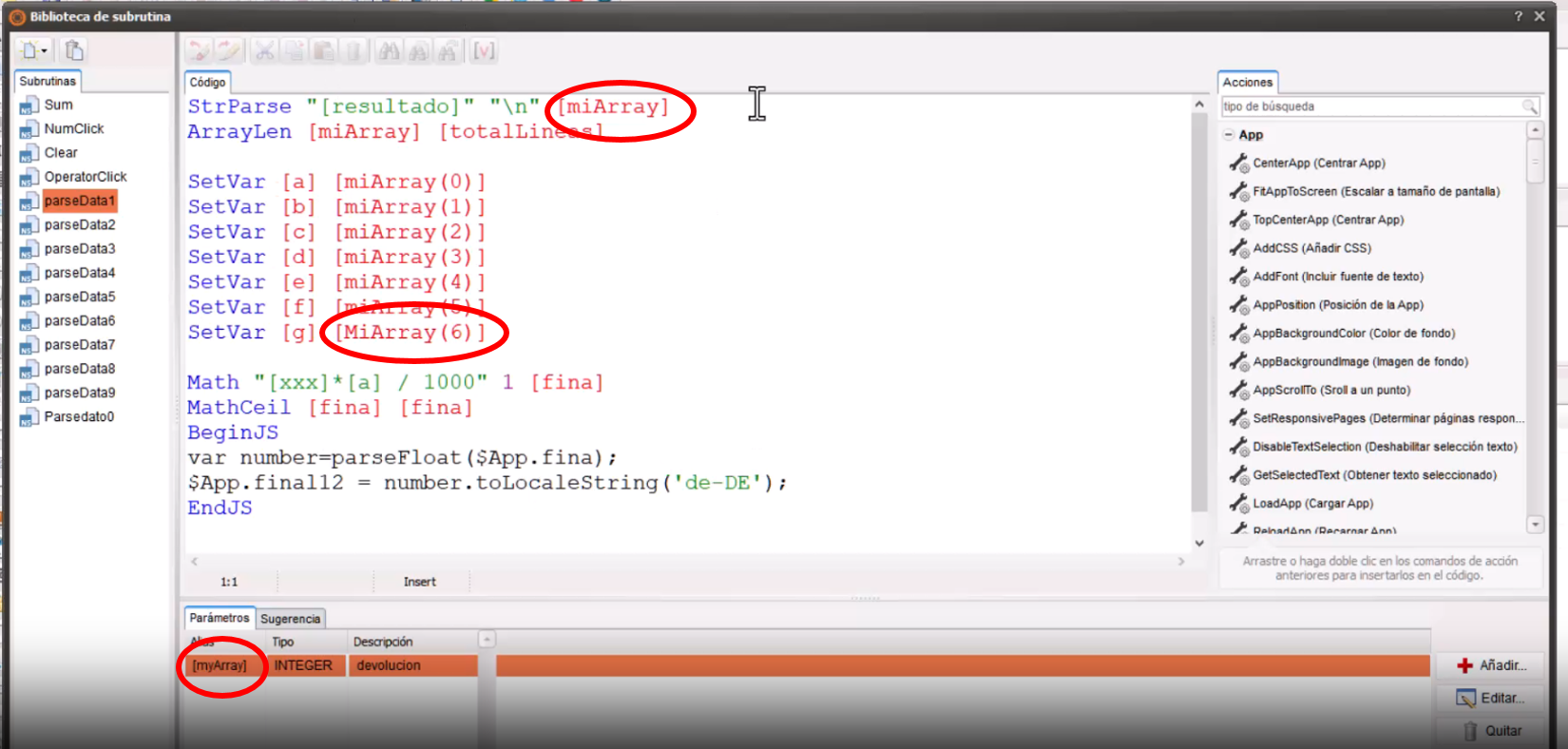
Quote from roccocogliano on July 21, 2023, 12:36 pmfirst you use [myArray] as parameter, then [miArray] and also [MiArray] in the routine
first you use [myArray] as parameter, then [miArray] and also [MiArray] in the routine
Quote from joferar333 on July 21, 2023, 12:44 pm@roccocogliano
Thank you really friend, I have corrected what you mark but even so I can't get it to read me... it's a Mandingo thing!
Could you do him a favor and see if you can read this file that I am attaching and place it in the variables to see if I can move forward once and for all...
Thank you really friend, I have corrected what you mark but even so I can't get it to read me... it's a Mandingo thing!
Could you do him a favor and see if you can read this file that I am attaching and place it in the variables to see if I can move forward once and for all...
Quote from roccocogliano on July 21, 2023, 12:48 pmQuote from roccocogliano on July 21, 2023, 11:38 am@joferar333
In the routine 'parseData1' try printing the contents of the variable [resultado] using a ConsoleLog or jsalert "[resultado]" (put it at the start of the routine) to see if the variable actually contains what you expect.
If correct, it should show you the contents of the file on screen
as i said before, try to see if it loads the file.
Quote from roccocogliano on July 21, 2023, 11:38 amIn the routine 'parseData1' try printing the contents of the variable [resultado] using a ConsoleLog or jsalert "[resultado]" (put it at the start of the routine) to see if the variable actually contains what you expect.
If correct, it should show you the contents of the file on screen
as i said before, try to see if it loads the file.
Quote from joferar333 on July 21, 2023, 12:56 pm@roccocogliano
Unfortunately I don't know how to use what you tell me.
This is a routine that Luis gave me but I can't get it to work, I've made many mistakes but I still can't get it to work.That's why I asked you if you could try to load that file that I attached that contains 6 lines and see if you can get it to read each line and you can apply it to a variable... this is really horrible for me and there are things that maybe I miss but my neurons obviously at 65 are no longer so awake... greetings
Unfortunately I don't know how to use what you tell me.
This is a routine that Luis gave me but I can't get it to work, I've made many mistakes but I still can't get it to work.
That's why I asked you if you could try to load that file that I attached that contains 6 lines and see if you can get it to read each line and you can apply it to a variable... this is really horrible for me and there are things that maybe I miss but my neurons obviously at 65 are no longer so awake... greetings
Quote from joferar333 on July 21, 2023, 1:08 pmThank you really friend, I have corrected what you mark but even so I can't get it to read me... it's a Mandingo thing!
Could you do him a favor and see if you can read this file that I am attaching and place it in the variables to see if I can move forward once and for all...
Thank you really friend, I have corrected what you mark but even so I can't get it to read me... it's a Mandingo thing!
Could you do him a favor and see if you can read this file that I am attaching and place it in the variables to see if I can move forward once and for all...

Quote from roccocogliano on July 21, 2023, 2:30 pm@joferar333
No need for me to try and read your file, you did and it works.
What I recommended was not a fix but a test to see if your routine was loading the file correctly and looking at the image you loaded, it does, it works, it loads the contents of the file into the [resultado] variable.
You can now comment out that line as well.
I recommend you check the variable names in your interface.
Make sure you spell variable names correctly wherever you use them.Regards
PS: age doesn't matter, I'm 55 :)
No need for me to try and read your file, you did and it works.
What I recommended was not a fix but a test to see if your routine was loading the file correctly and looking at the image you loaded, it does, it works, it loads the contents of the file into the [resultado] variable.
You can now comment out that line as well.
I recommend you check the variable names in your interface.
Make sure you spell variable names correctly wherever you use them.
Regards
PS: age doesn't matter, I'm 55 :)