
PreventInstallPrompt failed ?

Quote from Phil78 on February 25, 2022, 6:54 pmGood evening @luishp
I try to see the install dialog but [readyToInstall] is ever = false either on chrome, opera, firefox, samsung browser and either on windows and android.
yet all browsers propose the installation in their menus ?
Good evening @luishp
I try to see the install dialog but [readyToInstall] is ever = false either on chrome, opera, firefox, samsung browser and either on windows and android.
yet all browsers propose the installation in their menus ?

Quote from luishp on February 25, 2022, 8:31 pm@phil78 how are you testing the app? Note that it needs to meet all the requirements to be considered an installable PWA.
Regarding web browsers, this is the current availability:
@phil78 how are you testing the app? Note that it needs to meet all the requirements to be considered an installable PWA.
Regarding web browsers, this is the current availability:
Quote from Phil78 on February 28, 2022, 1:34 pm@luihp I call the link of my app (not on localhost) on the browser and I wait for the dialog until 8 seconds, and I examine the variable on the console...
I have the latest version of each browsers. The code is a copy paste of your sample. manifest is present.
@luihp I call the link of my app (not on localhost) on the browser and I wait for the dialog until 8 seconds, and I examine the variable on the console...
I have the latest version of each browsers. The code is a copy paste of your sample. manifest is present.
Quote from luishp on February 28, 2022, 6:14 pm@phil78 to be sure your app have all the requirements you must use the lighthouse browser plugin.
Regards.
@phil78 to be sure your app have all the requirements you must use the lighthouse browser plugin.
Regards.
Quote from Phil78 on February 28, 2022, 9:12 pm@luishp This is the lighthouse report :
The manifest file or service worker of the web application does not meet the installation requirements 1 reason
Service worker is a technology that allows your application to take advantage of many features that are unique to progressive web apps, such as offline operation, home screen addition and push notifications. When a service worker and manifest file are properly implemented, users can be prompted to add your application to their home screen through their browser. This feature can contribute to increased engagement. Read more about this
Reason for failure
Lighthouse could not determine if there was a service worker. Please try with a newer version of Chrome.this is the same for your app bibliotecasmadrid
@luishp This is the lighthouse report :
The manifest file or service worker of the web application does not meet the installation requirements 1 reason
Service worker is a technology that allows your application to take advantage of many features that are unique to progressive web apps, such as offline operation, home screen addition and push notifications. When a service worker and manifest file are properly implemented, users can be prompted to add your application to their home screen through their browser. This feature can contribute to increased engagement. Read more about this
Reason for failure
Lighthouse could not determine if there was a service worker. Please try with a newer version of Chrome.
this is the same for your app bibliotecasmadrid
Uploaded files: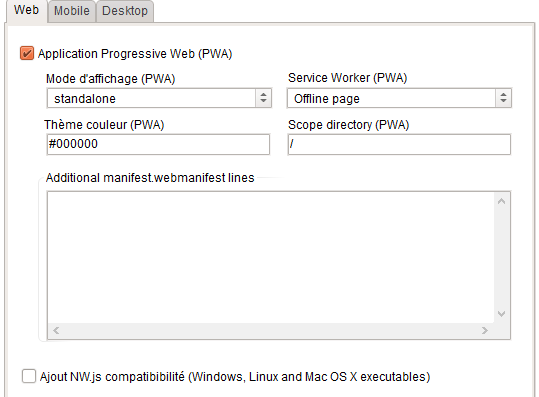
Quote from luishp on February 28, 2022, 10:03 pm@phil78 be sure to upload all the files to your web server. The service worker file should be: pwabuilder1-sw.root.js
I did a mistake with the link I shared with you.Please test these:
https://duchennetracker.com
https://visualneo.com/tutorials/installscreenAttached the compiled installscreen app as a PWA with all the files.
Regards.
@phil78 be sure to upload all the files to your web server. The service worker file should be: pwabuilder1-sw.root.js
I did a mistake with the link I shared with you.
Please test these:
https://duchennetracker.com
https://visualneo.com/tutorials/installscreen
Attached the compiled installscreen app as a PWA with all the files.
Regards.
Uploaded files:Quote from luishp on February 28, 2022, 10:05 pm@phil78 Another possibility is that you are publishing the PWA within a folder and not in your main domain or subdomain.
In that case be sure to add it to the "Source directory" field. For instance: "/myfolder/"Regards.
@phil78 Another possibility is that you are publishing the PWA within a folder and not in your main domain or subdomain.
In that case be sure to add it to the "Source directory" field. For instance: "/myfolder/"
Regards.
Quote from Phil78 on March 1, 2022, 11:54 am@luishp yes my app is in a subfolder, I have added source directory but there is no effect. I tried also with "/message/" in scope directory on the properties.
{
"name": "Messagerie LPG78",
"Source directory": "/message/",
"scope": "/",
"start_url": "index.html",
"theme_color": "#000000",
"background_color": "#000000",
"short_name": "Msg LPG78",
"description": "Messagerie Interne LPG78",
"author": "Philippe ALARY",
"lang": "fr",
"version": "1.0",
"display": "standalone",
"orientation": "any",
"icons": [{
"src": "img/messagerie LPG78-512.png",
"sizes": "512x512",
"purpose": "any maskable"
}]
}
@luishp yes my app is in a subfolder, I have added source directory but there is no effect. I tried also with "/message/" in scope directory on the properties.
{
"name": "Messagerie LPG78",
"Source directory": "/message/",
"scope": "/",
"start_url": "index.html",
"theme_color": "#000000",
"background_color": "#000000",
"short_name": "Msg LPG78",
"description": "Messagerie Interne LPG78",
"author": "Philippe ALARY",
"lang": "fr",
"version": "1.0",
"display": "standalone",
"orientation": "any",
"icons": [{
"src": "img/messagerie LPG78-512.png",
"sizes": "512x512",
"purpose": "any maskable"
}]
}
Quote from Phil78 on March 1, 2022, 1:27 pm@luishp I have installed chrome + lighthouse and now it is ok on chrome and edge but not on firefox and opera with "scope": "/message/", in manifest.
Thanks LuisRegards
@luishp I have installed chrome + lighthouse and now it is ok on chrome and edge but not on firefox and opera with "scope": "/message/", in manifest.
Thanks Luis
Regards
Quote from luishp on March 1, 2022, 6:43 pm@phil78 Firefox and Opera don't support PWA installation on Desktop. More info here:
"PWA" | Can I use... Support tables for HTML5, CSS3, etc
Regards.
@phil78 Firefox and Opera don't support PWA installation on Desktop. More info here:
"PWA" | Can I use... Support tables for HTML5, CSS3, etc
Regards.