
Problem entering only numbers in TextInput

Quote from javadrajabihakami on January 3, 2024, 6:09 pm1- Hello and good time to all my dear friends! Is there a way to enter only numbers in TextInput? And no text is recorded!
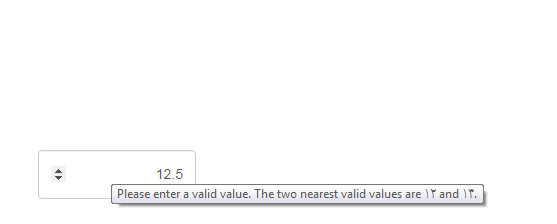
2- The number is registered in NumericInput! But when we go over it with the mouse! If the registered number is a decimal number! A small message will appear! That I do not like to have this message! Thank you for any advice.
Thanks
1- Hello and good time to all my dear friends! Is there a way to enter only numbers in TextInput? And no text is recorded!
2- The number is registered in NumericInput! But when we go over it with the mouse! If the registered number is a decimal number! A small message will appear! That I do not like to have this message! Thank you for any advice.
Thanks
Quote from javadrajabihakami on January 4, 2024, 1:22 pmThe code example I was looking for.
I would be happy if dear friends, if they have a better example, share it here. Thanks
The code example I was looking for.
I would be happy if dear friends, if they have a better example, share it here. Thanks

Quote from asmat on January 4, 2024, 1:43 pmHi, Just hide the numeric input's spinner, You will not see any message,
paste this code in project>properites>styles:
/* For Webkit browsers like Safari and Chrome */
input[type="number"]::-webkit-inner-spin-button,
input[type="number"]::-webkit-outer-spin-button {
  -webkit-appearance: none;
  margin: 0;
}

/* For Firefox */
input[type="number"] {
  -moz-appearance: textfield;
}
Hi, Just hide the numeric input's spinner, You will not see any message,
paste this code in project>properites>styles:
/* For Webkit browsers like Safari and Chrome */
input[type="number"]::-webkit-inner-spin-button,
input[type="number"]::-webkit-outer-spin-button {
  -webkit-appearance: none;
  margin: 0;
}

/* For Firefox */
input[type="number"] {
  -moz-appearance: textfield;
}

Quote from luishp on January 4, 2024, 9:14 pm@javadrajabihakami you can use slAllowedChars command to allow only numeric characters into any TextInput object-
@javadrajabihakami you can use slAllowedChars command to allow only numeric characters into any TextInput object-
Quote from javadrajabihakami on January 5, 2024, 3:31 pmQuote from luishp on January 4, 2024, 9:14 pm@javadrajabihakami you can use slAllowedChars command to allow only numeric characters into any TextInput object-
Unfortunately, using a mobile phone, I can fill in the fields that are only set to enter numbers with any type of letters! Is this code only for computers? Or I have not used it correctly! Of course, it works well on the computer. Thanks
Quote from luishp on January 4, 2024, 9:14 pm@javadrajabihakami you can use slAllowedChars command to allow only numeric characters into any TextInput object-
Unfortunately, using a mobile phone, I can fill in the fields that are only set to enter numbers with any type of letters! Is this code only for computers? Or I have not used it correctly! Of course, it works well on the computer. Thanks
Quote from luishp on January 6, 2024, 12:55 pm@javadrajabihakami please try this code and let me know if it works:
BeginJS
  const inputElement = document.getElementById('TextInput1');
  inputElement.addEventListener('input', function(event) {
    const inputValue = event.target.value;
    const allowedChars = /^[Z0-9\s]+$/;
    if (!allowedChars.test(inputValue)) {
      event.target.value = inputValue.replace(/[^Z0-9\s]+/g, '');
    }
  });
EndJS
It allows to restrict the allowed characters based in a regular expression.
To customize the regular expression
/^[a-zA-Z0-9\s]+$/and restrict or allow different characters in your HTML input field, you can modify it based on your specific requirements. Here's how you can customize it:
- Allow Specific Characters: If you want to allow specific characters, simply add those characters inside the square brackets
[]. For example, if you want to allow lowercase letters, digits, hyphens, and underscores, you can use[a-z0-9\-_]+.- Allow Special Characters: If you want to allow certain special characters, you can add them within the square brackets. Be careful with special characters, as some of them may have special meanings in regular expressions. You may need to escape them using a backslash (
\) if necessary. For example, to allow only letters, digits, hyphens, underscores, and periods, you can use[a-zA-Z0-9\-_.]+.- Disallow Specific Characters: If you want to disallow certain characters, you can exclude them from the character class. For example, if you want to allow all characters except the exclamation mark and the dollar sign, you can use
[^!$]+.Here are a few examples:
- Allow lowercase letters and digits only:
/^[a-z0-9]+$/- Allow letters, digits, hyphens, and underscores:
/^[a-zA-Z0-9-_]+$/- Allow letters, digits, and the "@" symbol (for email-like input):
/^[a-zA-Z0-9@]+$/Customize the regular expression according to your specific requirements by adjusting the characters within the square brackets and any necessary escape characters.
@javadrajabihakami please try this code and let me know if it works:
BeginJS
  const inputElement = document.getElementById('TextInput1');
  inputElement.addEventListener('input', function(event) {
    const inputValue = event.target.value;
    const allowedChars = /^[Z0-9\s]+$/;
    if (!allowedChars.test(inputValue)) {
      event.target.value = inputValue.replace(/[^Z0-9\s]+/g, '');
    }
  });
EndJS
It allows to restrict the allowed characters based in a regular expression.
To customize the regular expression /^[a-zA-Z0-9\s]+$/ and restrict or allow different characters in your HTML input field, you can modify it based on your specific requirements. Here's how you can customize it:
- Allow Specific Characters: If you want to allow specific characters, simply add those characters inside the square brackets
[]. For example, if you want to allow lowercase letters, digits, hyphens, and underscores, you can use[a-z0-9\-_]+. - Allow Special Characters: If you want to allow certain special characters, you can add them within the square brackets. Be careful with special characters, as some of them may have special meanings in regular expressions. You may need to escape them using a backslash (
\) if necessary. For example, to allow only letters, digits, hyphens, underscores, and periods, you can use[a-zA-Z0-9\-_.]+. - Disallow Specific Characters: If you want to disallow certain characters, you can exclude them from the character class. For example, if you want to allow all characters except the exclamation mark and the dollar sign, you can use
[^!$]+.
Here are a few examples:
- Allow lowercase letters and digits only:
/^[a-z0-9]+$/ - Allow letters, digits, hyphens, and underscores:
/^[a-zA-Z0-9-_]+$/ - Allow letters, digits, and the "@" symbol (for email-like input):
/^[a-zA-Z0-9@]+$/
Customize the regular expression according to your specific requirements by adjusting the characters within the square brackets and any necessary escape characters.
Quote from javadrajabihakami on January 7, 2024, 2:23 pmHello and good time! Thanks dear friend !
Yes it works well and it's what I'm looking for!
But I wish he didn't accept the distance.
thanks again
Hello and good time! Thanks dear friend !
Yes it works well and it's what I'm looking for!
But I wish he didn't accept the distance.
thanks again
Quote from luishp on January 7, 2024, 6:36 pm@javadrajabihakami Use this one:
BeginJS
const inputElement = document.getElementById('TextInput1');
inputElement.addEventListener('input', function(event) {
  const inputValue = event.target.value;
  const allowedChars = /^[0-9]+$/;
  if (!allowedChars.test(inputValue)) {
    event.target.value = inputValue.replace(/[^0-9]+/g, '');
  }
});
EndJS
@javadrajabihakami Use this one:
BeginJS
const inputElement = document.getElementById('TextInput1');
inputElement.addEventListener('input', function(event) {
  const inputValue = event.target.value;
  const allowedChars = /^[0-9]+$/;
  if (!allowedChars.test(inputValue)) {
    event.target.value = inputValue.replace(/[^0-9]+/g, '');
  }
});
EndJS
Quote from javadrajabihakami on January 8, 2024, 5:01 amQuote from luishp on January 7, 2024, 6:36 pm@javadrajabihakami Use this one:
Plain textCopy to clipboardOpen code in new windowEnlighterJS 3 Syntax HighlighterBeginJSconst inputElement = document.getElementById('TextInput1');inputElement.addEventListener('input', function(event) {const inputValue = event.target.value;const allowedChars = /^[0-9]+$/;if (!allowedChars.test(inputValue)) {event.target.value = inputValue.replace(/[^0-9]+/g, '');}});EndJSBeginJS const inputElement = document.getElementById('TextInput1'); inputElement.addEventListener('input', function(event) { const inputValue = event.target.value; const allowedChars = /^[0-9]+$/; if (!allowedChars.test(inputValue)) { event.target.value = inputValue.replace(/[^0-9]+/g, ''); } }); EndJSBeginJS const inputElement = document.getElementById('TextInput1'); inputElement.addEventListener('input', function(event) { const inputValue = event.target.value; const allowedChars = /^[0-9]+$/; if (!allowedChars.test(inputValue)) { event.target.value = inputValue.replace(/[^0-9]+/g, ''); } }); EndJS
thanks my dear friend
Quote from luishp on January 7, 2024, 6:36 pm@javadrajabihakami Use this one:
Plain textCopy to clipboardOpen code in new windowEnlighterJS 3 Syntax HighlighterBeginJSconst inputElement = document.getElementById('TextInput1');inputElement.addEventListener('input', function(event) {const inputValue = event.target.value;const allowedChars = /^[0-9]+$/;if (!allowedChars.test(inputValue)) {event.target.value = inputValue.replace(/[^0-9]+/g, '');}});EndJSBeginJS const inputElement = document.getElementById('TextInput1'); inputElement.addEventListener('input', function(event) { const inputValue = event.target.value; const allowedChars = /^[0-9]+$/; if (!allowedChars.test(inputValue)) { event.target.value = inputValue.replace(/[^0-9]+/g, ''); } }); EndJSBeginJS const inputElement = document.getElementById('TextInput1'); inputElement.addEventListener('input', function(event) { const inputValue = event.target.value; const allowedChars = /^[0-9]+$/; if (!allowedChars.test(inputValue)) { event.target.value = inputValue.replace(/[^0-9]+/g, ''); } }); EndJS
thanks my dear friend