
Problem with renaming plugin to dll and not compiling them

Quote from Ivanes82 on October 1, 2022, 3:15 am
@luishp @hpw
Estoy haciendo una aplicación con visualneo win, que usa 6 plugin, y uno de ellos pesa más de 100 mb. Como infla muchisimo el exe resultante, estoy tratando de probar la opción de no compilar en el exe los plugin, pero no funciona la aplicación. Me sale una ventana de alerta por cada plugin que hay, y la aplicación deja de funcionar. No se si es que hay algo mal con el tema del hash, o yo estoy haciendo algo mal.
Muchas gracias
I am making an application with visualneo win, which uses 6 plugins, and one of them weighs more than 100 mb. As it bloats a lot the resulting exe, I am trying to test the option of not compiling the plugins in the exe, but the application does not work. I get an alert window for each plugin, and the application stops working. I don't know if there is something wrong with the hashing issue, or I am doing something wrong.
Thank you very much

Estoy haciendo una aplicación con visualneo win, que usa 6 plugin, y uno de ellos pesa más de 100 mb. Como infla muchisimo el exe resultante, estoy tratando de probar la opción de no compilar en el exe los plugin, pero no funciona la aplicación. Me sale una ventana de alerta por cada plugin que hay, y la aplicación deja de funcionar. No se si es que hay algo mal con el tema del hash, o yo estoy haciendo algo mal.
Muchas gracias
I am making an application with visualneo win, which uses 6 plugins, and one of them weighs more than 100 mb. As it bloats a lot the resulting exe, I am trying to test the option of not compiling the plugins in the exe, but the application does not work. I get an alert window for each plugin, and the application stops working. I don't know if there is something wrong with the hashing issue, or I am doing something wrong.
Thank you very much

Quote from HPW on October 1, 2022, 11:13 amHello,
Is the path we see in the error popup window the path to the project folder and its Exe path?
And where is the path of the installed plugin?
Is the nbp file in the install path really the exactly same binary file as in the project folder?
Regards
Hans-Peter
Hello,
Is the path we see in the error popup window the path to the project folder and its Exe path?
And where is the path of the installed plugin?
Is the nbp file in the install path really the exactly same binary file as in the project folder?
Regards
Hans-Peter
Quote from Ivanes82 on October 2, 2022, 3:57 amHi @hpw, that address that appears in the image, is the address of the folder with the application already compiled. All the dll files are there.
I have all the plugins in a folder on a secondary hard disk.
The plugins are the same, the original one, as the one copied to the exe folder, in fact I have tried to copy them myself also by hand, but nothing worked.
It happens to me with the 6 plugins that the application uses. It is as if the hash that is generated when compiling the application is different when executing it.
Thank you very much for your time.
Hi @hpw, that address that appears in the image, is the address of the folder with the application already compiled. All the dll files are there.
I have all the plugins in a folder on a secondary hard disk.
The plugins are the same, the original one, as the one copied to the exe folder, in fact I have tried to copy them myself also by hand, but nothing worked.
It happens to me with the 6 plugins that the application uses. It is as if the hash that is generated when compiling the application is different when executing it.
Thank you very much for your time.
Quote from Ivanes82 on October 4, 2022, 8:10 pmVery good, is there any news, I have tried everything possible and there is no way to make it work.
Very good, is there any news, I have tried everything possible and there is no way to make it work.
Quote from HPW on October 5, 2022, 7:32 amHello,
Can you contact the author of the plugin?
He should have had the same problem when developing the plugin.
Maybe he/she can bring light into the problem.
Regards
Hans-Peter
Hello,
Can you contact the author of the plugin?
He should have had the same problem when developing the plugin.
Maybe he/she can bring light into the problem.
Regards
Hans-Peter
Quote from Ivanes82 on October 6, 2022, 1:06 pmVery good @hpw, sorry to be heavy, but I would like to use this function and I don't quite understand what I have to do. I have more than 50 plugins. Do I have to contact each of the developers? Does this mean that if the plugin developers have not implemented it, it will not work? If so, this leaves practically all visualneo plugins unusable with this function. The usefulness of this function seems to me great, but that it depends on the plugin developers, it seems to me a drawback, there are many really useful old plugins that probably will never be updated again. Hopefully there is a way to implement this without relying on updating plugins.
Thank you very much for your time. Best regards.
Very good @hpw, sorry to be heavy, but I would like to use this function and I don't quite understand what I have to do. I have more than 50 plugins. Do I have to contact each of the developers? Does this mean that if the plugin developers have not implemented it, it will not work? If so, this leaves practically all visualneo plugins unusable with this function. The usefulness of this function seems to me great, but that it depends on the plugin developers, it seems to me a drawback, there are many really useful old plugins that probably will never be updated again. Hopefully there is a way to implement this without relying on updating plugins.
Thank you very much for your time. Best regards.
Quote from HPW on October 8, 2022, 9:50 amHello,
I dig out my Win7 Development System and take a look at my original development test pub.
See the hardcopy of the compile setup.
The final Exe is targeted in the Deliver sub-folder
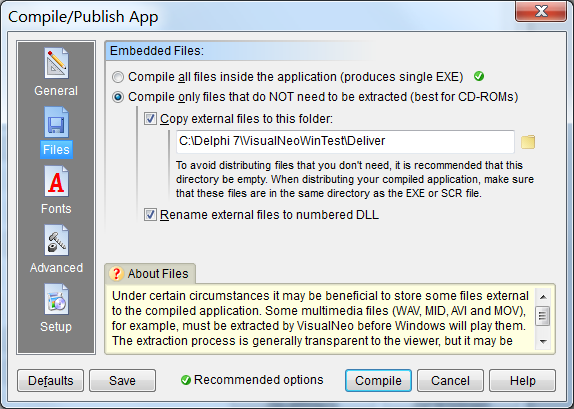
In the second hardcopy you see the Deliver folder as the target for the DLL files. And the renaming option is checked.
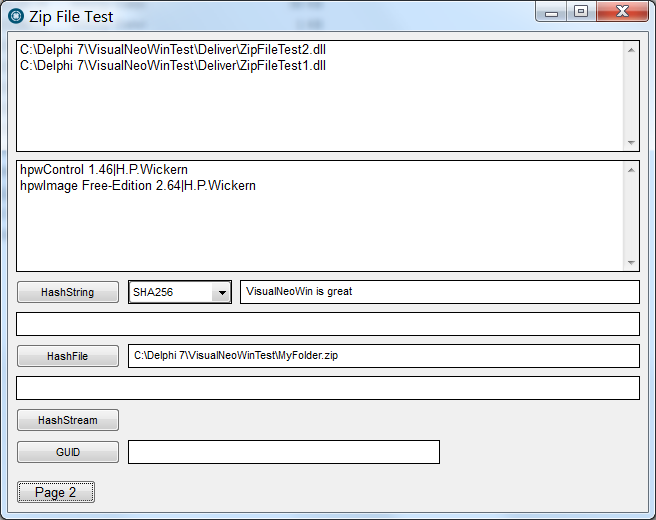
In my testapp I have a page that shows the loaded filennames of the DLL and their Plugin Title text.
SetVar "[PluginFileList]" "[*/*PluginFileList]"
SetVar "[PluginInfoList]" "[*/*PluginInfoList]"So I see that it worked for me an on my setup.
In your error Hardcopy I wonder that it complain about the plugin as .nbp type. Seems you have not activated renaming to dll.
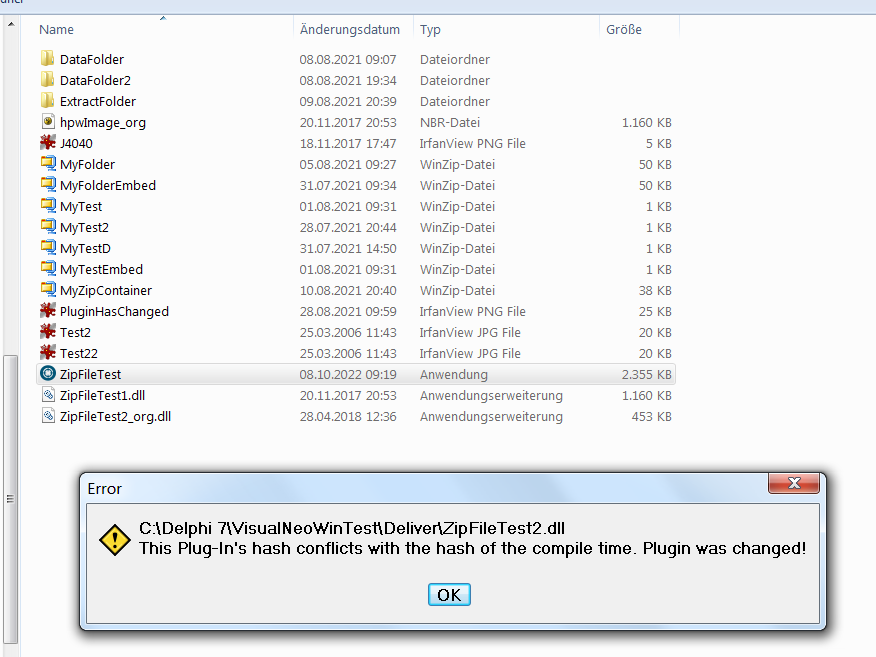
For testing I renamed my second DLL to a different name and restart my exe.
Then you see my 4. Hardcopy where the error is somewhat wrong. It complains about the hash, but the file is missing. Of cource a hash of nothing is different of the right file hash! ;-)
Regards
Hans-Peter
Hello,
I dig out my Win7 Development System and take a look at my original development test pub.
See the hardcopy of the compile setup.
The final Exe is targeted in the Deliver sub-folder
In the second hardcopy you see the Deliver folder as the target for the DLL files. And the renaming option is checked.
In my testapp I have a page that shows the loaded filennames of the DLL and their Plugin Title text.
SetVar "[PluginFileList]" "[*/*PluginFileList]"
SetVar "[PluginInfoList]" "[*/*PluginInfoList]"
So I see that it worked for me an on my setup.
In your error Hardcopy I wonder that it complain about the plugin as .nbp type. Seems you have not activated renaming to dll.
For testing I renamed my second DLL to a different name and restart my exe.
Then you see my 4. Hardcopy where the error is somewhat wrong. It complains about the hash, but the file is missing. Of cource a hash of nothing is different of the right file hash! ;-)
Regards
Hans-Peter
Uploaded files: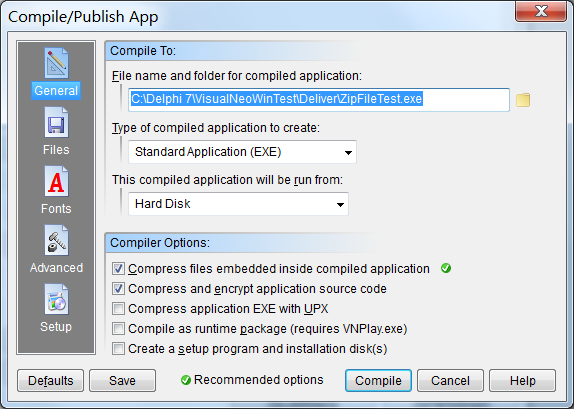
Quote from HPW on October 8, 2022, 10:04 amHello,
As another test I copied my final exe and the renamed DLL to a Stick and testrun it on a WIN 10 Laptop.
Runs fine there and the info page shows the correct file pathes and plugin Titles.
Regards
Hans-Peter
Hello,
As another test I copied my final exe and the renamed DLL to a Stick and testrun it on a WIN 10 Laptop.
Runs fine there and the info page shows the correct file pathes and plugin Titles.
Regards
Hans-Peter
Quote from Ivanes82 on October 8, 2022, 10:54 amHi @hpw, thank you very much for your time. It definitely doesn't work for me. I've recorded a video for you to see how I do it, to see if there's something I'm doing wrong and haven't noticed. I'm using windows 11, I don't know if it has anything to do with it. This afternoon I will try to install windows 7 on a secondary pc and try to compile from there.
Thank you very much for everything.
Hi @hpw, thank you very much for your time. It definitely doesn't work for me. I've recorded a video for you to see how I do it, to see if there's something I'm doing wrong and haven't noticed. I'm using windows 11, I don't know if it has anything to do with it. This afternoon I will try to install windows 7 on a secondary pc and try to compile from there.
Thank you very much for everything.
Quote from HPW on October 8, 2022, 12:05 pmHello,
Or can someone else confirm that there is a problem with Windows 11 ?
I have no win 11 system.
Regards
Hans-Peter
Hello,
Or can someone else confirm that there is a problem with Windows 11 ?
I have no win 11 system.
Regards
Hans-Peter
Quote from HPW on October 8, 2022, 12:20 pmHello,
Another thing you can test:
Make an test-app and use the command HashFile:
HashFile "SHA256" "[HashSourceFile]" "[HashResult]"
This you make with the origonal plugin nbp file (or nbr if exist)
And with your copied and reneamed DLL.
They should be the same hash.
Regards
Hans-Peter
Hello,
Another thing you can test:
Make an test-app and use the command HashFile:
HashFile "SHA256" "[HashSourceFile]" "[HashResult]"
This you make with the origonal plugin nbp file (or nbr if exist)
And with your copied and reneamed DLL.
They should be the same hash.
Regards
Hans-Peter

Quote from Vadim on October 8, 2022, 5:12 pm@ivanes82
If you send me the demo file with the plugin that is causing the error, I will try to compile it on Windows 11.
To check if the problem exists on another Windows 11 computer.
I tried it on a couple of projects with plugins, I didn't get any error messages.
If you send me the demo file with the plugin that is causing the error, I will try to compile it on Windows 11.
To check if the problem exists on another Windows 11 computer.
I tried it on a couple of projects with plugins, I didn't get any error messages.
Quote from Ivanes82 on October 8, 2022, 5:55 pmVery good @hpw and @vadim, I have tried to calculate the hash of the original file and the one copied by visualneo, and the hash matches, so it should work, but for some strange reason it does not.
This happens to me with all plugins, it is not something that is unique to a particular plugin.
Vadin, telling me that it is working for you in windows 11, the problem must be in my pc, I will try to compile from another pc with windows 11 to see if it lets me there.
Is the hash measure thinking in the plugin developers or in the security of our application generated with neobook? If it is the second option it would be great to disable it.Thank you both very much for your time and interest.
Very good @hpw and @vadim, I have tried to calculate the hash of the original file and the one copied by visualneo, and the hash matches, so it should work, but for some strange reason it does not.
This happens to me with all plugins, it is not something that is unique to a particular plugin.
Vadin, telling me that it is working for you in windows 11, the problem must be in my pc, I will try to compile from another pc with windows 11 to see if it lets me there.
Is the hash measure thinking in the plugin developers or in the security of our application generated with neobook? If it is the second option it would be great to disable it.
Thank you both very much for your time and interest.
Quote from Ivanes82 on October 8, 2022, 7:04 pmI have disabled the antivirus on my pc, I activate it regularly to scan the pc and I deactivate it again. I can't think what else might be interfering. I have also tried reinstalling visualneo win, but no luck.
I have disabled the antivirus on my pc, I activate it regularly to scan the pc and I deactivate it again. I can't think what else might be interfering. I have also tried reinstalling visualneo win, but no luck.
Quote from Ivanes82 on October 8, 2022, 7:28 pmHello @hpw,, I have been investing a little more, and in the project I'm working on has happened not to work with any plugin, but I've been testing plugin by plugin separately and there are some that work for me, but the vast majority of plugins do not.
@vadim These are some of the plugins that do not work and give me hash error:
zmwOnTheEdge
zmwClipTricks
zmwSelfControl
NeoDBPro
acPagesControl
dec_Zip
npTalk
npEdge
npFile
npUtil
dec_PlusThere are many more, practically 90% of the plugins do not work with the hash.
Hello @hpw,, I have been investing a little more, and in the project I'm working on has happened not to work with any plugin, but I've been testing plugin by plugin separately and there are some that work for me, but the vast majority of plugins do not.
@vadim These are some of the plugins that do not work and give me hash error:
zmwOnTheEdge
zmwClipTricks
zmwSelfControl
NeoDBPro
acPagesControl
dec_Zip
npTalk
npEdge
npFile
npUtil
dec_Plus
There are many more, practically 90% of the plugins do not work with the hash.

Quote from Steve on October 8, 2022, 9:46 pmI think the best idea to help you if you ZIP the EXE and DDl's and upload, we will test it because it's difficult help you without do analize and check options.
I think the best idea to help you if you ZIP the EXE and DDl's and upload, we will test it because it's difficult help you without do analize and check options.
Quote from HPW on October 9, 2022, 7:12 amHello,
Here my Test EXE with 2 DLL, for those who want to test on Winows 11
Regards
Hans-Peter
Hello,
Here my Test EXE with 2 DLL, for those who want to test on Winows 11
Regards
Hans-Peter
Uploaded files:Quote from Vadim on October 9, 2022, 9:18 am@hpw
@ivanes82
Here my Test EXE with 2 DLL, for those who want to test on Winows 11
I ran a test EXE, no error messages.
I also compiled my NeoCommands project without packing plugin files inside the EXE (using plugins NeoBookKB, NeoBookDBPro, dec_Plus, zmFunctions, alStartup). No error messages either.
Windows 11 (21H2), 64-bit
Here my Test EXE with 2 DLL, for those who want to test on Winows 11
I ran a test EXE, no error messages.
I also compiled my NeoCommands project without packing plugin files inside the EXE (using plugins NeoBookKB, NeoBookDBPro, dec_Plus, zmFunctions, alStartup). No error messages either.
Windows 11 (21H2), 64-bit