
Problem write to file

Quote from naglieri on January 1, 2022, 10:51 pmThe purpose is to save the value of a variable to a file.
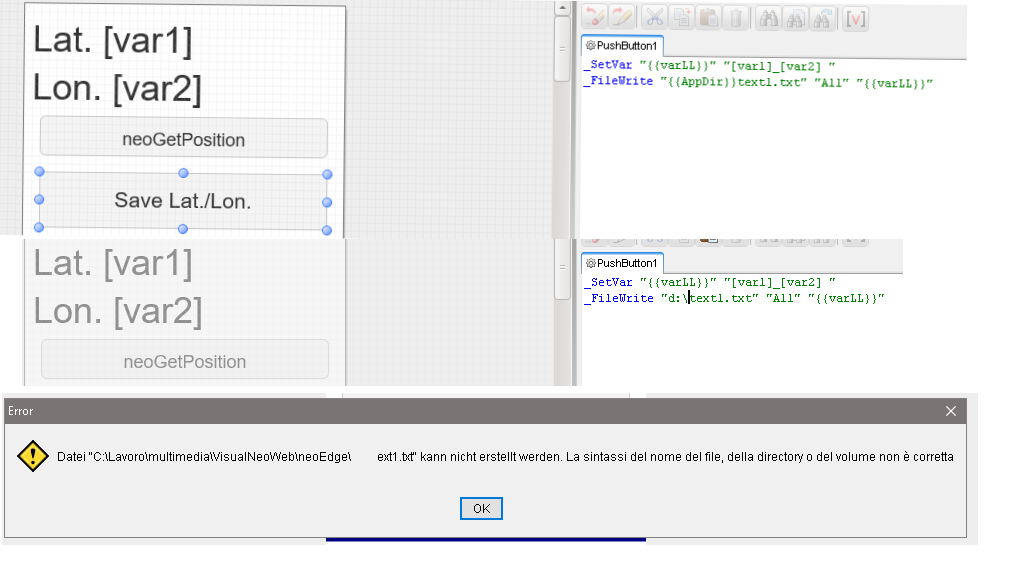
While in the lower part everything works correctly, in the upper part I can't write to the file.
Where am I doing wrong ?Thank you
The purpose is to save the value of a variable to a file.
While in the lower part everything works correctly, in the upper part I can't write to the file.
Where am I doing wrong ?
Thank you
Uploaded files:
Quote from luishp on January 1, 2022, 11:48 pmHi @naglierit
It seems you can only save strings to a file and not numbers. Not sure why this is happening but it's easy to fix:
SetVar [var1] "[var1] "
_SetVar "{{var1}}" "[var1]"
_FileWrite "{{AppDir}}text1.txt" "All" "{{var1}}"
The first line just adds a space to the numeric value so it's converted into a string and now everything works as expected.
Regards.
Hi @naglierit
It seems you can only save strings to a file and not numbers. Not sure why this is happening but it's easy to fix:
SetVar [var1] "[var1] "
_SetVar "{{var1}}" "[var1]"
_FileWrite "{{AppDir}}text1.txt" "All" "{{var1}}"
The first line just adds a space to the numeric value so it's converted into a string and now everything works as expected.
Regards.
Quote from naglieri on January 2, 2022, 1:47 amThanks for solution, another thing.
Using underscore is possible use some VisualNeo WIN command inside VisualNeo WEB.
There is also possibility to use VisualNeo WIN plugins? There are example ?
Thanks
Thanks for solution, another thing.
Using underscore is possible use some VisualNeo WIN command inside VisualNeo WEB.
There is also possibility to use VisualNeo WIN plugins? There are example ?
Thanks
Quote from luishp on January 2, 2022, 12:57 pmThere is also possibility to use VisualNeo WIN plugins? There are example ?
@naglieri Yes but you will need to compile your own neoEdge.exe to include the plugins you need. You will also have to include the new commands into neoEdge plugin for VisualNEO Web. Both source files are available in the neoEdge forum section. I think they are easy to understand and modify.
Let me know if you have any doubts.
Regards.
There is also possibility to use VisualNeo WIN plugins? There are example ?
@naglieri Yes but you will need to compile your own neoEdge.exe to include the plugins you need. You will also have to include the new commands into neoEdge plugin for VisualNEO Web. Both source files are available in the neoEdge forum section. I think they are easy to understand and modify.
Let me know if you have any doubts.
Regards.
Quote from naglieri on January 2, 2022, 6:27 pmI must admit that NeoEdge remains difficult for me to understand.
Yes, I'd like to integrate some plugins into NeoEdge and then use it in VisualNeo Win .... but I can't.
For example, could you explain or make a version of NeoEdge with for example the hpwUtility.nbp plugin inside?Sorry but I don't find a lot of documentation on forum.
Another little problem is in my example of yesterday.
When I write var on file, as path for file use {{AppDir}} , but if Use a path like "d:\" have error ( see image )
Where I'm wrong ?
Sorry again but after years spent on Neobook / VisualNeo Win, switching to the Web version, with almost no knowledge of HTML, is not easy.
I must admit that NeoEdge remains difficult for me to understand.
Yes, I'd like to integrate some plugins into NeoEdge and then use it in VisualNeo Win .... but I can't.
For example, could you explain or make a version of NeoEdge with for example the hpwUtility.nbp plugin inside?
Sorry but I don't find a lot of documentation on forum.
Another little problem is in my example of yesterday.
When I write var on file, as path for file use {{AppDir}} , but if Use a path like "d:\" have error ( see image )
Where I'm wrong ?
Sorry again but after years spent on Neobook / VisualNeo Win, switching to the Web version, with almost no knowledge of HTML, is not easy.
Uploaded files:
Quote from luishp on January 2, 2022, 7:40 pmYes, I'd like to integrate some plugins into NeoEdge and then use it in VisualNeo Win .... but I can't.
For example, could you explain or make a version of NeoEdge with for example the hpwUtility.nbp plugin inside?@naglieri just be sure you call at least one hpwUtility.nbp command from neoEdge.pub and compile.
Note that you will need npEdge plugin in order to compile neoEdge.exe.When I write var on file, as path for file use {{AppDir}} , but if Use a path like "d:\" have error ( see image )
Use d:\\ instead.
Note that probably you will get a Denied Access error if you try to access anything outside {{AppDir}}Sorry again but after years spent on Neobook / VisualNeo Win, switching to the Web version, with almost no knowledge of HTML, is not easy.
Mixing VisualNEO Web and VisualNEO Win is an advanced functionality.
My advice is to familiarize with VisualNEO Web first. You will probably don't need VisualNEO Win at all for most situations.Regards
Yes, I'd like to integrate some plugins into NeoEdge and then use it in VisualNeo Win .... but I can't.
For example, could you explain or make a version of NeoEdge with for example the hpwUtility.nbp plugin inside?
@naglieri just be sure you call at least one hpwUtility.nbp command from neoEdge.pub and compile.
Note that you will need npEdge plugin in order to compile neoEdge.exe.
When I write var on file, as path for file use {{AppDir}} , but if Use a path like "d:\" have error ( see image )
Use d:\\ instead.
Note that probably you will get a Denied Access error if you try to access anything outside {{AppDir}}
Sorry again but after years spent on Neobook / VisualNeo Win, switching to the Web version, with almost no knowledge of HTML, is not easy.
Mixing VisualNEO Web and VisualNEO Win is an advanced functionality.
My advice is to familiarize with VisualNEO Web first. You will probably don't need VisualNEO Win at all for most situations.
Regards