
Problema al leer un archivo / Problem reading a file

Quote from joferar333 on October 28, 2023, 12:37 pmHola! @luishp, @gaev, @rcohen
Me pasa algo muy curioso y no logro poderlo solucionar.
La cuestion es muy simple:
Yo cargo en una pequeña aplicacion un archivo de texto llamado string.txt (este archivo contiene 2424 lineas el archivo fue generado por un editor de textos grabado con formato utf-8 ya que contiene acentos...
Una vez cargado en la aplicacion hay un comando que lee el archivo linea por linea y me la va mostrando en una variable y aqui lo curioso las lineas del archivo que contienen acentos me las muestra mal ... aca un ejemplo en la foto
adjunto al archivo de texto
asi lo estoy llamando: FileRead "[PubDir]string.txt" "[linea]" "[string]"
Alguna idea para poder solucionar esto?
Desde ya muchas gracias.
Saludos!
ENGLISH
Something very curious happens to me and I can't solve it.
The question is very simple:
In a small application I load a text file called string.txt (this file contains 2424 lines, the file was generated by a text editor recorded with utf-8 format since it contains accents...
Once loaded in the application there is a command that reads the file line by line and shows it to me in a variable and here the curious thing is that the lines of the file that contain accents show them to me wrong... see is an example in the photo up
attached to text file
That's what I'm calling it: FileRead "[PubDir]string.txt" "[line]" "[string]"
Any ideas to solve this?
From already thank you very much.
Greetings!
Me pasa algo muy curioso y no logro poderlo solucionar.
La cuestion es muy simple:
Yo cargo en una pequeña aplicacion un archivo de texto llamado string.txt (este archivo contiene 2424 lineas el archivo fue generado por un editor de textos grabado con formato utf-8 ya que contiene acentos...
Una vez cargado en la aplicacion hay un comando que lee el archivo linea por linea y me la va mostrando en una variable y aqui lo curioso las lineas del archivo que contienen acentos me las muestra mal ... aca un ejemplo en la foto

adjunto al archivo de texto
asi lo estoy llamando: FileRead "[PubDir]string.txt" "[linea]" "[string]"
Alguna idea para poder solucionar esto?
Desde ya muchas gracias.
Saludos!
ENGLISH
Something very curious happens to me and I can't solve it.
The question is very simple:
In a small application I load a text file called string.txt (this file contains 2424 lines, the file was generated by a text editor recorded with utf-8 format since it contains accents...
Once loaded in the application there is a command that reads the file line by line and shows it to me in a variable and here the curious thing is that the lines of the file that contain accents show them to me wrong... see is an example in the photo up
attached to text file
That's what I'm calling it: FileRead "[PubDir]string.txt" "[line]" "[string]"
Any ideas to solve this?
From already thank you very much.
Greetings!


Quote from fkapnist on October 29, 2023, 11:53 amInstead of utf-8 format
try converting string.txt to Base64 format
------
(I found that VisualNEO Win will often display Unicode on paste, but will lose it on save....)
Instead of utf-8 format
try converting string.txt to Base64 format
------
(I found that VisualNEO Win will often display Unicode on paste, but will lose it on save....)

Quote from rasl on October 29, 2023, 5:16 pmstring.txt:
contraseña
período
instructions on the button:
FileRead "[PubDir]string.txt" "1" "[lin1]"
npUtf8ToAnsi "[lin1]" "[an1]"
FileRead "[PubDir]string.txt" "2" "[lin2]"
npUtf8ToAnsi "[lin2]" "[an2]"result
the plugin is : npUtil
I hope it helps you
salu2
string.txt:
contraseña
período

instructions on the button:
FileRead "[PubDir]string.txt" "1" "[lin1]"
npUtf8ToAnsi "[lin1]" "[an1]"
FileRead "[PubDir]string.txt" "2" "[lin2]"
npUtf8ToAnsi "[lin2]" "[an2]"
result

the plugin is : npUtil
I hope it helps you
salu2

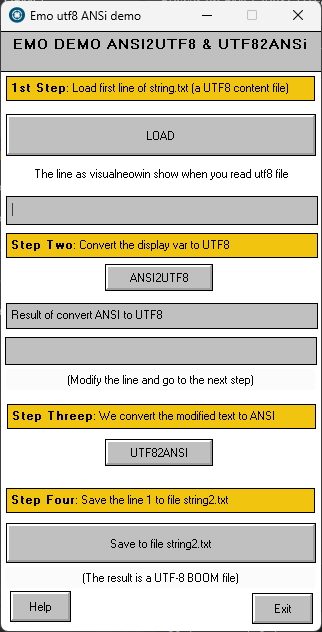
Quote from emo on October 29, 2023, 11:48 pmPuedes utilizar Vbscript para convertir ANSI2UTF8 y UTF82ANSi
Te dejo un ejemplo con las funciones y el programaYou can use Vbscript to convert ANSI2UTF8 and UTF82ANSiHere's an example of the functions and the program
Puedes utilizar Vbscript para convertir ANSI2UTF8 y UTF82ANSi
Te dejo un ejemplo con las funciones y el programa

Quote from Darbdenral on October 30, 2023, 12:15 amJust a heads up using VBScript for any software release is pretty much short lived as it's been on the chopping block for many years. And Microsoft finally announced just a couple weeks ago, it's now deprecated and no longer included with the Windows OS by default. They said VBScript will be available as a feature on demand before its removal from the operating system. It had a good run, almost 30 years!
See the latest additions here: https://learn.microsoft.com/en-us/windows/whats-new/deprecated-features
Just a heads up using VBScript for any software release is pretty much short lived as it's been on the chopping block for many years. And Microsoft finally announced just a couple weeks ago, it's now deprecated and no longer included with the Windows OS by default. They said VBScript will be available as a feature on demand before its removal from the operating system. It had a good run, almost 30 years!
See the latest additions here: https://learn.microsoft.com/en-us/windows/whats-new/deprecated-features
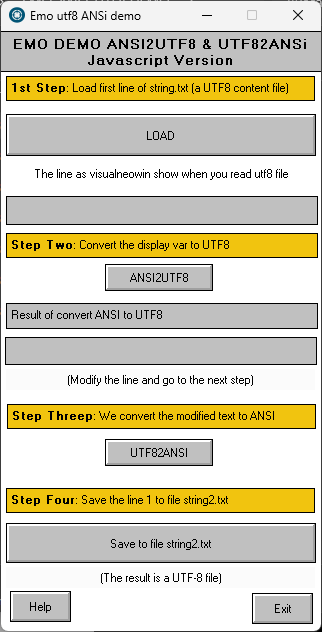
Quote from emo on October 30, 2023, 1:03 amWow @darbdenral sorry to hear that! In any case, you can always do the functions in javascript.@joferar333 Here is the same program but with the functions in javascript
Quote from Darbdenral on October 30, 2023, 2:03 am@emmanuel-fernandez
Yes, Jscript looks good too..
Maybe it will still work? Can someone answer this question.
Will VBScript continue to work in VisualNeoWin and NeoBook without installing on OS after Microsoft no longer includes it in the Windows OS?
Yes, Jscript looks good too..
Maybe it will still work? Can someone answer this question.
Will VBScript continue to work in VisualNeoWin and NeoBook without installing on OS after Microsoft no longer includes it in the Windows OS?

Quote from luishp on October 30, 2023, 12:56 pmWill VBScript continue to work in VisualNeoWin and NeoBook without installing on OS after Microsoft no longer includes it in the Windows OS?
That's a good question.
It seems they are removing VBScript for security reasons, as .vbs files are often used by hackers.
Anyway there is not much information available about how or when they will remove it.
Will VBScript continue to work in VisualNeoWin and NeoBook without installing on OS after Microsoft no longer includes it in the Windows OS?
That's a good question.
It seems they are removing VBScript for security reasons, as .vbs files are often used by hackers.
Anyway there is not much information available about how or when they will remove it.
Quote from fkapnist on October 30, 2023, 2:20 pmQuote from luishp on October 30, 2023, 12:56 pmWill VBScript continue to work in VisualNeoWin and NeoBook without installing on OS after Microsoft no longer includes it in the Windows OS?
That's a good question.
It seems they are removing VBScript for security reasons, as .vbs files are often used by hackers.
Anyway there is not much information available about how or when they will remove it.VBScript is supported only in IE mode (Microsoft Edge backward compatibility via Internet Explorer mode, support ending in 2029).
.
Quote from luishp on October 30, 2023, 12:56 pmWill VBScript continue to work in VisualNeoWin and NeoBook without installing on OS after Microsoft no longer includes it in the Windows OS?
That's a good question.
It seems they are removing VBScript for security reasons, as .vbs files are often used by hackers.
Anyway there is not much information available about how or when they will remove it.
VBScript is supported only in IE mode (Microsoft Edge backward compatibility via Internet Explorer mode, support ending in 2029).
.