
problems with neotable and null values

Quote from Phil78 on December 3, 2021, 8:34 pmHi all, I have 2 problems.
1 Display is not the same when the column is defined editable or not. I do not want to see null (see image attached.
2 When I have null values I lost elements using ArrayAddItem. with the example below, I expect 9 elements but I have only 5 ??
CreateEmptyArray [aligne]
LoopObject [Prop] [neoTableRow]
If [Prop] != "ID"
ArrayAddItem [aligne] [neoTableRow([Prop])]
Endif
EndLoop
Hi all, I have 2 problems.
1 Display is not the same when the column is defined editable or not. I do not want to see null (see image attached.
2 When I have null values I lost elements using ArrayAddItem. with the example below, I expect 9 elements but I have only 5 ??
CreateEmptyArray [aligne]
LoopObject [Prop] [neoTableRow]
If [Prop] != "ID"
ArrayAddItem [aligne] [neoTableRow([Prop])]
Endif
EndLoop
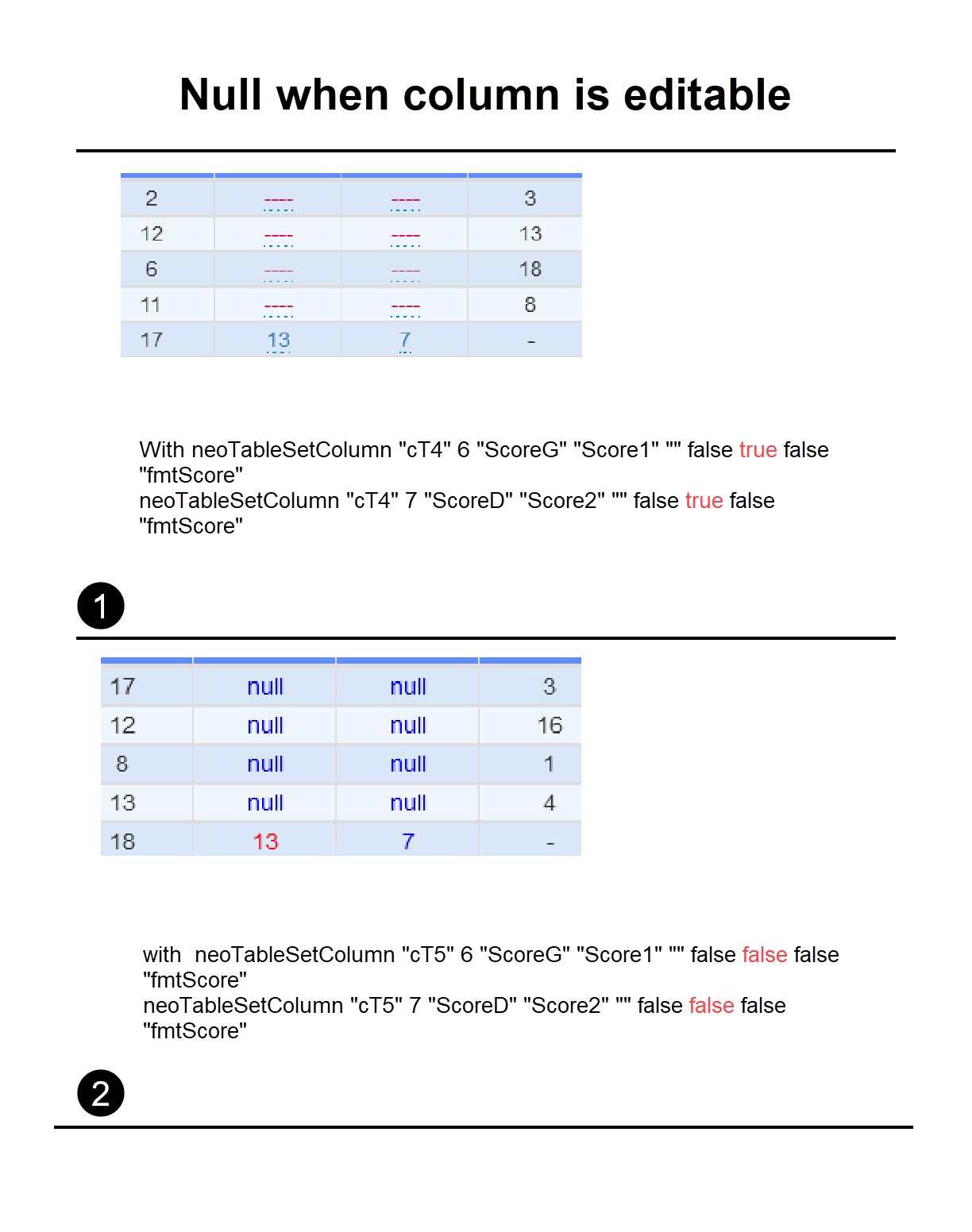

Quote from luishp on December 3, 2021, 9:04 pm@phil78 you should use the last neoTableSetColumn parameter: "Subroutine to format the data". In that subroutine you can check if [value] == null and return any other string to show instead. Please check the included neoTable tutorial for more information and samples.
Regards.
@phil78 you should use the last neoTableSetColumn parameter: "Subroutine to format the data". In that subroutine you can check if [value] == null and return any other string to show instead. Please check the included neoTable tutorial for more information and samples.
Regards.
Quote from luishp on December 4, 2021, 1:45 pm@phil78 sorry I don't understand question 2. Please provide a working sample isolating the problem.
Thank you!
@phil78 sorry I don't understand question 2. Please provide a working sample isolating the problem.
Thank you!
Quote from luishp on December 4, 2021, 10:31 pmHi @phil78. PLease take a close look at the LoopObject command in the help documentation. It's purpose is to retrieve object properties names. This would be the correct usage:
CreateEmptyArray [aligne]
LoopObject [Prop] [MyObjectVar]
  ArrayAddItem [aligne] [Prop]
EndLoop
ConsoleTable [aligne]
Then you will get the properties names listed.
I don't understand what was your original goal yet, sorry.Regards.
Hi @phil78. PLease take a close look at the LoopObject command in the help documentation. It's purpose is to retrieve object properties names. This would be the correct usage:
CreateEmptyArray [aligne]
LoopObject [Prop] [MyObjectVar]
  ArrayAddItem [aligne] [Prop]
EndLoop
ConsoleTable [aligne]
Then you will get the properties names listed.
I don't understand what was your original goal yet, sorry.
Regards.
Quote from Phil78 on December 6, 2021, 12:52 pmHi Luis
I know about loopobject ,
LoopObject [Prop] [MyObjectVar]
ArrayAddItem [aligne] [MyObjectVar([Prop])]if you examine my code you will see the loop give me the property name, and after I call the value this property. Even if I write directly with the name ArrayAddItem [aligne] [MyObjectVar('P3')] I do not have an Item added. I think this is a bug !
I found a workaround but I have a new problem. If I copy an array of object using SetVar [Array2] [Array1] or ArrayCopy [Array1] 0 6 [Array2], when I modify after a value in Array1 it is also modified in Array2 ???
Regards
Hi Luis
I know about loopobject ,
LoopObject [Prop] [MyObjectVar]
ArrayAddItem [aligne] [MyObjectVar([Prop])]
if you examine my code you will see the loop give me the property name, and after I call the value this property. Even if I write directly with the name ArrayAddItem [aligne] [MyObjectVar('P3')] I do not have an Item added. I think this is a bug !
I found a workaround but I have a new problem. If I copy an array of object using SetVar [Array2] [Array1] or ArrayCopy [Array1] 0 6 [Array2], when I modify after a value in Array1 it is also modified in Array2 ???
Regards
Quote from luishp on December 6, 2021, 11:12 pmHi @phil78,
Regarding null values, I think that's the way JavaScript works. Note that LoopObject translates to this JavaScript: for (Prop in MyObjectVar)
If I copy an array of object using SetVar [Array2] [Array1] or ArrayCopy [Array1] 0 6 [Array2], when I modify after a value in Array1 it is also modified in Array2 ???
Please provide a complete sample so I can better understand you.
Anyway this is exactly what ArrayCopy does:ArrayCopy = function(a, start, len) { if (a && start>-1 && len>0) return a.slice(start, start + len); return [] };I think it should work fine but I'm curious about your example.
Regards
Hi @phil78,
Regarding null values, I think that's the way JavaScript works. Note that LoopObject translates to this JavaScript: for (Prop in MyObjectVar)
If I copy an array of object using SetVar [Array2] [Array1] or ArrayCopy [Array1] 0 6 [Array2], when I modify after a value in Array1 it is also modified in Array2 ???
Please provide a complete sample so I can better understand you.
Anyway this is exactly what ArrayCopy does:
ArrayCopy = function(a, start, len) {
    if (a && start>-1 && len>0) return a.slice(start, start + len);
    return []
};
I think it should work fine but I'm curious about your example.
Regards
Quote from luishp on December 7, 2021, 2:30 pmHi @phil78. It seems you are trying to copy an Array whose elements are objects and not values.
Please take a look here to understand what's happening in your sample app:
https://stackoverflow.com/questions/29050004/modifying-a-copy-of-a-javascript-object-is-causing-the-original-object-to-changeRegards
Hi @phil78. It seems you are trying to copy an Array whose elements are objects and not values.
Please take a look here to understand what's happening in your sample app:
https://stackoverflow.com/questions/29050004/modifying-a-copy-of-a-javascript-object-is-causing-the-original-object-to-change
Regards
Quote from luishp on December 7, 2021, 3:05 pm@phil78 the attached sample will work as it clones objects instead of passing objects by reference.
Regards.
@phil78 the attached sample will work as it clones objects instead of passing objects by reference.
Regards.
Quote from Phil78 on December 7, 2021, 3:24 pmThanks a lot @luishp ,
indeed I replaced ArrayCopy with
StringifyJSON [mydata] [Temp]
ParseJSON "[Temp]" [array1]and it works !
it would be interesting for java novices like me, to create a native visualneo function ArrayObjectCopy that does the operation directly. What do you think about it?
Best regards
Thanks a lot @luishp ,
indeed I replaced ArrayCopy with
StringifyJSON [mydata] [Temp]
ParseJSON "[Temp]" [array1]
and it works !
it would be interesting for java novices like me, to create a native visualneo function ArrayObjectCopy that does the operation directly. What do you think about it?
Best regards