
PUT method with neoAjaxSendEx

Quote from suyonob on November 8, 2024, 5:16 pmHello @luishp,
Could you please guide me on how to use the PUT method with
neoAjaxSendEx? I'd appreciate any instructions or examples you might have.Thank you!
Hello @luishp,
Could you please guide me on how to use the PUT method with neoAjaxSendEx? I'd appreciate any instructions or examples you might have.
Thank you!
Uploaded files: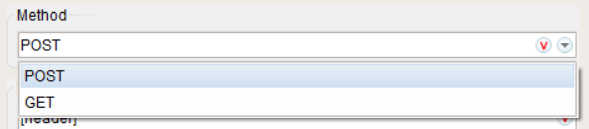

Quote from luishp on November 8, 2024, 7:56 pm@suyonob here's a detailed step-by-step guide to using
neoAjaxSendExwith thePUTmethod in VisualNEO Web, focusing on headers and JSON data:Step 1: Understand the Purpose of
neoAjaxSendEx
neoAjaxSendExis used in VisualNEO Web for sending HTTP requests to a server, allowing you to perform various actions such as data submission or updates using methods like GET, POST, PUT, and DELETE.Step 2: Set Up the HTTP Request Structure
When you use the
PUTmethod, the typical structure forneoAjaxSendExis as follows:neoAjaxSendEx "URL" "METHOD" "HEADERS" "DATA" "RESPONSE_TYPE" "SUCCESS_SUBROUTINE" "ERROR_SUBROUTINE"
- URL: The endpoint you are sending data to (e.g.,
https://example.com/api/resource).- METHOD: The HTTP method to use (e.g.,
PUT).- HEADERS: A JSON-like string that includes authentication tokens and content type.
- DATA: The body of the request, typically formatted as JSON for PUT requests.
- RESPONSE_TYPE: Expected response format (e.g.,
json).- SUCCESS_SUBROUTINE: Subroutine to call when the request succeeds.
- ERROR_SUBROUTINE: Subroutine to call when the request fails.
Step 3: Prepare the Header Data
If your request requires authentication or additional headers (e.g., content type, authorization), prepare them as a formatted string or JSON-like structure:
- Header Preparation:
- For bearer tokens (common for API authentication):
SetVar [MyHeaderData] '{"Authorization": "Bearer your_token_here", "Content-Type": "application/json"}'
- For basic authentication (less common but sometimes required):
SetVar [MyHeaderData] '{"Authorization": "Basic bXlVc2VyTmFtZTpteVBhc3N3b3Jk", "Content-Type": "application/json"}'
(where
bXlVc2VyTmFtZTpteVBhc3N3b3Jkis a Base64-encoded string ofusername:password)Step 4: Prepare the Data to Send
Format the body of your request as a JSON string:
SetVar [DataToSend] '{"username": "johndoe", "email": "johndoe@example.com"}'
Step 5: Implement Success and Error Handling
Create subroutines to handle the response:
succesSubroutine:
AlertBox "Success" "The request was completed successfully." ""errorSubroutine:AlertBox "Error" "The request failed. Please check your data and try again." ""
Return
Step 6: Send the PUT Request
Combine all parts and call
neoAjaxSendEx:neoAjaxSendEx "https://example.com/api/resource" "PUT" [MyHeaderData] [DataToSend] "json" "successSubroutine" "errorSubroutine"
Step 7: Points to Consider
- CORS: Ensure that the server supports CORS if your app and server are on different domains.
- Security: Be careful with exposing tokens or sensitive data directly in your code. Secure your app accordingly.
- Testing: Test your request using tools like Postman to ensure the server responds as expected before implementing it in your app.
Explanation Recap:
- Headers: Specify authentication and content type.
- Data: Format as JSON for PUT requests.
- Handling Response: Use subroutines for success and error handling.
- Server Requirements: Verify if the server expects additional headers or data formatting.
@suyonob here's a detailed step-by-step guide to using neoAjaxSendEx with the PUT method in VisualNEO Web, focusing on headers and JSON data:
Step 1: Understand the Purpose of neoAjaxSendEx
neoAjaxSendEx is used in VisualNEO Web for sending HTTP requests to a server, allowing you to perform various actions such as data submission or updates using methods like GET, POST, PUT, and DELETE.
Step 2: Set Up the HTTP Request Structure
When you use the PUT method, the typical structure for neoAjaxSendEx is as follows:
neoAjaxSendEx "URL" "METHOD" "HEADERS" "DATA" "RESPONSE_TYPE" "SUCCESS_SUBROUTINE" "ERROR_SUBROUTINE"
- URL: The endpoint you are sending data to (e.g.,
https://example.com/api/resource). - METHOD: The HTTP method to use (e.g.,
PUT). - HEADERS: A JSON-like string that includes authentication tokens and content type.
- DATA: The body of the request, typically formatted as JSON for PUT requests.
- RESPONSE_TYPE: Expected response format (e.g.,
json). - SUCCESS_SUBROUTINE: Subroutine to call when the request succeeds.
- ERROR_SUBROUTINE: Subroutine to call when the request fails.
Step 3: Prepare the Header Data
If your request requires authentication or additional headers (e.g., content type, authorization), prepare them as a formatted string or JSON-like structure:
- Header Preparation:
- For bearer tokens (common for API authentication):
SetVar [MyHeaderData] '{"Authorization": "Bearer your_token_here", "Content-Type": "application/json"}'
- For basic authentication (less common but sometimes required):
SetVar [MyHeaderData] '{"Authorization": "Basic bXlVc2VyTmFtZTpteVBhc3N3b3Jk", "Content-Type": "application/json"}'
(where
bXlVc2VyTmFtZTpteVBhc3N3b3Jkis a Base64-encoded string ofusername:password)
- For bearer tokens (common for API authentication):
Step 4: Prepare the Data to Send
Format the body of your request as a JSON string:
SetVar [DataToSend] '{"username": "johndoe", "email": "johndoe@example.com"}'
Step 5: Implement Success and Error Handling
Create subroutines to handle the response:
succesSubroutine:
AlertBox "Success" "The request was completed successfully." ""AlertBox "Error" "The request failed. Please check your data and try again." ""
Return
Step 6: Send the PUT Request
Combine all parts and call neoAjaxSendEx:
neoAjaxSendEx "https://example.com/api/resource" "PUT" [MyHeaderData] [DataToSend] "json" "successSubroutine" "errorSubroutine"
Step 7: Points to Consider
- CORS: Ensure that the server supports CORS if your app and server are on different domains.
- Security: Be careful with exposing tokens or sensitive data directly in your code. Secure your app accordingly.
- Testing: Test your request using tools like Postman to ensure the server responds as expected before implementing it in your app.
Explanation Recap:
- Headers: Specify authentication and content type.
- Data: Format as JSON for PUT requests.
- Handling Response: Use subroutines for success and error handling.
- Server Requirements: Verify if the server expects additional headers or data formatting.