
PWA Scope

Quote from EduardoVolpi on January 5, 2022, 7:11 pmWhen our pwa doesn't reside in the root domain, we have to manually edit the 'manifest.webmanifest' file and change the scope to "scope": "/directory/".
While it's not that laborious, it would be nice if we could do this from within the program itself.
Just an idea.
When our pwa doesn't reside in the root domain, we have to manually edit the 'manifest.webmanifest' file and change the scope to "scope": "/directory/".
While it's not that laborious, it would be nice if we could do this from within the program itself.
Just an idea.

Quote from luishp on January 5, 2022, 8:21 pm@eduardovolpi yes, you are right. I've been thinking about this but not sure about how to implement it regarding user interface.
Perhaps adding a new text field "Scope directory (left empty for root)"?Thank you!
@eduardovolpi yes, you are right. I've been thinking about this but not sure about how to implement it regarding user interface.
Perhaps adding a new text field "Scope directory (left empty for root)"?
Thank you!
Quote from EduardoVolpi on January 5, 2022, 10:53 pmYes @luishp , I think it's the best way, the default is root, you don't need to fill anything, and if the installation is in a directory then the person fills it with "/directory name/"
Yes @luishp , I think it's the best way, the default is root, you don't need to fill anything, and if the installation is in a directory then the person fills it with "/directory name/"
@eduardovolpi done! :)

Quote from CDY@44 on January 6, 2022, 7:04 pmHi @luishp,
I don't really understand the purpose of this change, because until now I was using "https://www.myDomain.fr/my folder" to host my PWA and it works without any problem....
Maybe there is a trick I don't understand well...Regards,
Hi @luishp,
I don't really understand the purpose of this change, because until now I was using "https://www.myDomain.fr/my folder" to host my PWA and it works without any problem....
Maybe there is a trick I don't understand well...
Regards,
Quote from EduardoVolpi on January 6, 2022, 7:55 pmHi @luishp
Thank you. It's much easier now! :-)
Hi @cdy44-2
Your pwa, installed in a subdirectory behaves like a pwa or a common webpage?
Take a look at some more info in this site:
https://developer.mozilla.org/en-US/docs/Web/Manifest/scope
Hi @luishp
Thank you. It's much easier now! :-)
Hi @cdy44-2
Your pwa, installed in a subdirectory behaves like a pwa or a common webpage?
Take a look at some more info in this site:
Quote from luishp on January 6, 2022, 7:59 pm@cdy44-2 if the scope is not correctly set, your PWA will not be installable from the Web Browsers.
And that's one of the main benefits of PWA's.Regards.
@cdy44-2 if the scope is not correctly set, your PWA will not be installable from the Web Browsers.
And that's one of the main benefits of PWA's.
Regards.
Quote from CDY@44 on January 6, 2022, 8:21 pmHi @luishp and @eduardovolpi
Take a look at this : I have made a PWA on my Iphone and an ANDROID phone without problem...
I mean it is installed on my screen as an app.https://www.media44.fr/wopagen/
Hi @luishp and @eduardovolpi
Take a look at this : I have made a PWA on my Iphone and an ANDROID phone without problem...
I mean it is installed on my screen as an app.
Quote from luishp on January 6, 2022, 8:33 pm@cdy44-2 I think you are missing something really important about PWA's.
They don't need to be compiled into an .apk to install them. They can be installed right from the Web Browser.
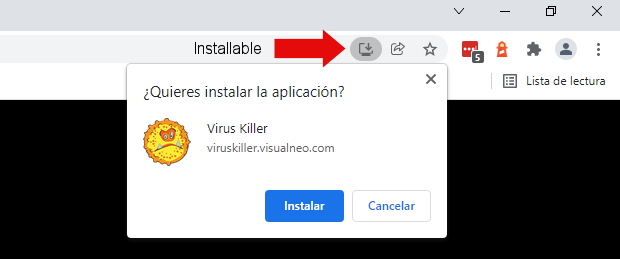
Your App is not installable because the scope is not correctly defined. Take a look at the attached pictures.
This is valid for Desktop, Tablets and Mobiles.Regards.
@cdy44-2 I think you are missing something really important about PWA's.
They don't need to be compiled into an .apk to install them. They can be installed right from the Web Browser.
Your App is not installable because the scope is not correctly defined. Take a look at the attached pictures.
This is valid for Desktop, Tablets and Mobiles.
Regards.
Uploaded files: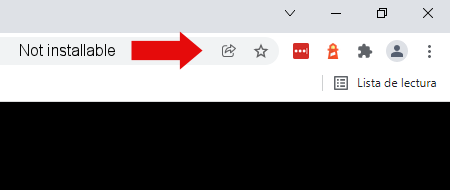
Quote from CDY@44 on January 6, 2022, 8:54 pmIt is absolutely not an *.apk !
When I say "installed" I mean that the Web Browser offers me to create an icon on the main screen, like it does for an other app but in fact it is a web site in the folder "wopagen".
It works on my iPhone, my iPad and also on my ANDROID phone
May be I am wrong somewhere... ;)
It is absolutely not an *.apk !
When I say "installed" I mean that the Web Browser offers me to create an icon on the main screen, like it does for an other app but in fact it is a web site in the folder "wopagen".
It works on my iPhone, my iPad and also on my ANDROID phone
May be I am wrong somewhere... ;)
Quote from CDY@44 on January 6, 2022, 9:27 pmI have made the update, compile as a PWA with "/wopagen2" in scope directory, copied all files in :
https://www.media44.fr/wopagen2
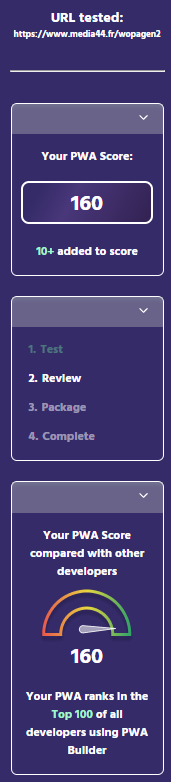
I have a score of 160 in PWA Builder of 160, but when I launch the Web Browser at : https://www.media44.fr/wopagen2
I don't have the possibility to install it (on my PC)...
I have made the update, compile as a PWA with "/wopagen2" in scope directory, copied all files in :
https://www.media44.fr/wopagen2
I have a score of 160 in PWA Builder of 160, but when I launch the Web Browser at : https://www.media44.fr/wopagen2
I don't have the possibility to install it (on my PC)...
Uploaded files:
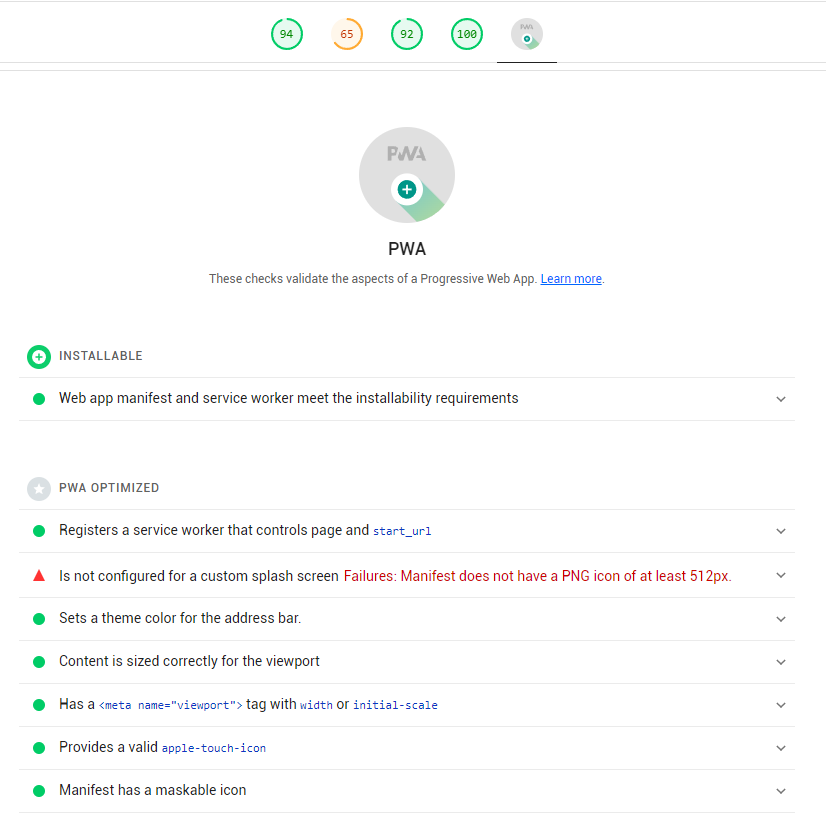
Quote from luishp on January 6, 2022, 9:39 pm@cdy44-2 pwabuilder.com is fine to pack your webapp into an .apk but use Google Lighthouse to be sure your app is installable.
Take a look at your manifest file:{ "name": "MyPassGenerator", "scope": "/wopagen2", "start_url": "index.html", "theme_color": "#000000", "background_color": "#000000", "short_name": "MyPass", "description": "Génération de mots de passe", "author": "Denis COUDROY", "lang": "en", "version": "1.1", "display": "fullscreen", "orientation": "portrait", "icons": [{ "src": "img/Apps-File-Encrypted-icon.png", "sizes": "128x128", "purpose": "any maskable" }] }Your icon size is too small. It should be at least 512 x 512 px.
Regards.
@cdy44-2 pwabuilder.com is fine to pack your webapp into an .apk but use Google Lighthouse to be sure your app is installable.
Take a look at your manifest file:
{
"name": "MyPassGenerator",
"scope": "/wopagen2",
"start_url": "index.html",
"theme_color": "#000000",
"background_color": "#000000",
"short_name": "MyPass",
"description": "Génération de mots de passe",
"author": "Denis COUDROY",
"lang": "en",
"version": "1.1",
"display": "fullscreen",
"orientation": "portrait",
"icons": [{
"src": "img/Apps-File-Encrypted-icon.png",
"sizes": "128x128",
"purpose": "any maskable"
}]
}
Your icon size is too small. It should be at least 512 x 512 px.
Regards.
Uploaded files:
Quote from EduardoVolpi on January 6, 2022, 10:32 pmQuote from CDY@44 on January 6, 2022, 9:27 pmI have made the update, compile as a PWA with "/wopagen2" in scope directory, copied all files in :
https://www.media44.fr/wopagen2
I have a score of 160 in PWA Builder of 160, but when I launch the Web Browser at : https://www.media44.fr/wopagen2
I don't have the possibility to install it (on my PC)...
@cdy44-2
You are still missing the last "/" in your scope. It should be "/wopagen2/"
Do that, use the correct icon size (minimum 512x512) and everything will work properly.
Quote from CDY@44 on January 6, 2022, 9:27 pmI have made the update, compile as a PWA with "/wopagen2" in scope directory, copied all files in :
https://www.media44.fr/wopagen2
I have a score of 160 in PWA Builder of 160, but when I launch the Web Browser at : https://www.media44.fr/wopagen2
I don't have the possibility to install it (on my PC)...
You are still missing the last "/" in your scope. It should be "/wopagen2/"
Do that, use the correct icon size (minimum 512x512) and everything will work properly.
Quote from CDY@44 on January 6, 2022, 10:48 pmThank you so much @eduardovolpi and @luishp
I feel really stupid for making so many mistakes....
Best regards,
Thank you so much @eduardovolpi and @luishp
I feel really stupid for making so many mistakes....
Best regards,
Quote from EduardoVolpi on January 6, 2022, 10:59 pmYou're welcome @cdy44-2, nobody knows everything and that's what this community exists for.
You're welcome @cdy44-2, nobody knows everything and that's what this community exists for.