Random Action

Quote from hector68 on November 9, 2022, 5:20 amhello guys , anyone knows how can i make random actions ? , i want make one single button , after click its run one action between a lot of it .. and how can i learn more about visual neo ?
hello guys , anyone knows how can i make random actions ? , i want make one single button , after click its run one action between a lot of it .. and how can i learn more about visual neo ?
Uploaded files: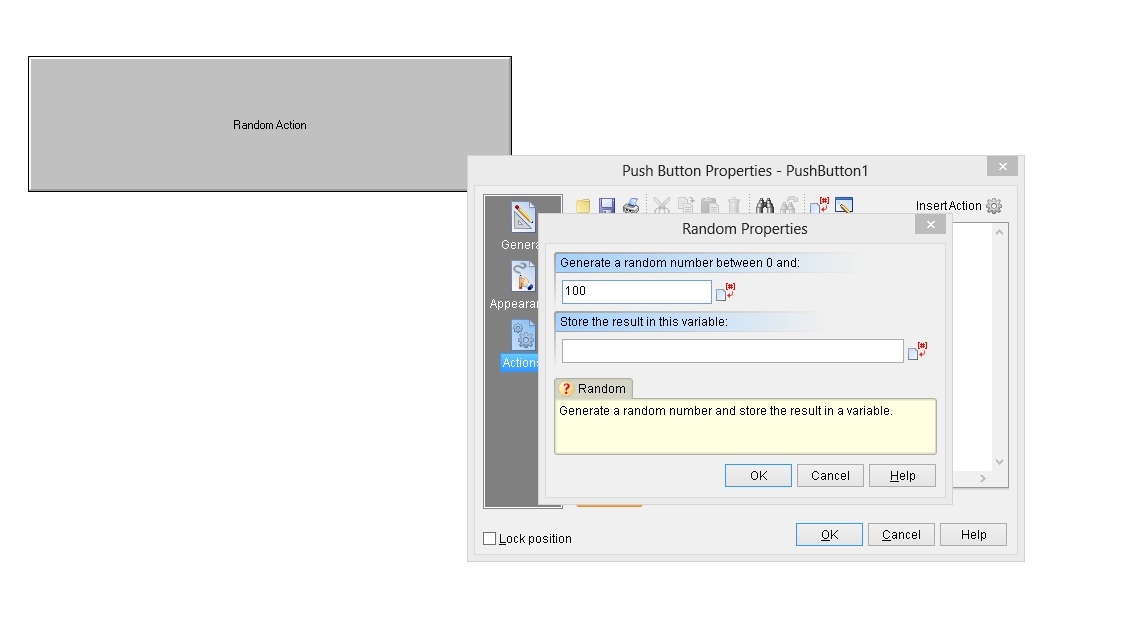

Quote from rafamacor on November 9, 2022, 10:23 amPush Button Properties - PushButton 1
Random "2" "[RANDOM-NUMBER]"
.
If "[RANDOM-NUMBER]" "=" "0"
AlertBox "RANDOM = 0" "Hi ;)"
Else
If "[RANDOM-NUMBER]" "=" "1"
Balloon "Bye !!!" "-1" "-1" "0"
Else
If "[RANDOM-NUMBER]" "=" "2"
StickyNote "-1" "-1" "Ready ???" "0"
ElseEndIf
EndIf
EndIf
Push Button Properties - PushButton 1
Random "2" "[RANDOM-NUMBER]"
.
If "[RANDOM-NUMBER]" "=" "0"
AlertBox "RANDOM = 0" "Hi ;)"
Else
If "[RANDOM-NUMBER]" "=" "1"
Balloon "Bye !!!" "-1" "-1" "0"
Else
If "[RANDOM-NUMBER]" "=" "2"
StickyNote "-1" "-1" "Ready ???" "0"
Else
EndIf
EndIf
EndIf

Quote from Vadim on November 9, 2022, 10:27 am@hector68
Of course, you can do this.
For example, with the Random command you can generate the number you want in the range you specify, and then with the logical IF condition you can run the script you want.
Basic information about VisualNEO Win commands can be found in the help: https://winhelp.visualneo.com/
I have a free online course for learning from scratch, and although it's in Russian, the browser can translate now from any language to any other (I use the course to teach students, so it requires registration): https://distant.orgpsiholog.ru/course/view.php?id=20
Of course, you can do this.
For example, with the Random command you can generate the number you want in the range you specify, and then with the logical IF condition you can run the script you want.
Basic information about VisualNEO Win commands can be found in the help: https://winhelp.visualneo.com/
I have a free online course for learning from scratch, and although it's in Russian, the browser can translate now from any language to any other (I use the course to teach students, so it requires registration): https://distant.orgpsiholog.ru/course/view.php?id=20
Quote from hector68 on November 10, 2022, 3:22 pmtnk you @rafamacor its works ,wohooo !
@vadim , good resources for learn , Thank you for help.
tnk you @rafamacor its works ,wohooo !
@vadim , good resources for learn , Thank you for help.
Uploaded files: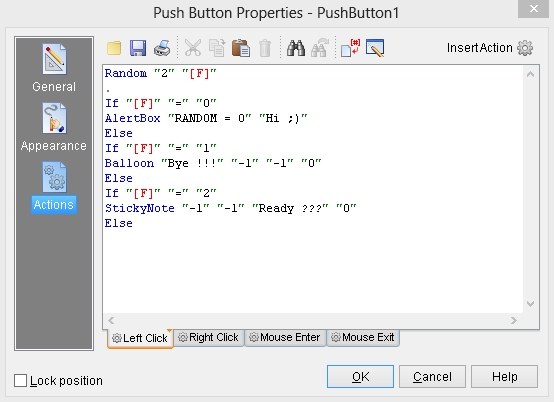
Quote from Vadim on November 10, 2022, 6:43 pm@hector68
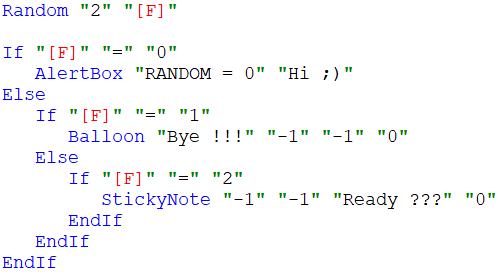
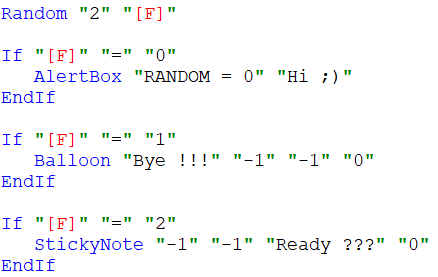
Yes, and it's better to close logical conditions with the EndIF command, this will save you from errors if you add code below.
It also makes sense to indent, it makes the code more understandable.
These two variants will work the same way:
Yes, and it's better to close logical conditions with the EndIF command, this will save you from errors if you add code below.
It also makes sense to indent, it makes the code more understandable.
These two variants will work the same way:
Uploaded files: