
[RECURSO] ArialVNIcons 2.0 - Para UI dinámica mejorada + Toggles, Listas, Rankings + 450 iconos / Disponible NARROW - Forum
[RECURSO] ArialVNIcons 2.0 - Para UI dinámica mejorada + Toggles, Listas, Rankings + 450 iconos / Disponible NARROW

Quote from alangonzalez91 on January 19, 2026, 6:01 am-------------------------------------
--------- PASS: 12345 ----------
-------------------------------------
Buenas a todos, libero la versión 2.0 de la fuente ArialVNIcons, que como sabrán por la versión 1.0 tiene la capacidad de graficar iconos mediante texto dentro del “caption” de botones, listas, textentry, radiobutton y checkbox usando : (dos puntos) seguido del denominador del icono por ejemplo… :del (dibuja icono de borrar), :file (dibuja icono de archivo), etc.
Además de poder integrarlo con la interfaz de la App si se lo configura en el apartado “App Propeties -> Interface” para poder usarlo dentro de comando como AlertBox, MessageBox, MenuEx, etc.
En la versión 2.0 se suman las funcionalidades de usar implementar controles de Toggles, Listas y Rankings sin usar nada más que la fuente y programación en leguaje nativo.
¿Cómo instalar?
Paso 1) Cerrar todos los programas que estén abiertos, incluido este programa.
Paso 2) Haga clic con el botón izquierdo sobre las fuentes ArialVNIcons_.ttf y ArialVNIcons_controls.ttf y ejecute la opción "Instalar para todos los usuarios"
Paso 3) En VisualNEO Win, incluya la fuente en la interfaz interna en App -> App propeties -> Interface -> Custom font: ArialVNIcons, 16pt Bold
Paso 4) En VisualNEO Win, incluya la fuente en la compilación, en App -> Compilar / Publish -> Fonts -> Iclude all fonts
Ante inconvenientes:
Paso 1) Abra la carpeta "Fuentes" de windows y elimine todo rastro de ArialVNIcons, tanto normal, como Controls como Narrow.
Paso 2) Reinicie la PC, y reinstale las fuentes sin programas abiertos.
- A veces el cache de fuentes de windows no se libera hasta reiniciar la PC
- La fuente ArialVNIcons_constrols.ttf sólo soporta altura hasta 22 puntos.
ENGLISH
Hello everyone, I'm releasing version 2.0 of the ArialVNIcons font. As you may know from version 1.0, it can display icons using text within the "caption" of buttons, lists, textentry boxes, radio buttons, and checkboxes using a colon (:) followed by the icon's name, for example: :del (draws a delete icon), :file (draws a file icon), etc.
It can also be integrated into the app's interface by configuring it in the "App Properties -> Interface" section, allowing its use within commands like AlertBox, MessageBox, MenuEx, etc.
Version 2.0 adds the functionality to implement Toggle, List, and Ranking controls using only the font and native programming language.
How to install?
Step 1) Close all open programs, including this one.
Step 2) Left-click on the ArialVNIcons_.ttf and ArialVNIcons_controls.ttf fonts and select "Install for all users".
Step 3) In VisualNEO Win, include the font in the internal interface by going to App -> Application Properties -> Interface -> Custom Font: ArialVNIcons, 16pt Bold.
Step 4) In VisualNEO Win, include the font in the build by going to App -> Compiler / Publish -> Fonts -> Include all fonts.
Troubleshooting:
Step 1) Open the Windows "Fonts" folder and delete all traces of ArialVNIcons, including the regular, Controls, and Narrow versions.
Step 2) Restart your PC and reinstall the fonts with no other programs open.
- Sometimes the Windows font cache is not cleared until the PC is restarted.
- The ArialVNIcons_controls.ttf font only supports a height of up to 22 points.
https://www.youtube.com/watch?v=kVXo3qDxMqs
Link versión 1.0
-------------------------------------
--------- PASS: 12345 ----------
-------------------------------------
Buenas a todos, libero la versión 2.0 de la fuente ArialVNIcons, que como sabrán por la versión 1.0 tiene la capacidad de graficar iconos mediante texto dentro del “caption” de botones, listas, textentry, radiobutton y checkbox usando : (dos puntos) seguido del denominador del icono por ejemplo… :del (dibuja icono de borrar), :file (dibuja icono de archivo), etc.
Además de poder integrarlo con la interfaz de la App si se lo configura en el apartado “App Propeties -> Interface” para poder usarlo dentro de comando como AlertBox, MessageBox, MenuEx, etc.
En la versión 2.0 se suman las funcionalidades de usar implementar controles de Toggles, Listas y Rankings sin usar nada más que la fuente y programación en leguaje nativo.
¿Cómo instalar?
Paso 1) Cerrar todos los programas que estén abiertos, incluido este programa.
Paso 2) Haga clic con el botón izquierdo sobre las fuentes ArialVNIcons_.ttf y ArialVNIcons_controls.ttf y ejecute la opción "Instalar para todos los usuarios"
Paso 3) En VisualNEO Win, incluya la fuente en la interfaz interna en App -> App propeties -> Interface -> Custom font: ArialVNIcons, 16pt Bold
Paso 4) En VisualNEO Win, incluya la fuente en la compilación, en App -> Compilar / Publish -> Fonts -> Iclude all fonts
Ante inconvenientes:
Paso 1) Abra la carpeta "Fuentes" de windows y elimine todo rastro de ArialVNIcons, tanto normal, como Controls como Narrow.
Paso 2) Reinicie la PC, y reinstale las fuentes sin programas abiertos.
- A veces el cache de fuentes de windows no se libera hasta reiniciar la PC
- La fuente ArialVNIcons_constrols.ttf sólo soporta altura hasta 22 puntos.
ENGLISH
Hello everyone, I'm releasing version 2.0 of the ArialVNIcons font. As you may know from version 1.0, it can display icons using text within the "caption" of buttons, lists, textentry boxes, radio buttons, and checkboxes using a colon (:) followed by the icon's name, for example: :del (draws a delete icon), :file (draws a file icon), etc.
It can also be integrated into the app's interface by configuring it in the "App Properties -> Interface" section, allowing its use within commands like AlertBox, MessageBox, MenuEx, etc.
Version 2.0 adds the functionality to implement Toggle, List, and Ranking controls using only the font and native programming language.
How to install?
Step 1) Close all open programs, including this one.
Step 2) Left-click on the ArialVNIcons_.ttf and ArialVNIcons_controls.ttf fonts and select "Install for all users".
Step 3) In VisualNEO Win, include the font in the internal interface by going to App -> Application Properties -> Interface -> Custom Font: ArialVNIcons, 16pt Bold.
Step 4) In VisualNEO Win, include the font in the build by going to App -> Compiler / Publish -> Fonts -> Include all fonts.
Troubleshooting:
Step 1) Open the Windows "Fonts" folder and delete all traces of ArialVNIcons, including the regular, Controls, and Narrow versions.
Step 2) Restart your PC and reinstall the fonts with no other programs open.
- Sometimes the Windows font cache is not cleared until the PC is restarted.
- The ArialVNIcons_controls.ttf font only supports a height of up to 22 points.
Link versión 1.0
Uploaded files: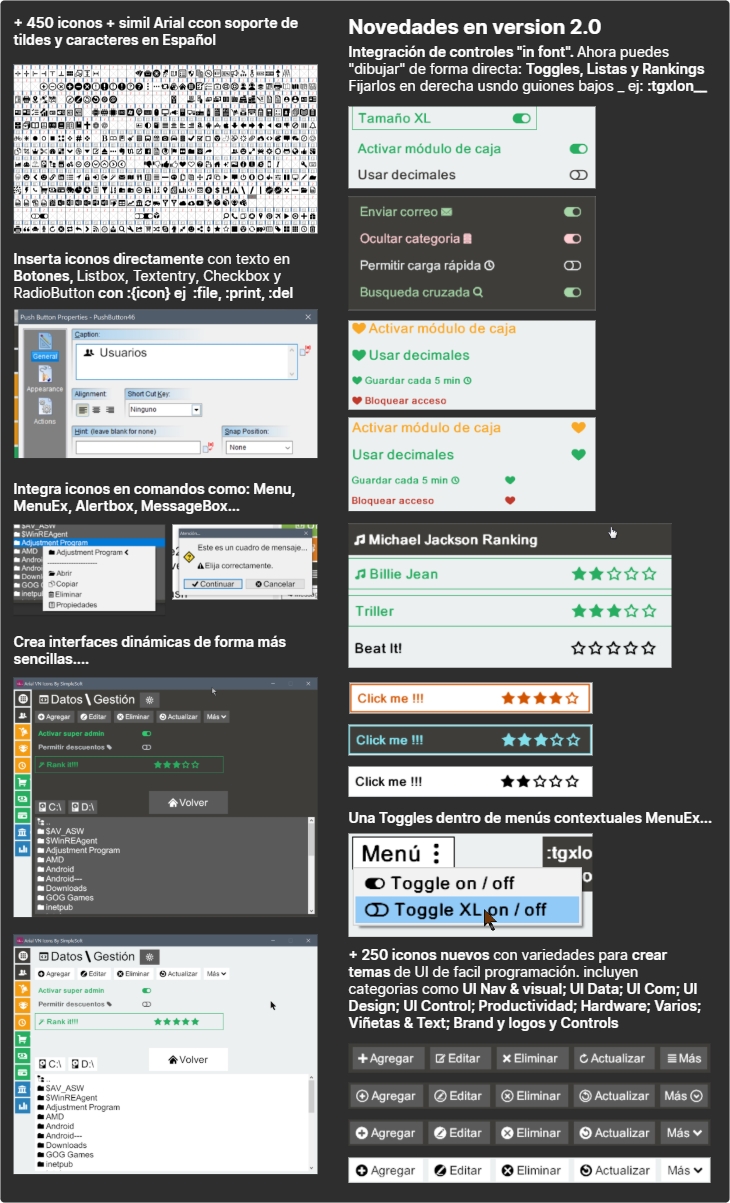

Quote from Anthony LaTorre on January 19, 2026, 6:22 pmAlan, this is a very cool styling option... I'm going to be using this in a project I'm creating.
Using your VN. Icons, and my Styled Text and Styled Tabs plugins, creating beautiful VNW interfaces has never been easier...
Thank you for making this available for the VisualNeo community...
Alan, this is a very cool styling option... I'm going to be using this in a project I'm creating.
Using your VN. Icons, and my Styled Text and Styled Tabs plugins, creating beautiful VNW interfaces has never been easier...
Thank you for making this available for the VisualNeo community...
Quote from alangonzalez91 on January 19, 2026, 11:17 pmExcellent, Anthony. Thank you for your contributions. I'm also planning to create a demo using different plugins, including yours. Greetings!
Excellent, Anthony. Thank you for your contributions. I'm also planning to create a demo using different plugins, including yours. Greetings!
Quote from alangonzalez91 on January 23, 2026, 1:30 amArialVNIcons 2.0 Demo
ArialVNIcons 2.0 Demo
Uploaded files: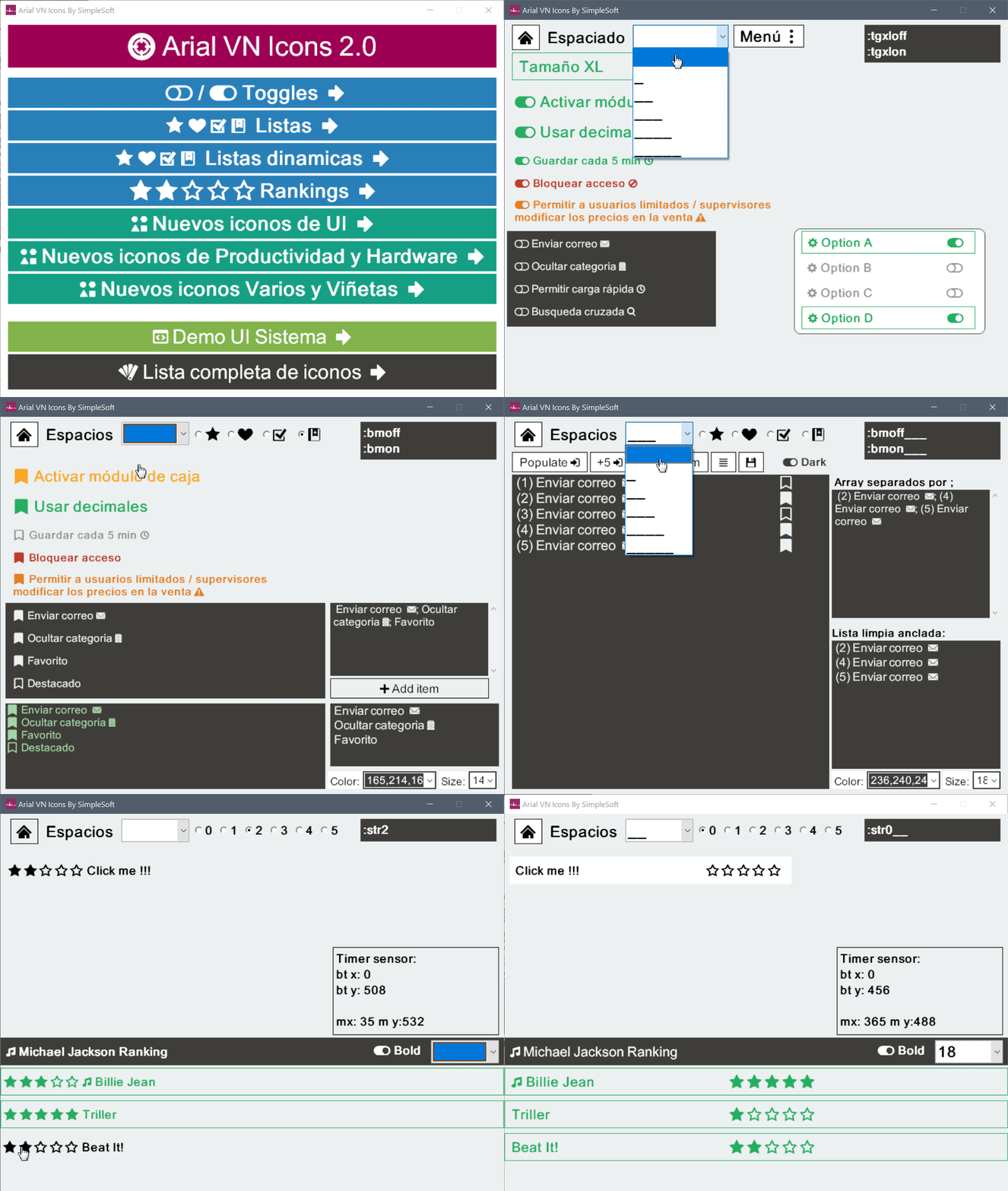
Quote from alangonzalez91 on January 23, 2026, 1:56 amArialVNIcons 2.0 Demo
ArialVNIcons 2.0 Demo
Uploaded files: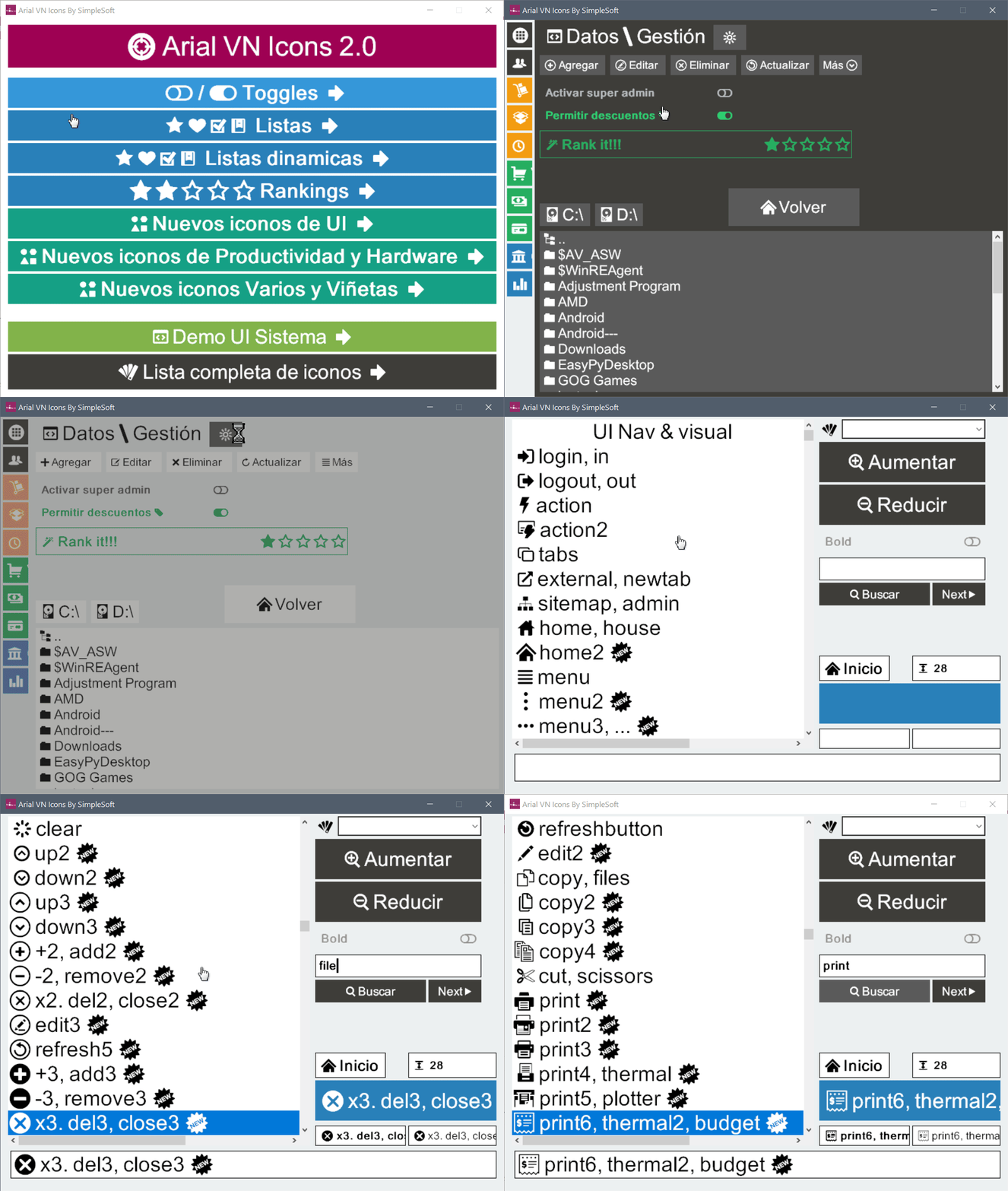
Quote from Anthony LaTorre on January 23, 2026, 6:01 pmI really love Alan's Icons... And they work well with my Styled Tabs Pro plugin...
Nice job Alan, your work is greatly appreciated.
I really love Alan's Icons... And they work well with my Styled Tabs Pro plugin...
Nice job Alan, your work is greatly appreciated.
Uploaded files: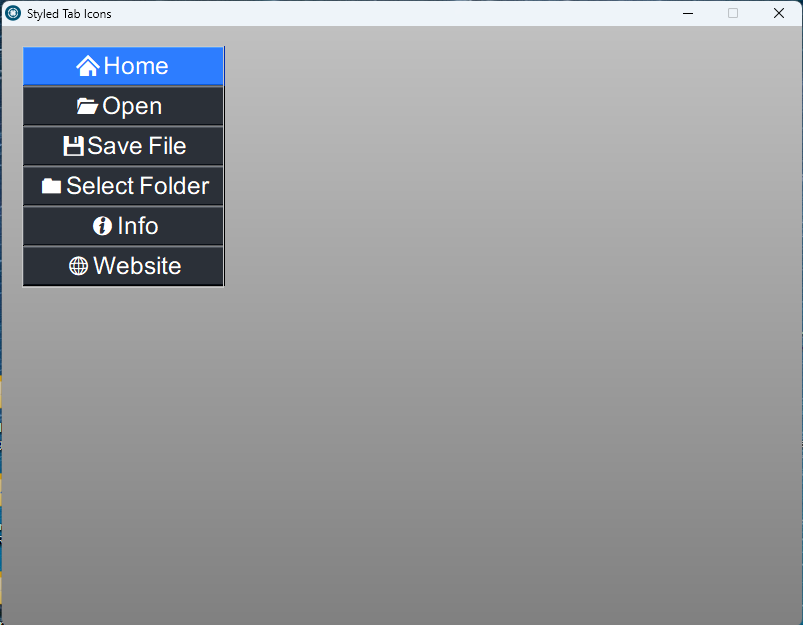

Quote from alangonzalez91 on January 24, 2026, 1:53 amHi fkapnist, if you haven't been able to extract the file, check your WinRAR version; it needs to be higher than 5.6. That might be the problem. Greetings
Hi fkapnist, if you haven't been able to extract the file, check your WinRAR version; it needs to be higher than 5.6. That might be the problem. Greetings
Quote from no1g8tor96 on July 30, 2026, 4:06 amIt has to be a winRAR or something that can use passwords. WIndows wont let you do it.
Is there no way to use it with the new version? I have to old one but was going to get this for some of the cool new features.
Let me know. This is very cool stuff.
Thanks again.
It has to be a winRAR or something that can use passwords. WIndows wont let you do it.
Is there no way to use it with the new version? I have to old one but was going to get this for some of the cool new features.
Let me know. This is very cool stuff.
Thanks again.
Quote from alangonzalez91 on July 30, 2026, 4:26 amYou should use the updated WinRAR... the password is 12345. The password is set so the browser doesn't block the download for "unsafe content."
The ArialVNIcons font has no VisualNEO version restrictions; you just need to uninstall the old font and install the new one. Restart your computer for the changes to take effect.
Regarding uxElements, I haven't yet tested or validated its functionality in the new version of VN because it was developed using the previous version. Until the new version of VN enters Release Candidate, I won't attempt to create the corresponding port because internally it could have variations that the plugin can't handle. But the adaptation will definitely be done in the future.
Regards
You should use the updated WinRAR... the password is 12345. The password is set so the browser doesn't block the download for "unsafe content."
The ArialVNIcons font has no VisualNEO version restrictions; you just need to uninstall the old font and install the new one. Restart your computer for the changes to take effect.
Regarding uxElements, I haven't yet tested or validated its functionality in the new version of VN because it was developed using the previous version. Until the new version of VN enters Release Candidate, I won't attempt to create the corresponding port because internally it could have variations that the plugin can't handle. But the adaptation will definitely be done in the future.
Regards
Quote from alangonzalez91 on July 30, 2026, 4:45 amDisponible formato Semi Comprimido o "Narrow" ver 2.0 (Sólo fuentes .ttf)
Available in Semi-Compressed or "Narrow" format version 2.0 (Only .ttf fonts)
* Bugs visuales corregidos
Disponible formato Semi Comprimido o "Narrow" ver 2.0 (Sólo fuentes .ttf)
Available in Semi-Compressed or "Narrow" format version 2.0 (Only .ttf fonts)
* Bugs visuales corregidos
Uploaded files: