
REFERENCE YOUR PLUG-INS

Quote from joferar333 on May 31, 2023, 7:29 pm@darbdenral
Hello friend, the truth was unknown to your plugs. I have been amazed and amazed but I ask you if you can help me understand something that escapes me, for example if you choose an alert where an input must be entered, for example an email box, I put email as a label in that input and leave the placeholder empty now I don't realize where the variable that should take the value that is entered in the email is configured? The same thing is not clear to me with all those that require an input. I do not realize how to take the value entered when executing it...
And finally, abusing your generosity, I would like to ask you to see if you can guide me to handle errors, I am not trained and I cannot do it.
example
I suppose that a certain action is executed, I would need to know if it was executed successfully or if it had an error to be able to branch into the next action, but I can't do it, that is, I need to have a variable that stores whether there was an error or not
Thank you in advance, and congratulations, the excellent material that I have downloaded from your pageBestRegards
Hello friend, the truth was unknown to your plugs. I have been amazed and amazed but I ask you if you can help me understand something that escapes me, for example if you choose an alert where an input must be entered, for example an email box, I put email as a label in that input and leave the placeholder empty now I don't realize where the variable that should take the value that is entered in the email is configured? The same thing is not clear to me with all those that require an input. I do not realize how to take the value entered when executing it...
And finally, abusing your generosity, I would like to ask you to see if you can guide me to handle errors, I am not trained and I cannot do it.
example
I suppose that a certain action is executed, I would need to know if it was executed successfully or if it had an error to be able to branch into the next action, but I can't do it, that is, I need to have a variable that stores whether there was an error or not
Thank you in advance, and congratulations, the excellent material that I have downloaded from your page
BestRegards

Quote from Darbdenral on May 31, 2023, 9:27 pm@joferar333
I apologize for the confusion, but I'm not sure which specific plugin you are referring to. Could you please provide more details or clarify the context?
Thank you for your kind words about the materials you have downloaded. I'm glad you find them helpful. If you have any further questions, please feel free to ask.
Best regards,
I apologize for the confusion, but I'm not sure which specific plugin you are referring to. Could you please provide more details or clarify the context?
Thank you for your kind words about the materials you have downloaded. I'm glad you find them helpful. If you have any further questions, please feel free to ask.
Best regards,
Quote from joferar333 on May 31, 2023, 9:39 pmHi egain @darbdenral
In the photo that I attached I show you where I have the doubt, is it to know if in what I show there should go the variable that will take when the imput data is entered?
And on the other hand, I don't know if you have any example of error handling so that I can see what it means to achieve this...
thanks again
Hi egain @darbdenral
In the photo that I attached I show you where I have the doubt, is it to know if in what I show there should go the variable that will take when the imput data is entered?
And on the other hand, I don't know if you have any example of error handling so that I can see what it means to achieve this...
thanks again
Uploaded files: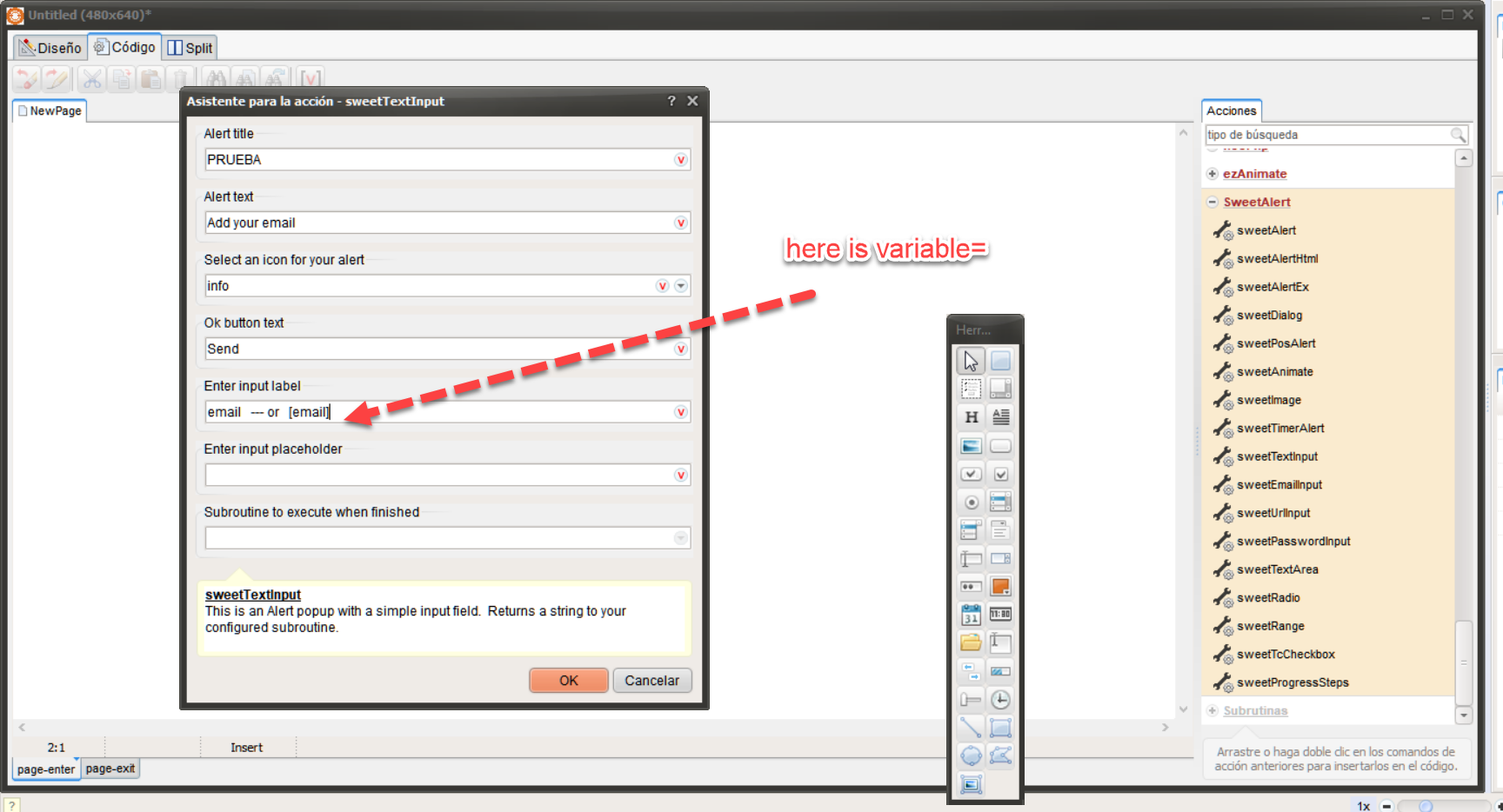
Quote from Darbdenral on June 1, 2023, 6:34 amHi @joferar333,
Yes, you can get the data value in a subroutine. The Alert will return a string to your subroutine of choice.
Example Alert
sweetEmailInput "Input email address" "" "" "Ok" "Your email address" "Enter your email address" "InputResult"Using my example above, I need to create a subroutine called InputResult and make a parameter Alias name of [inputValue] type string and I'll use a description "Input value as string"
The subroutine content below will get the value of [inputValue] and display it in a popup ..
.Input result
sweetAlert "results" "[inputValue]" "success" "ok" ""
See examples here: https://tropicdesigns.net/vnwdemos/neosweet
I hope this helps..
Hi @joferar333,
Yes, you can get the data value in a subroutine. The Alert will return a string to your subroutine of choice.
Example Alert
sweetEmailInput "Input email address" "" "" "Ok" "Your email address" "Enter your email address" "InputResult"
Using my example above, I need to create a subroutine called InputResult and make a parameter Alias name of [inputValue] type string and I'll use a description "Input value as string"
The subroutine content below will get the value of [inputValue] and display it in a popup ..
.Input result
sweetAlert "results" "[inputValue]" "success" "ok" ""
See examples here: https://tropicdesigns.net/vnwdemos/neosweet
I hope this helps..
Uploaded files: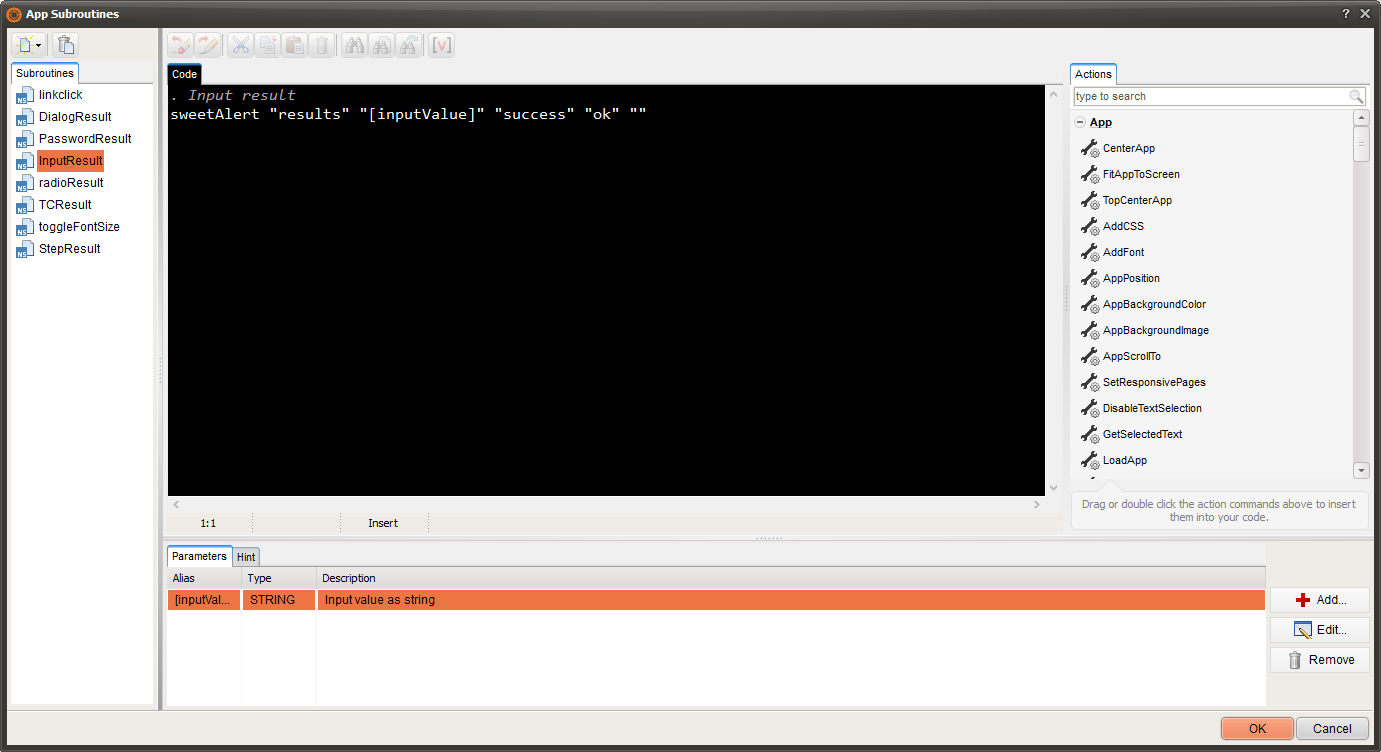
Quote from joferar333 on June 1, 2023, 4:17 pmHi!, @darbdenral
Is there a way that you can set the popup to open at the top, not in the center, since I'm applying it to a phone app it gets cut off with the keyboard...
And secondly, is there a way to add a cancel button to the textimput since I experimented and it stayed there and I couldn't exit without continuing....
thank you
Hi!, @darbdenral
Is there a way that you can set the popup to open at the top, not in the center, since I'm applying it to a phone app it gets cut off with the keyboard...
And secondly, is there a way to add a cancel button to the textimput since I experimented and it stayed there and I couldn't exit without continuing....
thank you
Quote from Darbdenral on June 1, 2023, 11:57 pmHi @joferar333
Is there a way that you can set the popup to open at the top, not in the center, since I'm applying it to a phone app it gets cut off with the keyboard...
Not normally, but you can create a custom alert using JavaScript.
And secondly, is there a way to add a cancel button to the textimput since I experimented and it stayed there and I couldn't exit without continuing....
You can click anywhere off the alert and it should go away on all alerts, but the cancel button can be added using a custom alert in JavaScript too
Here is an example, add this code to a button to test. It requires the subroutine we used above called InputResult to process result.
BeginJs
function sweetEmail(
  title,
  msg,
  icon,
  okBtn,
  label,
  placeholder,
  position
) {
  (async () => {
    const { value: input } = await Swal.fire({

      showCancelButton: true,
      confirmButtonText: "Ok",
      cancelButtonText: "Cancel",
      title: title,
      text: msg,
      input: "email",
      icon: icon,
      inputLabel: label,
      inputPlaceholder: placeholder,
      position: position,
    });

    if (input)
      {
        // Run subroutine named InputResult and capture result
        $scope.InputResult(input);
      }
    else
      {
        // User aborted
        //$scope.InputResult("Party Pooper! :( ");
      }
  })();
}

// position choices - 'top','top-start','top-end','center','center-start','center-end','bottom', 'bottom-start', or 'bottom-end'
sweetEmail("Input email address", "", "", "Ok", "Your email address", "Enter your email address","top");

EndJs
your welcome!
Hi @joferar333
Is there a way that you can set the popup to open at the top, not in the center, since I'm applying it to a phone app it gets cut off with the keyboard...
Not normally, but you can create a custom alert using JavaScript.
And secondly, is there a way to add a cancel button to the textimput since I experimented and it stayed there and I couldn't exit without continuing....
You can click anywhere off the alert and it should go away on all alerts, but the cancel button can be added using a custom alert in JavaScript too
Here is an example, add this code to a button to test. It requires the subroutine we used above called InputResult to process result.
BeginJs
function sweetEmail(
  title,
  msg,
  icon,
  okBtn,
  label,
  placeholder,
  position
) {
  (async () => {
    const { value: input } = await Swal.fire({

      showCancelButton: true,
      confirmButtonText: "Ok",
      cancelButtonText: "Cancel",
      title: title,
      text: msg,
      input: "email",
      icon: icon,
      inputLabel: label,
      inputPlaceholder: placeholder,
      position: position,
    });

    if (input)
      {
        // Run subroutine named InputResult and capture result
        $scope.InputResult(input);
      }
    else
      {
        // User aborted
        //$scope.InputResult("Party Pooper! :( ");
      }
  })();
}

// position choices - 'top','top-start','top-end','center','center-start','center-end','bottom', 'bottom-start', or 'bottom-end'
sweetEmail("Input email address", "", "", "Ok", "Your email address", "Enter your email address","top");

EndJs
your welcome!
Quote from joferar333 on June 2, 2023, 12:27 amHi!, @darbdenral SUPER THANKS!!!
I only have one question, I am implementing in my app sweetTextInput no sweetEmail the code your send is valid to my request change sweetEmail to sweetTextInput in start code?
Hi!, @darbdenral SUPER THANKS!!!
I only have one question, I am implementing in my app sweetTextInput no sweetEmail the code your send is valid to my request change sweetEmail to sweetTextInput in start code?
Quote from Darbdenral on June 2, 2023, 4:39 am@joferar333
Well yes, you can rename the function to sweetText, then change the input type to "text" .. You can use, text, email , number, password, url, file, tel or textarea
So, input: "email" becomes..
input: "text",that's it, should work fine.. just change your labels, placeholders and such to display what you wish ..
Well yes, you can rename the function to sweetText, then change the input type to "text" .. You can use, text, email , number, password, url, file, tel or textarea
So, input: "email" becomes..
input: "text",
that's it, should work fine.. just change your labels, placeholders and such to display what you wish ..
Quote from joferar333 on June 2, 2023, 4:54 pmFriend @darbdenral thank you very much for your appreciated time and help.
I really appreciate your work, which by the way, I cannot help but emphasize again that it is excellent.
At 65 years old and with zero experience in neobook programming and now win and the web have given me the opportunity to have a great hobby that I really enjoy beyond the quarrels that I sometimes get when I can't do something because I don't understand English well. , but beyond that, it is really magical to be able to enjoy this exciting world and generate things that are productive for the people I love and those around me. For example, this last project was focused on being able to make a hairdresser's shift app that A godson has just opened, and you have no idea the great feeling I have felt to be able to meet the goal and this is partly due to the invaluable help I always receive from @Luishp, @Gaev, @Vadim who are always there unconditionally and now on my list you join the people with whom one finds content and supported. Many successes
Friend @darbdenral thank you very much for your appreciated time and help.
I really appreciate your work, which by the way, I cannot help but emphasize again that it is excellent.
At 65 years old and with zero experience in neobook programming and now win and the web have given me the opportunity to have a great hobby that I really enjoy beyond the quarrels that I sometimes get when I can't do something because I don't understand English well. , but beyond that, it is really magical to be able to enjoy this exciting world and generate things that are productive for the people I love and those around me. For example, this last project was focused on being able to make a hairdresser's shift app that A godson has just opened, and you have no idea the great feeling I have felt to be able to meet the goal and this is partly due to the invaluable help I always receive from @Luishp, @Gaev, @Vadim who are always there unconditionally and now on my list you join the people with whom one finds content and supported. Many successes
Quote from Darbdenral on June 2, 2023, 9:43 pmYou're welcome, @joferar333! I'm glad I could be of help, I'm truly humbled to join this group of individuals. :) It's great to see you embrace Neobook programming and enjoy it as a hobby. Don't worry about the language barrier; you're doing just fine. Congratulations on successfully completing your hairdresser's shift app project. Keep up the fantastic job, and I wish you continued success.
thanks!
You're welcome, @joferar333! I'm glad I could be of help, I'm truly humbled to join this group of individuals. :) It's great to see you embrace Neobook programming and enjoy it as a hobby. Don't worry about the language barrier; you're doing just fine. Congratulations on successfully completing your hairdresser's shift app project. Keep up the fantastic job, and I wish you continued success.
thanks!
Quote from Darbdenral on June 2, 2023, 10:16 pm@Luishp or anyone..
In the sweetEmail function above, how could we use the subroutine name passed to the function as a variable? I had to hard code the subroutine name because I tried various ways, each time errors occurred using $scope or whatever.
So, if we added a subroutine name as "InputResult" to the end of this action..
sweetEmail("Input email address", "", "", "Ok", "Your email address", "Enter your email address","top", "InputResult");Now in the actual function, assuming we've already added it to the function parameters as "subroutine" variable, how would we use it now since we need to use the $scope, correct?
This will cause error..
// Run subroutine named InputResult and capture result
   $scope.subroutine(input);
@Luishp or anyone..
In the sweetEmail function above, how could we use the subroutine name passed to the function as a variable? I had to hard code the subroutine name because I tried various ways, each time errors occurred using $scope or whatever.
So, if we added a subroutine name as "InputResult" to the end of this action..
sweetEmail("Input email address", "", "", "Ok", "Your email address", "Enter your email address","top", "InputResult");
Now in the actual function, assuming we've already added it to the function parameters as "subroutine" variable, how would we use it now since we need to use the $scope, correct?
This will cause error..
// Run subroutine named InputResult and capture result
   $scope.subroutine(input);
Quote from joferar333 on June 2, 2023, 10:24 pm@darbdenral
Excuse me, not understanding this message, do I have to make any changes to the routine you sent me?
S
Excuse me, not understanding this message, do I have to make any changes to the routine you sent me?
S
Quote from Darbdenral on June 2, 2023, 10:31 pmExcuse me, not understanding this message, do I have to make any changes to the routine you sent me?
No, your fine..
Basically, if we can pass subroutine as a variable, we can use any subroutine name we want, without calling a generic subroutine or hard-coded one.. it's just better coding.
Excuse me, not understanding this message, do I have to make any changes to the routine you sent me?
No, your fine..
Basically, if we can pass subroutine as a variable, we can use any subroutine name we want, without calling a generic subroutine or hard-coded one.. it's just better coding.
Quote from joferar333 on June 2, 2023, 10:51 pmok @darbdenral perfect!
Thanks
ok @darbdenral perfect!
Thanks
Quote from joferar333 on June 3, 2023, 6:16 pmDear, I have tried to test the code that you sent me as you sent it to me and unfortunately I cannot make it work...
I am attaching the source, it is just a button with the code that you sent me, maybe I did something wrong but I don't think I have followed the code step by step in that button
Dear, I have tried to test the code that you sent me as you sent it to me and unfortunately I cannot make it work...
I am attaching the source, it is just a button with the code that you sent me, maybe I did something wrong but I don't think I have followed the code step by step in that button
Uploaded files:
Quote from Darbdenral on June 3, 2023, 9:52 pm@joferar333
It was your subroutine that was the problem. You should have created the subroutine as NeoScript not JavaScript. Also, the InputResult subroutine had no code to do the work, it was empty.
I am attaching the fixed source.
It was your subroutine that was the problem. You should have created the subroutine as NeoScript not JavaScript. Also, the InputResult subroutine had no code to do the work, it was empty.
I am attaching the fixed source.
Uploaded files: