
Request: Help with clickable form with text output generator

Quote from Daniel Housa on May 3, 2021, 11:51 amI am new to VN and still completely lost. I have a small knowledge of VBA and PhraseExpress text expander scripting. I would like to create a clickable form as per attachment.
I am unable to understand the syntax of VN and hence I am lost. I would need just to show how t0:
- When I select from ListBox it populates the textarea but aside writing the value also write some text before and possiblz after the inserted selected ListBox item.
- Same as above for Dropdown
- How to insert textarea and output with some extra text before and after
- How to enter Number value from the form and make some basic calculation if more than 20 and less than 40 do something, if more than 40 do something and remember that the value was in some range
- If I would have several Number, ListBox or Textarea inputs I would be able to make judgment if any fulfilled criterion of being either over 0r Dropdown value e.g. basosquamous and make text output risk factor present in the text area.
I would like to show HOW TO / DIRECTION on this sample so I would be able to create my own more complicated forms. I am not sure if somebody would do this as a freelance but I cannot afford to pay a lot.
I am new to VN and still completely lost. I have a small knowledge of VBA and PhraseExpress text expander scripting. I would like to create a clickable form as per attachment.
I am unable to understand the syntax of VN and hence I am lost. I would need just to show how t0:
- When I select from ListBox it populates the textarea but aside writing the value also write some text before and possiblz after the inserted selected ListBox item.
- Same as above for Dropdown
- How to insert textarea and output with some extra text before and after
- How to enter Number value from the form and make some basic calculation if more than 20 and less than 40 do something, if more than 40 do something and remember that the value was in some range
- If I would have several Number, ListBox or Textarea inputs I would be able to make judgment if any fulfilled criterion of being either over 0r Dropdown value e.g. basosquamous and make text output risk factor present in the text area.
I would like to show HOW TO / DIRECTION on this sample so I would be able to create my own more complicated forms. I am not sure if somebody would do this as a freelance but I cannot afford to pay a lot.
Uploaded files: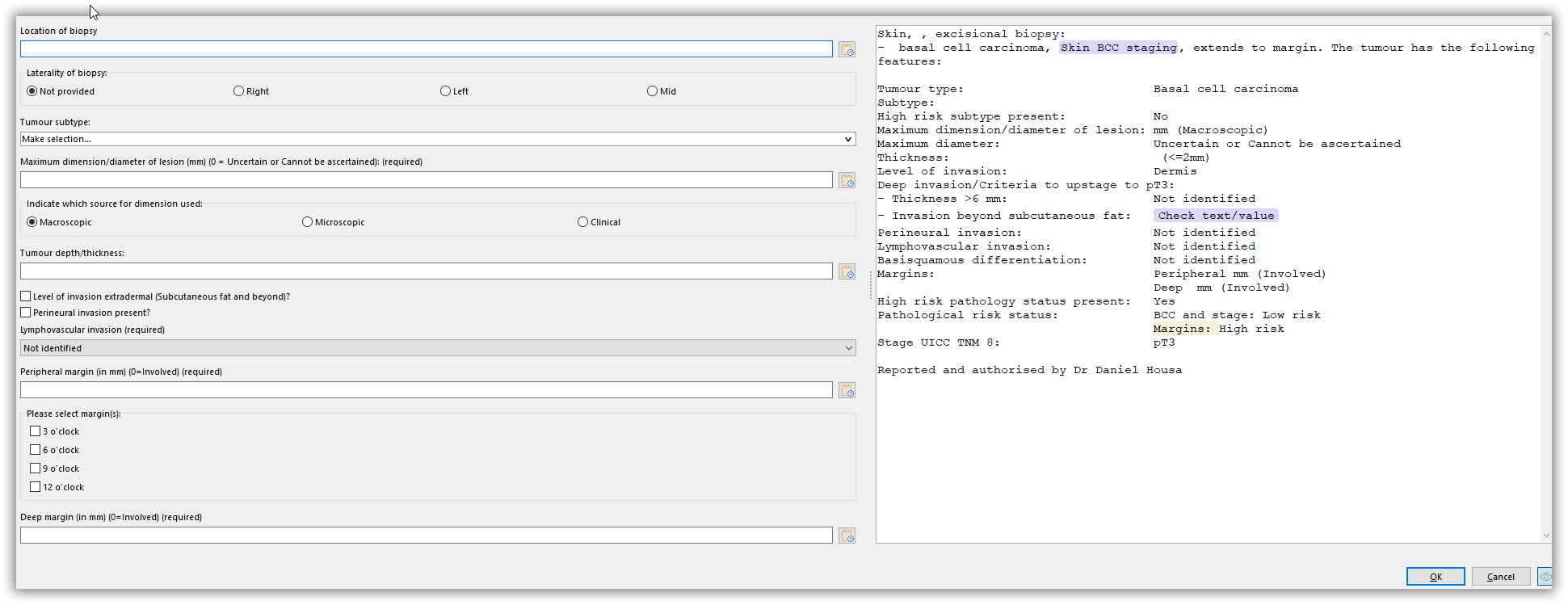
Quote from Gaev on May 3, 2021, 1:28 pm@daniel-housa
When you say VN, are you referring to ...
a) VisualNEOWin ... which compiles your .pub to a Windows program (.exe)
or
b) VisualNEOWeb ... which transforms your project to a group of files that enable your App to be run inside a Browser (and with some more effort, as a native App on your smart phone etc.)
If it is (a), I can assist you (no charge) ... it might be best to discuss details of your requirements offline from this forum ... do you have access to Skype or ZOOM ? ... what country (time zone are you in) ?
Otherwise, there are several others on this forum who are in a better position to do so.
When you say VN, are you referring to ...
a) VisualNEOWin ... which compiles your .pub to a Windows program (.exe)
or
b) VisualNEOWeb ... which transforms your project to a group of files that enable your App to be run inside a Browser (and with some more effort, as a native App on your smart phone etc.)
If it is (a), I can assist you (no charge) ... it might be best to discuss details of your requirements offline from this forum ... do you have access to Skype or ZOOM ? ... what country (time zone are you in) ?
Otherwise, there are several others on this forum who are in a better position to do so.
Quote from Daniel Housa on May 9, 2021, 10:02 pmSorry for the late reply. I had no VisualNEO Win just Web so I bought Win today. I have Skype and Zoom and Telegram. I am based in GMT+0.
Sorry for the late reply. I had no VisualNEO Win just Web so I bought Win today. I have Skype and Zoom and Telegram. I am based in GMT+0.
Quote from Gaev on May 10, 2021, 2:07 am@daniel-housa
I had no VisualNEO Win just Web so I bought Win today.
Just so you know, VisualNEOWin will produce a Windows program (.exe file) ... which will store (any) data to files on your computer's local disk ... is that your intended use of this Application ?
I have Skype and Zoom and Telegram. I am based in GMT+0.
If this is the type of program you are seeking, I can help you.
I live in Toronto (Canada) ... GMT-4
Let us go for a ZOOM conversation ... perhaps you can use the Form here ... https://visualneo.com/contact ... to pass your email address to @luishp ... he will then advise me privately.
Please also advise the times when it is convenient to ZOOM about this ... I will then schedule a ZOOM meeting and advise you of details ... it will be more convenient to ZOOM from your Windows computer where VisualNEOWin is installed (in case there is reason to screen share).
I had no VisualNEO Win just Web so I bought Win today.
Just so you know, VisualNEOWin will produce a Windows program (.exe file) ... which will store (any) data to files on your computer's local disk ... is that your intended use of this Application ?
I have Skype and Zoom and Telegram. I am based in GMT+0.
If this is the type of program you are seeking, I can help you.
I live in Toronto (Canada) ... GMT-4
Let us go for a ZOOM conversation ... perhaps you can use the Form here ... https://visualneo.com/contact ... to pass your email address to @luishp ... he will then advise me privately.
Please also advise the times when it is convenient to ZOOM about this ... I will then schedule a ZOOM meeting and advise you of details ... it will be more convenient to ZOOM from your Windows computer where VisualNEOWin is installed (in case there is reason to screen share).
Quote from Daniel Housa on May 10, 2021, 8:52 amThank you. I would first try to create something myself this week in order not to be a passive consumer. I have just two questions:
- Is it possible to copy the content of SimpleText object Text1 into Clipboard with a button?
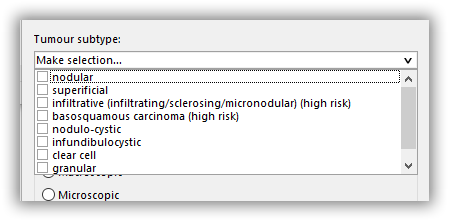
- Is it possible to have CheckBox Group selection as per attached png so one may select multiple options at once?
Thank you. I would first try to create something myself this week in order not to be a passive consumer. I have just two questions:
- Is it possible to copy the content of SimpleText object Text1 into Clipboard with a button?
- Is it possible to have CheckBox Group selection as per attached png so one may select multiple options at once?
Quote from Gaev on May 10, 2021, 2:16 pm@daniel-housa
Is it possible to copy the content of SimpleText object Text1 into Clipboard with a button?
Take a look at attached pub; if anything is not clear, post your enquiries here.
Also, related help information can be found here ... https://winhelp.visualneo.com/SimpleTextTool.html
Response to Question 2 to follow.
Is it possible to copy the content of SimpleText object Text1 into Clipboard with a button?
Take a look at attached pub; if anything is not clear, post your enquiries here.
Also, related help information can be found here ... https://winhelp.visualneo.com/SimpleTextTool.html
Response to Question 2 to follow.
Uploaded files:Quote from Gaev on May 10, 2021, 2:46 pm@daniel-housa
Is it possible to have CheckBox Group selection as per attached png so one may select multiple options at once?
VisualNEOWin does not directly support grouped-checkboxes, but you can build one from multiple single-checkboxes.
Take a look at the attached updated pub (second page)
Also, related help information can be found here ... https://winhelp.visualneo.com/CheckBoxTool.html
Is it possible to have CheckBox Group selection as per attached png so one may select multiple options at once?
VisualNEOWin does not directly support grouped-checkboxes, but you can build one from multiple single-checkboxes.
Take a look at the attached updated pub (second page)
Also, related help information can be found here ... https://winhelp.visualneo.com/CheckBoxTool.html
Uploaded files:
Quote from Daniel Housa on May 11, 2021, 8:17 pmHi
thank you for examples. I was just wondering if it is possible to copy the textbox content as a whole after it is all filled. I would love to have a sort of preview.
Hi
thank you for examples. I was just wondering if it is possible to copy the textbox content as a whole after it is all filled. I would love to have a sort of preview.
Uploaded files:Quote from Gaev on May 11, 2021, 10:27 pm@daniel-housa
if it is possible to copy the textbox content as a whole after it is all filled.
My answer is in the attached xxxxresponse1.pub
Please rename xxxxtemplate.pub to xxxxTemplate.txt (this Forum will not allow me to upload a file with the txt extension) ... the xxxxTemplate.txt file must be in the same folder as the xxxxresponse1.pub file.
This is how things work ...
After each change to the values of your Radio Button or TextEntry widgets, there is a GoSub "RefreshTemplate" command; this subroutine reads the template text file into a variable, and then, the PopulateStr command substitutes all the [variables] with their current values.
Another way, not demonstrated in my pub, would be to setup your TextBox such that its content is a variable e.g. [resultText] ... then, have the subroutine build this variable via SetVar commands e.g. ...
SetVar "[resultText]" "Type: Basal cell carcinoma[#13][#10]"
SetVar "[resultText]" "[resultText]Subtype: [BCCSubtype][#13][#10]"
SetVar "[resultText]" "[resultText]Size: [BCCSize][#13][#10]"
SetVar "[resultText]" "[resultText]Stage: [BCCStage]"
if it is possible to copy the textbox content as a whole after it is all filled.
My answer is in the attached xxxxresponse1.pub
Please rename xxxxtemplate.pub to xxxxTemplate.txt (this Forum will not allow me to upload a file with the txt extension) ... the xxxxTemplate.txt file must be in the same folder as the xxxxresponse1.pub file.
This is how things work ...
After each change to the values of your Radio Button or TextEntry widgets, there is a GoSub "RefreshTemplate" command; this subroutine reads the template text file into a variable, and then, the PopulateStr command substitutes all the [variables] with their current values.
Another way, not demonstrated in my pub, would be to setup your TextBox such that its content is a variable e.g. [resultText] ... then, have the subroutine build this variable via SetVar commands e.g. ...
SetVar "[resultText]" "Type: Basal cell carcinoma[#13][#10]"
SetVar "[resultText]" "[resultText]Subtype: [BCCSubtype][#13][#10]"
SetVar "[resultText]" "[resultText]Size: [BCCSize][#13][#10]"
SetVar "[resultText]" "[resultText]Stage: [BCCStage]"
Uploaded files:
Quote from Daniel Housa on May 11, 2021, 11:39 pmThank you. I will look into it. Just the last question. If I would like to create a disabled object that becomes enabled by e.g clicking on button, how to do it? I have tried EnableObject "TextEntry3" but does not work
Thank you. I will look into it. Just the last question. If I would like to create a disabled object that becomes enabled by e.g clicking on button, how to do it? I have tried EnableObject "TextEntry3" but does not work
Uploaded files:Quote from Gaev on May 12, 2021, 3:47 pm@daniel-housa
I would like to create a disabled object that becomes enabled by e.g clicking on button, how to do it? I have tried EnableObject "TextEntry3" but does not work
The commands works as expected.
However, you have made it so they are invoked within the TextChange event of the TextEntry3 widget; once TextEntry3 is disabled, you can not invoke its TextChange event ever again ... hence, you can not change it again.
Remove the If/Else/Endif code block from the TextChange event of TextEntry3 ... and place the EnableObject command in the click event of the radio button labelled Nodular ... and a DisableObject command in the click event of other radio button(s).
That way, the TextEntry3 widget is enable/disabled immediately upon selection of the radio buttons.
I would like to create a disabled object that becomes enabled by e.g clicking on button, how to do it? I have tried EnableObject "TextEntry3" but does not work
The commands works as expected.
However, you have made it so they are invoked within the TextChange event of the TextEntry3 widget; once TextEntry3 is disabled, you can not invoke its TextChange event ever again ... hence, you can not change it again.
Remove the If/Else/Endif code block from the TextChange event of TextEntry3 ... and place the EnableObject command in the click event of the radio button labelled Nodular ... and a DisableObject command in the click event of other radio button(s).
That way, the TextEntry3 widget is enable/disabled immediately upon selection of the radio buttons.