
Resolution of 3840x3160

Quote from nikyred on March 3, 2023, 11:29 amHi,
I need to develop an application using Visual Neo Win with a resolution of 3840x3160.
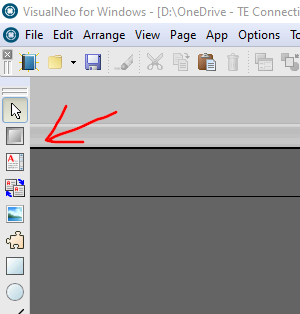
When I set this resolution, I am unable to see the right and left margins in the workspace.
How can I handle this situation?"
Thanks
Hi,
I need to develop an application using Visual Neo Win with a resolution of 3840x3160.
When I set this resolution, I am unable to see the right and left margins in the workspace.
How can I handle this situation?"
Thanks
Uploaded files: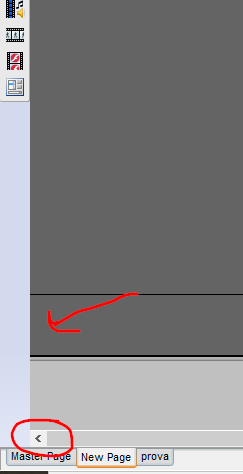

Quote from fkapnist on March 3, 2023, 1:11 pm@nikyred
I made a video editing (green screen) program using VisualNEO Win and FFmpeg. It can handle 4K resolution (3840 × 2160 - 4K UHD) and larger. But when editing, it is better to use a "proxy preview" of a smaller size. To do this, just make a toggle button that switches from 3840 resolution to a smaller and more workable size, although the final render will be 3840 full screen. Keep in mind that most monitors cannot display 4K anyway (maybe why yours cuts off the edges?)... The industry standard for laptops and smartphones is 2.5K (1440 pixels) because that's all the human eye can discern at those sizes, anything larger is a waste of resources.
.
P.S.
I created a new Untitled app at 3840x3160 resolution and I can see everything.
Are you using the correct scrollbars?
Try hiding the Object List, etc., from View...
.
I made a video editing (green screen) program using VisualNEO Win and FFmpeg. It can handle 4K resolution (3840 × 2160 - 4K UHD) and larger. But when editing, it is better to use a "proxy preview" of a smaller size. To do this, just make a toggle button that switches from 3840 resolution to a smaller and more workable size, although the final render will be 3840 full screen. Keep in mind that most monitors cannot display 4K anyway (maybe why yours cuts off the edges?)... The industry standard for laptops and smartphones is 2.5K (1440 pixels) because that's all the human eye can discern at those sizes, anything larger is a waste of resources.
.
P.S.
I created a new Untitled app at 3840x3160 resolution and I can see everything.
Are you using the correct scrollbars?
Try hiding the Object List, etc., from View...
.
Quote from nikyred on March 3, 2023, 1:42 pmHi,
I tried to hide all the listings
but i can't see the working area margins.
very strange
Hi,
I tried to hide all the listings
but i can't see the working area margins.
very strange
Quote from fkapnist on March 3, 2023, 2:51 pmQuote from nikyred on March 3, 2023, 1:42 pmHi,
I tried to hide all the listings
but i can't see the working area margins.
very strange
@nikyred
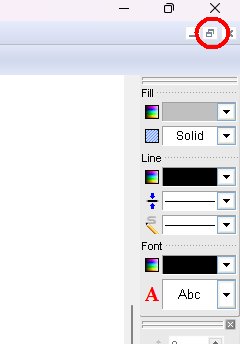
Maybe you have your work area set to maximized.
If you can see this (topright.jpg) on the top right of your window, try clicking on "restore down."
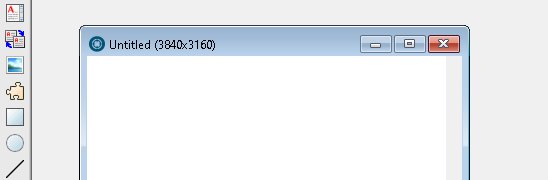
Then you should be able to see the title bar of your work area (topdown2.jpg).
.
Quote from nikyred on March 3, 2023, 1:42 pmHi,
I tried to hide all the listings
but i can't see the working area margins.
very strange
Maybe you have your work area set to maximized.
If you can see this (topright.jpg) on the top right of your window, try clicking on "restore down."
Then you should be able to see the title bar of your work area (topdown2.jpg).
.
Uploaded files:
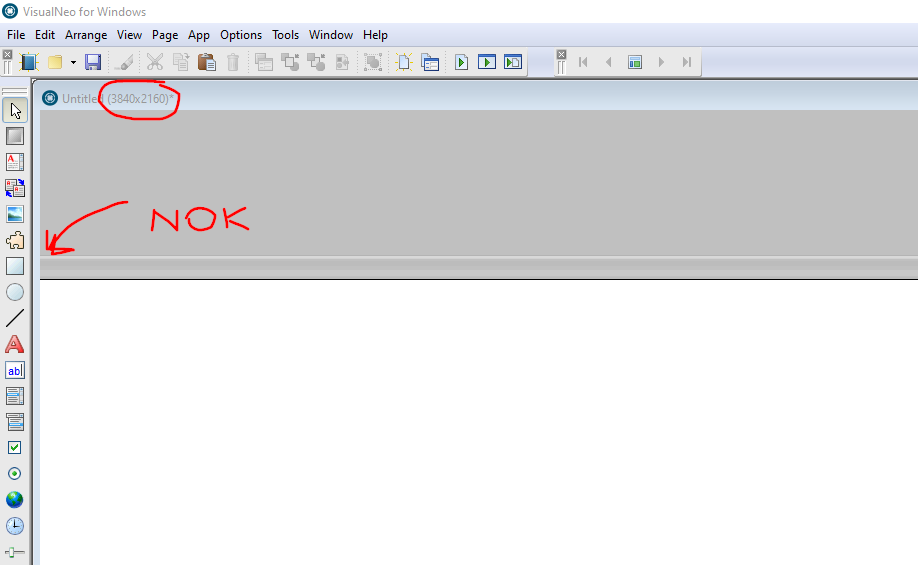
Quote from nikyred on March 3, 2023, 3:26 pmIf I set 1920x1024 I see the margin, if I set 3840x2160
I no longer see the left and right margins, I only see the upper and lower margins
If I set 1920x1024 I see the margin, if I set 3840x2160
I no longer see the left and right margins, I only see the upper and lower margins
Uploaded files: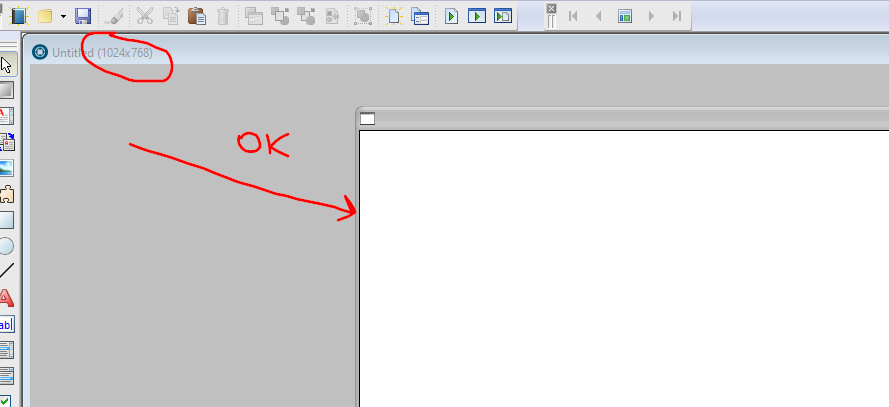
Quote from fkapnist on March 3, 2023, 3:40 pm@nikyred
Then it could be the connected display resolution of your Windows Settings.
My laptop is set to (Recommended) 1920 x 1080 and I can see everything.
But if I set the resolution to 1280 x 768 I am not able to see the right margin of the work area at all.
P.S.
The images you just posted seem to show a Custom Window within the work area, and it is the custom window that does not show its margins. Is that correct?
Maybe you should upload your app file to make it easier to understand....
.
.
Then it could be the connected display resolution of your Windows Settings.
My laptop is set to (Recommended) 1920 x 1080 and I can see everything.
But if I set the resolution to 1280 x 768 I am not able to see the right margin of the work area at all.
P.S.
The images you just posted seem to show a Custom Window within the work area, and it is the custom window that does not show its margins. Is that correct?
Maybe you should upload your app file to make it easier to understand....
.
.

Quote from CN_Iceman on March 3, 2023, 7:34 pmQuote from nikyred on March 3, 2023, 1:42 pmHi,
I tried to hide all the listings
but i can't see the working area margins.
very strange
Hey!
How many screens do you have?
If you have 2... or more... it's a known problem that VisualNEO Win doesn't handle them well at all. The problem comes from the previous NeoBook. I work with 2 monitors with 4K resolution (3840 × 2160) each, and there is no problem with the height, but the width does not correspond to the VisualNEO variables.
I often use a program that I want to be placed in the upper left corner of the monitor that is on the left. Well, for the window to scroll there, I have to set the value of the [WindowLeft] variable to -2563 (yes, a negative value). If you add the width of the 2 screens, it should have 7680 pixels, so that value (-2563) doesn't make any sense. It seems that the program detected 3 monitors instead of 2... (7680 / 3 = 2560)
I have tried to create an Application with the measures that you propose and it also "gets out of the box."
Maybe only having a monitor will make the thing work as @fkapnist has commented.Good luck!
Quote from nikyred on March 3, 2023, 1:42 pmHi,
I tried to hide all the listings
but i can't see the working area margins.
very strange
Hey!
How many screens do you have?
If you have 2... or more... it's a known problem that VisualNEO Win doesn't handle them well at all. The problem comes from the previous NeoBook. I work with 2 monitors with 4K resolution (3840 × 2160) each, and there is no problem with the height, but the width does not correspond to the VisualNEO variables.
I often use a program that I want to be placed in the upper left corner of the monitor that is on the left. Well, for the window to scroll there, I have to set the value of the [WindowLeft] variable to -2563 (yes, a negative value). If you add the width of the 2 screens, it should have 7680 pixels, so that value (-2563) doesn't make any sense. It seems that the program detected 3 monitors instead of 2... (7680 / 3 = 2560)
I have tried to create an Application with the measures that you propose and it also "gets out of the box."
Maybe only having a monitor will make the thing work as @fkapnist has commented.
Good luck!
Quote from nikyred on March 6, 2023, 4:07 pmThanks for the tips.
It's not a dual monitor issue, I've tried unplugging everything.attached my app.
Thanks for the tips.
It's not a dual monitor issue, I've tried unplugging everything.
attached my app.
Uploaded files:Quote from fkapnist on March 6, 2023, 5:01 pmQuote from nikyred on March 6, 2023, 4:07 pmThanks for the tips.
It's not a dual monitor issue, I've tried unplugging everything.attached my app.
"Container_pressa50" contains a picture, a text, and a rectangle.
All the other rectangles are outside of that container. Maybe If you paste them all INTO the container, you will be able to view your pub better? It seems that the height of 2160 gives a weird aspect ratio, making it difficult to see what you are doing. But if you change the height to 3160, it gives a better view for editing. Then you can add to StartUp:
SetVar "[PubHeight]" "2160"to get the precise pub size that you want.
.
P.S. In your initial post you said the height is 3160, but in your sample pub it is 2160....
.
Quote from nikyred on March 6, 2023, 4:07 pmThanks for the tips.
It's not a dual monitor issue, I've tried unplugging everything.attached my app.
"Container_pressa50" contains a picture, a text, and a rectangle.
All the other rectangles are outside of that container. Maybe If you paste them all INTO the container, you will be able to view your pub better? It seems that the height of 2160 gives a weird aspect ratio, making it difficult to see what you are doing. But if you change the height to 3160, it gives a better view for editing. Then you can add to StartUp:
SetVar "[PubHeight]" "2160"
to get the precise pub size that you want.
.
P.S. In your initial post you said the height is 3160, but in your sample pub it is 2160....
.