
Runtime Error

Quote from rcohen on July 10, 2020, 12:42 amI've been building test project in trying to get my feet wet with VNW... just a page of buttons with links to other places.
After more than a week of using and adding to this project, it suddenly wouldn't render the page, but returned an error::
Expected ';' (main.js?v=17, 44)
[$injector:modulerr] http://errors.angularjs.org/1.7.7/$injector/modulerr?p0=NeoApp&p1=Error: [$injector:nomod] http://errors.angularjs.org/1.7.7/$injector/nomod?p0=NeoApp
at Anonymous function (file:///F:/MyDocuments/VisualNeoWeb/Libraries/js/angular.min.js:26:447)
at b (file:///F:/MyDocuments/VisualNeoWeb/Libraries/js/angular.min.js:25:459)
at Anonymous function (file:///F:/MyDocuments/VisualNeoWeb/Libraries/js/angular.min.js:26:220)
at Anonymous function (file:///F:/MyDocuments/VisualNeoWeb/Libraries/js/angular.min.js:42:494)
at r (file:///F:/MyDocuments/VisualNeoWeb/Libraries/js/angular.min.js:8:74)
at g (file:///F:/MyDocuments/VisualNeoWeb/Libraries/js/angular.min.js:42:344)
at fb (file:///F:/MyDocuments/VisualNeoWeb/Libraries/js/angular.min.js:46:454)
at c (file:///F:/MyDocuments/VisualNeoWeb/Libraries/js/angular.min.js:22:55)
at Uc (file:///F:/MyDocuments/VisualNeoWeb/Libraries/js/angular.min.js:22:363)
at Ae (file:///F:/MyDocuments/VisualNeoWeb/Libraries/js/angular.min.js:21:45) (jquery.min.js, 2)
And when rendered it simply shows a white screen. Nothing on my end has changed, so I don't understand why after a week it's suddenly throwing errors. The project file minus the personal links are attached.
Thanks
I've been building test project in trying to get my feet wet with VNW... just a page of buttons with links to other places.
After more than a week of using and adding to this project, it suddenly wouldn't render the page, but returned an error::
Expected ';' (main.js?v=17, 44)
[$injector:modulerr] http://errors.angularjs.org/1.7.7/$injector/modulerr?p0=NeoApp&p1=Error: [$injector:nomod] http://errors.angularjs.org/1.7.7/$injector/nomod?p0=NeoApp
at Anonymous function (file:///F:/MyDocuments/VisualNeoWeb/Libraries/js/angular.min.js:26:447)
at b (file:///F:/MyDocuments/VisualNeoWeb/Libraries/js/angular.min.js:25:459)
at Anonymous function (file:///F:/MyDocuments/VisualNeoWeb/Libraries/js/angular.min.js:26:220)
at Anonymous function (file:///F:/MyDocuments/VisualNeoWeb/Libraries/js/angular.min.js:42:494)
at r (file:///F:/MyDocuments/VisualNeoWeb/Libraries/js/angular.min.js:8:74)
at g (file:///F:/MyDocuments/VisualNeoWeb/Libraries/js/angular.min.js:42:344)
at fb (file:///F:/MyDocuments/VisualNeoWeb/Libraries/js/angular.min.js:46:454)
at c (file:///F:/MyDocuments/VisualNeoWeb/Libraries/js/angular.min.js:22:55)
at Uc (file:///F:/MyDocuments/VisualNeoWeb/Libraries/js/angular.min.js:22:363)
at Ae (file:///F:/MyDocuments/VisualNeoWeb/Libraries/js/angular.min.js:21:45) (jquery.min.js, 2)
And when rendered it simply shows a white screen. Nothing on my end has changed, so I don't understand why after a week it's suddenly throwing errors. The project file minus the personal links are attached.
Thanks
Uploaded files:
Quote from asmat on July 10, 2020, 1:56 amHi @rcohen,
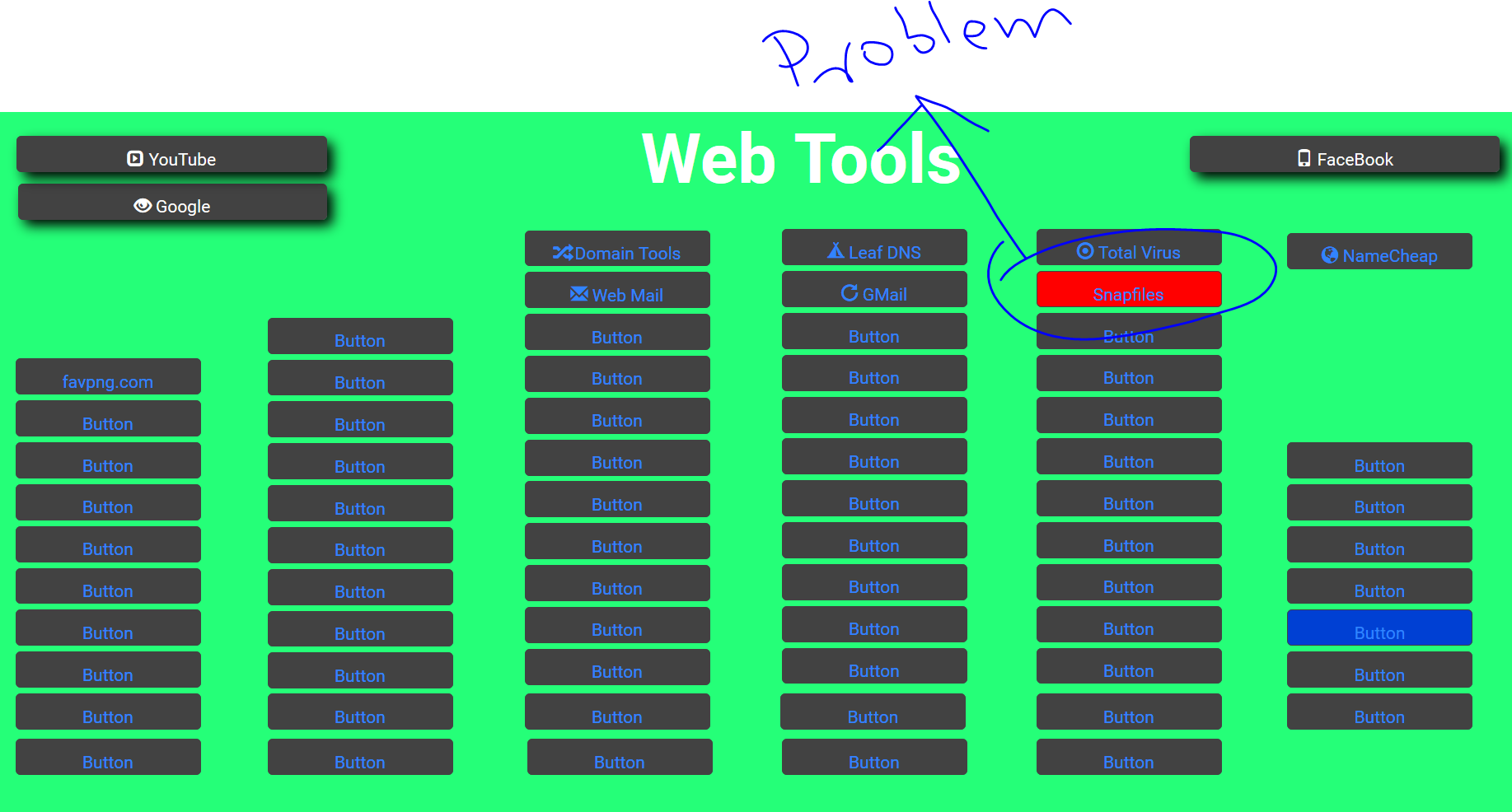
Your problem is in this command that I have found it in Snapfiles button
GetAppURL [https://www.snapfiles.com/freeware/]The square bracket shows the variable you can not naming variable something like this "https://www.snapfiles.com/freeware/"
:
Hi @rcohen,
Your problem is in this command that I have found it in Snapfiles button
GetAppURL [https://www.snapfiles.com/freeware/]
The square bracket shows the variable you can not naming variable something like this "https://www.snapfiles.com/freeware/"
:
Uploaded files:
Quote from rcohen on July 10, 2020, 2:35 amOh wow..... a cut and paste error ;-/ How on earth did you find it? It would be great if there were specific info that referred to that line of code specifically, as it would make it easy to find.
Thanks Asmat for your time.
r
Oh wow..... a cut and paste error ;-/ How on earth did you find it? It would be great if there were specific info that referred to that line of code specifically, as it would make it easy to find.
Thanks Asmat for your time.
r
Quote from rcohen on July 10, 2020, 9:24 pmAsmat, I was curious how you found that error. I've been looking for a way to see code execution, as exists in the NeoBook debugger. Is there something of that nature with VNW that I"m overlooking? I've looked and can't find such.
Thanks.
Asmat, I was curious how you found that error. I've been looking for a way to see code execution, as exists in the NeoBook debugger. Is there something of that nature with VNW that I"m overlooking? I've looked and can't find such.
Thanks.

Quote from luishp on July 11, 2020, 7:03 pm@rcohen Try using the integrated browser development tools: just press F12 while testing your app within FireFox or Chrome.
It will give you a lot of information about what's going on on your app.
Also note NeoScript VisualNEO Web variables should be properly named with JavaScript naming rules:
https://www.dummies.com/web-design-development/javascript/naming-javascript-variables/Regards
@rcohen Try using the integrated browser development tools: just press F12 while testing your app within FireFox or Chrome.
It will give you a lot of information about what's going on on your app.
Also note NeoScript VisualNEO Web variables should be properly named with JavaScript naming rules:
https://www.dummies.com/web-design-development/javascript/naming-javascript-variables/
Regards