
scorm output

Quote from Peter on October 19, 2021, 6:18 pmE-learning is getting more and more popular. Some authoring tools have the ability to convert their projects to SCORM compatible file. Probably VisualNEO can have this feature... :-) (Or a plugin?)
Regards,
Peter
E-learning is getting more and more popular. Some authoring tools have the ability to convert their projects to SCORM compatible file. Probably VisualNEO can have this feature... :-) (Or a plugin?)
Regards,
Peter

Quote from luishp on October 20, 2021, 7:02 am@info1, I think it's possible and I would like this possibility too, but don't have knowlegde enough to implement it. Anyway I have found these JavaScript libraries that should do the job (once you understand how to use them):
https://github.com/jcputney/scorm-again
https://github.com/gabrieldoty/simplify-scormRegards.
@info1, I think it's possible and I would like this possibility too, but don't have knowlegde enough to implement it. Anyway I have found these JavaScript libraries that should do the job (once you understand how to use them):
https://github.com/jcputney/scorm-again
https://github.com/gabrieldoty/simplify-scorm
Regards.
Quote from Peter on October 20, 2021, 3:16 pmThanks. These links are more about "using" scorm, and not "creating" scorm. Maybe these ones can help to understand how scorm works:
https://en.opensuse.org/EXelearning
https://adlnet.gov/projects/scorm/#scorm-2004-4th-edition
https://www.elearninglearning.com/convert/html/scorm/?open-article-id=11622130&article-title=how-to-convert-an-html-file-to-scorm&blog-domain=ispringsolutions.com&blog-title=ispring-solutions
I have not tried:
https://www.learningcart.com/custom/HTMLtoScorm.aspx
Thanks. These links are more about "using" scorm, and not "creating" scorm. Maybe these ones can help to understand how scorm works:
https://en.opensuse.org/EXelearning
https://adlnet.gov/projects/scorm/#scorm-2004-4th-edition
I have not tried:

Quote from Christian Giebel on October 22, 2021, 6:34 amI can give a hint for the direction to go to implement SCORM functionality.
A SCORM course is a simple HTML website that calls some webservice functions in a special order.
In case of SCORM 1.2 it is:
 LMSInitialize( "" ) : bool
 LMSFinish( "" ) : bool
 LMSGetValue( element : CMIElement ) : string
 LMSSetValue( element : CMIElement, value : string) : string
 LMSCommit( "" ) : bool
 LMSGetLastError() : CMIErrorCode
 LMSGetErrorString( errorCode : CMIErrorCode ) : string
 LMSGetDiagnostic( errocCode : CMIErrorCode ) : string
A plugin must provide such functions in a JavaScript webservice. The scrom documentation shows what "return" values are expected for the functions. Just implement this functions in a JavaScript library and get yourself a professional scorm eLearning course. See in browser debugger when your functions are called and test return values. For details please see here:
https://scorm.com/scorm-explained/technical-scorm/scorm-12-overview-for-developers/
I assume it is easy to create a VisualNeo Web plugin that can handle a VisualNeo Website as a SCORM elearning course. But it is very hard to create an eLearning enviroment that can run any SCORM or other courses. You need very many test courses to create a stable Learning Management System.
I can give a hint for the direction to go to implement SCORM functionality.
A SCORM course is a simple HTML website that calls some webservice functions in a special order.
In case of SCORM 1.2 it is:
 LMSInitialize( "" ) : bool
 LMSFinish( "" ) : bool
 LMSGetValue( element : CMIElement ) : string
 LMSSetValue( element : CMIElement, value : string) : string
 LMSCommit( "" ) : bool
 LMSGetLastError() : CMIErrorCode
 LMSGetErrorString( errorCode : CMIErrorCode ) : string
 LMSGetDiagnostic( errocCode : CMIErrorCode ) : string
A plugin must provide such functions in a JavaScript webservice. The scrom documentation shows what "return" values are expected for the functions. Just implement this functions in a JavaScript library and get yourself a professional scorm eLearning course. See in browser debugger when your functions are called and test return values. For details please see here:
I assume it is easy to create a VisualNeo Web plugin that can handle a VisualNeo Website as a SCORM elearning course. But it is very hard to create an eLearning enviroment that can run any SCORM or other courses. You need very many test courses to create a stable Learning Management System.
Quote from luishp on October 22, 2021, 9:45 amI assume it is easy to create a VisualNeo Web plugin that can handle a VisualNeo Website as a SCORM elearning course.
@christian-giebel I think that's the point. It will allow us to create interactive eLearning templates that can be easily customized and published within an LMS. Just as iSpring or Adobe Captivate do but with much more flexibility.
Thanks for sharing!Regards.
I assume it is easy to create a VisualNeo Web plugin that can handle a VisualNeo Website as a SCORM elearning course.
@christian-giebel I think that's the point. It will allow us to create interactive eLearning templates that can be easily customized and published within an LMS. Just as iSpring or Adobe Captivate do but with much more flexibility.
Thanks for sharing!
Regards.
Quote from Peter on October 22, 2021, 10:40 amYes, that is the point! :-)
Creating LMS is not a VisualNEO task, I think! :-)
Moodle and other systems can do it.
And it was my intention to use a more flexible solution than iSpring and Kotobee because I knew that SCORM is created from HTML, and VisualNEO has HTML output, so it should be able to create a SCORM output also somehow... :-)
Thanks for both of you! I hope, it can be managed. Waiting for the solution. Thanks again!
Yes, that is the point! :-)
Creating LMS is not a VisualNEO task, I think! :-)
Moodle and other systems can do it.
And it was my intention to use a more flexible solution than iSpring and Kotobee because I knew that SCORM is created from HTML, and VisualNEO has HTML output, so it should be able to create a SCORM output also somehow... :-)
Thanks for both of you! I hope, it can be managed. Waiting for the solution. Thanks again!
Quote from Christian Giebel on October 22, 2021, 1:28 pmWe would need a plugin that provides the Scorm functionality.
I think it might be possible to add a debugging LMS to the plugin that logs and responds to the Scorm events. I will discuss it in background with Luis. So chances are very high that VisualNeo Web will receive a SCOM plugin within this year.
We would need a plugin that provides the Scorm functionality.
I think it might be possible to add a debugging LMS to the plugin that logs and responds to the Scorm events. I will discuss it in background with Luis. So chances are very high that VisualNeo Web will receive a SCOM plugin within this year.
Quote from Peter on October 22, 2021, 3:57 pmGreat! :-)
if you need a Moodle site to try outputs, I can provide you an account to e-studymaterials.com/mlms/ (just installed and checking its possibilities...), or I can do it for you...
(Do you know how I can change my "info1" name to a more informal one? :-) It was given automatically when I bought VisualNeo )
Great! :-)
if you need a Moodle site to try outputs, I can provide you an account to e-studymaterials.com/mlms/ (just installed and checking its possibilities...), or I can do it for you...
(Do you know how I can change my "info1" name to a more informal one? :-) It was given automatically when I bought VisualNeo )
Quote from luishp on October 23, 2021, 8:22 am(Do you know how I can change my "info1" name to a more informal one? :-) It was given automatically when I bought VisualNeo )
Hi @info1, I have changed your name to Peter (let me know if you prefer any other) But the forum nick can't be modified, sorry!.
Best regards.
(Do you know how I can change my "info1" name to a more informal one? :-) It was given automatically when I bought VisualNeo )
Hi @info1, I have changed your name to Peter (let me know if you prefer any other) But the forum nick can't be modified, sorry!.
Best regards.
Quote from luishp on October 23, 2021, 12:24 pm@info1, while @christian-giebel works in a SCORM VisualNEO Web plugin, I have done a small utility to package any VisualNEO Web compiled application into a SCORM 1.2 compliant .zip file.
Works fine on SCORM Cloud but right now it only allows to track "Completion" into the LMS.I'm sure Christian plugin will add additional communication commands.
Just a first step into SCORM compatibility :)
Let me know if it works for you or if you find any issues.Thank you!Best regards.
@info1, while @christian-giebel works in a SCORM VisualNEO Web plugin, I have done a small utility to package any VisualNEO Web compiled application into a SCORM 1.2 compliant .zip file.
Just a first step into SCORM compatibility :)
Let me know if it works for you or if you find any issues.
Quote from luishp on October 25, 2021, 9:47 am@christian-giebel @info1
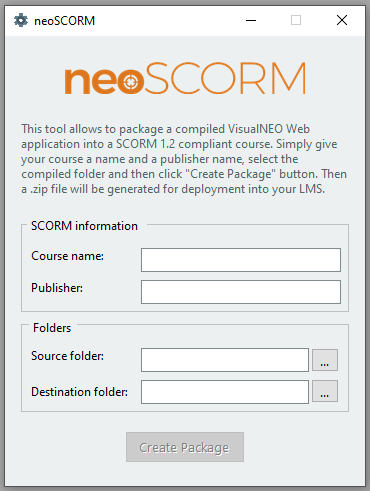
I have updated the neoSCORM utility with a new interface.
Now it lists all app files in imsmanifest.xml and not only the main one.It has been tested in SCORM Cloud and Moodle successfuly.Please let me know if you find any problem.Regards.
I have updated the neoSCORM utility with a new interface.
Now it lists all app files in imsmanifest.xml and not only the main one.
Quote from Peter on October 25, 2021, 4:31 pm@luishp I cannot find any differences as a 'user'. (I did not open the scorm zip.)
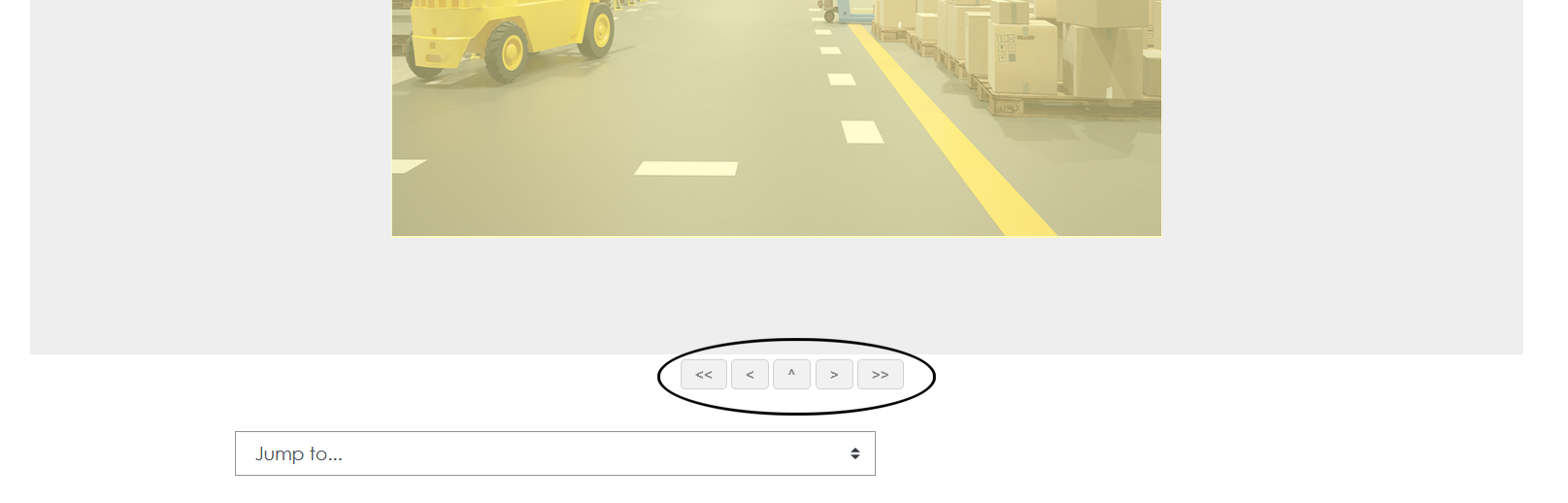
Navigator buttons outside of VisualNEO are not always necessary (generally not). I think, it is manageable from scorm output script.
@luishp I cannot find any differences as a 'user'. (I did not open the scorm zip.)
Navigator buttons outside of VisualNEO are not always necessary (generally not). I think, it is manageable from scorm output script.
Quote from luishp on October 25, 2021, 6:41 pm@info1 I don't understand you. I have completely redesigned neoSCORM user interface.
Navigator buttons outside of VisualNEO are not always necessary (generally not). I think, it is manageable from scorm output script.
I don't know what are you talking about, sorry.
@info1 I don't understand you. I have completely redesigned neoSCORM user interface.
Navigator buttons outside of VisualNEO are not always necessary (generally not). I think, it is manageable from scorm output script.
I don't know what are you talking about, sorry.

Quote from sghoshnbu on October 25, 2021, 6:58 pm@Luis Did you upload the 25th October modification?. Once downloaded, it is showing the date 23rd October 2021(First version?).
The file size is 2.25MB.
@Luis Did you upload the 25th October modification?. Once downloaded, it is showing the date 23rd October 2021(First version?).
The file size is 2.25MB.
Uploaded files: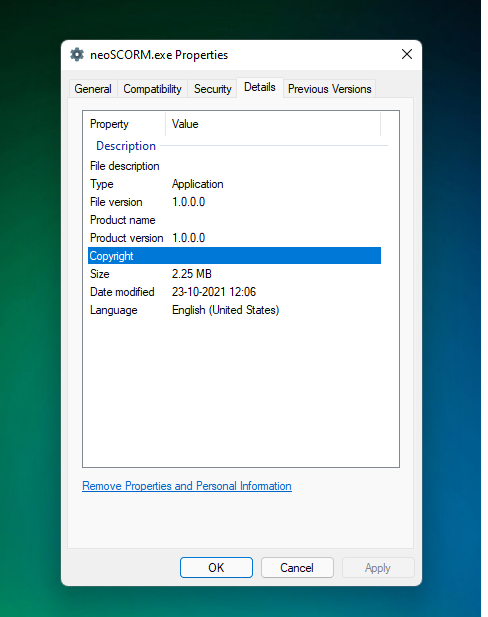
Quote from Peter on October 25, 2021, 9:07 pm@sghoshnbu it has different file size, so should be.
@sghoshnbu it has different file size, so should be.
Quote from luishp on October 25, 2021, 10:00 pm@sghoshnbu Date modified should be 25-10-2021 (last uploaded version) It's in beta stage, not even version 1.0
@info1 that's not VisualNEO Web related, but Moodle. If you use SCORM Cloud those buttons will not appear.Regards.
@sghoshnbu Date modified should be 25-10-2021 (last uploaded version) It's in beta stage, not even version 1.0
@info1 that's not VisualNEO Web related, but Moodle. If you use SCORM Cloud those buttons will not appear.
Regards.
Quote from Peter on October 26, 2021, 9:39 pmQuote from luishp on October 25, 2021, 10:00 pm@sghoshnbu Date modified should be 25-10-2021 (last uploaded version) It's in beta stage, not even version 1.0
@info1 that's not VisualNEO Web related, but Moodle. If you use SCORM Cloud those buttons will not appear.Regards.
Yes, you were right. I've found the settings in Moodle. Sorry...
Quote from luishp on October 25, 2021, 10:00 pm@sghoshnbu Date modified should be 25-10-2021 (last uploaded version) It's in beta stage, not even version 1.0
@info1 that's not VisualNEO Web related, but Moodle. If you use SCORM Cloud those buttons will not appear.Regards.
Yes, you were right. I've found the settings in Moodle. Sorry...
Quote from Peter on October 26, 2021, 9:49 pmQuote from luishp on October 26, 2021, 7:02 amI have updated the application again
Regards.
It works. :-) Happiness! :-)
Probably the intitial Source folder should be "Documents" and the destination folder the same as the source folder selected by the user. And when user opens NeoSCORM second time, the previously chosen folders should be the default.
Quote from luishp on October 26, 2021, 7:02 amI have updated the application again
Regards.
It works. :-) Happiness! :-)
Probably the intitial Source folder should be "Documents" and the destination folder the same as the source folder selected by the user. And when user opens NeoSCORM second time, the previously chosen folders should be the default.