
Screen redraw :: IDE

Quote from rcohen on November 17, 2021, 4:42 amHi all,
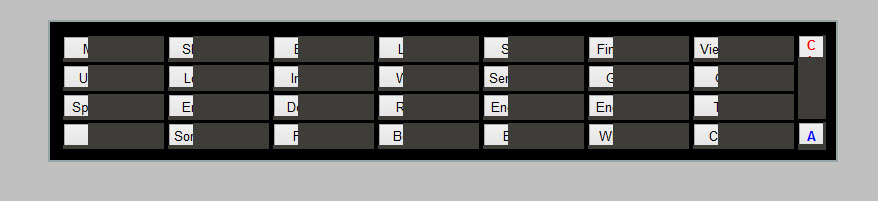
I seem to be having this problem with interface elements vanishing in part or in full, as I swap between screens testing results.
I'm wondering if anyone else is having this problem and perhaps has a workaround. I can't even figure out how to refresh without shutting down and restarting the software.
Hi all,
I seem to be having this problem with interface elements vanishing in part or in full, as I swap between screens testing results.
I'm wondering if anyone else is having this problem and perhaps has a workaround. I can't even figure out how to refresh without shutting down and restarting the software.
Uploaded files:

Quote from HPW on November 17, 2021, 8:23 amHello,
....as I swap between screens testing results.
Can you explain with more detail what you mean with that.
How can we reproduce the behaviour?
Regards
Hans-Peter
Hello,
....as I swap between screens testing results.
Can you explain with more detail what you mean with that.
How can we reproduce the behaviour?
Regards
Hans-Peter
Quote from rcohen on November 17, 2021, 8:37 amHi @hpw, and thanks.
The interface looks like this, and when I bounce between the IDE and the runtime for testing, sometimes (not all the time) I return to the IDE and it looks like the above example. The screen is not being completely redrawn. And I don't know if you CAN reproduce the behavior, in fact that was my question... to find out if anyone else is having this issue...
Hi @hpw, and thanks.
The interface looks like this, and when I bounce between the IDE and the runtime for testing, sometimes (not all the time) I return to the IDE and it looks like the above example. The screen is not being completely redrawn. And I don't know if you CAN reproduce the behavior, in fact that was my question... to find out if anyone else is having this issue...
Uploaded files:

Quote from rcohen on November 18, 2021, 11:01 pmI guess no one else is having screen redraw issues? It's surely not my card, as I do video editing on this box and have a very capable graphics card.
@luishp
@hpw
Is there anything I can tweak or check to perhaps solve this issue?
Thanks
I guess no one else is having screen redraw issues? It's surely not my card, as I do video editing on this box and have a very capable graphics card.
Is there anything I can tweak or check to perhaps solve this issue?
Thanks
Quote from HPW on November 18, 2021, 11:33 pmHello,
I have no idea, because I do not yet understand the problem.
What do you mean with 'bounce' between IDE and Runtime?
Do you teststart the runtime and close the runtime and return then to the IDE?
Or do you leave the test runtime running and try to make the IDE aktiv? That is a problem.
Regards
Hans-Peter
Hello,
I have no idea, because I do not yet understand the problem.
What do you mean with 'bounce' between IDE and Runtime?
Do you teststart the runtime and close the runtime and return then to the IDE?
Or do you leave the test runtime running and try to make the IDE aktiv? That is a problem.
Regards
Hans-Peter
Quote from rcohen on November 18, 2021, 11:58 pmThanks for the reply @hpw,
I bounce/switch between the runtime (after pressing F9) and the IDE, but I of course close the test runtime beforehand.
It's some kind of a graphics / interface issue.... and since I have no F5 here in IDE, the only way I can force a redraw, is to restart VNW.
Thanks for the reply @hpw,
I bounce/switch between the runtime (after pressing F9) and the IDE, but I of course close the test runtime beforehand.
It's some kind of a graphics / interface issue.... and since I have no F5 here in IDE, the only way I can force a redraw, is to restart VNW.

Quote from Vadim on November 19, 2021, 10:12 am@rcohen
I'm not sure if this will help, but you can try these ways (at least it won't take long):
1) update your video card driver;
2) run VisualNEO Win as an administrator,
3) run VisualNEO Win in compatibility troubleshooting mode (via the context menu),
4) reinstall VisualNEO Win in compatibility mode with Windows 7 (or even XP).
I'm not sure if this will help, but you can try these ways (at least it won't take long):
1) update your video card driver;
2) run VisualNEO Win as an administrator,
3) run VisualNEO Win in compatibility troubleshooting mode (via the context menu),
4) reinstall VisualNEO Win in compatibility mode with Windows 7 (or even XP).

Quote from mishem on November 19, 2021, 10:28 amhttps://winhelp.visualneo.com/Access.html
The Image Cache Size may be adjusted to optimize the performance of publications that contain a large number of images. For publications with many small images, you may be able to improve performance by increasing the size of the cache. For publications that consist primarily of very large images, performance can be improved by reducing the cache size. Incorrectly adjusting the cache size can have the opposite effect and actually degrade performance, especially on older PCs. For this reason we recommend that you leave the cache size set at the default value of 30 unless you're having performance problems.
https://winhelp.visualneo.com/Access.html
The Image Cache Size may be adjusted to optimize the performance of publications that contain a large number of images. For publications with many small images, you may be able to improve performance by increasing the size of the cache. For publications that consist primarily of very large images, performance can be improved by reducing the cache size. Incorrectly adjusting the cache size can have the opposite effect and actually degrade performance, especially on older PCs. For this reason we recommend that you leave the cache size set at the default value of 30 unless you're having performance problems.
Quote from rcohen on November 20, 2021, 12:41 am@Vadim, thanks for the response. I can't mess with my video drivers (long story) but I will try running as admin, etc, thanks. I don't think reinstalling will do anything as it has done this since the first day... nothing new.
@mishem, yes, thanks.. but that is the first thing I tried to tweak. No affect.
@hpw I don't know if this is possible, but do you think you might build in a screen redraw menu / hotkey option next update? I kept reaching for F5 LOL and of course it wasn't there.
Thanks guys.
@Vadim, thanks for the response. I can't mess with my video drivers (long story) but I will try running as admin, etc, thanks. I don't think reinstalling will do anything as it has done this since the first day... nothing new.
@mishem, yes, thanks.. but that is the first thing I tried to tweak. No affect.
@hpw I don't know if this is possible, but do you think you might build in a screen redraw menu / hotkey option next update? I kept reaching for F5 LOL and of course it wasn't there.
Thanks guys.
Quote from HPW on November 20, 2021, 8:58 amHello,
You might test another 2 things:
When your IDE hangs again, go to the taskmanager processlist and check if the test-exe is really gone.
The IDE checks for the running test-exe and only when it does not find anything it returns into its main-loop.
The other thing would be to deaktivate all plugins. Make a fresh restart and a test-pub with only standard objekts and code.
Then test with that if you can reproduce your problem. A misbehaving plugin might produce unwanted results.
When the problem is gone, add one plugin after the other and retest.
Regards
Hans-Peter
Hello,
You might test another 2 things:
When your IDE hangs again, go to the taskmanager processlist and check if the test-exe is really gone.
The IDE checks for the running test-exe and only when it does not find anything it returns into its main-loop.
The other thing would be to deaktivate all plugins. Make a fresh restart and a test-pub with only standard objekts and code.
Then test with that if you can reproduce your problem. A misbehaving plugin might produce unwanted results.
When the problem is gone, add one plugin after the other and retest.
Regards
Hans-Peter
Quote from rcohen on November 26, 2021, 12:39 amJust to report back, I have taken your advice and placed all plugins I'm not using in the not deactivated list, and the problem went away. I don't have the time currently to figure out exactly which plugin caused the issue, but I'll guess I'll find that someday ;-)
Thanks
Just to report back, I have taken your advice and placed all plugins I'm not using in the not deactivated list, and the problem went away. I don't have the time currently to figure out exactly which plugin caused the issue, but I'll guess I'll find that someday ;-)
Thanks