
Scrolling container in Neo Win..

Quote from Sinesi Giuseppe on August 24, 2025, 8:30 amTranslator
Great plugin, can you move the sidebar with the mouse wheel? I'm attaching a video, could it be a bug?
Great plugin, can you move the sidebar with the mouse wheel? I'm attaching a video, could it be a bug?
Uploaded files:
Quote from emo on August 24, 2025, 3:35 pm
Hi everyone,
Thanks @sinesi-giuseppe to your feedback, I've released an update to the plugin.
Version 2.2 is now available and adds mouse wheel support for vertical scrolling!
This is also a good opportunity to clarify the best and safest way to add objects to the container:
The recommended method is always to add objects manually within the NeoBook editor to the Container.
This guarantees perfect behavior in all situations, especially for resizable windows.If for a specific reason you need to use emo_ScrollableContainer_AddObject, please be aware that this action is only recommended for applications with a FIXED window size.
For RESIZABLE windows, you must use the manual method to prevent the visual glitch when resize.
To explain the "why": the AddObject action is essentially a visual trick. It uses a command to make the object appear inside the container, but it doesn't actually add it to the container's official object hierarchy within the NeoBook engine.
Because NeoBook's engine isn't aware of this "trick," it repositions the object incorrectly during a resize. Adding the objects manually creates the proper hierarchy, which solves the problem completely.
Enjoy the update
Hi everyone,
Thanks @sinesi-giuseppe to your feedback, I've released an update to the plugin.
Version 2.2 is now available and adds mouse wheel support for vertical scrolling!
This is also a good opportunity to clarify the best and safest way to add objects to the container:
The recommended method is always to add objects manually within the NeoBook editor to the Container.
This guarantees perfect behavior in all situations, especially for resizable windows.
If for a specific reason you need to use emo_ScrollableContainer_AddObject, please be aware that this action is only recommended for applications with a FIXED window size.
For RESIZABLE windows, you must use the manual method to prevent the visual glitch when resize.
To explain the "why": the AddObject action is essentially a visual trick. It uses a command to make the object appear inside the container, but it doesn't actually add it to the container's official object hierarchy within the NeoBook engine.
Because NeoBook's engine isn't aware of this "trick," it repositions the object incorrectly during a resize. Adding the objects manually creates the proper hierarchy, which solves the problem completely.
Enjoy the update
Quote from Sinesi Giuseppe on August 25, 2025, 2:54 pmAs always, thanks for the quick update.
I'm reporting a small bug with the graphical effect when the container has a border.
You're making using VisualNeo enjoyable again.
As always, thanks for the quick update.
I'm reporting a small bug with the graphical effect when the container has a border.
You're making using VisualNeo enjoyable again.
Quote from emo on August 25, 2025, 3:40 pmHi @sinesi-giuseppe ,
That is not a bug, as I specified in the demo: "Use Line to None"
Since the native Visualneowin container is not designed to handle scrolling, if you add a border, it will repeat when you scroll. Hence, my message in the demo: do not use a line in the border and set it to none.
Anyway, thanks for using the plugin. I'm glad you're giving new life to Visualneowin!
;-)
Hi @sinesi-giuseppe ,
That is not a bug, as I specified in the demo: "Use Line to None"
Since the native Visualneowin container is not designed to handle scrolling, if you add a border, it will repeat when you scroll. Hence, my message in the demo: do not use a line in the border and set it to none.
Anyway, thanks for using the plugin. I'm glad you're giving new life to Visualneowin!
;-)
Quote from Sinesi Giuseppe on August 27, 2025, 6:53 amTranslator
Thanks for the plugins you're developing for us. I wanted to take advantage of your generosity. Can you develop a plugin that provides tabs to containers?
Thanks for the plugins you're developing for us. I wanted to take advantage of your generosity. Can you develop a plugin that provides tabs to containers?
Uploaded files: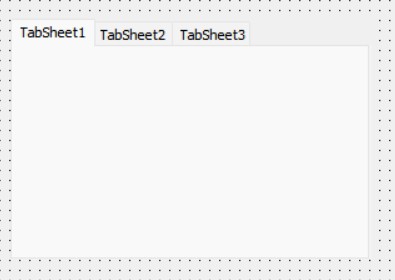
Quote from emo on August 27, 2025, 9:20 amHi @sinesi-giuseppe ,
Technology moves fast, and as developers, we need to adapt. Tools like the Emo Plugin PureBasic Wizard and the examples I shared are perfect for creating custom solutions (like the tabbed container plugin you mentioned) without starting from scratch. Integrating AI into your workflow helps you:
Automate repetitive tasks: The Wizard generates ready-to-compile templates, saving hours of manual work, and is perfect for handing over to the AI.
Experiment with new ideas: AI can help generate execution logic for your code.
Stay competitive: Mastering these tools gives you an edge in creating unique plugins.
Time to start building your own plugins! 😉
Don't ask me, ask the AI!
Hi @sinesi-giuseppe ,
Technology moves fast, and as developers, we need to adapt. Tools like the Emo Plugin PureBasic Wizard and the examples I shared are perfect for creating custom solutions (like the tabbed container plugin you mentioned) without starting from scratch. Integrating AI into your workflow helps you:
-
Automate repetitive tasks: The Wizard generates ready-to-compile templates, saving hours of manual work, and is perfect for handing over to the AI.
-
Experiment with new ideas: AI can help generate execution logic for your code.
-
Stay competitive: Mastering these tools gives you an edge in creating unique plugins.
Time to start building your own plugins! 😉
Don't ask me, ask the AI!