
Selector de Objetos no se ajusta al tamaño del ojeto

Quote from Tino Campos on July 7, 2020, 8:54 pmHola,
Cualquier objeto que selecciono el selector no se ajusta al tamaño del objeto.
He mirado configuraciones pero no veo el problema.
Adjunto imagen.
Hola,
Cualquier objeto que selecciono el selector no se ajusta al tamaño del objeto.
He mirado configuraciones pero no veo el problema.
Adjunto imagen.
Uploaded files: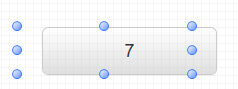
Quote from Gaev on July 8, 2020, 3:14 am@tino-campos
Any object that I select the selector does not fit the size of the object.
I have looked at settings but I don't see the problem.If this is happening to every object ...
1) Do you have anything in the Project >>> Properties >>> Styles section ? ... if so, please post its con tent here
2) Do you have anything in the Project >>> Properties >>> Libraries/Files section ? ... if so, please provide details (file names and content)
If this is happening to objects that you copy/paste (or duplicate), but not when you create a new one, take a look at the margin and padding properties of the affected objects (in particular the left properties).
Also, is it the blue dots (or the image of the object) that are positioned at the specified left (position) property ?
Lastly, at run time, are the object images at the positions specified in the left property ?
Any object that I select the selector does not fit the size of the object.
I have looked at settings but I don't see the problem.
If this is happening to every object ...
1) Do you have anything in the Project >>> Properties >>> Styles section ? ... if so, please post its con tent here
2) Do you have anything in the Project >>> Properties >>> Libraries/Files section ? ... if so, please provide details (file names and content)
If this is happening to objects that you copy/paste (or duplicate), but not when you create a new one, take a look at the margin and padding properties of the affected objects (in particular the left properties).
Also, is it the blue dots (or the image of the object) that are positioned at the specified left (position) property ?
Lastly, at run time, are the object images at the positions specified in the left property ?
Quote from Tino Campos on July 8, 2020, 9:09 amHello,
It always happens to me, even when opening the sample projects that come with the program.
Hello,
It always happens to me, even when opening the sample projects that come with the program.

Quote from luishp on July 8, 2020, 6:02 pm@tino-campos that's quite strange. Please check your Internet Explorer version. It should be version 11.
@tino-campos that's quite strange. Please check your Internet Explorer version. It should be version 11.
Quote from Tino Campos on July 8, 2020, 7:51 pmInternet Explorer Vervion 11.
Windows 10
Internet Explorer Vervion 11.
Windows 10
Uploaded files: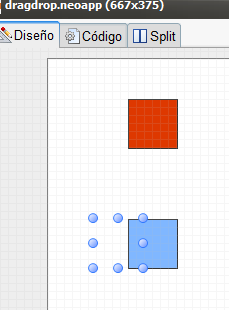
Quote from Tino Campos on July 8, 2020, 9:26 pmSolved. It was a problem of scaling the screen.
Thank you
Solved. It was a problem of scaling the screen.
Thank you