
Receiving data from another application into VisualNeoWin Application - Forum
Receiving data from another application into VisualNeoWin Application

Quote from Kriscall on July 11, 2023, 8:07 amNeed some help or ideas?
Is there a way through memory and not read writing to disk or to a database to send data directly to VisualNeoWin application ?
I was thinking of setting up for example a virtual comport ? get one application to send the data to a port and Visualneo application to receive it?
Is there a better way? The data I will be sending from the other application live updating fast (Python will be live text data it's processed information from OPENCV and I need to transmit it to a VisualNeoWin application for processing.
IDEA's or Soultions Please :)
Need some help or ideas?
Is there a way through memory and not read writing to disk or to a database to send data directly to VisualNeoWin application ?
I was thinking of setting up for example a virtual comport ? get one application to send the data to a port and Visualneo application to receive it?
Is there a better way? The data I will be sending from the other application live updating fast (Python will be live text data it's processed information from OPENCV and I need to transmit it to a VisualNeoWin application for processing.
IDEA's or Soultions Please :)

Quote from Gaev on July 11, 2023, 4:10 pm@kriscall
Is there a way through memory and not read writing to disk or to a database to send data directly to VisualNeoWin application ?
1) clipboard ?
2) you can setup your pub to only run one copy at a time, and have your Python Application "run this pub with parameters corresponding to the data"; your pub can read the parameters (from the command line) and keep running the pub with other variables intact.
The data I will be sending from the other application live updating fast (Python will be live text data it's processed information from OPENCV and I need to transmit it to a VisualNeoWin application for processing.
Whatever method you choose, one needs to know ...
- how frequent is fast ?
- how long will it take to process received data ?
- what happens if your pub can not keep up with received data ?
Is there a way through memory and not read writing to disk or to a database to send data directly to VisualNeoWin application ?
1) clipboard ?
2) you can setup your pub to only run one copy at a time, and have your Python Application "run this pub with parameters corresponding to the data"; your pub can read the parameters (from the command line) and keep running the pub with other variables intact.
The data I will be sending from the other application live updating fast (Python will be live text data it's processed information from OPENCV and I need to transmit it to a VisualNeoWin application for processing.
Whatever method you choose, one needs to know ...
- how frequent is fast ?
- how long will it take to process received data ?
- what happens if your pub can not keep up with received data ?
Quote from Kriscall on July 11, 2023, 11:57 pmI have thought about clipboard but it was not a professional ethical way especially if it was in use by other applications. It's also open for other appliactions. I wanted something a little more secure that will not interrupt my data flow.
As for your questions If I had one method to even test,I could start to answer them. :( but there is no communication yet.
As an estimate the data will be streaming but I could work with intermitted as a start with any solution.
Thanks for the solution, hopefully I can find a way soon. A DB is looking like the only way and clearing the DB every so often. Again, not the best solution in the world but it might have to do. Anyway, if any of you have other suggestions keep them coming.
I have thought about clipboard but it was not a professional ethical way especially if it was in use by other applications. It's also open for other appliactions. I wanted something a little more secure that will not interrupt my data flow.
As for your questions If I had one method to even test,I could start to answer them. :( but there is no communication yet.
As an estimate the data will be streaming but I could work with intermitted as a start with any solution.
Thanks for the solution, hopefully I can find a way soon. A DB is looking like the only way and clearing the DB every so often. Again, not the best solution in the world but it might have to do. Anyway, if any of you have other suggestions keep them coming.

Quote from Talker on July 13, 2023, 3:45 amI agree that using the clipboard may not be the most elegant way. But if you don't want to write to a text file or database then I don't see another way.
However, in order to not have the user lose current clipboard contents you can perhaps first store it into a variable and then send your contents via command line (and clipboard) to the Neo app. And then restore previous clipboard contents afterward?
Of course, this will only work with plain text I think...
I was just asking Robert from RCmedia about this the other day. He gave me the following example of how to do this in Neo:
SetVar "[HoldCurrentContents]" "[ClipBoard]"
SetVar "[ClipBoard]" "456789"
Delay "250"
SetVar "[ClipBoard]" "[HoldCurrentContents]"
I agree that using the clipboard may not be the most elegant way. But if you don't want to write to a text file or database then I don't see another way.
However, in order to not have the user lose current clipboard contents you can perhaps first store it into a variable and then send your contents via command line (and clipboard) to the Neo app. And then restore previous clipboard contents afterward?
Of course, this will only work with plain text I think...
I was just asking Robert from RCmedia about this the other day. He gave me the following example of how to do this in Neo:
SetVar "[HoldCurrentContents]" "[ClipBoard]"
SetVar "[ClipBoard]" "456789"
Delay "250"
SetVar "[ClipBoard]" "[HoldCurrentContents]"
Quote from Gaev on July 13, 2023, 4:27 pm@kriscall
Thank you for your response.
I can not debate the merits (or otherwise) of using the Clipboard without some real world cases (how often, what kind of data, how much data etc.), but I do not see the arguments you put forward against its use ...
1) "especially if it was in use by other applications."
You can devise a scheme to counter this ...
a) (optional) at start of your pub, set Clipboard content to (say) "Available for use"
b) have a Timer running in your Application to check the contents of the of the Clipboard (say every 250 msec)
c) content directed at your pub would have a prefix that included ...
- a predetermined prefix like "for {name of your pub here}qwerty4567: from Application {AppName here}, {timestamp and/or sequence number here}:"
... if content was for your pub, Timer event would paste it into a variable/array, and reset the Clipboard to "Available for use"; else do nothing.
d) (optional; goes with (a) above) have the other Applications only copy to clipboard if the Clipboard content is "Available for use" (or empty)
Together, (a) and (d) would avoid the miniscule probability of 'simultaneous copy to clipboard' by multiple Applications.
2) "It's also open for other applictions. I wanted something a little more secure that will not interrupt my data flow."
Writing/Reading via text files would be equally insecure and also run into the possibility of simultaneous access by multiple Applications.
3) A database as an intermediary could be made more secure, but it would still require the other Apps to be able to write to it; also, as far as speed is concerned, the process of Opening/Closing a database for each message exchange might be too slow to meet your needs.
As for my second suggestion, perhaps you did not understand the mechanics of it; however, it would be faster than using a database.
Before I ask you to reconsider it, you need to be clear about the frequency and type/size of data exchange first.
Thank you for your response.
I can not debate the merits (or otherwise) of using the Clipboard without some real world cases (how often, what kind of data, how much data etc.), but I do not see the arguments you put forward against its use ...
1) "especially if it was in use by other applications."
You can devise a scheme to counter this ...
a) (optional) at start of your pub, set Clipboard content to (say) "Available for use"
b) have a Timer running in your Application to check the contents of the of the Clipboard (say every 250 msec)
c) content directed at your pub would have a prefix that included ...
- a predetermined prefix like "for {name of your pub here}qwerty4567: from Application {AppName here}, {timestamp and/or sequence number here}:"
... if content was for your pub, Timer event would paste it into a variable/array, and reset the Clipboard to "Available for use"; else do nothing.
d) (optional; goes with (a) above) have the other Applications only copy to clipboard if the Clipboard content is "Available for use" (or empty)
Together, (a) and (d) would avoid the miniscule probability of 'simultaneous copy to clipboard' by multiple Applications.
2) "It's also open for other applictions. I wanted something a little more secure that will not interrupt my data flow."
Writing/Reading via text files would be equally insecure and also run into the possibility of simultaneous access by multiple Applications.
3) A database as an intermediary could be made more secure, but it would still require the other Apps to be able to write to it; also, as far as speed is concerned, the process of Opening/Closing a database for each message exchange might be too slow to meet your needs.
As for my second suggestion, perhaps you did not understand the mechanics of it; however, it would be faster than using a database.
Before I ask you to reconsider it, you need to be clear about the frequency and type/size of data exchange first.

Quote from emo on July 14, 2023, 1:40 am@kriscall , as @gaev has very well explained to you, it is necessary to know the frequency and the type / size of the data that you send from python to visualneowin, to know which method is more accurate to use.
Another solution that could work for you, but requires a third-party and paid plugin is use the nptalk plugin used as server, and from the python program send the data to this server by tcpip. To use tcpip from python and be understood by the nptalk server, you just need to send the data in ascii and add the ascii characters 6 and 7 to the end of the string you send.
Plugin information: https://www.decsoftutils.com/Humm/Sites/Main/Views/Data/NeoPlugins/Plugins/nptalk/index.html
I leave you an image with the example of the code in python 3.8 and the server receiving the data using the example server that comes with nptalk.
It's just another solution that might work for you and which in any case depends on whether you can implement similar code in your python program and if it meets the expectations to process your data (frequency, type, size, etc.)
Of course the clipboard solution can be totally valid as explained by gaev
Greetings and happy summer
@kriscall , as @gaev has very well explained to you, it is necessary to know the frequency and the type / size of the data that you send from python to visualneowin, to know which method is more accurate to use.
Another solution that could work for you, but requires a third-party and paid plugin is use the nptalk plugin used as server, and from the python program send the data to this server by tcpip. To use tcpip from python and be understood by the nptalk server, you just need to send the data in ascii and add the ascii characters 6 and 7 to the end of the string you send.
Plugin information: https://www.decsoftutils.com/Humm/Sites/Main/Views/Data/NeoPlugins/Plugins/nptalk/index.html
I leave you an image with the example of the code in python 3.8 and the server receiving the data using the example server that comes with nptalk.
It's just another solution that might work for you and which in any case depends on whether you can implement similar code in your python program and if it meets the expectations to process your data (frequency, type, size, etc.)
Of course the clipboard solution can be totally valid as explained by gaev
Greetings and happy summer
Uploaded files: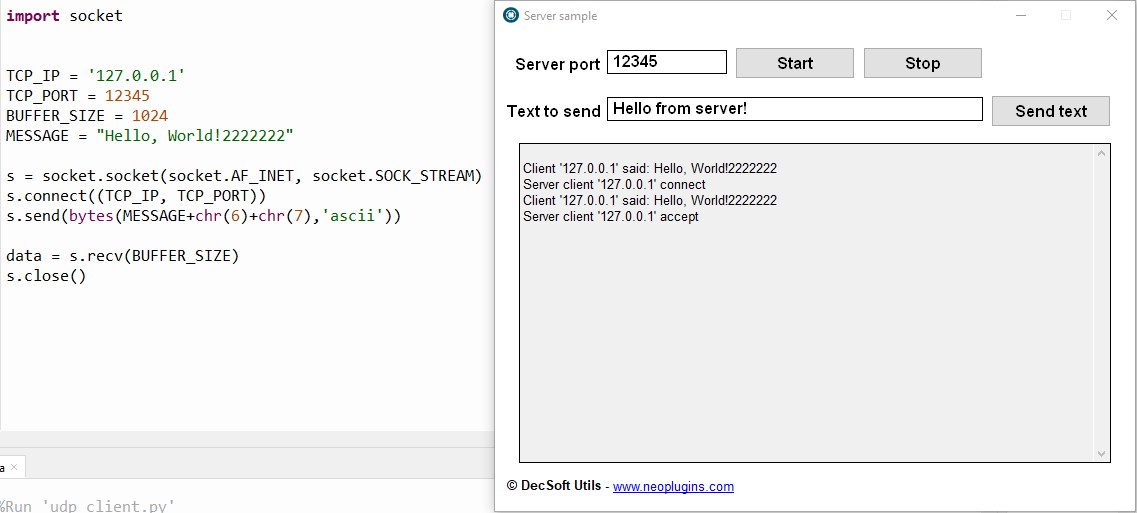

Quote from DaviddeArgentina on July 14, 2023, 4:51 amneobook (and I imagine VisualNeoWin too) has a variable called [CommandLine] that fulfills the function of receiving the parameters that are given when a program calls another, sending information.
I also imagine that the Python environment must also have a communication context between programs
If this is possible (for Python to receive values on its own command line), this could be done without much complication using NeoBook's Run action (VisualNeo Win)
my 0.01
neobook (and I imagine VisualNeoWin too) has a variable called [CommandLine] that fulfills the function of receiving the parameters that are given when a program calls another, sending information.
I also imagine that the Python environment must also have a communication context between programs
If this is possible (for Python to receive values on its own command line), this could be done without much complication using NeoBook's Run action (VisualNeo Win)
my 0.01

Quote from Darbdenral on July 17, 2023, 4:15 am@kriscall
I created a project for someone a while back that was similar, so I have experience with a similar type project. However, I'm not sure what kind of data your interested in transferring to VisualNeoWin, text, binary, etc.. You said, streaming, so I'm assuming we're dealing with bytes of data, but for how long? I have a packet protocol that can take data from a Python or PHP project, through a VN Win plugin into a VN Win project. It includes an automated queue for data when a bottleneck might occur, but you would need to send data intermittent not continuous, similar to sending a text message, file sending like JSON, XML, etc. Another words, you could stay connected as long as you like and send generous amounts of data when needed, but not streaming continuously while connected. Then, how would your VisualNeo Win project expect to receive data? (ex. Text) Let me know if your interested,
Let me know..
Contact me
I created a project for someone a while back that was similar, so I have experience with a similar type project. However, I'm not sure what kind of data your interested in transferring to VisualNeoWin, text, binary, etc.. You said, streaming, so I'm assuming we're dealing with bytes of data, but for how long? I have a packet protocol that can take data from a Python or PHP project, through a VN Win plugin into a VN Win project. It includes an automated queue for data when a bottleneck might occur, but you would need to send data intermittent not continuous, similar to sending a text message, file sending like JSON, XML, etc. Another words, you could stay connected as long as you like and send generous amounts of data when needed, but not streaming continuously while connected. Then, how would your VisualNeo Win project expect to receive data? (ex. Text) Let me know if your interested,
Let me know..
Contact me

Quote from ebear on August 2, 2023, 8:51 amHello All,
Only jumping into this thread. I asked this already some time ago... I didn't get any response.
Windows uses WCF (Windows Communication Foundation) to communicate between two windows applications.https://learn.microsoft.com/en-us/dotnet/framework/wcf/whats-wcf
Connected to the original question in this thread, my question is if anyone already has done something with Visual NeoWin in combination with WCF, if it is even possible.
It could be a standard way to communicate with third part applications who use WCF. I have one project where it would be usable.
Best regards,
Eric
Update: I see that some projects are available on GitHub to use Delphi with WCF.
https://github.com/theilgaz/delphi-wcf-service-demo
Im not a plugin developer (no time enough) but maybe someone could give it a try...
Eric
Hello All,
Only jumping into this thread. I asked this already some time ago... I didn't get any response.
Windows uses WCF (Windows Communication Foundation) to communicate between two windows applications.
https://learn.microsoft.com/en-us/dotnet/framework/wcf/whats-wcf
Connected to the original question in this thread, my question is if anyone already has done something with Visual NeoWin in combination with WCF, if it is even possible.
It could be a standard way to communicate with third part applications who use WCF. I have one project where it would be usable.
Best regards,
Eric
Update: I see that some projects are available on GitHub to use Delphi with WCF.
https://github.com/theilgaz/delphi-wcf-service-demo
Im not a plugin developer (no time enough) but maybe someone could give it a try...
Eric