
SetObjectCSS

Quote from llazzari on August 10, 2020, 3:47 pmCreateEmptyObject [mycss]
SetVar [mycss (hover)("background")] [colSfondohover]
SetObjectCSS "Container2" [mycss]
what is the correct syntax to use in
SetObjectCSS for the hover property.
CreateEmptyObject [mycss]
SetVar [mycss (hover)("background")] [colSfondohover]
SetObjectCSS "Container2" [mycss]
what is the correct syntax to use in
SetObjectCSS for the hover property.
Quote from Gaev on August 10, 2020, 4:30 pm@llazzari
what is the correct syntax to use in
SetObjectCSS for the hover property"hover" is not a property but a state (between mouse-enter and mouse-leave events).
So, place these commands in the mouse-enter event code section of Container2 ...
CreateEmptyObject [mycss]
SetVar [mycss("background-color")] "red"
SetObjectCSS "Container2" [mycss]
... and these commands in the mouse-leave event code section of Container2 ...
CreateEmptyObject [mycss]
SetVar [mycss("background-color")] "green"
SetObjectCSS "Container2" [mycss]
Note: you can replace red/green with your own [variables].
what is the correct syntax to use in
SetObjectCSS for the hover property
"hover" is not a property but a state (between mouse-enter and mouse-leave events).
So, place these commands in the mouse-enter event code section of Container2 ...
CreateEmptyObject [mycss]
SetVar [mycss("background-color")] "red"
SetObjectCSS "Container2" [mycss]
... and these commands in the mouse-leave event code section of Container2 ...
CreateEmptyObject [mycss]
SetVar [mycss("background-color")] "green"
SetObjectCSS "Container2" [mycss]
Note: you can replace red/green with your own [variables].

Quote from luishp on August 10, 2020, 6:47 pm@llazzari You can also use this syntax:
CreateEmptyObject [mycss]
SetVar [mycss.background] "red"
SetVar [mycss.borderWidth] 5
SetObjectCSS "Container1" [mycss]
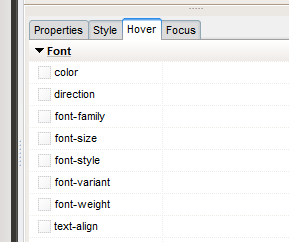
For hover (mouse over values), you can use the properties panel (see attachment) or something like this:
BeginJS
$("#Container1").hover(function(){
  $(this).css("background-color", "yellow");
  }, function(){
  $(this).css("background-color", "pink");
});
EndJS
The JQuery hover() method specifies two functions to run when the mouse pointer hovers over the selected elements. This method triggers both the mouseenter and mouseleave events.
@llazzari You can also use this syntax:
CreateEmptyObject [mycss]
SetVar [mycss.background] "red"
SetVar [mycss.borderWidth] 5
SetObjectCSS "Container1" [mycss]
For hover (mouse over values), you can use the properties panel (see attachment) or something like this:
BeginJS
$("#Container1").hover(function(){
  $(this).css("background-color", "yellow");
  }, function(){
  $(this).css("background-color", "pink");
});
EndJS
The JQuery hover() method specifies two functions to run when the mouse pointer hovers over the selected elements. This method triggers both the mouseenter and mouseleave events.
Uploaded files:
Quote from llazzari on August 17, 2020, 9:49 pmFor the Box-shadow attribute with the SetObjectCSS method
how can i set its properties.Thank you
For the Box-shadow attribute with the SetObjectCSS method
how can i set its properties.Thank you
Quote from Gaev on August 18, 2020, 1:12 am@llazzari
For the Box-shadow attribute with the SetObjectCSS method how can i set its properties.
CreateEmptyObject [boxShadowCss]
... optional
SetVar [boxShadowCss.backgroundColor] "red"
... h-offset v-offset blur spread color
SetVar [boxShadowCss.boxShadow] "20px 10px 5px 3px grey"
SetObjectCSS "BoxShadow" [boxShadowCss]
For the Box-shadow attribute with the SetObjectCSS method how can i set its properties.
CreateEmptyObject [boxShadowCss]
... optional
SetVar [boxShadowCss.backgroundColor] "red"
... h-offset v-offset blur spread color
SetVar [boxShadowCss.boxShadow] "20px 10px 5px 3px grey"
SetObjectCSS "BoxShadow" [boxShadowCss]