
Show embedded picture in Custom Window - How To

Quote from impactband4u on August 27, 2020, 5:34 pmHi guys,
How do I show a Embedded picture in a Custom Window that is on another page?
a "Container" (PictureContainer) is on Page2 with a picture file inside named [Picture]
With a button clicked this is what i tried
CustomWindow "" "465" "23" "PictureContainer" "DialogBox"
SetObjectFileName "[Picture]" "[Embedded][PictureName].jpg"
This doesn't work
so i tried
CustomWindow "" "465" "23" "PictureContainer" "DialogBox"
SetObjectFileName "Picture" "[Embedded][PictureName].jpg"
but nothing seems to work. Any help please
Thank You
Hi guys,
How do I show a Embedded picture in a Custom Window that is on another page?
a "Container" (PictureContainer) is on Page2 with a picture file inside named [Picture]
With a button clicked this is what i tried
CustomWindow "" "465" "23" "PictureContainer" "DialogBox"
SetObjectFileName "[Picture]" "[Embedded][PictureName].jpg"
This doesn't work
so i tried
CustomWindow "" "465" "23" "PictureContainer" "DialogBox"
SetObjectFileName "Picture" "[Embedded][PictureName].jpg"
but nothing seems to work. Any help please
Thank You

Quote from Vadim on August 27, 2020, 9:22 pm@impactband4u
Johny, pay attention to what is in the variables - this can be seen in the debugger (in the debugger) on the "variables" tab.
All variables must have correct values.
For example, if you use a variable as the name of the "Picture" object, then at the moment of calling the command to replace the image file, this variable must store the name of the existing object.
Further, if you substitute a variable instead of a file name, then by this moment it must store the file name, and the file itself must exist with the same name.
Johny, pay attention to what is in the variables - this can be seen in the debugger (in the debugger) on the "variables" tab.
All variables must have correct values.
For example, if you use a variable as the name of the "Picture" object, then at the moment of calling the command to replace the image file, this variable must store the name of the existing object.
Further, if you substitute a variable instead of a file name, then by this moment it must store the file name, and the file itself must exist with the same name.

Quote from Vadim on August 28, 2020, 8:54 am@rasl It is possible and so, but it is not necessary.
Both of Johny's (@impactband4u) suggestions will work if the variables are filled in correctly and if the object names are chosen correctly. For example, if the file extension is already specified (.jpg), then the [PictureName] variable should not contain the file extension. And if the path to the image file is [Embedded], then the variable [PictureName] should not contain the path to the file (which usually starts with the drive name and so on).
You can use a variable instead of an object name, but then this variable must be filled with the name of an actually existing object before the command to change the file name of this object is called (otherwise, there will be a void instead of the object name). If there is only one object for displaying images and it does not change to another, then there is no point in using a variable to specify the name of the object (after all, the name of the object is the same). In this case, it is better to write the name of the object, for example "Picture1", like this:
SetObjectFileName "Picture1" "[Embedded] [PictureName] .jpg"
If image files can be not only ".jpg", then you have to write like this:
SetObjectFileName "Picture1" "[Embedded] [PictureName]"
In this case, the [PictureName] variable must contain the name of the image file along with the file extension.
To make this transparent, you need to look into the "Variables" tab in the debugger - there you will see that the variables that you create are actually stored. You will see a discrepancy between what you expect and what is actually happening there. The debugger in VisualNEO Win is great!
@rasl It is possible and so, but it is not necessary.
Both of Johny's (@impactband4u) suggestions will work if the variables are filled in correctly and if the object names are chosen correctly. For example, if the file extension is already specified (.jpg), then the [PictureName] variable should not contain the file extension. And if the path to the image file is [Embedded], then the variable [PictureName] should not contain the path to the file (which usually starts with the drive name and so on).
You can use a variable instead of an object name, but then this variable must be filled with the name of an actually existing object before the command to change the file name of this object is called (otherwise, there will be a void instead of the object name). If there is only one object for displaying images and it does not change to another, then there is no point in using a variable to specify the name of the object (after all, the name of the object is the same). In this case, it is better to write the name of the object, for example "Picture1", like this:
SetObjectFileName "Picture1" "[Embedded] [PictureName] .jpg"
If image files can be not only ".jpg", then you have to write like this:
SetObjectFileName "Picture1" "[Embedded] [PictureName]"
In this case, the [PictureName] variable must contain the name of the image file along with the file extension.
To make this transparent, you need to look into the "Variables" tab in the debugger - there you will see that the variables that you create are actually stored. You will see a discrepancy between what you expect and what is actually happening there. The debugger in VisualNEO Win is great!
Quote from impactband4u on August 28, 2020, 11:25 am@vadim
Thank you for the reply, but for some reason I just don't get it right. This is soooo frustrating for me :(. If you could help with a demo pub i would appreciate it very much.
I just want to mention that the container with picture file inside is on another page and are called to open next to the pub where it must show the pictures with a button pressed from the pub
I have pictures Embedded in my pub named Sample 1, Sample2 etc. If i click on a name in ListBox it must display the Embedded picture in the custom window next to it.
"When i double click in ListBox"
This is the codeSetVar "[BName]" "" StrIns "[ListBox1A]" "[BName]" "" "[BName]" SetObjectFileName "Picture1" "[Embedded][BName].jpg"I tried everything but nothing seems to work
Thank you for the reply, but for some reason I just don't get it right. This is soooo frustrating for me :(. If you could help with a demo pub i would appreciate it very much.
I just want to mention that the container with picture file inside is on another page and are called to open next to the pub where it must show the pictures with a button pressed from the pub
I have pictures Embedded in my pub named Sample 1, Sample2 etc. If i click on a name in ListBox it must display the Embedded picture in the custom window next to it.
"When i double click in ListBox"
This is the code
SetVar "[BName]" ""
StrIns "[ListBox1A]" "[BName]" "" "[BName]"

SetObjectFileName "Picture1" "[Embedded][BName].jpg"
I tried everything but nothing seems to work
Uploaded files:
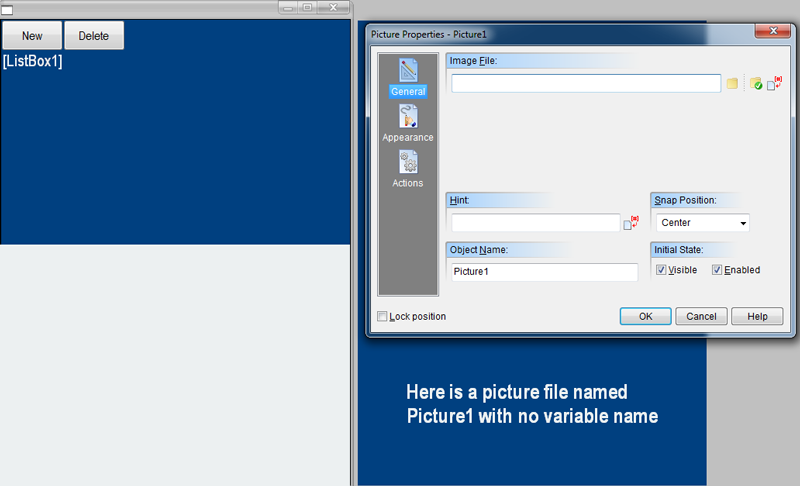
Quote from Vadim on August 28, 2020, 6:12 pm@impactband4u
See the attached sample. Double-clicking on an item in the list opens the container as you would like. If I get you right.
In fact, it does not matter which page your container is on, with the CustomWindow command you can open it at any time.
See the attached sample. Double-clicking on an item in the list opens the container as you would like. If I get you right.
In fact, it does not matter which page your container is on, with the CustomWindow command you can open it at any time.
Uploaded files:Quote from impactband4u on August 28, 2020, 6:37 pm@vadim
Now i'm confused! Maybe there's a problem on my side somewhere. I downloaded your demo but still it doesn't work. If i double click on your demo pub "Picture1", the custom window do appear but it is grey, no picture is showing
Now i'm confused! Maybe there's a problem on my side somewhere. I downloaded your demo but still it doesn't work. If i double click on your demo pub "Picture1", the custom window do appear but it is grey, no picture is showing
Quote from impactband4u on August 28, 2020, 6:41 pmOK i got it!!!! The files that you Embedded in the Demo was not Embedded when i opened the pub, so i Embedded it again and then it worked.
THANK YOU VADIM!
OK i got it!!!! The files that you Embedded in the Demo was not Embedded when i opened the pub, so i Embedded it again and then it worked.
THANK YOU VADIM!
Quote from Vadim on August 28, 2020, 6:41 pmCheck that the specified files are nested (since we are using the [Embedded] variable in the file path, not [PubDir]).
Check that the specified files are nested (since we are using the [Embedded] variable in the file path, not [PubDir]).
Quote from impactband4u on August 28, 2020, 7:46 pm@vadim
Can you please take a look at this, It seems i can't make it work the way i want to
Can you please take a look at this, It seems i can't make it work the way i want to
Quote from impactband4u on August 28, 2020, 7:54 pmI try to send a Zip or Winrar file but neither wants to upload. Where can i send the demo pub @ Vadim please
I try to send a Zip or Winrar file but neither wants to upload. Where can i send the demo pub @ Vadim please
Quote from impactband4u on August 28, 2020, 8:18 pmI've Got It!!!!!!!!! I can't believe that one (1) space between the variable names let me struggle so much.
Greetings
I've Got It!!!!!!!!! I can't believe that one (1) space between the variable names let me struggle so much.
Greetings