
Simulate mouse right click...

Quote from DaviddeArgentina on August 5, 2022, 7:25 pmHi overthere,
I know about the ClickMouse action. It's works fine for the Left Click-
Are there any service or plugin in order to perform simulates Right Click?
Thanks in advance,
David de Argentina
Hi overthere,
I know about the ClickMouse action. It's works fine for the Left Click-
Are there any service or plugin in order to perform simulates Right Click?
Thanks in advance,
David de Argentina

Quote from Gaev on August 5, 2022, 8:24 pm@daviddeargentina
Would this work for your needs ?
1) For the Right Click event code, have just one command like this ...
GoSub "rightClickForButtonXYZ"... place the code that services the right click event for ButtonXYZ in the subroutine labelled "rightClickForButtonXYZ"
2) Now, instead of a command like ClickMouse, just do a ...
GoSub "rightClickForButtonXYZ"
Would this work for your needs ?
1) For the Right Click event code, have just one command like this ...
GoSub "rightClickForButtonXYZ"
... place the code that services the right click event for ButtonXYZ in the subroutine labelled "rightClickForButtonXYZ"
2) Now, instead of a command like ClickMouse, just do a ...
GoSub "rightClickForButtonXYZ"
Quote from DaviddeArgentina on August 5, 2022, 8:37 pmThanks Gaev,
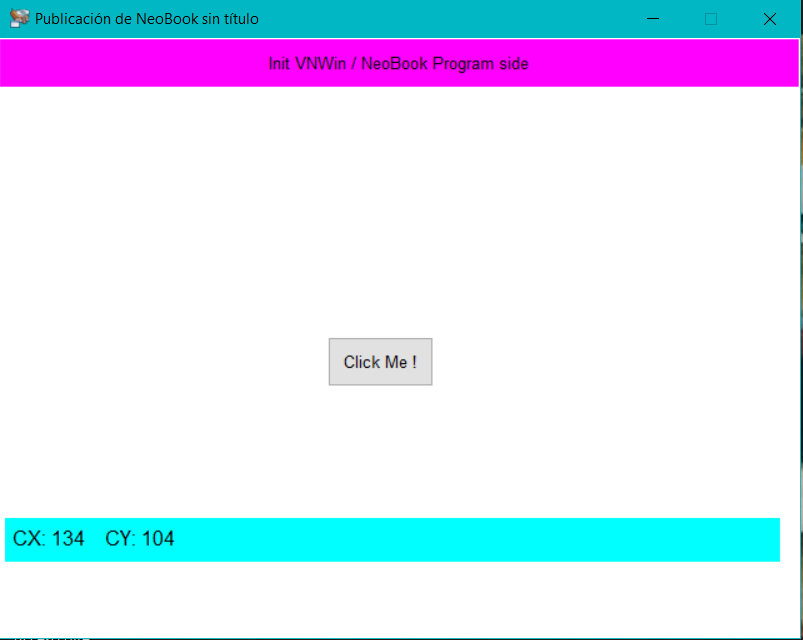
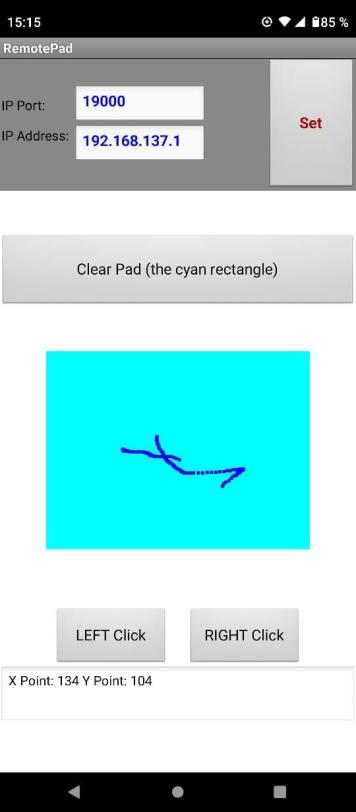
I'm doing a Android APP that simulates the pad of the notebook ( or the mouse), and sends events to a VNW / NeoBook program using the wifi router .
I just discover the HPWAutoit Plugin seems to do the job.
I still can't do tests, because I'm in full development
Cheers
David de Argentina
Thanks Gaev,
I'm doing a Android APP that simulates the pad of the notebook ( or the mouse), and sends events to a VNW / NeoBook program using the wifi router .
I just discover the HPWAutoit Plugin seems to do the job.
I still can't do tests, because I'm in full development
Cheers
David de Argentina
Quote from DaviddeArgentina on August 5, 2022, 9:26 pmI just did the first test:
It does everything wrong, but it works.... ;-)(We're going bad, but we're going fast)
I just did the first test:
It does everything wrong, but it works.... ;-)
(We're going bad, but we're going fast)
Quote from DaviddeArgentina on August 6, 2022, 8:25 pmThe sample works.... allmost all.
I can manage the VNW / NeoBook program using the Phone APP.
There are the basics actions:
I can move the mouse into the screen of the PC, and perform the Left & Right Clicks
If you are interested on this technology, feel free to ask me via email.
aplicaciones (at) rocketmail (dot) com
Greetings from Buenos Aires,
David de Argentina
The sample works.... allmost all.
I can manage the VNW / NeoBook program using the Phone APP.
There are the basics actions:
I can move the mouse into the screen of the PC, and perform the Left & Right Clicks
If you are interested on this technology, feel free to ask me via email.
aplicaciones (at) rocketmail (dot) com
Greetings from Buenos Aires,
David de Argentina
Uploaded files:

Quote from Talker on January 9, 2024, 1:57 amI was looking for a similar functionality for an app. Turns out David's (Decsoft) NpUtil can do a left click, right-click, and middle click (mouse wheel).
Now all I need is a "press" (keeping the left mouse button pressed for dragging purposes). Currently, I'm using a Run command that loads a separate C# executable for that. But that is bound to trigger false alerts...
If anyone knows a way to keep the left mouse button pressed natively with Neo, I would be extremely grateful. Or maybe it can be done with one of the AutoIT plug-ins, I will check.
I was looking for a similar functionality for an app. Turns out David's (Decsoft) NpUtil can do a left click, right-click, and middle click (mouse wheel).
Now all I need is a "press" (keeping the left mouse button pressed for dragging purposes). Currently, I'm using a Run command that loads a separate C# executable for that. But that is bound to trigger false alerts...
If anyone knows a way to keep the left mouse button pressed natively with Neo, I would be extremely grateful. Or maybe it can be done with one of the AutoIT plug-ins, I will check.
Quote from Talker on January 9, 2024, 2:12 amYes, the RAC_MouseDown action in RAC_nbAutoIt3x does the job! Although I need to experiment with adding the proper amount of delays.
Yes, the RAC_MouseDown action in RAC_nbAutoIt3x does the job! Although I need to experiment with adding the proper amount of delays.
Quote from Talker on January 9, 2024, 3:02 amHmm...my app records a mouse position and then plays it back in various ways (mouse position + left-click/right-click/middle click/left button down).
With the AutoIt plug-in, dragging a file to a folder on my desktop works. However, it won't work in Windows Explorer. It does drag the file but does not actually put it in the folder (regardless of the amount of delay I'm adding :-().
Hmm...my app records a mouse position and then plays it back in various ways (mouse position + left-click/right-click/middle click/left button down).
With the AutoIt plug-in, dragging a file to a folder on my desktop works. However, it won't work in Windows Explorer. It does drag the file but does not actually put it in the folder (regardless of the amount of delay I'm adding :-().
Quote from Talker on January 10, 2024, 7:27 pmThank you very much! That looks like an interesting plug-in. Particularly since it also supports the mouse wheel.
Thank you very much! That looks like an interesting plug-in. Particularly since it also supports the mouse wheel.