
Sort objects in object list

Quote from AtariRiot on January 3, 2021, 3:24 pmHi,
I wonder if its spossible to sort the objects in the object list. Only thing i can do is "bring to front" or "send to back", which brings the object to the very front or the very back. If I have push buttons 4,5,6,7 and I want to have push button 6 above push button 4 how would I do that?
Regards
Hi,
I wonder if its spossible to sort the objects in the object list. Only thing i can do is "bring to front" or "send to back", which brings the object to the very front or the very back. If I have push buttons 4,5,6,7 and I want to have push button 6 above push button 4 how would I do that?
Regards
Uploaded files: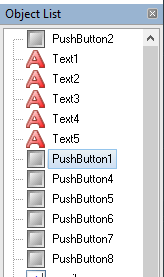

Quote from impactband4u on January 4, 2021, 12:17 am@Fabian Grabowski
Click "Arrange"-"Set Tab Order" and there you can set the tab order. You can move buttons, etc up or down or you can select and drag it up or down.
Greetings
@Fabian Grabowski
Click "Arrange"-"Set Tab Order" and there you can set the tab order. You can move buttons, etc up or down or you can select and drag it up or down.
Greetings
Quote from AtariRiot on January 4, 2021, 12:35 amThank you for your reply. In the "Arrange"-"Set Tab Order" I can set the tab order. So when i press the tab key on my keyboard, while running my project, I can define which object is selected next. This wont help me getting the chaos out of my object list and is not really helping me out.
Thank you for your reply. In the "Arrange"-"Set Tab Order" I can set the tab order. So when i press the tab key on my keyboard, while running my project, I can define which object is selected next. This wont help me getting the chaos out of my object list and is not really helping me out.

Quote from Vadim on January 4, 2021, 6:13 am@fabian-grabowski
Objects in the background are higher in the list of objects. Determine for yourself the necessary order to understand which object should be the topmost and send it first to the background, then send the others in sequence to the background, in the right order. Or do the opposite if you want the list in reverse order.
That is, if you need to order all the objects in the list of objects, then put them all in the given order to the background or to the foreground in turn.
Objects in the background are higher in the list of objects. Determine for yourself the necessary order to understand which object should be the topmost and send it first to the background, then send the others in sequence to the background, in the right order. Or do the opposite if you want the list in reverse order.
That is, if you need to order all the objects in the list of objects, then put them all in the given order to the background or to the foreground in turn.
Quote from AtariRiot on January 4, 2021, 9:38 amThank you for your reply @vadim. Indeed, that was the only way I was thinking of which is possible. But I think its rather complicated. It would be much more handy to have an additional feature like "bring forward" and "send backward" under the "arrange" tab. And maybe even with hotkeys assigned to this feature. This way you could increase or decrease the object's index by one step rather than sorting every object again and again if you want to change any object's index. Is this maybe planned for a future update? As you can see in the attachment / screenshot this has been done before by others.
Thank you for your reply @vadim. Indeed, that was the only way I was thinking of which is possible. But I think its rather complicated. It would be much more handy to have an additional feature like "bring forward" and "send backward" under the "arrange" tab. And maybe even with hotkeys assigned to this feature. This way you could increase or decrease the object's index by one step rather than sorting every object again and again if you want to change any object's index. Is this maybe planned for a future update? As you can see in the attachment / screenshot this has been done before by others.
Uploaded files: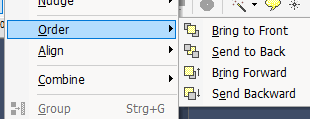
Quote from Vadim on January 4, 2021, 11:33 am@fabian-grabowski
Why? I'm curious. Do you have a real task that requires a strict order of objects exactly in the list of objects?
Why? I'm curious. Do you have a real task that requires a strict order of objects exactly in the list of objects?
Quote from AtariRiot on January 4, 2021, 3:14 pm@vadim
Its just a matter of clarity. Especially when you work on bigger projects I like to have them in order. Maybe its because Im german :D
Right now im using the group feature alot, so its not such a pain to have the objects in correct order. Anyways, the feature "bring forward" and "send backward" would be highly appreciable.
My intent opening this topic was just to make sure Im not missing some hotkey or menu item to make it possible. Im pretty new to VisualNEO Win.
Its just a matter of clarity. Especially when you work on bigger projects I like to have them in order. Maybe its because Im german :D
Right now im using the group feature alot, so its not such a pain to have the objects in correct order. Anyways, the feature "bring forward" and "send backward" would be highly appreciable.
My intent opening this topic was just to make sure Im not missing some hotkey or menu item to make it possible. Im pretty new to VisualNEO Win.