
Sorting clipboard text

Quote from Talker on March 14, 2022, 11:09 pmIf the option already exists in NEO then I may have missed it, but I want to sort current clipboard text alphabetically. If the following text is on the clipboard:
Hans
Anton
David
then I want it to be sorted (and ready to be pasted):
Anton
David
Hans
Or is there a plug-in that will do that? Preferably numeric sorting as well.
If the option already exists in NEO then I may have missed it, but I want to sort current clipboard text alphabetically. If the following text is on the clipboard:
Hans
Anton
David
then I want it to be sorted (and ready to be pasted):
Anton
David
Hans
Or is there a plug-in that will do that? Preferably numeric sorting as well.


Quote from HPW on March 15, 2022, 9:53 amHello,
You may also have a look at hpwLineSort from hpwControl.
https://www.hpwsoft.de/anmeldung/html1/neobook/neobook10.html
Regards
Hans-Peter
Hello,
You may also have a look at hpwLineSort from hpwControl.
https://www.hpwsoft.de/anmeldung/html1/neobook/neobook10.html
Regards
Hans-Peter

Quote from zmWorks7 on March 15, 2022, 12:21 pmHi @talker
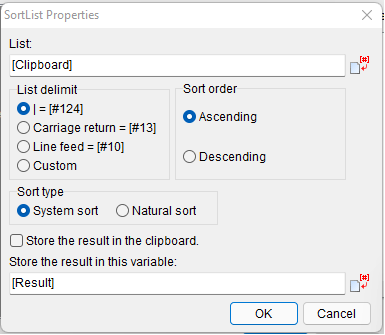
ClipTricks is a plugin designed with ease of use in mind. This small 13 function plugin is packed with many options per function. Our sort features a "Natural" sort order, which will sort your numeric data properly without having to pad them with zeros and also system sort just like VisualNeoWin and Many options for most functions makes this useful for about any text processing you might require. All functions can save to a variable and / or directly to the system clipboard.
You can download it from here: https://zmware.rcmediaservices.net/zmwcliptricks
Thanks,
Zaeem
Hi @talker
ClipTricks is a plugin designed with ease of use in mind. This small 13 function plugin is packed with many options per function. Our sort features a "Natural" sort order, which will sort your numeric data properly without having to pad them with zeros and also system sort just like VisualNeoWin and Many options for most functions makes this useful for about any text processing you might require. All functions can save to a variable and / or directly to the system clipboard.
You can download it from here: https://zmware.rcmediaservices.net/zmwcliptricks
Thanks,
Zaeem
Quote from Talker on March 15, 2022, 5:34 pmThanks, Vadim and Hans-Peter I wasn't aware of these two options.
However, it looks like the RC-Media ClipTricks plug-in does exactly what I want.
I just ordered it. Awaiting the unlock code...
I believe Zaeem has several new plug-ins coming up? I will surely be interested in hearing about those as well!
Thanks, Vadim and Hans-Peter I wasn't aware of these two options.
However, it looks like the RC-Media ClipTricks plug-in does exactly what I want.
I just ordered it. Awaiting the unlock code...
I believe Zaeem has several new plug-ins coming up? I will surely be interested in hearing about those as well!