
Special characters

Quote from smartmedia on July 15, 2023, 9:20 pmHi..
I am tying to change randomly the background color of a container and use the following code.
CreateArray [BackgroundColor] #FFD4AF,#D3EBFF,#B2D0DC
Random 2 [rnd]
SetObjectStyle "Container3" "background-color" "[BackgroundColor([rnd])]"
The code is not running, i am guessing that something has to do with special character #
In some other case i want to read the [ character from a file but also the script is not run. Any work around ?
In Neobook we use to have
" [#34][ [#91]] [#93]| [#124]Carriage Return [#13]Line Feed [#10]Tab [#9]Did those work on VNW ?
Hi..
I am tying to change randomly the background color of a container and use the following code.
CreateArray [BackgroundColor] #FFD4AF,#D3EBFF,#B2D0DC
Random 2 [rnd]
SetObjectStyle "Container3" "background-color" "[BackgroundColor([rnd])]"
The code is not running, i am guessing that something has to do with special character #
In some other case i want to read the [ character from a file but also the script is not run. Any work around ?
In Neobook we use to have

Quote from Gaev on July 16, 2023, 2:50 am@smartmedia
Try this ...
CreateArray [BackgroundColor] "#FFD4AF,#D3EBFF,#B2D0DC"
Random 2 [rnd]
SetObjectStyle "Container13" "background-color" "[BackgroundColor([rnd])]"
Try this ...
CreateArray [BackgroundColor] "#FFD4AF,#D3EBFF,#B2D0DC"
Random 2 [rnd]
SetObjectStyle "Container13" "background-color" "[BackgroundColor([rnd])]"
Quote from Gaev on July 16, 2023, 3:28 am@smartmedia
" [#34]
[ [#91]
] [#93]
| [#124]
Carriage Return [#13]
Line Feed [#10]
Tab [#9]Try this ...
UnicodeToChar 91 [neoOpen]
UnicodeToChar 93 [neoClose]
UnicodeToChar 124 [neoBar]
UnicodeToChar 13 [neoCR]
UnicodeToChar 34 [neoLF]
UnicodeToChar 9 [neoTab]
Note that CR, LF and Tab characters are not recognized by rich text containers, but you can verify the others by placing this html inside a container ...
neoDQ ... [neoDQ]<br/>
neoOpen ... [neoOpen]<br/>
neoClose... [neoClose]<br/>
neoBar... [neoBar]<br/>
" [#34]
[ [#91]
] [#93]
| [#124]
Carriage Return [#13]
Line Feed [#10]
Tab [#9]
Try this ...
UnicodeToChar 91 [neoOpen]
UnicodeToChar 93 [neoClose]
UnicodeToChar 124 [neoBar]
UnicodeToChar 13 [neoCR]
UnicodeToChar 34 [neoLF]
UnicodeToChar 9 [neoTab]
Note that CR, LF and Tab characters are not recognized by rich text containers, but you can verify the others by placing this html inside a container ...
neoDQ ... [neoDQ]<br/>
neoOpen ... [neoOpen]<br/>
neoClose... [neoClose]<br/>
neoBar... [neoBar]<br/>
Quote from smartmedia on July 16, 2023, 7:00 pmHi @gaev
The quotes on
CreateArray [BackgroundColor] "#FFD4AF,#D3EBFF,#B2D0DC"did the work.
On my second part i have managed to read from the language file the variable who has brackets but for some reason the setvar it cant run.
This is the code i am trying to make it run.
UnicodeToChar 91 [BracketOpen]
Loop 0 [arraylength] [LoopPos]
   SetVar [thisLineText] [myVariableItems([LoopPos])]
   StrParse "[thisLineText]" "|" [thisLinePart]
   StrSearch "[BracketOpen]" "[thisLinePart(0)]" [DERQT]
   If [DERQT] == 0
   SetVar [thisLinePart(0)] "[thisLinePart(1)]"
   else
   SetObjectHTML "[thisLinePart(0)]" "[thisLinePart(1)]"
   endif
EndLoop
So this line SetVar [thisLinePart(0)] "[thisLinePart(1)]" is not running and i dont know why.
Hi @gaev
The quotes on
CreateArray [BackgroundColor] "#FFD4AF,#D3EBFF,#B2D0DC"
did the work.
On my second part i have managed to read from the language file the variable who has brackets but for some reason the setvar it cant run.
This is the code i am trying to make it run.
UnicodeToChar 91 [BracketOpen]
Loop 0 [arraylength] [LoopPos]
   SetVar [thisLineText] [myVariableItems([LoopPos])]
   StrParse "[thisLineText]" "|" [thisLinePart]
   StrSearch "[BracketOpen]" "[thisLinePart(0)]" [DERQT]
   If [DERQT] == 0
   SetVar [thisLinePart(0)] "[thisLinePart(1)]"
   else
   SetObjectHTML "[thisLinePart(0)]" "[thisLinePart(1)]"
   endif
EndLoop
So this line SetVar [thisLinePart(0)] "[thisLinePart(1)]" is not running and i dont know why.
Quote from Gaev on July 16, 2023, 8:00 pm@smartmedia
i have managed to read from the language file the variable who has brackets
but for some reason the setvar it cant runSo this line SetVar [thisLinePart(0)] "[thisLinePart(1)]" is not running and i dont know why
Please post the values of [myVariableItems(0)], [myVariableItems(1)], [myVariableItems(2)] etc. (NOT how it looks on your file) ... I will then try and run/examine the rest of your code to find where the error lies.
i have managed to read from the language file the variable who has brackets
but for some reason the setvar it cant runSo this line SetVar [thisLinePart(0)] "[thisLinePart(1)]" is not running and i dont know why
Please post the values of [myVariableItems(0)], [myVariableItems(1)], [myVariableItems(2)] etc. (NOT how it looks on your file) ... I will then try and run/examine the rest of your code to find where the error lies.
Quote from smartmedia on July 17, 2023, 6:46 amHi @gaev
What i am trying to do is to load variables and values from the text file and load them on runtime.
[thisLinePart(0)] has a variable name inside for example [gaev] and [thisLinePart(1)] variable has a value, for example: is amazing.
Hi @gaev
What i am trying to do is to load variables and values from the text file and load them on runtime.
[thisLinePart(0)] has a variable name inside for example [gaev] and [thisLinePart(1)] variable has a value, for example: is amazing.
Quote from Gaev on July 17, 2023, 4:30 pm@smartmedia
I first tried this code ...
UnicodeToChar 124 [neoBar]
UnicodeToChar 91 [neoOpen]
UnicodeToChar 93 [neoClose]

SetVar "[myItem]" "[neoOpen]gaev[neoClose][neoBar] loves building Apps with VisualNEOWeb"
StrSearch "[neoOpen]" "[myItem]" [openBeracketPos]
AlertBox "Open Bracket" "at [openBeracketPos]" ""
... and everything worked as expected.
I then tried this (using an inline variable which I assume is what you get when you load it from your server) ...
UnicodeToChar 124 [neoBar]
UnicodeToChar 91 [neoOpen]
UnicodeToChar 93 [neoClose]

SetVar "[myItem]" "[neoOpen]gaev[neoClose][neoBar] loves building Apps with VisualNEOWeb"
StrSearch "[neoOpen]" "[myItem]" [openBeracketPos]
..AlertBox "Open Bracket" "at [openBeracketPos]" ""

StrParse "[myItem]" "[neoBar]" [thisLinePart]
AlertBox "Line Parts" "0=[thisLinePart(0)]<br/>1=[thisLinePart(1)]" ""
If [openBeracketPos] == 0
   SetVar [thisLinePart(0)] "[thisLinePart(1)]"
Else
   ...SetObjectHTML "[thisLinePart(0)]" "[thisLinePart(1)]"
Endif
... it also worked as expected.
However, you will notice that I have commented out one of your lines because I am not sure what you meant to achieve with it ...
If the open bracket is not in the first (zero th) position, you take the value of the second (1 th) parsed item (which would be some text) and use in the SetObjectHTML command as the object name ?
Please explain.
I first tried this code ...
UnicodeToChar 124 [neoBar]
UnicodeToChar 91 [neoOpen]
UnicodeToChar 93 [neoClose]

SetVar "[myItem]" "[neoOpen]gaev[neoClose][neoBar] loves building Apps with VisualNEOWeb"
StrSearch "[neoOpen]" "[myItem]" [openBeracketPos]
AlertBox "Open Bracket" "at [openBeracketPos]" ""
... and everything worked as expected.
I then tried this (using an inline variable which I assume is what you get when you load it from your server) ...
UnicodeToChar 124 [neoBar]
UnicodeToChar 91 [neoOpen]
UnicodeToChar 93 [neoClose]

SetVar "[myItem]" "[neoOpen]gaev[neoClose][neoBar] loves building Apps with VisualNEOWeb"
StrSearch "[neoOpen]" "[myItem]" [openBeracketPos]
..AlertBox "Open Bracket" "at [openBeracketPos]" ""

StrParse "[myItem]" "[neoBar]" [thisLinePart]
AlertBox "Line Parts" "0=[thisLinePart(0)]<br/>1=[thisLinePart(1)]" ""
If [openBeracketPos] == 0
   SetVar [thisLinePart(0)] "[thisLinePart(1)]"
Else
   ...SetObjectHTML "[thisLinePart(0)]" "[thisLinePart(1)]"
Endif
... it also worked as expected.
However, you will notice that I have commented out one of your lines because I am not sure what you meant to achieve with it ...
If the open bracket is not in the first (zero th) position, you take the value of the second (1 th) parsed item (which would be some text) and use in the SetObjectHTML command as the object name ?
Please explain.
Quote from smartmedia on July 17, 2023, 6:35 pmHi @gaev
1 FileToVar "[NAB.PageID]-[Language].txt" [TranslationText]
2 neoSetItem "SelectedLanguage" [Language] ""

3 Wait 700

4 StrParse "[TranslationText]" "\r\n" [myVariableItems]
5 ArrayLen [myVariableItems] [arraylength]

6 UnicodeToChar 91 [BracketOpen]
7 Loop 0 [arraylength] [LoopPos]
8   SetVar [thisLineText] [myVariableItems([LoopPos])]
9   StrParse "[thisLineText]" "|" [thisLinePart]
10   StrSearch "[BracketOpen]" "[thisLinePart(0)]" [DERQT]
11   If [DERQT] == 0
12   SetVar [thisLinePart(0)] "[thisLinePart(1)]"
13   else
14   SetObjectHTML "[thisLinePart(0)]" "[thisLinePart(1)]"
15   endif
16 EndLoop
The all code reads reads a language file parse the contains on an array based on \r\n
Then gets on a loop and inside the loop splits every line into two parts based on | character
After it search the first character of part 1, if the character is open bracket it means that is variable and runs a setvar, if not, it means that is object and runs the SetObjectHTML.
Now, my issue is on line 12 of my code. why ?
Because [thisLinePart(0)] has this: [gaev] and [thisLinePart(1)] has this: is amazing.
My setvar simple is not replace [thisLinePart(0)] with [gaev] as support to.
Hi @gaev
1 FileToVar "[NAB.PageID]-[Language].txt" [TranslationText]
2 neoSetItem "SelectedLanguage" [Language] ""

3 Wait 700

4 StrParse "[TranslationText]" "\r\n" [myVariableItems]
5 ArrayLen [myVariableItems] [arraylength]

6 UnicodeToChar 91 [BracketOpen]
7 Loop 0 [arraylength] [LoopPos]
8   SetVar [thisLineText] [myVariableItems([LoopPos])]
9   StrParse "[thisLineText]" "|" [thisLinePart]
10   StrSearch "[BracketOpen]" "[thisLinePart(0)]" [DERQT]
11   If [DERQT] == 0
12   SetVar [thisLinePart(0)] "[thisLinePart(1)]"
13   else
14   SetObjectHTML "[thisLinePart(0)]" "[thisLinePart(1)]"
15   endif
16 EndLoop
The all code reads reads a language file parse the contains on an array based on \r\n
Then gets on a loop and inside the loop splits every line into two parts based on | character
After it search the first character of part 1, if the character is open bracket it means that is variable and runs a setvar, if not, it means that is object and runs the SetObjectHTML.
Now, my issue is on line 12 of my code. why ?
Because [thisLinePart(0)] has this: [gaev] and [thisLinePart(1)] has this: is amazing.
My setvar simple is not replace [thisLinePart(0)] with [gaev] as support to.
Quote from Gaev on July 17, 2023, 6:49 pm@smartmedia
Now, my issue is on line 12 of my code. why ?
Because [thisLinePart(0)] has this: [gaev] and [thisLinePart(1)] has this: is amazing.
My setvar simple is not replace [thisLinePart(0)] with [gaev] as support to.I am still confused ...
If I place an AlertBox after Line 12, it displays ...
0= loves building Apps with VisualNEOWeb
1= loves building Apps with VisualNEOWeb... what value do you want in the two parts AFTER the SetVar command is serviced ?
Now, my issue is on line 12 of my code. why ?
Because [thisLinePart(0)] has this: [gaev] and [thisLinePart(1)] has this: is amazing.
My setvar simple is not replace [thisLinePart(0)] with [gaev] as support to.
I am still confused ...
If I place an AlertBox after Line 12, it displays ...
0= loves building Apps with VisualNEOWeb
1= loves building Apps with VisualNEOWeb
... what value do you want in the two parts AFTER the SetVar command is serviced ?
Quote from smartmedia on July 17, 2023, 7:30 pm@gaev
as you see in the photo, this is the file is been read from the code.
Again the 12 line SetVar [thisLinePart(0)] "[thisLinePart(1)]"
has to be SetVar [gaev] "is amazing"
I dont know how simple then that to explain it.
as you see in the photo, this is the file is been read from the code.
Again the 12 line SetVar [thisLinePart(0)] "[thisLinePart(1)]"
has to be SetVar [gaev] "is amazing"
I dont know how simple then that to explain it.
Uploaded files: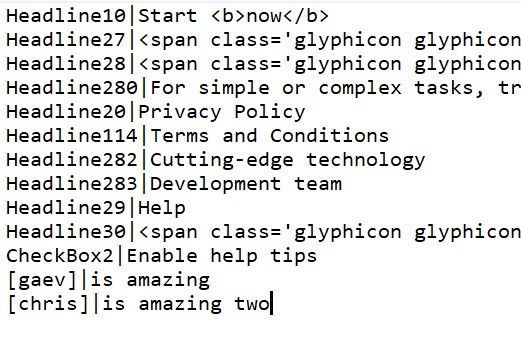
Quote from Gaev on July 17, 2023, 8:02 pm@smartmedia
Again the 12 line SetVar [thisLinePart(0)] "[thisLinePart(1)]"
has to be SetVar [gaev] "is amazing"
I dont know how simple then that to explain it.Thanks for the picture, but that was NOT what I was confused about.
I am assuming that you want your line 12 to end up updating variable [gaev] with the contents of thisLinePart(1)]; if so, the command ...
SetVar [thisLinePart(0)] "[thisLinePart(1)]"
... will not do it ... in NeoBook (and VisualNEOWin), you could use ...
SetVar [[thisLinePart(0)]] "[thisLinePart(1)]"... for a double substitute, but VisualNEOWeb (i.e. javascript) does not have a similar facility ... you have to use the SetCompVar command. ... give me a couple of hours and I will post the solution (after I verify it).
Again the 12 line SetVar [thisLinePart(0)] "[thisLinePart(1)]"
has to be SetVar [gaev] "is amazing"
I dont know how simple then that to explain it.
Thanks for the picture, but that was NOT what I was confused about.
I am assuming that you want your line 12 to end up updating variable [gaev] with the contents of thisLinePart(1)]; if so, the command ...
SetVar [thisLinePart(0)] "[thisLinePart(1)]"
... will not do it ... in NeoBook (and VisualNEOWin), you could use ...
SetVar [[thisLinePart(0)]] "[thisLinePart(1)]"
... for a double substitute, but VisualNEOWeb (i.e. javascript) does not have a similar facility ... you have to use the SetCompVar command. ... give me a couple of hours and I will post the solution (after I verify it).
Quote from Gaev on July 17, 2023, 8:50 pm@smartmedia
Upon further investigation, I believe the problem occurs well before Line 12t ...
a) either at Line 4 ... StrParse "[TranslationText]" "\r\n" [myVariableItems]
b) or at Line 8 ... SetVar [thisLineText] [myVariableItems([LoopPos])]
Place this command ...
AlertBox "thislineText" "[thisLineText]" ""... immediately after Line 8 ... SetVar [thisLineText] [myVariableItems([LoopPos])] ... if I am correct, the content from/including the Open bracket to/including the Close Bracket won't be there.
Please let me know what is being reported by your App.
Upon further investigation, I believe the problem occurs well before Line 12t ...
a) either at Line 4 ... StrParse "[TranslationText]" "\r\n" [myVariableItems]
b) or at Line 8 ... SetVar [thisLineText] [myVariableItems([LoopPos])]
Place this command ...
AlertBox "thislineText" "[thisLineText]" ""
... immediately after Line 8 ... SetVar [thisLineText] [myVariableItems([LoopPos])] ... if I am correct, the content from/including the Open bracket to/including the Close Bracket won't be there.
Please let me know what is being reported by your App.
Quote from smartmedia on July 17, 2023, 10:08 pm@gaev
i put an AlertBox "[gaev] - [chris]" "[thisLineText]" ""
after line 9 and the variable is not showing at all. When i placed the variables ([gaev] - [chris] in the alertbox got undefined.
you right..
i put an AlertBox "[gaev] - [chris]" "[thisLineText]" ""
after line 9 and the variable is not showing at all. When i placed the variables ([gaev] - [chris] in the alertbox got undefined.
you right..
Quote from Gaev on July 17, 2023, 10:28 pm@smartmedia
So the first thing you need to do is get around this anomaly with VisualNEOWeb when loading (from an external file) content that contains OpenBrackets.
One way would be to ...
- use something like {{varname] in place of [varname] in the file
- then do a StrReplace after it is loaded and parsed... though I have not thought through how you are going to populate such a dynamically created variable name.
If this workaround is acceptable to you, let me know and I can play with some possibilities.
So the first thing you need to do is get around this anomaly with VisualNEOWeb when loading (from an external file) content that contains OpenBrackets.
One way would be to ...
- use something like {{varname] in place of [varname] in the file
- then do a StrReplace after it is loaded and parsed
... though I have not thought through how you are going to populate such a dynamically created variable name.
If this workaround is acceptable to you, let me know and I can play with some possibilities.
Quote from smartmedia on July 18, 2023, 10:14 am@gaev
@luishp
The conclusion i came up is that you can't create on the fly a new variable if is not declared on design mode. I don't know if Lui knows something else i don't know.
The conclusion i came up is that you can't create on the fly a new variable if is not declared on design mode. I don't know if Lui knows something else i don't know.

Quote from luishp on July 18, 2023, 2:06 pm@smartmedia, @gaev
The conclusion i came up is that you can't create on the fly a new variable if is not declared on design mode.
Yes it's possible with a little bit of JavaScript:
SetVar [variableName] "gaev"
SetVar [variableValue] "is amazing"
BeginJS
   $App[$App.variableName] = $App.variableValue;
EndJS
This code will generate on the fly a new variable whose name is "gaev" and value "is amazing" :)
The conclusion i came up is that you can't create on the fly a new variable if is not declared on design mode.
Yes it's possible with a little bit of JavaScript:
SetVar [variableName] "gaev"
SetVar [variableValue] "is amazing"
BeginJS
   $App[$App.variableName] = $App.variableValue;
EndJS
This code will generate on the fly a new variable whose name is "gaev" and value "is amazing" :)
Quote from Gaev on July 18, 2023, 3:22 pm@luishp
Yes it's possible with a little bit of JavaScript:
Thanks Luis ... I knew you had mentioned this a long while ago ... I just could not remember the details ... and I needed time to search through the forums.
Now, the only issue for @smartmedia is how to work around the fact that when you try to load text with Open/Close brackets from files, the resulting variable loses that part of the text ... let me know if you are interested in a work around solution mentioned in my previous post.
Yes it's possible with a little bit of JavaScript:
Thanks Luis ... I knew you had mentioned this a long while ago ... I just could not remember the details ... and I needed time to search through the forums.
Now, the only issue for @smartmedia is how to work around the fact that when you try to load text with Open/Close brackets from files, the resulting variable loses that part of the text ... let me know if you are interested in a work around solution mentioned in my previous post.
Quote from smartmedia on July 18, 2023, 8:05 pm@gaev @luishp
The original idea was to read a line from a text file like this [Variable]|Value. But since he wasn't reading the brackets i changed to *
Java have worked and the all code is this.
FileToVar "[NAB.PageID]-[Language].txt" [TranslationText]
neoSetItem "SelectedLanguage" [Language] ""

Wait 700

StrParse "[TranslationText]" "\r\n" [myVariableItems]
ArrayLen [myVariableItems] [arraylength]


Loop 0 [arraylength] [LoopPos]
   SetVar [thisLineText] [myVariableItems([LoopPos])]
   StrParse "[thisLineText]" "|" [thisLinePart]
   StrSearch "*" "[thisLinePart(0)]" [DERQT]
   If [DERQT] == 0
   StrDel "[thisLinePart(0)]" 0 1 [thisLinePart(0)]
   SetVar [LinePart1] [thisLinePart(0)]
   SetVar [LinePart2] [thisLinePart(1)]
   BeginJS
   $App[$App.LinePart1] = $App.LinePart2;
   EndJS
   else
   SetObjectHTML "[thisLinePart(0)]" "[thisLinePart(1)]"
   endif
EndLoop
And just when I thought I was done I tried putting variables in the menu instead of text and found that for some reason it doesn't work.
The original idea was to read a line from a text file like this [Variable]|Value. But since he wasn't reading the brackets i changed to *
Java have worked and the all code is this.
FileToVar "[NAB.PageID]-[Language].txt" [TranslationText]
neoSetItem "SelectedLanguage" [Language] ""

Wait 700

StrParse "[TranslationText]" "\r\n" [myVariableItems]
ArrayLen [myVariableItems] [arraylength]


Loop 0 [arraylength] [LoopPos]
   SetVar [thisLineText] [myVariableItems([LoopPos])]
   StrParse "[thisLineText]" "|" [thisLinePart]
   StrSearch "*" "[thisLinePart(0)]" [DERQT]
   If [DERQT] == 0
   StrDel "[thisLinePart(0)]" 0 1 [thisLinePart(0)]
   SetVar [LinePart1] [thisLinePart(0)]
   SetVar [LinePart2] [thisLinePart(1)]
   BeginJS
   $App[$App.LinePart1] = $App.LinePart2;
   EndJS
   else
   SetObjectHTML "[thisLinePart(0)]" "[thisLinePart(1)]"
   endif
EndLoop
And just when I thought I was done I tried putting variables in the menu instead of text and found that for some reason it doesn't work.