
Speech Recognition ?

Quote from Kriscall on November 15, 2021, 2:02 pmHey guys, I'm after some idea's plugins, or suggestions for speech recognition. Any idea's how I can give visual neo a set of keywords and it can detect and find a match? It's for an automation program any suggestions will be appreciated
Hey guys, I'm after some idea's plugins, or suggestions for speech recognition. Any idea's how I can give visual neo a set of keywords and it can detect and find a match? It's for an automation program any suggestions will be appreciated

Quote from luishp on November 15, 2021, 2:09 pm@kriscall are you talking about VisualNEO Web or VisualNEO Win?
I did some sucessful tests for speech recognition using VisualNEO Web with this API:
https://developer.mozilla.org/en-US/docs/Web/API/SpeechRecognitionRegards.
@kriscall are you talking about VisualNEO Web or VisualNEO Win?
I did some sucessful tests for speech recognition using VisualNEO Web with this API:
https://developer.mozilla.org/en-US/docs/Web/API/SpeechRecognition
Regards.

Quote from DaviddeArgentina on November 15, 2021, 3:21 pmAnother idea:
https://docs.microsoft.com/en-us/previous-versions/office/developer/speech-technologies/hh361683(v=office.14)
My 0.01
Another idea:
My 0.01

Quote from mishem on November 16, 2021, 3:45 pmText-To-Speech.
Text-To-Speech
ksTTS_GetListVoices=Get a list of voices.
ksTTS_Speak=Speak text.
ksTTS_SetVolume=Set the volume of pronunciation.
ksTTS_SetRate=Set the rate of pronunciation.
Text-To-Speech.
Text-To-Speech
ksTTS_GetListVoices=Get a list of voices.
ksTTS_Speak=Speak text.
ksTTS_SetVolume=Set the volume of pronunciation.
ksTTS_SetRate=Set the rate of pronunciation.

Quote from Talker on November 16, 2021, 6:29 pmGreat Plug-in Mishem, thank you!
Question: I would like it to immediately read out current clipboard contents so I replaced
ksTTS_Speak "[TextEntry1]" "[ListBox1]" "1"
with:
ksTTS_Speak "[Clipboard]" "[ListBox1]" "1"
but that's not responding yet...
Also, is it possible to skip the Voices selection and make it read (clipboard contents) straightaway upon launching with the default Windows voice (usually David)?
Great Plug-in Mishem, thank you!
Question: I would like it to immediately read out current clipboard contents so I replaced
ksTTS_Speak "[TextEntry1]" "[ListBox1]" "1"
with:
ksTTS_Speak "[Clipboard]" "[ListBox1]" "1"
but that's not responding yet...
Also, is it possible to skip the Voices selection and make it read (clipboard contents) straightaway upon launching with the default Windows voice (usually David)?
Quote from Talker on November 16, 2021, 6:44 pmAlso, would it be possible to make the application Close automatically when reading is done? I put Exit "" "" in Idle Event (for a couple of seconds) but of course not reading is not considered "idle".
Also, would it be possible to make the application Close automatically when reading is done? I put Exit "" "" in Idle Event (for a couple of seconds) but of course not reading is not considered "idle".
Quote from mishem on November 16, 2021, 8:18 pmI haven't worked with this plugin. I can't say anything. And the developer hasn't shown up in a while.
I haven't worked with this plugin. I can't say anything. And the developer hasn't shown up in a while.
Quote from mishem on November 16, 2021, 8:50 pm@talker
Here the site is when it was good for voice engines.
https://mytts.forum2x2.ru/c1-category
True, he is in Russian. Maybe something interesting for yourself. I was there for a very long time, when I was interested in this issue.
Here the site is when it was good for voice engines.
https://mytts.forum2x2.ru/c1-category
True, he is in Russian. Maybe something interesting for yourself. I was there for a very long time, when I was interested in this issue.

Quote from rafamacor on November 16, 2021, 9:59 pm@talker
You can try the PUB that I accompany, read the clipboard every time it changes.
Hope this can help you.
You can try the PUB that I accompany, read the clipboard every time it changes.
Hope this can help you.
Uploaded files:

Quote from albertomeyer on November 16, 2021, 10:40 pmYou can try my ClipBoard Plugin. Its is advanced.
You can try my ClipBoard Plugin. Its is advanced.


Quote from Krakerman on November 17, 2021, 5:06 pmDid you look at DecSoft's (https://www.decsoftutils.com/neoplugins/) plugin npSapi.
Did you look at DecSoft's (https://www.decsoftutils.com/neoplugins/) plugin npSapi.
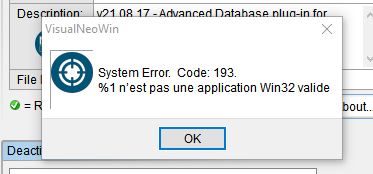
Quote from mishem on November 17, 2021, 6:17 pmTrying this plugin
Which of the two?
I both have both errors. Try to turn off other plugins. Perhaps conflict.
Trying this plugin
Which of the two?
I both have both errors. Try to turn off other plugins. Perhaps conflict.
Quote from CDY@44 on November 17, 2021, 6:25 pmHi @mishem,
Both of them too.
All plugins desactived, no way to install the plugins (ksTTS, nzPluginSpeech )...
Hi @mishem,
Both of them too.
All plugins desactived, no way to install the plugins (ksTTS, nzPluginSpeech )...
Quote from mishem on November 17, 2021, 6:54 pmThis is something in your system does not correctly happen. I have them installed and work both.
This is something in your system does not correctly happen. I have them installed and work both.
Quote from Talker on November 18, 2021, 3:55 amI believe the original poster's question was about Speech Recognition which is Speech to Text. But Text To Speech is also interesting :-).
@mishem
Thanks for the additional link to the TTS voices site.
About ksTTS.nbp. It works very well. And it's an interesting plug-in for sure. I have been doing some experimenting with it. However, I did find that the initial download link got blocked by Malwarebytes Browser Guard (Chrome extension). I am pretty sure that this is a false-positive.
@rafamacor
Thank you very much for your sample project! This has been very useful :-).
For some reason,when I added some more actions to the timer operation, Bitdefender all of a sudden started flagging ksTTS.nbp. I've never seen an AV actually deleting a .nbp file in the Neo program folder! Anyway, undoing those changes (and then rendering the executable to another location) fixes the problem. Strange, but I'm pretty sure that this is a false positive as well.
I hope you can help me with one more thing. How do I make your sample app work only when a specific window/program is active, let's say Notepad?
@albertomeyer
I checked out your plug-in and indeed it offers some interesting options. I particularly like the graphics support (and the option to save the image). This plug-in, articulate the sample app is also very good for "Neo beginners" such as myself.
I did found that on some of my C# text applications (where contents of the text field is automatically saved to the clipboard upon closing the app) your sample application says "Cannot display. Data in Clipboard is in an unknown format." while in fact it's just plaintext or rich text. However, I found that this is not an issue of your plug-in, but merely something in Neo itself which I have yet to figure out. Anyway, I will probably purchase your plug-in because it's very reasonably priced (which I find important).
One request: Is it possible to include the option in your to display the path of a file or folder in Windows Explorer when the user "copies" that item?
If I remember correctly you mentioned somewhere that it is possible to add DPI awareness to Neo? If you can create a plugin for that I will be the first to purchase it (if it is about the same price as your tmClipBoard plug-in that is ;-)). For me this is an important feature. DPI awareness may not be crucial to those who use regular (100% window scaling). But as soon as you go up (125/150%) the font in Neo gets really blurry.
@DaviddeArgentina
Thanks for the tip on the WSR project. I've been looking for something like this. Something similar to Voice Attack (which is also using WSR I suspect, but maybe another - third-party - speech engine).
When I finally got the references working in the Visual Studio project, I successfully issued the "Red" command (with the message box) only once. After that Windows Speech Recognition kept freezing on me, aarrgghh!! I've seen this happen a lot in Windows 11. WSR works better in Windows 10.I guess we need to check out the Mozilla project that Luis mentioned earlier.
I will check out the nzPluginSpeech now and report back.
I believe the original poster's question was about Speech Recognition which is Speech to Text. But Text To Speech is also interesting :-).
Thanks for the additional link to the TTS voices site.
About ksTTS.nbp. It works very well. And it's an interesting plug-in for sure. I have been doing some experimenting with it. However, I did find that the initial download link got blocked by Malwarebytes Browser Guard (Chrome extension). I am pretty sure that this is a false-positive.
Thank you very much for your sample project! This has been very useful :-).
For some reason,when I added some more actions to the timer operation, Bitdefender all of a sudden started flagging ksTTS.nbp. I've never seen an AV actually deleting a .nbp file in the Neo program folder! Anyway, undoing those changes (and then rendering the executable to another location) fixes the problem. Strange, but I'm pretty sure that this is a false positive as well.
I hope you can help me with one more thing. How do I make your sample app work only when a specific window/program is active, let's say Notepad?
I checked out your plug-in and indeed it offers some interesting options. I particularly like the graphics support (and the option to save the image). This plug-in, articulate the sample app is also very good for "Neo beginners" such as myself.
I did found that on some of my C# text applications (where contents of the text field is automatically saved to the clipboard upon closing the app) your sample application says "Cannot display. Data in Clipboard is in an unknown format." while in fact it's just plaintext or rich text. However, I found that this is not an issue of your plug-in, but merely something in Neo itself which I have yet to figure out. Anyway, I will probably purchase your plug-in because it's very reasonably priced (which I find important).
One request: Is it possible to include the option in your to display the path of a file or folder in Windows Explorer when the user "copies" that item?
If I remember correctly you mentioned somewhere that it is possible to add DPI awareness to Neo? If you can create a plugin for that I will be the first to purchase it (if it is about the same price as your tmClipBoard plug-in that is ;-)). For me this is an important feature. DPI awareness may not be crucial to those who use regular (100% window scaling). But as soon as you go up (125/150%) the font in Neo gets really blurry.
Thanks for the tip on the WSR project. I've been looking for something like this. Something similar to Voice Attack (which is also using WSR I suspect, but maybe another - third-party - speech engine).
When I finally got the references working in the Visual Studio project, I successfully issued the "Red" command (with the message box) only once. After that Windows Speech Recognition kept freezing on me, aarrgghh!! I've seen this happen a lot in Windows 11. WSR works better in Windows 10.
I guess we need to check out the Mozilla project that Luis mentioned earlier.
I will check out the nzPluginSpeech now and report back.
Quote from mishem on November 18, 2021, 4:26 amI hope you can help me with one more thing. How do I make your sample app work only when a specific window/program is active, let's say Notepad?
I advise you to pay attention to the plugin zmFunctions. There is a Russian version http://neobooker.ru/forum/37-1610-1
But perhaps somewhere on the forum or someone has an English version.
I hope you can help me with one more thing. How do I make your sample app work only when a specific window/program is active, let's say Notepad?
I advise you to pay attention to the plugin zmFunctions. There is a Russian version http://neobooker.ru/forum/37-1610-1
But perhaps somewhere on the forum or someone has an English version.
Quote from Talker on November 18, 2021, 4:53 amI attached the English version.
I see a lot of Windows functions in zm. I take it I need GetExeNameByHandle?
In this case that would be:
Untitled - Notepad
Which variable do I store to make the rest of the script (let's say opening a message box) only work if Notepad is opened (if it's not, the script won't perform)?
I attached the English version.
I see a lot of Windows functions in zm. I take it I need GetExeNameByHandle?
In this case that would be:
Untitled - Notepad
Which variable do I store to make the rest of the script (let's say opening a message box) only work if Notepad is opened (if it's not, the script won't perform)?
Uploaded files: